Java常用API
API
API(Application Programming Interface):应用程序编程接口。就是别人写好的一些类,给程序员直接拿去调用即可
解决问题
Java中的API有很多,这些API不用去死记硬背,需要使用的时候查询API文档即可
在线地址(JDK11汉化版本):https://www.runoob.com/manual/jdk11api/index.html
官方API地址(无汉化,全版本):https://docs.oracle.com/en/java/javase/21/docs/api/index.html
当查询API文档还是没弄清如何使用,直接在搜索引擎中查询也能解决问题
String类
特点:
- Java程序中所有字符串文字(例如”abc”)都是String类的对象
- String是不可改变的,它们的值在创建后无法更改。想要更改,需要使用新的对象替换
String s = "abc";
   s = "cba";// 替换新对象
3. String虽然不可改变,但是可以被共享操作
String s1 = "abc";
   String s2 = "abc";
   System.out.println(s1 == s2);// true
字符串常量池(String Pool):当使用双引号创建字符串对象的时候,会检查数据在常量池中是否存在
如果不存在:创建新的对象,如果存在:复用对象
String构造方法
public String():创建空白字符串,不含有任何内容public String(char[] chs):根据字符数组,创建字符串对象public String(String original):根据传入的字符串创建字符串对象
示例:
public class StringDemo01 {
    public static void main(String[] args) {
        String s1 = new String();
        System.out.println(s1);

        char[] chs = {'a','b','c'};
        String s2 = new String(chs);
        System.out.println(s2);     // abc

        String s3 = new String("abc");
        System.out.println(s3);     // abc

        System.out.println(s2 == s3);   // false
    }
}
双引号创建字符串对象:数据在字符串常量池中存储
构造方法创建:会在堆内存中开辟独立的内存空间
String类面试题
利用构造方法创建String对象

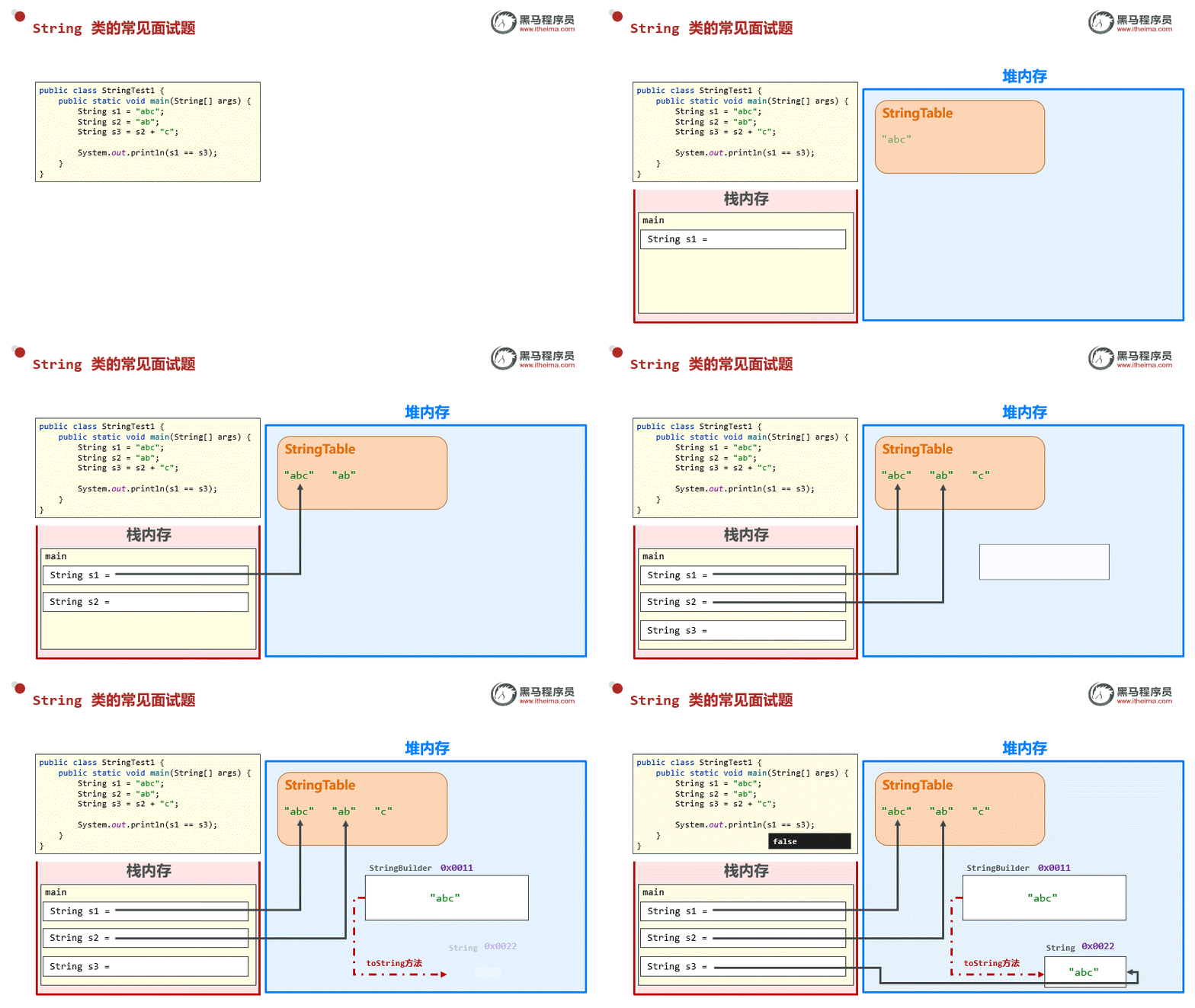
String s2 = new String(“abc”);实际上创建了两个对象
一个对象存放在StringTable中,另一个对象直接开辟在堆内存中
然后将StringTable中字符串对象的地址值复制给了堆内存中字符串对象(因为字符串底层是字符数组,数组给数组赋值就是复制地址值)
变量与字面量拼接
String s1 = "abc";
String s2 = "ab";
String s3 = s2 + "c";
System.out.println(s1 == s3);// false
字符串串联是通过StringBuilder(或StringBuffer)类及其append方法实现的
也是说当出现字符串拼接时,底层会创建StringBuilder类并调用append方法重新创建一个字符串对象,然后再通过toString又创建出最终的字符串对象底层代码:
new StringBuilder().append(s2).append("c").toString();
toString():创建新String对象(内容为 “abc”),但不在常量池中
字面量与字面量拼接
String s1 = "abc";
String s2 = "a" + "b" + "c";
System.out.println(s1 == s2);// true
这里的结果为true是因为s2的操作是字面量拼接,而上个案例是变量与字面量拼接
Java对于字面量拼接是有优化的,所以在字节码文件中显示的就是
String s2 = "abc"
String类比较
public boolean equals(要比较的字符串):完全一样结果为True,否则为False
示例:
String s1 ="abc";
String s2 = new String("abc");
System.out.println(s1.equals(s2));  // true

String tmp = "c";
String s3 = "ab" + tmp;
System.out.println(s3.equals(s1));  // true

String s4 = "a" + "b" + "c";
System.out.println(s4.equals(s1));  // true
public boolean equalsIgnoreCase(要比较的字符串):忽略大小写的比较
示例:
String s1 = "Hello World";
String s2 = new String("hello world");
System.out.println(s1.equalsIgnoreCase(s2));    // true
String字符串遍历
public char[] toCharArray():将字符串转换为字符数组
示例:
String s1 = "Hello World";
char[] chs = s1.toCharArray();

for (int i = 0; i < chs.length; i++) {
    System.out.print(chs[i]);
}
public char charAt(int index):根据索引查找字符
示例:
String s1 = new String("Hello World");
char c = s1.charAt(0);

System.out.println(c);// H
public int length():返回字符串的长度,注意不能省略括号
示例:
String s1 = "Hello World";
System.out.println(s1.length());// 11
案例:获取某个字符串中大写字母、小写字母、数字的个数
import java.util.Scanner;

public class StringDemo08 {
    public static void main(String[] args) {
        // 例如:aAb3&c2B*4CD1

        Scanner sc = new Scanner(System.in);
        System.out.print("请输入:");
        String content = sc.next();

        char[] chs = content.toCharArray();

        int UpperLetter = 0;
        int LowerLetter = 0;
        int NumberLetter = 0;

        for (int i = 0; i < chs.length; i++) {
            if (chs[i] >= 'a' && chs[i] <= 'z') {
                LowerLetter++;
            } else if (chs[i] >= 'A' && chs[i] <= 'Z') {
                UpperLetter++;
            } else if (chs[i] >= '0' && chs[i] <= '9') {
                NumberLetter++;
            }
        }

        System.out.println("大写字母个数:" + UpperLetter);
        System.out.println("小写字母个数:" + LowerLetter);
        System.out.println("数字个数:" + NumberLetter);
    }
}
字符串截取
public String substring(int beginIndex);:从开始索引截取到末尾public String substring(int beginIndex, int endIndex);:根据索引范围截取字符串,包头不包尾
示例:
String s1 = "Hello World";
int begin = 0;
int end = 0;
for (int i = 0; i < s1.length(); i++) {
    if (s1.charAt(i) == 'W') {
        begin = i;
    }
    if (s1.charAt(i) == 'd') {
        end = i;
    }
}
System.out.println(s1.substring(begin));            // World
System.out.println(s1.substring(begin, end + 1));   // World
案例:将手机号中间4位数用*号替代
Scanner sc = new Scanner(System.in);
System.out.print("请输入手机号:");
String  phone = sc.next();

String begin = phone.substring(0,3);
String end = phone.substring(7);

System.out.println(begin + "****" + end);
字符串替换方法
public String replace(旧值, 新值):替换,返回值为替换结果
示例:
// 将敏感词替换为***
Scanner sc = new Scanner(System.in);
System.out.println("请输入:");
String s = sc.next();

s = s.replace("TMD","***");
System.out.println(s);
字符串切割
public String[] split(String regex);:根据传入的字符串作为规则进行切割,将切割后的内容存入字符串数组中,并将字符串数组返回
示例:
String ip = "192.168.100.200";
String[] split = ip.split("\\.");// 以 . 为分隔规则

for (String s : split) {
    System.out.println(s);
}
String常用方法总结
| 方法 | 说明 |
|---|---|
| public boolean equals(String s); | 字符串与字符串比较,完全一致返回true,否则返回false |
| public boolean equalsIgnoreCase(String s); | 字符串与字符串比较,忽略大小写 |
| public char[] toCharArray(); | 将字符串转换为字符数组 |
| public char charAt(int index); | 根据索引找字符 |
| public int length(); | 返回字符串长度 |
| public String substring(int beginIndex); | 从开始索引截取到字符串末尾 |
| public String substring(int beginIndex, int endIndex); | 从开始索引截取到末尾所以,包头不包尾 |
| public String replace(“oldString”, “newString”); | 将字符串中旧的值替换为新的值 |
| public String[] split(String regex); | 根据规则切割字符串,返回切割后的字符串数组 |
StringBuilder
- 提高字符串的操作效率
- StringBuilder是字符串缓冲区,可以将其理解为是一种容器
- 容器可以添加任意数据类型,但是只要进入这个容器,全部变成字符串
- StringBuilder是一个可变的字符序列
普通String类和StringBuilder对比:
// 普通String类
// System.currentTimeMillis();记录了1970年1月1日到现在所经历的毫秒值
long before = System.currentTimeMillis();// 开始时间

String s = "";
for (int i = 0; i < 100000; i++) {
    s += i;
}

long after = System.currentTimeMillis();// 结束时间
System.out.println(s);
System.out.println("花费时长:" + (after - before));     // 4685毫秒
// StringBuilder类
StringBuilder sb = new StringBuilder();
long before = System.currentTimeMillis();

for (int i = 0; i < 100000; i++) {
    sb.append(i);
}

long after = System.currentTimeMillis();
System.out.println(sb);
System.out.println("花费时长:" + (after - before));     // 5毫秒
StringBuilder方法
StringBuilder构造方法
| 构造器 | 说明 |
|---|---|
| StringBuilder() | 构造一个字符串构建器,其中不包含任何字符,初始容量为16字符 |
| StringBuilder(int capacity) | 构造一个字符串构建器,其中没有任何字符,并且具有capacity参数指定的初始容量 |
| StringBuilder(CharSequence seq) | 构造一个字符串构建器,其中包含于指定CharSequence相同的字符 |
| StringBuilder(String str) | 构造一个初始化为指定字符串内容的字符串构建器 |
append添加方法
public StringBuilder append(任意类型);:添加数据到缓冲区,返回对象自己
示例:
StringBuilder sb = new StringBuilder();
StringBuilder sb1 = sb.append("红色");
StringBuilder sb2 = sb.append("绿色");
StringBuilder sb3 = sb.append("蓝色");

System.out.println(sb == sb1);  // true
System.out.println(sb1 == sb2); // true
System.out.println(sb2 == sb3); // true

System.out.println(sb);  // 红色绿色蓝色
System.out.println(sb1); // 红色绿色蓝色
System.out.println(sb2); // 红色绿色蓝色
System.out.println(sb3); // 红色绿色蓝色

// 以上代码可以通过链式编程优化:
StringBuilder sb = new StringBuilder();
sb.append("红色").append("绿色").append("蓝色");// 红色绿色蓝色

System.out.println(sb);
链式编程:如果方法返回值是对象,就可以继续向下调用方法
reverse反转方法
public StringBuilder reverse();:反转缓冲区的内容
示例:
StringBuilder sb = new StringBuilder("1234");
sb.reverse().append("1234").reverse();  // 1234 => 4321 => 43211234 => 43211234

System.out.println(sb);// 43211234
length获取长度方法
public int length();:获取长度
示例:
StringBuilder sb = new StringBuilder();
sb.append("1234567890");

System.out.println(sb.length());    // 10
System.out.println(sb.capacity());  // 16
toString转换类型方法
public String toString();:转换为String类型
示例:
StringBuilder sb = new StringBuilder();
sb.append("1234567890");

if (sb instanceof StringBuilder) {
    System.out.println("我是StringBuilder类型");
}

String string = sb.toString();
if (string instanceof String) {
    System.out.println("我是String类型");
}
案例——回文字符串
需求:键盘接收一个字符串,程序判断出该字符串是否是回文字符串,并在控制台打印是或不是
回文字符串:123321,111
非回文字符串:123123
代码如下:
import java.util.Scanner;

public class StringBuilderTest01 {
    /*
        需求:键盘接收一个字符串,程序判断出该字符串是否是回文字符串,并在控制台打印是或不是
        回文字符串:123321,111
        非回文字符串:123123
    */

    public static void main(String[] args) {
        Scanner sc = new Scanner(System.in);
        System.out.print("请输入:");
        String input = sc.next();

        StringBuilder sb = new StringBuilder(input);

        if (input.equals(sb.reverse().toString())) {
            System.out.println("是");
        } else {
            System.out.println("不是");
        }
    }
}
案例——拼接字符串
需求:定义一个方法,把int数组中的数据按照指定的格式拼接成一个字符串返回
调用该方法,并在控制台输出结果
例如:数组int[] arr = {1, 2, 3};
执行方法后的输出结果为:[1,2,3]
代码如下:
public class StringBuilderTest02 {
    public static void main(String[] args) {
        int[] arr = {1,2,3,4,5,6,7,8,9};
        String formatArr = printArr(arr);
        System.out.println(formatArr);
    }

    public static String printArr(int[] arr) {
        StringBuilder sb = new StringBuilder();
        sb.append("[");
        for (int i = 0; i < arr.length; i++) {
            if (i != arr.length - 1) {
                sb.append(i).append(",").append(" ");
            } else {
                sb.append(i);
            }
        }
        sb.append("]");

        return sb.toString();
    }
}
StringBuilder原理
字符串拼接底层实现:
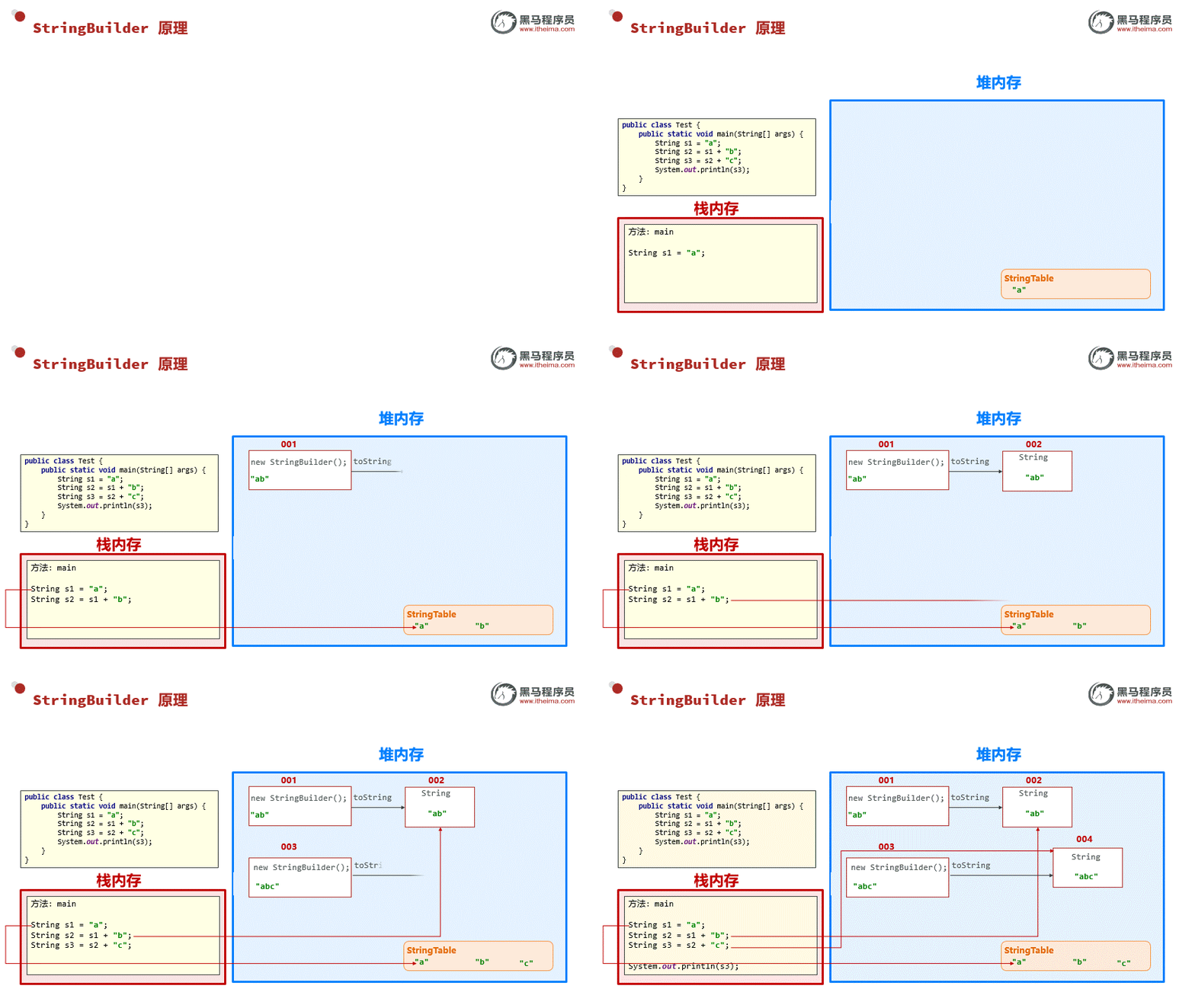
当直接使用String类进行字符串拼接时,底层会创建新的StringBuilder对象,拼接一次就创建一个新的对象,这会浪费性能
但是通过StringBuilder调用append方法,等到所有拼接操作完成后再利用toString()转换为String类型,这个过程只会创建一次StringBuilder对象
StringBuffer
在官方文档,对StringBuilder的描述是这样的:
- 一个可变的字符序列。 此类提供与
StringBuffer兼容的API,但不保证同步。 此类设计用作StringBuffer替代品,用于单个线程使用字符串缓冲区的位置(通常情况下)。
对StringBuffer的描述是这样的:
- 线程安全,可变的字符序列。 字符串缓冲区类似于String ,但可以进行修改。 在任何时间点它都包含一些特定的字符序列,但序列的长度和内容可以通过某些方法调用来改变。
总结来说:StringBuilder是兼容StringBuffer的。当只有单个线程时,可以使用StringBuilder,因为StringBuilder的性能更好。StringBuffer虽然性能不如StringBuilder,但是适用于涉及线程安全的情况。
Math类
- 包含执行基本数字运算的方法
| 方法名 | 说明 |
|---|---|
| public static int abs(int a) | 获取参数绝对值 |
| public static double ceil(double a) | 向上取整 |
| public static double floor(double a) | 向下取整 |
| public static int round(double a) | 四舍五入 |
| public static int max(int a,int b) | 获取两个int值中的较大值 |
| public static double pow(double a,double b) | 返回a的b次幂的值 |
| public static double random() | 返回值为double的随机值,范围[0.0, 1.0) |
示例:
public class MathDemo01 {
    /*
        | 方法名                                      | 说明                                   |
        | ------------------------------------------- | -------------------------------------- |
        | public static int abs(int a)                | 获取参数绝对值                         |
        | public static double ceil(double a)         | 向上取整                               |
        | public static double floor(double a)        | 向下取整                               |
        | public static int round(double a)           | 四舍五入                               |
        | public static int max(int a,int b)          | 获取两个int值中的较大值                |
        | public static double pow(double a,double b) | 返回a的b次幂的值                       |
        | public static double random()               | 返回值为double的随机值,范围[0.0, 1.0] |
    */
    public static void main(String[] args) {
        int num01 = -123;
        int num02 = 123;
        System.out.println(Math.abs(num01) == Math.abs(num02));     // 100

        double d1 = 3.1314;
        System.out.println(Math.ceil(d1) + Math.floor(d1) + Math.round(d1)); // 10.0 = 3.0 + 4.0 + 3.0

        System.out.println(Math.max(99,100));   // 100

        System.out.println(Math.pow(2,8));      // 256.0

        System.out.println(Math.random()); // 0 ~ 无限接近于1

    }
}
System类
- 和系统相关的操作
| 方法名 | 说明 |
|---|---|
| public static void exit(int status) | 终止当前运行的Java虚拟机,非零表示异常终止 |
| public static long currentTimeMillies() | 返回当前系统的时间毫秒值(当前时间 - 1970/1/1) |
| public static void arraycopy(Object src,int srcPos,Object dest,int destPos,int length) | 数组拷贝 1. 数组源数据 2. 起始索引 3. 目的地数组 4. 起始索引 5. 拷贝的个数 |
System类中的方法都接近于底层操作,性能较好
包装类
- 将基本数据类型,包装成类(变成引用数据类型)
- 当基本数据类型包装成了类,也就可以创建对象,对象中的方法可以解决一些特定问题
| 基本数据类型 | 引用数据类型 |
|---|---|
| byte | Byte |
| short | Short |
| int | Integer |
| long | Long |
| char | Character |
| float | Float |
| double | Double |
| boolean | Boolean |
Integer类
- 将基本数据类型,手动包装为类
- 两种方式:
- public Integer(int value);// 构造方法创建对象,新版本已经弃用,且未来可能被移除
- public static Integer valueOf(int i); // 静态方法返回对象
示例:
int i = 10;
Integer integer = Integer.valueOf(i);
以上这种方式,为手动装箱。将基本数据类型,手动包装为类
int i1 = 10;
Integer integer = Integer.valueOf(i1);
int i2 = integer.intValue();
以上这种方式,为手动拆箱。将包装类对象,转换为基本数据类型
自动拆装箱(JDK5版本之后):
Integer integer = 10;
int i = integer;
System.out.println(i);              // 10

Integer integer1 = 11;
int i1 = 12;
System.out.println(integer1 + i1);  // 23
常见方法
| 方法名 | 说明 |
|---|---|
| public static String toBinaryString(int i) | 得到二进制 |
| public static String toOctalString(int i) | 得到八进制 |
| public static String toHexString(int i) | 得到十六进制 |
| public static int parseInt(String s) | 把字符串类型的整数转成int类型的整数 |
除了Character,所有包装类都有parseXXX()的方法,都是用于转换成自己对应的基本数据类型
BigDecimal类
- 用于解决小数运算中,出现的不精确问题
比如:
double d1 = 0.1;
double d2 = 0.2;
System.out.println(d1 + d2);    // 0.30000000000000004
- 创建对象方法
- public BigDecimal(double val);// 不推荐,创建出的对象依旧存在不精确问题
- public BigDecimal(String val);
- public static BigDecimal valueOf(double val);
示例:
package bigDecimal;

import java.math.BigDecimal;

public class BigDecimalDemo02 {

    public static void main(String[] args) {
        // 创建对象方法
        //- public BigDecimal(double val);  // 不推荐,创建出的对象依旧存在不精确问题
        //- public BigDecimal(String val);
        //- public static BigDecimal valueOf(double val);

        BigDecimal bigDecimal_01 = new BigDecimal(0.1);
        BigDecimal bigDecimal_02 = new BigDecimal(0.2);
        System.out.println(bigDecimal_01.add(bigDecimal_02));   // 0.3000000000000000166533453693773481063544750213623046875

        bigDecimal_01 = new BigDecimal("0.1");
        bigDecimal_02 = new BigDecimal("0.2");

        System.out.println(bigDecimal_01.add(bigDecimal_02));   // 0.3

        bigDecimal_01 = BigDecimal.valueOf(0.1   );
        bigDecimal_02 = BigDecimal.valueOf(0.2);
        System.out.println(bigDecimal_01.add(bigDecimal_02));   // 0.3
    }
}
常见方法
| 方法名 | 说明 |
|---|---|
| public BigDecimal add(BigDecimal b) | 加法 |
| public BigDecimal subtract(BigDecimal b) | 减法 |
| public BigDecimal multiply(BigDecimal b) | 乘法 |
| public BigDecimal divide(BigDecimal b) | 除法 |
| public BigDecimal divide(另一个BigDecimal对象,精确几位,舍入模式) | 除法 |
| public double doubleValue(BigDecimal b); | 将BigDecimal转换为double类型 |
舍入模式:RoundingMode.Half_UP 四舍五入、RoundingMode.UP 进一法、RoundingMode.DOWN 去尾法
示例:
package bigDecimal;

import java.math.BigDecimal;
import java.math.RoundingMode;

public class BigDecimalDemo03 {
    /*
        | 方法名                                                       | 说明 |
        | ------------------------------------------------------------ | ---- |
        | public BigDecimal add(BigDecimal b)                          | 加法 |
        | public BigDecimal subtract(BigDecimal b)                     | 减法 |
        | public BigDecimal multiply(BigDecimal b)                     | 乘法 |
        | public BigDecimal divide(BigDecimal b)                       | 除法 |
        | public BigDecimal divide(另一个BigDecimal对象,精确几位,舍入模式) | 除法 |
    */
    public static void main(String[] args) {
        BigDecimal bd1 = BigDecimal.valueOf(10.0);
        BigDecimal bd2 = BigDecimal.valueOf(3.0);

        double res1 = bd1.add(bd2).doubleValue();
        double res2 = bd1.subtract(bd2).doubleValue();
        double res3 = bd1.multiply(bd2).doubleValue();
        System.out.println(res1);
        System.out.println(res2);
        System.out.println(res3);

        // 当遇到除不尽的情况,就会出现异常
        // double res4 = bd1.divide(bd2).doubleValue(); 10 / 3 除不尽
        double res4 = bd1.divide(bd2,2, RoundingMode.HALF_UP).doubleValue();
        System.out.println(res4);
    }
}
Arrays类
- 数组操作工具类,专门用于操作数组元素
| 方法名 | 说明 |
|---|---|
| public static String toString(类型[] a) | 将数组元素拼接为带有格式的字符串 |
| public static boolean eqauls(类型[] a, 类型[] b) | 比较两个数组内容是否相同 |
| public static int binarySearch(int[] a,int key) | 查找元素在数组中的索引(二分查找法) |
| public static void sort(类型[] a) | 对数组进行默认升序排序 |
| public static void sort(类型[] a, 比较器); | 根据比较器进行排序 |
二分查找法:获取数组中间元素,如果中间元素小于查找值,说明在右边,如果中间元素大于查找值,说明在左边。然后再对左/右边的数组继续以上操作。直到中间元素 = 查找值
核心思想就是将数组一分为二,所以叫二分查找法。
当数组中不存在查找的元素,返回一个负数,且这个负数的值为
查找元素如果存在,那它应该在的位置
示例:
package arrays;

import java.util.Arrays;
import java.util.Comparator;

public class ArraysDemo {
    public static void main(String[] args) {
        int[] arr = {11,22,33,44,55,66,77,88,99};
        System.out.println(Arrays.toString(arr));   // [11, 22, 33, 44, 55, 66, 77, 88, 99]

        int[] arr1 = {11,22,33,44,55,66,77,88,99};
        System.out.println(Arrays.equals(arr,arr1));    // true

        System.out.println(Arrays.binarySearch(arr,77));    // 6

        String[] arr2 = {"张三","李四","王五","张伞伞","李思思","王武武","Alice","Bob","Candy","David"};
        Arrays.sort(arr2, Comparator.reverseOrder());
        System.out.println(Arrays.toString(arr2));  // [王武武, 王五, 李思思, 李四, 张伞伞, 张三, David, Candy, Bob, Alice]
    }
}
时间类
JDK8版本之前:Date、SimpleDateFormat
JDK8版本之后:LocalDate、LocalTime、LocalDateTime、DateTimeFormatter、ChronoUnit
JDK8版本之前
Date类
- 代表的是日期和时间
| 构造器 | 说明 |
|---|---|
| public Date() | 创建一个Date对象,代表的是系统当前的日期时间 |
| public Date(long time) | 把时间毫秒值转换成Date日期对象 |
示例:
public class DateDemo01 {
    public static void main(String[] args) {
        Date d1 = new Date();
        System.out.println(d1);     // Wed Jul 30 16:57:10 CST 2020

        Date d2 = new Date(0);
        System.out.println(d2);     // Thu Jan 01 08:00:00 CST 1970
    }
}
常见方法
| 方法名 | 说明 |
|---|---|
| public long getTime() | 返回从1970年1月1日 00:00:00走到此前的总的毫秒数 |
| public void setTime(long time) | 设置日期对象的时间为当前时间毫秒值对应的时间 |
示例:
Date d1 = new Date();
Date d2 = new Date(5000);

System.out.println(d1.getTime());   // 1753866128367
System.out.println(d2.getTime());   // 5000

d2.setTime(10000);
System.out.println(d2.getTime());   // 10000
SimpleDateFormat类
- 用于日期格式化
| 构造器 | 说明 |
|---|---|
| public SimpleDateFormat() | 构造一个SimpleDateFormat,使用默认格式 |
| public SimpleDateFormat(String pattern) | 构造一个SimpleDateForma,使用指定格式 |
格式化方法:
| 格式化方法 | 说明 |
|---|---|
| public final format(Date date) | 将日期格式化 日期/时间 字符串 |
| public final Date parse(String source) | 将字符串解析为日期类型 |
示例:
public class SimpleDateFormatDemo01 {
    public static void main(String[] args) throws ParseException {
        SimpleDateFormat sdf1 = new SimpleDateFormat("yyyy-MM-dd HH:mm:ss");
        SimpleDateFormat sdf2 = new SimpleDateFormat("yyyy年MM月dd HH:mm:ss");

        Date now = new Date();
        System.out.println(sdf1.format(now));   // 2020-07-30 17:09:53
        System.out.println(sdf2.format(now));   // 2020年07月30 17:09:53

        String myDate1 = "2000-01-01 00:00:00";
        String myDate2 = "2000年01月01 00:00:00";
        Date parse = sdf1.parse(myDate1);
        System.out.println(parse);

        parse = sdf2.parse(myDate2);
        System.out.println(parse);
    }
}
调用parse方法时,需要和格式化字符串匹配,否则会报错
计算年龄案例
package date.beforeJdk8;

import java.text.ParseException;
import java.text.SimpleDateFormat;

import java.util.Date;
import java.util.Scanner;

public class DateTest01 {
    public static void main(String[] args) {
        // 键盘录入用户的生日,计算出用户的年龄
        Scanner sc = new Scanner(System.in);

        System.out.println("请输入出生日期:");
        String birthday= sc.next();

        SimpleDateFormat sdf = new SimpleDateFormat("yyyy-MM-dd");

        Date userBirthday = new Date();
        Date today = new Date();
        try {
            userBirthday = sdf.parse(birthday);
        } catch (ParseException e) {
            System.out.println("输入日期格式错误!");
        }

        long l = today.getTime() - userBirthday.getTime();
        long age = l / 1000 / 60 / 60 / 24 / 365;
        System.out.println(age);
    }
}
JDK8版本之后
新版本的时间API有以下优势:
- 设计更合理,功能丰富,使用更方便
- 都是不可变对象,修改后会返回新的时间对象,不会丢失最开始的时间
- 线程安全
- 能精确到毫米、纳秒
LocalDate:年、月、日
LocalTime:时、分、秒
LocalDateTime:年、月、日、时、分、秒
DateTimeFormatter:用于时间的格式化和解析
ChronoUnit:计算时间间隔的工具类
时间类
LocalDate:代表本地日期(年、月、日、星期)
LocalTime:代表本地时间(时、分、秒、纳秒)
LocalDateTime:代表本地日期、时间(年、月、日、星期、时、分、秒、纳秒)
获取对象
| 方法名 | 示例 |
|---|---|
| public static Xxxx now():获取系统当前时间对应的该对象 | LocalDate ld = LocalDate.now(); LocalTime lt = LocalTime.now(); LocalDateTime ldt = LocalDateTime.now(); |
| public static Xxxx of(…):获取指定时间的对象 | LocalDate ld = LocalDate.of(2009, 11, 11); LocalTime lt = LocalTime.now(9, 8, 59); LocalDateTime ldt = LocalDateTime.now(2025, 02, 16, 13, 35, 05); |
示例:
LocalDateTime ldt = LocalDateTime.now();
System.out.println(ldt);    // 2020-07-30T17:40:53.534061700

LocalDateTime setLDT = LocalDateTime.of(2007, 10,10,10,10,10,10);
System.out.println(setLDT); // 2007-10-10T10:10:10.000000010

LocalDate localDate = setLDT.toLocalDate();
LocalTime localTime = setLDT.toLocalTime();
System.out.println(localDate);  // 2007-10-10
System.out.println(localTime);  // 10:10:10.000000010
LocalDateTime是可以直接转换为LocalDate或LocalTime的
LocalDate和LocalTime经过组合也可以转换为LocalDateTime
获取具体时间
| 方法名 | 功能 |
|---|---|
| int getYear() | 获取年份字段 |
| Month getMonth() | 使用Month枚举获取年份字段 |
| int getMonthValue() | 获取1到12之间的月份字段 |
| int getDayOfMonth() | 获取日期字段 |
| DayOfWeek getDayOfWeek() | 获取星期几字段,即枚举DayOfWeek |
| int getHour() | 获取当日时间字段 |
| int getMinute() | 获取分钟字段 |
| int getSecond() | 获取秒字段 |
示例:
// 获取具体的某天、某月、某日、某个星期
LocalDateTime localDateTime = LocalDateTime.of(2007,8,20,13,2
System.out.println(localDateTime);  // 2007-08-20T13:27:50

// 年
int year = localDateTime.getYear();
// 月
Month month = localDateTime.getMonth();
int monthValue = month.getValue();
// 日
int dayOfMonth = localDateTime.getDayOfMonth();
// 星期
DayOfWeek dayOfWeek = localDateTime.getDayOfWeek();
int weekValue = dayOfWeek.getValue();
// 时
int hour = localDateTime.getHour();
// 分
int minute = localDateTime.getMinute();
// 秒
int second = localDateTime.getSecond();

System.out.println("年: " + year);// 2007
System.out.println("月: " + monthValue);// 8
System.out.println("一个月的第几日: " + dayOfMonth);// 20
System.out.println("一周的第几天:" + weekValue);// 1
System.out.println("时: " + hour);// 13
System.out.println("分: " + minute);// 27
System.out.println("秒: " + second);// 50
获取具体时间,只需要.get即可,后续根据IDEA给出的提示选择
修改时间方法
- LocalDateTime、LocalDate、LocalTime都是不可变的,下列方法返回的是一个新的对象
| 方法名 | 说明 |
|---|---|
| withHour、withMinute、withSecond、withNano | 修改时间,返回新时间对象 |
| plusHours、plusMinutes、plusSeconds、plusNanos | 把某个字段时间进行增加操作,返回新时间对象 |
| minusHours、minusMinutes、plusSeconds、plusNanos | 把某个字段时间进行减小操作,返回新时间对象 |
| equals、isBefore、isAfter | 判断2个时间对象,是否相等,在前还是在后 |
示例:
LocalDateTime nowTime = LocalDateTime.now();
// 当前时间
System.out.println("当前时间:" + nowTime);

// minus:减去
System.out.println("减去一小时:" + nowTime.minusHours(1));       // 减去一小时:2020-07-30T17:18:59.818044600
System.out.println("减去一分钟:" + nowTime.minusMinutes(1));     // 减去一分钟:2020-07-30T18:17:59.818044600
System.out.println("减去一秒钟:" + nowTime.minusSeconds(1));     // 减去一秒钟:2020-07-30T18:18:58.818044600
System.out.println("减去一纳秒:" + nowTime.minusNanos(1));       // 减去一纳秒:2020-07-30T18:18:59.818044599

// plus:加
System.out.println("加上一小时:" + nowTime.plusHours(1));        // 加上一小时:2020-07-30T19:20:29.534092300
System.out.println("加上一分钟:" + nowTime.plusMinutes(1));      // 加上一分钟:2020-07-30T18:21:29.534092300
System.out.println("加上一秒钟:" + nowTime.plusSeconds(1));      // 加上一秒钟:2020-07-30T18:20:30.534092300
System.out.println("加上一纳秒:" + nowTime.plusNanos(1));        // 加上一纳秒:2020-07-30T18:20:29.534092301

// 直接修改
System.out.println("年份修改为2000年:" + nowTime.withYear(2000));// 年份修改为2000年:2000-07-30T18:26:43.201030600
System.out.println("月份修改为12月:" + nowTime.withMonth(12));// 月份修改为12月:2020-12-30T18:26:43.201030600
System.out.println("日期修改为08日:" + nowTime.withDayOfMonth(8));// 日期修改为08日:2020-07-08T18:26:43.201030600
System.out.println("小时修改为晚上八点:" + nowTime.withHour(20));  // 小时修改为晚上八点:2020-07-30T20:26:43.201030600
System.out.println("分钟修改为一刻钟:" + nowTime.withMinute(15));  // 分钟修改为一刻钟:2020-07-30T18:15:43.201030600
System.out.println("秒钟修改为59秒:" + nowTime.withSecond(59));   // 秒钟修改为59秒:2020-07-30T18:26:59.201030600
System.out.println("纳秒修改为555纳秒:" + nowTime.withNano(555));  // 纳秒修改为555纳秒:2020-07-30T18:26:43.000000555
时间格式化类
- DateTimeFormatter:用于时间的格式化和解析
| 方法名 | 说明 |
|---|---|
| static DateTimeFormatter ofPattern(格式) | 获取格式对象 |
| String format(时间对象) | 按照指定方式格式化 |
| LocalDateTime LocalDateTime.parse(“解析字符串”, 格式化对象) | 解析为LocalDateTime对象 |
| LocalDate LocalDate.parse(“解析字符串”, 格式化对象) | 解析为LocalDate对象 |
| LocalTime LocalTime.parse(“解析字符串”, 格式化对象) | 解析为LocalTime对象 |
格式化示例:
LocalDateTime ldt = LocalDateTime.now();
System.out.println("没有经过格式化之前的日期:" + ldt);  // 2020-07-30T18:36:16.995669600

// 获取格式化对象
DateTimeFormatter dateTimeFormatter = DateTimeFormatter.ofPattern("yyyy-MM-dd HH:mm:ss:nn");
String formatDate = dateTimeFormatter.format(ldt);
System.out.println("格式化后的日期:" + formatDate);    // 2020-07-30 18:38:18:538572300
解析示例:
DateTimeFormatter dateTimeFormatter = DateTimeFormatter.ofPattern("yyyy-MM-dd HH:mm:ss:nn");

LocalDateTime localDateTime = LocalDateTime.parse("2030-11-08 20:18:58:000000", dateTimeFormatter);
LocalDate localDate = LocalDate.parse("2030-11-08 20:18:58:000000", dateTimeFormatter);
LocalTime localTime = LocalTime.parse("2030-11-08 20:18:58:000000", dateTimeFormatter);

System.out.println("解析后的LocalDateTime:" + localDateTime);   // 2030-11-08T20:18:58
System.out.println("解析后的LocalDate:" + localDate);           // 2030-11-08
System.out.println("解析后的LocalTime:" + localTime);           // 20:18:58
格式化中的MM和dd表示月份和日期必须是双位数的,比如8月8日就要写成08月08日
如果写成yyyy-M-d,那么就不会出现问题了,且12月12日这种双位数日期也可以正常处理
时间间隔类
- Duration:用于计算两个时间间隔(秒、纳秒)
- Period:用于计算两个日期间隔(年、月、日)
- ChronoUnit:用于计算两个日期间隔(全能)
示例:
// 当前时间
LocalDateTime now = LocalDateTime.now();

// 生日
LocalDateTime birthday = LocalDateTime.of(2018,7,29,19,0,0);
System.out.println("相差的年数:" + ChronoUnit.YEARS.between(birthday,now));          // 相差的年数:2
System.out.println("相差的月数:" + ChronoUnit.MONTHS.between(birthday,now));         // 相差的月数:24
System.out.println("相差的周数:" + ChronoUnit.WEEKS.between(birthday,now));          // 相差的周数:104
System.out.println("相差的天数:" + ChronoUnit.DAYS.between(birthday,now));           // 相差的天数:732
System.out.println("相差的时数:" + ChronoUnit.HOURS.between(birthday,now));          // 相差的时数:17568
System.out.println("相差的分数:" + ChronoUnit.MINUTES.between(birthday,now));        // 相差的分数:1054082
System.out.println("相差的秒数:" + ChronoUnit.MINUTES.between(birthday,now));        // 相差的秒数:1054082
System.out.println("相差的半天数:" + ChronoUnit.HALF_DAYS.between(birthday,now));     // 相差的半天数:1464
System.out.println("相差的十年数:" + ChronoUnit.DECADES.between(birthday,now));       // 相差的十年数:0
System.out.println("相差的百年数:" + ChronoUnit.CENTURIES.between(birthday,now));     // 相差的百年数:0
System.out.println("相差的千年数:" + ChronoUnit.MILLENNIA.between(birthday,now));     // 相差的千年数:0
System.out.println("相差的万年数:" + ChronoUnit.ERAS.between(birthday,now));          // 相差的万年数:0