分库分表
随着用户不断的进行下单,MySQL订单表中的数据会不断的增多,其存储及查询性能也会随之下降
当数据量没有那么大的时候,可以通过添加索引和缓存来进行查询优化,但是数据量过大,就只能分库分表了
分库分表可以简单理解为原来一个表存储数据现在改为通过多个数据库及多个表去存储
一般认为,当MySQL单表行数超过500万行或者单表容量超过2GB时建议进行分库分表
在数据量及访问压力不是特别大的情况,首先考虑缓存、读写分离、索引技术等方案
只有上面方法已经无法支撑时,再考虑进行分库分表,因为分库分表成本比较高,带来的问题也比较多
方案介绍
分库分表包括分库和分表两个部分,在生产中通常包括:垂直分库、水平分库、垂直分表、水平分表四种方式
在微服务环境下,一般一个微服务对应一个数据库,也就是说已经实现了分库,因此重点来看分表
垂直分表
垂直分表就是将一张表中的列分到多张表中,一般用在单张数据表列比较多的情况下按冷热字段进行拆分
例如下面的案例中,用户在浏览商品列表时,只会关注商品名称、图片、价格等
只有对某商品感兴趣时才会查看该商品的详细描述
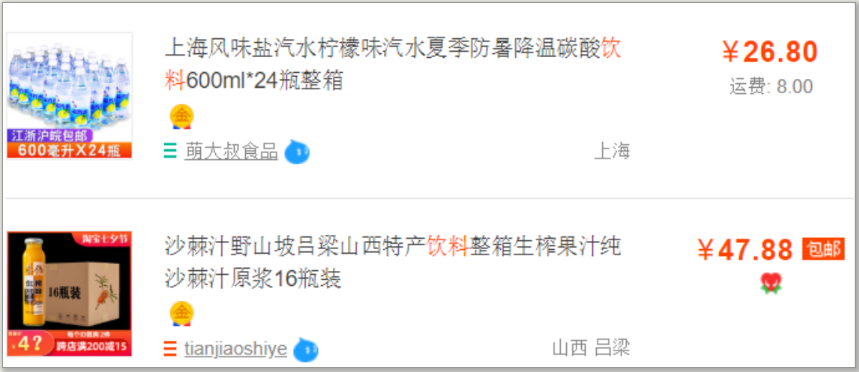
也就是说,商品描述字段访问频次较低,且该字段存储占用空间较大,访问单个数据IO时间较长
在此情况下,就可以将访问频次较高的商品基本信息放在一张表中,而将访问频次低的描述信息单独放在一张表中
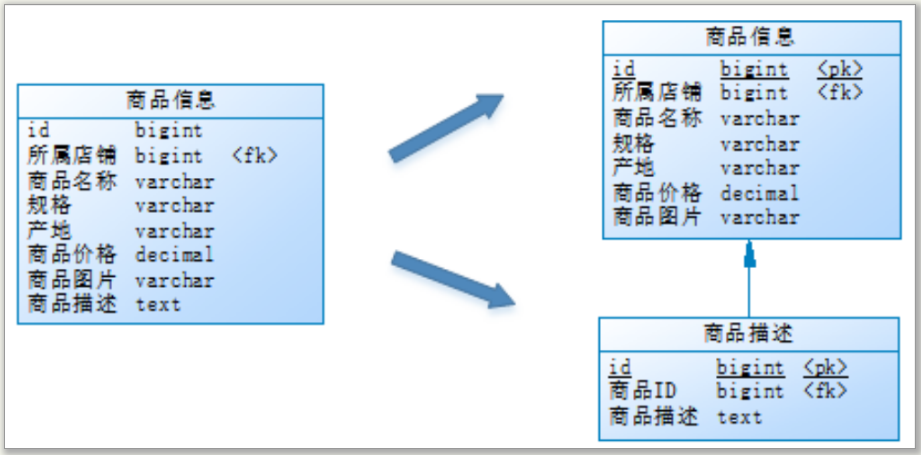
垂直分表带来的好处是:减少了每张表中的字段数量,提高了热数据的访问效率
垂直分表的一般规则是:
- 把不常用的字段单独放在一张表
- 把text、blob等大字段单独放在一张表
- 经常组合查询的列放在一张表中
水平分表
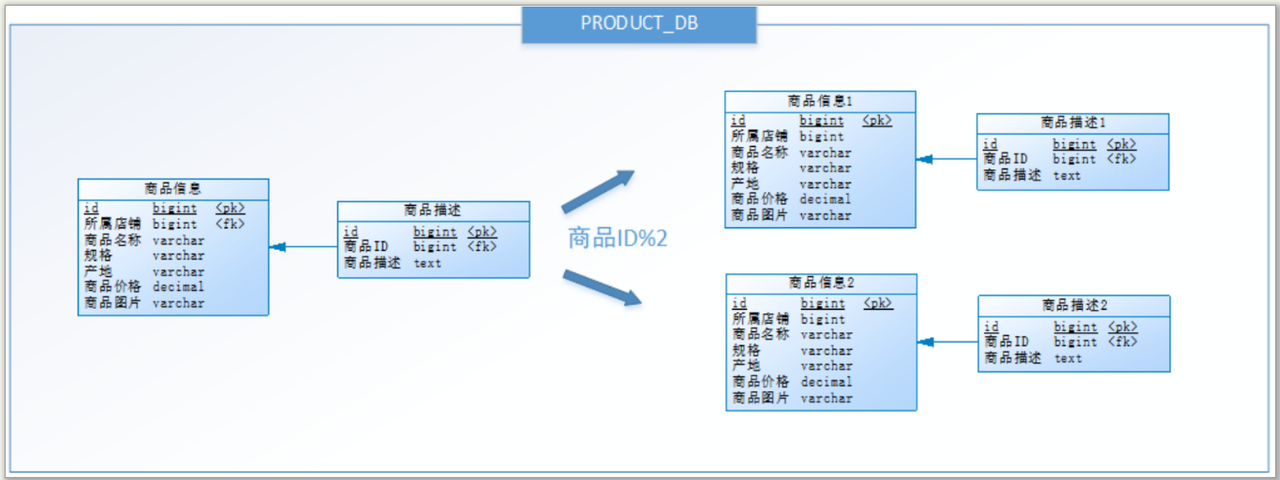
水平分表就是一张表的数据分散到多张数据表中去,一般用在单张表数据量过多的情况
例如下面的案例中,商品表的数据量假设有1000w,就可以将一张商品表拆分为结构一样的两张,每个表存500w
至于分散数据的原则,经常使用到的两种方案是:hash方式和range方式
- hash方式:按照订单id散列法进行数据分散,id对表数量取余得到的结果就是数据要分散到表的索引
- 此方式的优点是数据分散均匀,缺点是扩容时需要迁移数据
- range方式:0到500万到1表,500万到1000万到2表,依次类推
- 此方式的优点是扩容时不需要迁移数据,缺点是存在数据分布不均匀的情况
方案设计
说明
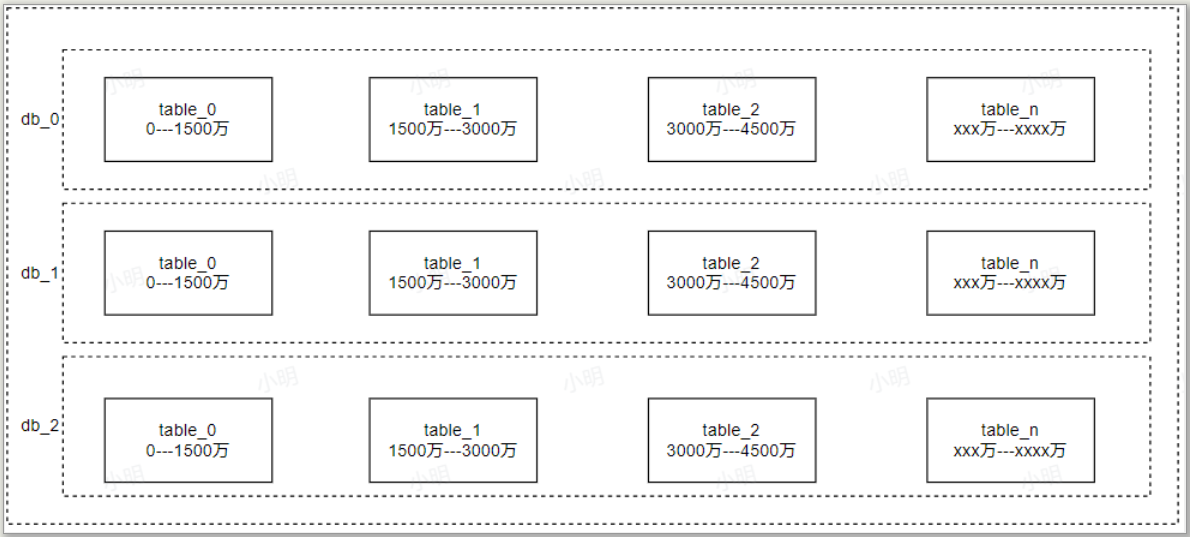
本次订单分库分表,使用hash法进行分库,使用range法进行分表
- 分库:设计三个数据库,根据用户id分库,分库表达式为:db_用户id % 3
- 分表:根据订单范围分表,0—1500万落到table_0,1500万—3000万落到table_1,依次类推
操作
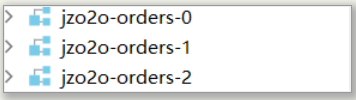
订单数据库分为三个库 :jzo2o-orders-0、jzo2o-orders-1、jzo2o-orders-2
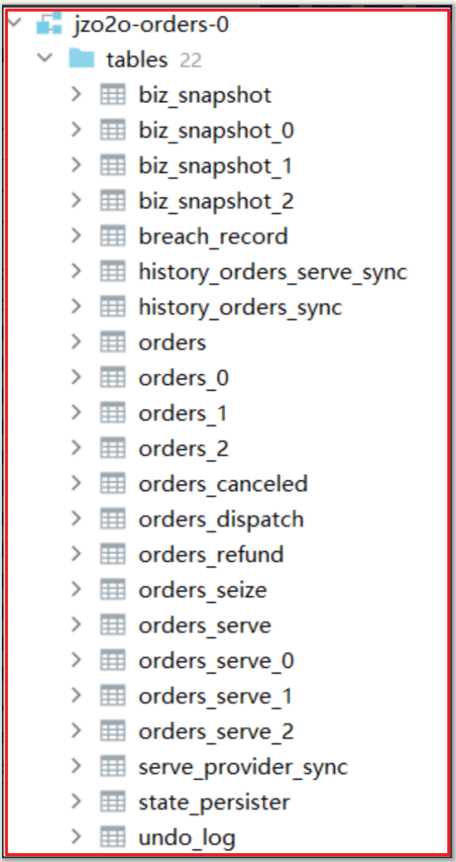
每个数据库对orders、biz_snapshot、orders_serve进行分表(暂分3个表)
其它表为广播表(即在每个数据库都存在且数据是完整的)
技术
ShardingSphere是一款分布式的数据库生态系统,可以将任意数据库转换为分布式数据库
它基于底层数据库提供分布式数据库解决方案,可以水平扩展计算和存储
官方文档:https://shardingsphere.apache.org/document/current/cn/overview/
具体实现
添加依赖
在jzo2o-orders-base工程引入jzo2o-shardingsphere-jdbc的依赖
<dependency>
    <groupId>com.jzo2o</groupId>
    <artifactId>jzo2o-shardingsphere-jdbc</artifactId>
</dependency>
添加配置
在jzo2o-orders-base工程的resources下配置shardingsphere-jdbc-dev.yml
dataSources: # 数据源, 下面可以配置多个数据库连接信息
  jzo2o-orders-0:
    dataSourceClassName: com.zaxxer.hikari.HikariDataSource
    jdbcUrl: jdbc:mysql://192.168.101.68:3306/jzo2o-orders-0?useUnicode=true&characterEncoding=UTF-8&autoReconnect=true&serverTimezone=Asia/Shanghai
    username: root
    password: mysql
  jzo2o-orders-1:
    dataSourceClassName: com.zaxxer.hikari.HikariDataSource
    jdbcUrl: jdbc:mysql://192.168.101.68:3306/jzo2o-orders-1?useUnicode=true&characterEncoding=UTF-8&autoReconnect=true&serverTimezone=Asia/Shanghai
    username: root
    password: mysql
  jzo2o-orders-2:
    dataSourceClassName: com.zaxxer.hikari.HikariDataSource
    jdbcUrl: jdbc:mysql://192.168.101.68:3306/jzo2o-orders-2?useUnicode=true&characterEncoding=UTF-8&autoReconnect=true&serverTimezone=Asia/Shanghai
    username: root
    password: mysql
rules:
  - !TRANSACTION
    defaultType: BASE
    providerType: Seata
  - !SHARDING
    tables: # 数据分片规则配置
      orders: # 逻辑表名称
        actualDataNodes: jzo2o-orders-${0..2}.orders_${0..2} # 实际数据节点 数据源名+表名
        tableStrategy: # 分表策略
          standard:
            shardingColumn: id #分片列名称
            shardingAlgorithmName: orders_table_inline #分片算法名称
        databaseStrategy: # 分库策略
          standard: # 用于单分片键的标准分片场景
            shardingColumn: user_id # 分片列名称
            shardingAlgorithmName: orders_database_inline # 分片算法名称
      orders_serve:
        actualDataNodes: jzo2o-orders-${0..2}.orders_serve_${0..2}
        tableStrategy:
          standard:
            shardingColumn: id
            shardingAlgorithmName: orders_serve_table_inline
        databaseStrategy:
          standard:
            shardingColumn: serve_provider_id
            shardingAlgorithmName: orders_serve_database_inline
      biz_snapshot:
        actualDataNodes: jzo2o-orders-${0..2}.biz_snapshot_${0..2}
        tableStrategy:
          standard:
            shardingColumn: biz_id
            shardingAlgorithmName: biz_snapshot_table_inline
        databaseStrategy:
          standard:
            shardingColumn: db_shard_id
            shardingAlgorithmName: biz_snapshot_database_inline
    shardingAlgorithms:
      # 订单-分库算法
      orders_database_inline:
        type: INLINE
        props:
          # 分库算法表达式
          algorithm-expression: jzo2o-orders-${user_id % 3}
          # 分库支持范围查询
          allow-range-query-with-inline-sharding: true
      # 订单-分表算法
      orders_table_inline:
        type: INLINE
        props:
          # 分表算法表达式
          algorithm-expression: orders_${(int)Math.floor(id % 10000000000 / 15000000)}
          # 允许范围查询
          allow-range-query-with-inline-sharding: true
      # 服务单-分库算法
      orders_serve_database_inline:
        type: INLINE
        props:
          # 分库算法表达式
          algorithm-expression: jzo2o-orders-${serve_provider_id % 3}
          # 允许范围查询
          allow-range-query-with-inline-sharding: true
      # 服务单-分表算法
      orders_serve_table_inline:
        type: INLINE
        props:
          # 允许范围查询
          algorithm-expression: orders_serve_${(int)Math.floor(id % 10000000000 / 15000000)}
          # 允许范围查询
          allow-range-query-with-inline-sharding: true
      # 快照-分库算法
      biz_snapshot_database_inline:
        type: INLINE
        props:
          # 分库算法表达式
          algorithm-expression: jzo2o-orders-${db_shard_id % 3}
          # 允许范围查询
          allow-range-query-with-inline-sharding: true
      # 快照-分表算法
      biz_snapshot_table_inline:
        type: INLINE
        props:
          # 允许范围查询
          algorithm-expression: biz_snapshot_${(int)Math.floor((Long.valueOf(biz_id))  % 10000000000 / 15000000)}
          # 允许范围查询
          allow-range-query-with-inline-sharding: true
    # id生成器
    keyGenerators:
      snowflake:
        type: SNOWFLAKE
  - !BROADCAST # 广播表
    tables:
      - breach_record
      - orders_canceled
      - orders_refund
      - orders_dispatch
      - orders_seize
      - serve_provider_sync
      - state_persister
      - orders_dispatch_receive
      - undo_log
      - history_orders_sync
      - history_orders_serve_sync
props:
  sql-show: true # 打印sql
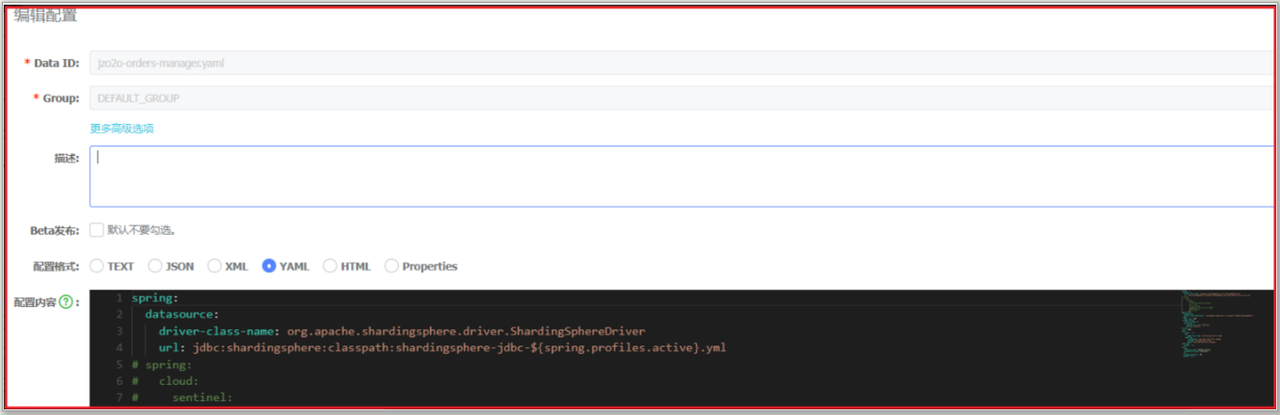
进入nacos在jzo2o-orders-manager.yaml中配置数据源使用ShardingSphereDriver:
spring:
  datasource:
    driver-class-name: org.apache.shardingsphere.driver.ShardingSphereDriver
    url: jdbc:shardingsphere:classpath:shardingsphere-jdbc-${spring.profiles.active}.yml
状态机分库
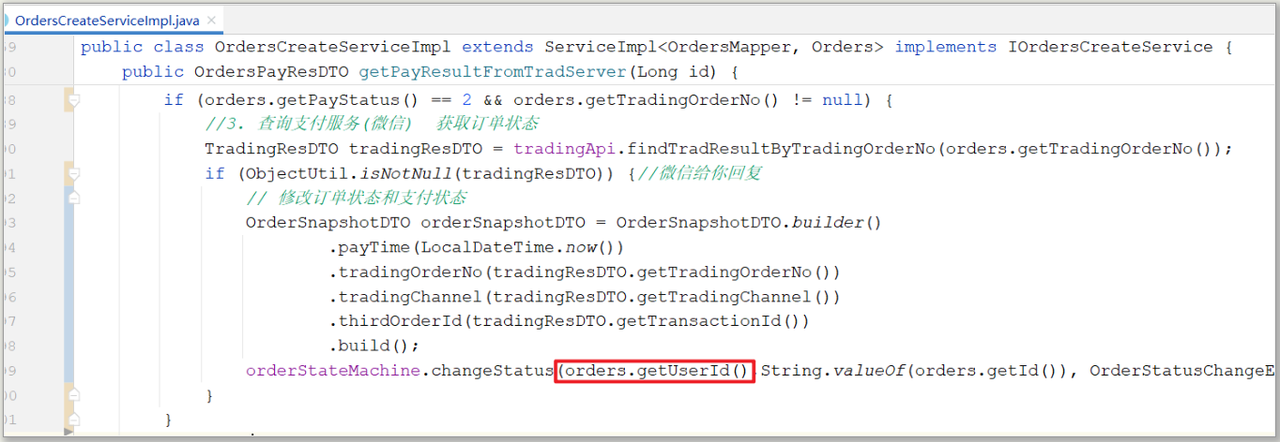
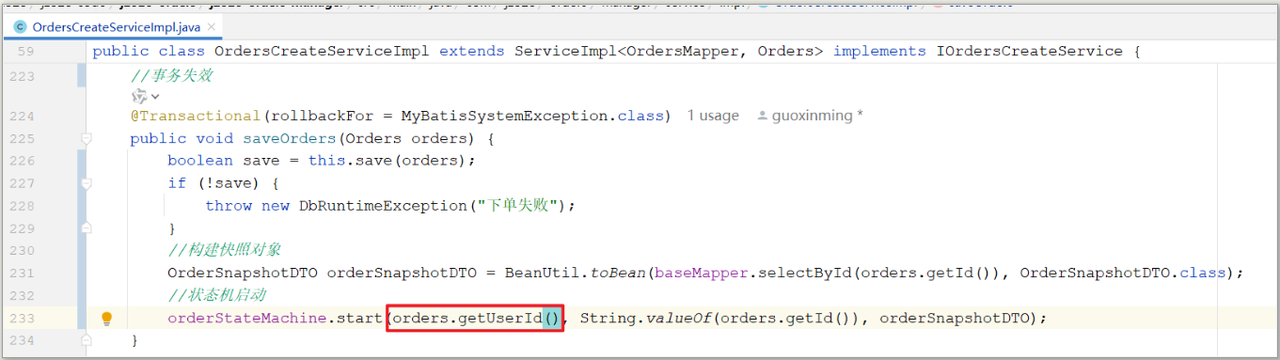
由于对状态机进行了分库分表,需要修改创建订单方法中启动状态机代码:
使用start(Long dbShardId, String bizId, T bizSnapshot) 方法启动状态机,传入分片键user_id
支付成功调用状态机变更状态方法:
使用:changeStatus(Long dbShardId, String bizId, StatusChangeEvent statusChangeEventEnum, T bizSnapshot)变更状态, 传入分片键user_id,代码如下: