异步处理和AMQP协议
异步处理基础概念
在接收设备数据之前,需要先来熟悉一些基本的概念,方便理解接收设备数据的基本思路
同步和异步
同步和异步的概念:
- 同步(Background Synchronous)是指任务在后台进行处理,但其他任务需要等待任务完成后才能执行
- 异步(Asynchronous)是指任务的提交和执行是相互独立的,任务的执行不会阻塞程序的继续执行
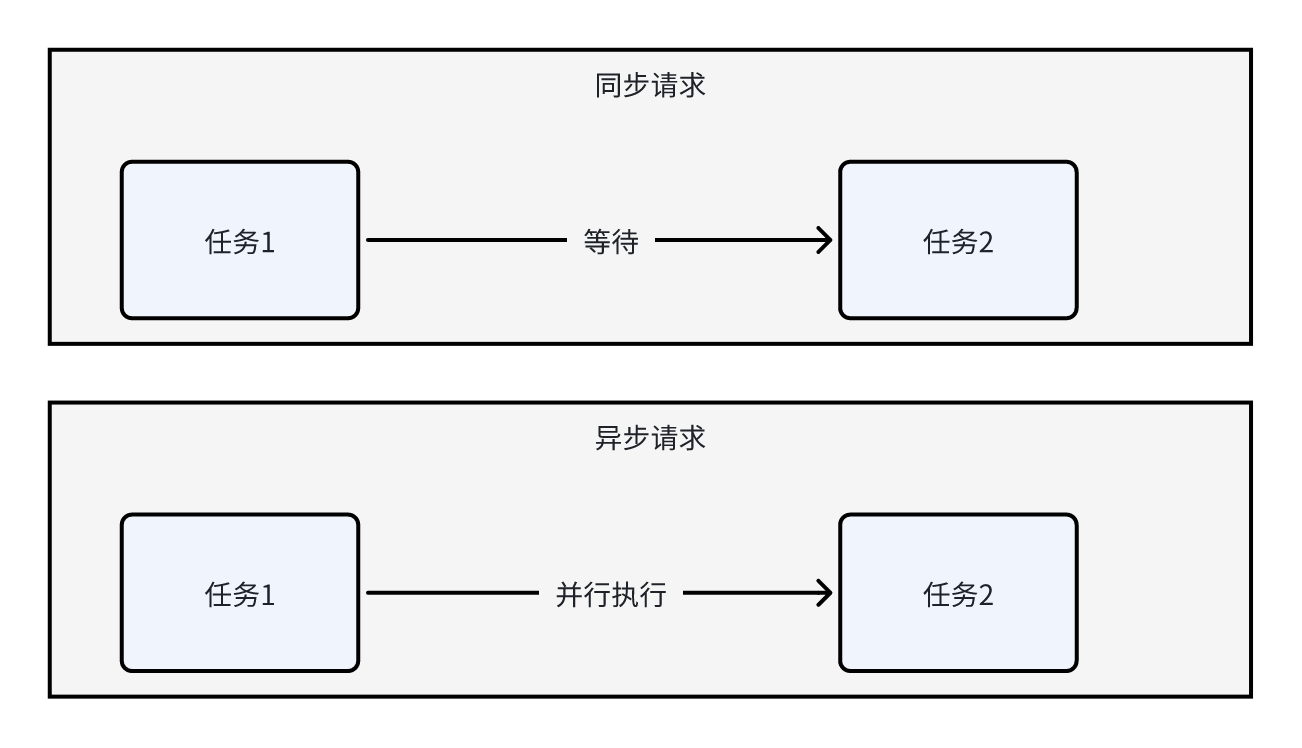
- 同步请求下,任务1完成后才能执行任务2,任务2需要等待任务1的完成。这种顺序执行的方式称为同步
- 异步请求下,任务1和任务2可以并行执行,彼此之间相互独立,不需要等待对方的完成。这种并行执行的方式称为异步
单线程/多线程:决定了有多少人”同时干活”
同步/异步:决定了是否需要”一直等着”
异步的优缺点:
- 好处:
- 提高系统的并发性
- 改善系统的响应性
- 缺点:
- 复杂性增加
- 资源消耗增加
消息队列的基本概念
知道了同步和异步的区别之后,再来理解一下消息队列的概念,**消息队列都是以异步的方式进行请求的**
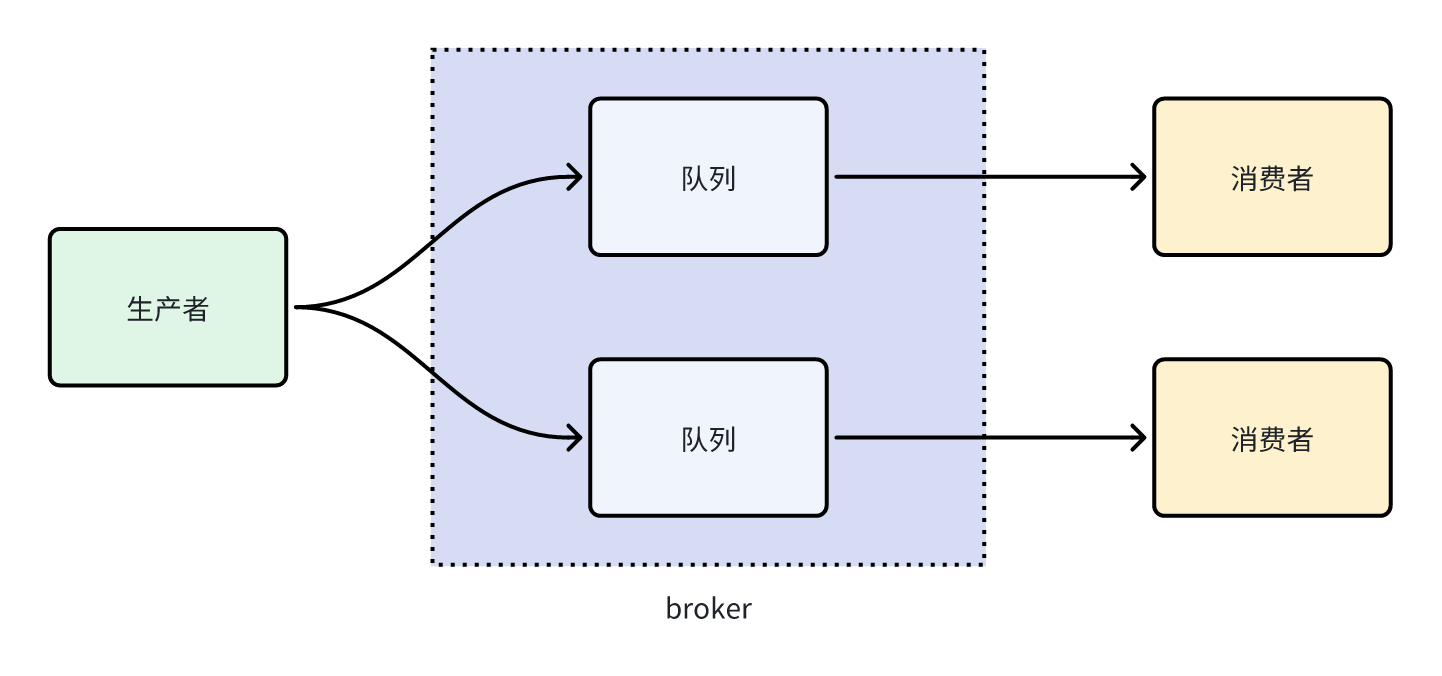
- broker:负责接收、存储和分发消息的中间件组件,实现类发送者和接收者之间的解耦和异步通信
- 生产者:负责将消息发送到消息队列中
- 消费者:负责从消息队列中获取消息并进行处理
- 队列:负责存储消息
- topic:消息的分类
在IOT中数据流转是这样的,如下图
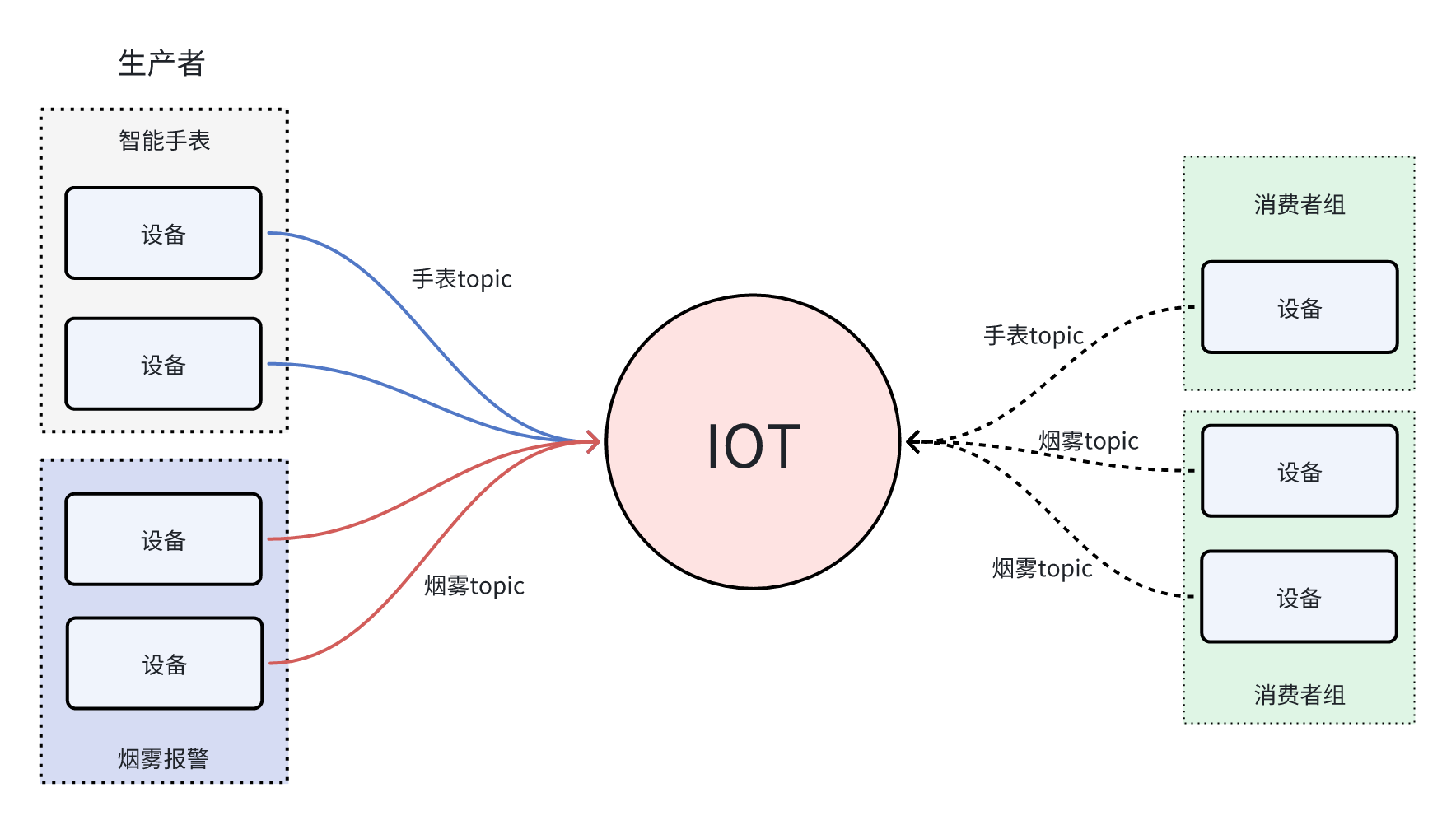
- 生产者:设备负责将消息发送到IOT中(队列)
- 每个产品可以绑定不同的topic来对消息进行分类,比如有手表topic、烟雾topic
- IOT本身相当于是一个队列
- 消费者可以从指定的topic中获取数据
- 如果有多个消费者都要接收同一类消息,可以设置多个消费者,称为消费者组
什么是AMQP
现在已经清楚了消息队列的基础概念,在IOT中是用AMQP来接收和处理消息的
AMQP全称Advanced Message Queuing Protocol,是一种网络协议,用于在应用程序之间传递消息。它是一种开放标准的消息传递协议,可以在不同的系统之间实现可靠、安全、高效的消息传递
AMQP协议的实现包括多种消息队列软件,例如RabbitMQ、Apache ActiveMQ、Apache Qpid等。这些软件提供了可靠、高效的消息传递服务,广泛应用于分布式系统、云计算、物联网等领域
其中的RabbitMQ在微服务课程中会详细、重点讲解
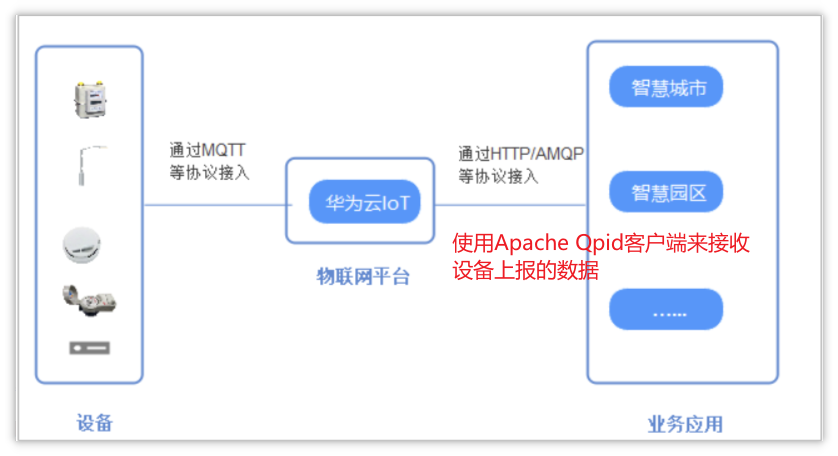
设备数据转发
在IOT官方文档中,已经提供了对应的数据转发的解决方案,如下链接:AMQP转发
官网Java SDK接入
创建数据转发规则
设备接入物联网平台后,可以通过自定义Topic或产品模型将数据上报给平台。在控制台上设置订阅后,平台会将包括设备生命周期变更、属性上报、消息上报及状态变更等信息,通过订阅推送的方式转发到您指定的服务器
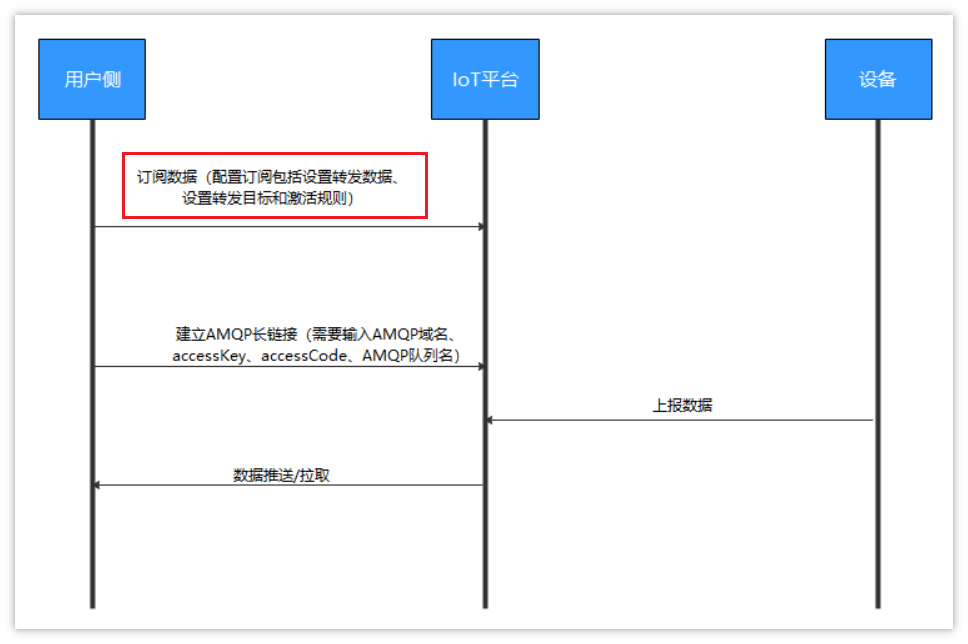
- 订阅(AMQP): 用户可以通过控制台或调用API创建订阅,以获取设备的变更信息,如设备状态、数据上报等。订阅时需要指定具体的AMQP消息通道
- 推送: 一旦订阅成功,物联网平台会根据用户选择的数据类型,自动将相关变更推送到指定的AMQP消息队列中。用户使用AMQP客户端(Apache Qpid)连接到IoT平台即可接收这些更新信息
按照上述流程,开发者需要在IOT平台中创建转发规则,才能让AMQP客户端接收到数据
配置规则参考官方说明:https://support.huaweicloud.com/usermanual-iothub/iot_01_00101.html
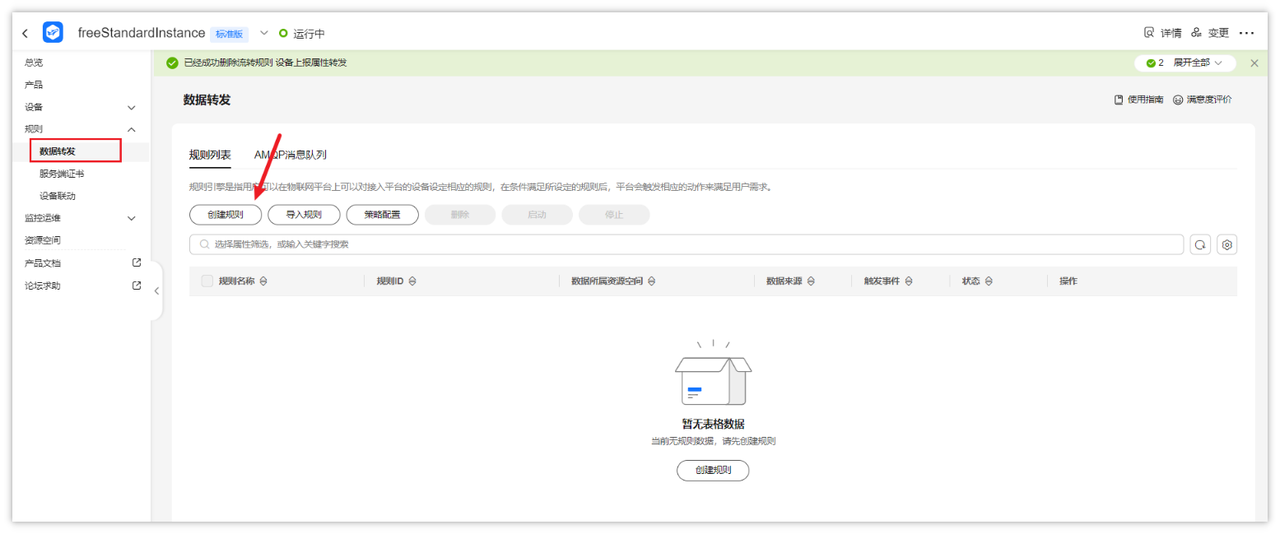
- 找到规则->数据转发->创建规则
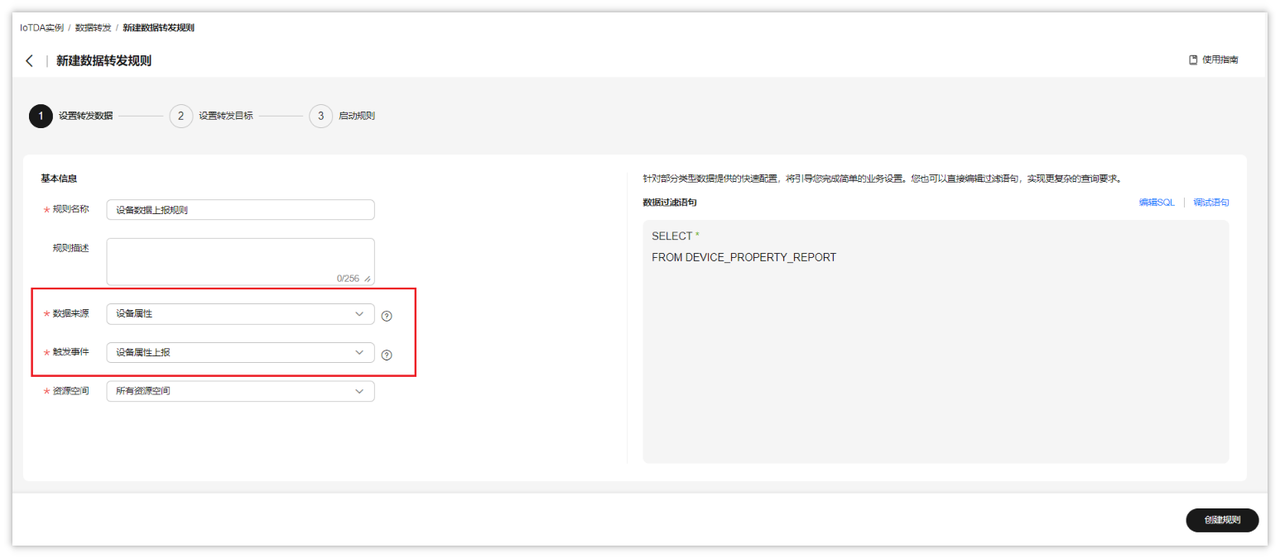
- 创建规则,其中数据来源为:设备属性
- 添加转发目标,转发目标选择:AMQP推送消息队列
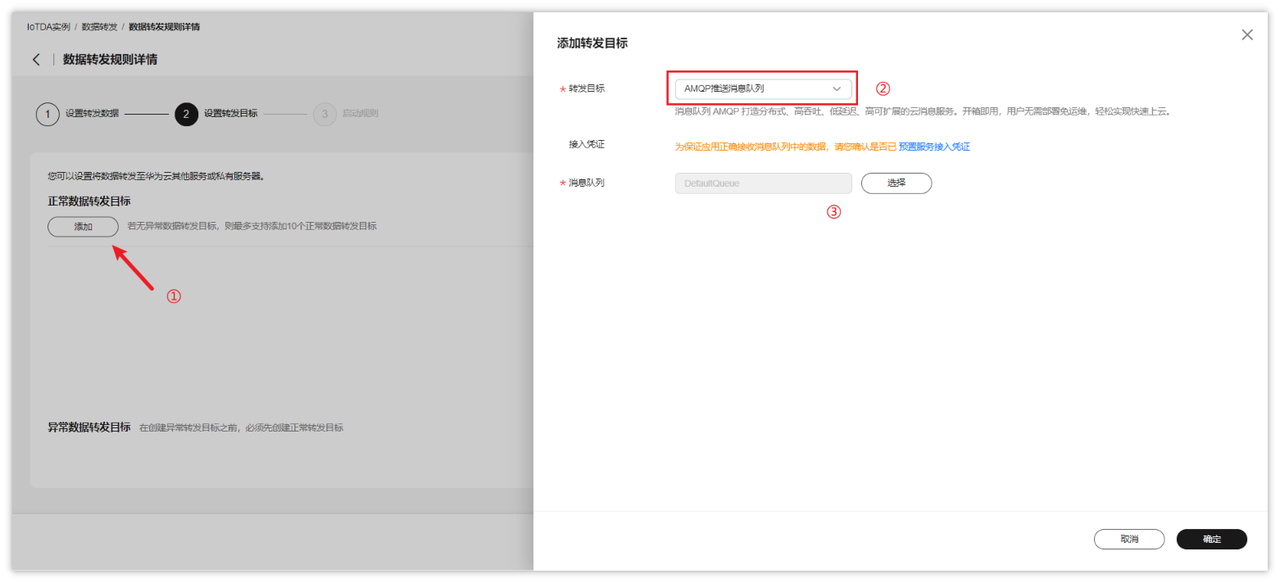
- 上述操作完成后,可以启动规则
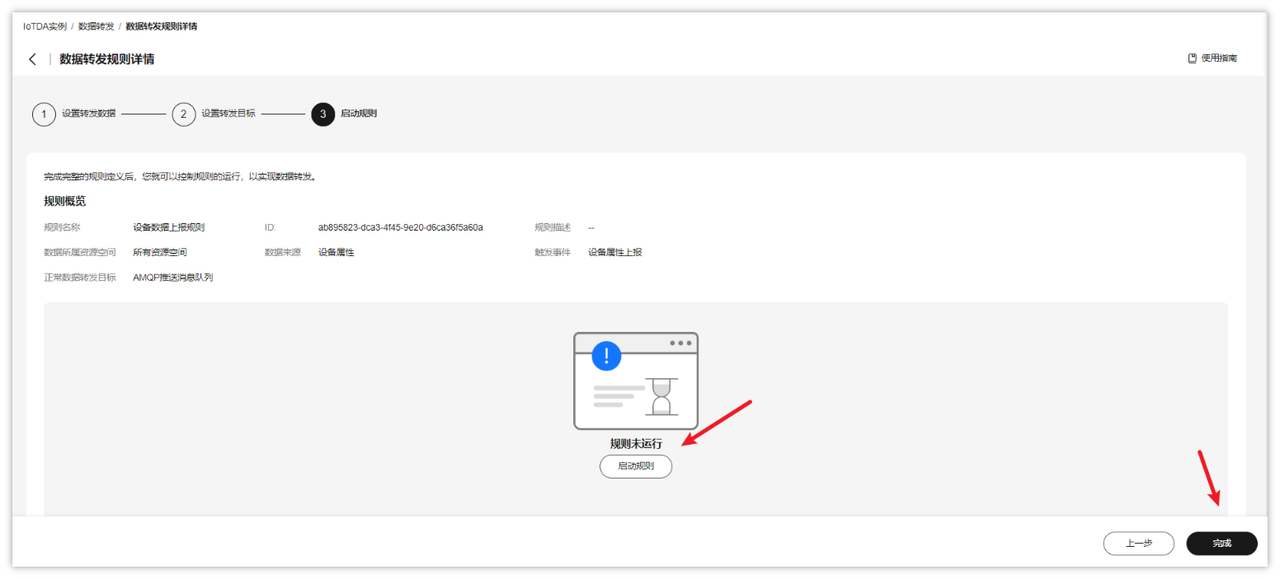
Java SDK接入示例
- 下载sdk代码
下载地址:https://developer.obs.myhuaweicloud.com/manage/amqp/amqp-demo.zip
官网说明参考:https://support.huaweicloud.com/usermanual-iothub/iot_01_00100_3.html
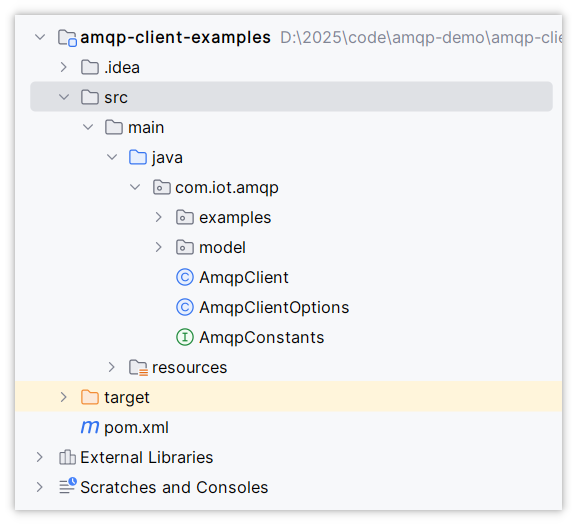
- 使用idea打开刚刚下载的amqp-demo中的amqp-client-examples代码目录,如下图
- 修改连接参数
可以直接到AmqpConstants类中进行修改,以下参数的获取都可以通过对应链接说明找到
package com.iot.amqp;

public interface AmqpConstants {
    /**
     * AMQP接入域名
     * 参考:https://support.huaweicloud.com/usermanual-iothub/iot_01_00100_2.html#section2
     */
    String HOST = "38e7abedbf.st1.iotda-app.cn-east-3.myhuaweicloud.com";   // eg: "****.iot-amqps.cn-north-4.myhuaweicloud.com";

    /**
     * AMQP接入端口
     * 参考:https://support.huaweicloud.com/usermanual-iothub/iot_01_00100_2.html#section2
     */
    int PORT = 5671;

    /**
     * 接入凭证键值
     * 参考:https://support.huaweicloud.com/usermanual-iothub/iot_01_00100_2.html#section3
     */
    String ACCESS_KEY = "S2DSSeTC5";

    /**
     * 接入凭证密钥
     * 参考:https://support.huaweicloud.com/usermanual-iothub/iot_01_00100_2.html#section3
     */
    String ACCESS_CODE = "61xLTVTzppmBi62h5my2TT2LIXpU";

    /**
     * 默认队列,无需改动
     */
    String DEFAULT_QUEUE = "DefaultQueue";
}
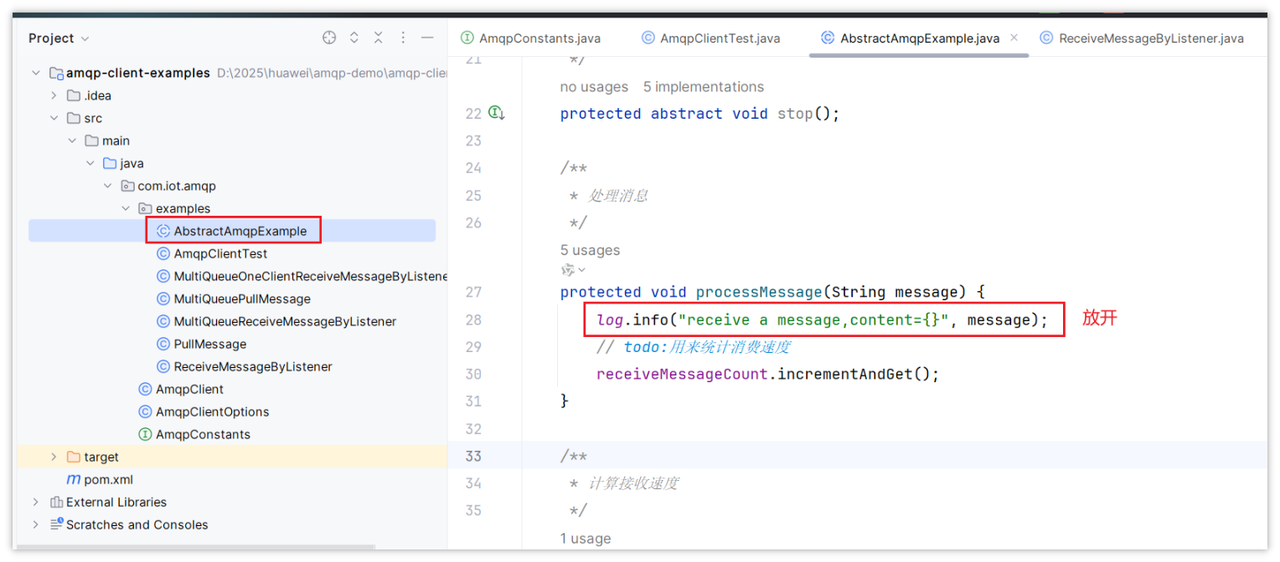
- 放开AbstractAmqpExample中的打印消息的代码,如下图:
SDK改造
改造思路
SDK中提供的这个工具类,只是官网提供的参考代码,需要将其改造后集成到自己的项目中,改造思路如下:
- 导入对应的依赖
- 所有的可变参数,如HOST、ACCESS_KEY、ACCESS_CODE、DEFAULT_QUEUE统一在配置文件中维护
- 在项目中根据项目需求配置线程池
- 让Spring进行管理和监听,一旦有数据变化,马上消费,可以让这个类实现ApplicationRunner接口,重新run方法
导入pom依赖
在zzyl-nursing-platform模块中导入依赖,参考官网提供的pom依赖,如下:
<!-- amqp 1.0 qpid client -->
<dependency>
    <groupId>org.apache.qpid</groupId>
    <artifactId>qpid-jms-client</artifactId>
    <version>0.61.0</version>
</dependency>
配置文件添加iot配置
# 华为云IOT配置
huaweicloud:
  ak: *********
  sk: *********
  regionId: cn-east-3
  endpoint: *********
  projectId: *********
  #amqp相关配置
  host: *********
  accessKey: *********
  accessCode: *********
  queueName: DefaultQueue   #默认无需改动
实现ApplicationRunner接口
让AmqpClient 实现ApplicationRunner接口,重写run方法,然后调用处理数据方法(由main方法改造而来)
package com.zzyl.nursing.job;

import cn.hutool.core.text.CharSequenceUtil;
import com.zzyl.framework.config.properties.HuaWeiIotConfigProperties;
import lombok.extern.slf4j.Slf4j;
import org.apache.qpid.jms.*;
import org.apache.qpid.jms.message.JmsInboundMessageDispatch;
import org.apache.qpid.jms.transports.TransportOptions;
import org.apache.qpid.jms.transports.TransportSupport;
import org.springframework.beans.factory.annotation.Autowired;
import org.springframework.boot.ApplicationArguments;
import org.springframework.boot.ApplicationRunner;
import org.springframework.scheduling.concurrent.ThreadPoolTaskExecutor;
import org.springframework.stereotype.Component;

import javax.jms.*;
import java.net.InetAddress;
import java.net.URI;
import java.net.UnknownHostException;
import java.text.MessageFormat;
import java.util.HashMap;
import java.util.Map;
import java.util.UUID;
import java.util.stream.Collectors;

/**
 * @author itcast
 */
@Slf4j
@Component
public class AmqpClient implements ApplicationRunner {

    @Autowired
    private HuaWeiIotConfigProperties huaWeiIotConfigProperties;

    // 业务处理异步线程池,线程池参数可以根据您的业务特点调整,或者您也可以用其他异步方式处理接收到的消息。
    @Autowired
    private ThreadPoolTaskExecutor threadPoolTaskExecutor;

    // 控制台服务端订阅中消费组状态页客户端ID一栏将显示clientId参数。
    // 建议使用机器UUID、MAC地址、IP等唯一标识等作为clientId。便于您区分识别不同的客户端。
    private static String clientId;

    static {
        try {
            clientId = InetAddress.getLocalHost().getHostAddress();
        } catch (UnknownHostException e) {
            e.printStackTrace();
        }
    }

    @Override
    public void run(ApplicationArguments args) throws Exception {
        start();
    }

    public void start() throws Exception {
        // 参数说明,请参见AMQP客户端接入说明文档。
        for (int i = 0; i < huaWeiIotConfigProperties.getConnectionCount(); i++) {
            // 创建amqp连接
            Connection connection = getConnection();

            // 加入监听者
            ((JmsConnection) connection).addConnectionListener(myJmsConnectionListener);
            // 创建会话。
            // Session.CLIENT_ACKNOWLEDGE: 收到消息后,需要手动调用message.acknowledge()。
            // Session.AUTO_ACKNOWLEDGE: SDK自动ACK(推荐)。
            Session session = connection.createSession(false, Session.AUTO_ACKNOWLEDGE);
            connection.start();

            // 创建Receiver连接。
            MessageConsumer consumer = newConsumer(session, connection, huaWeiIotConfigProperties.getQueueName());
            consumer.setMessageListener(messageListener);
        }

        log.info("amqp  is started successfully, and will exit after server shutdown ");
    }

    /**
     * 创建amqp连接
     *
     * @return amqp连接
     */
    private Connection getConnection() throws Exception {
        String connectionUrl = generateConnectUrl();
        JmsConnectionFactory cf = new JmsConnectionFactory(connectionUrl);
        // 信任服务端
        TransportOptions to = new TransportOptions();
        to.setTrustAll(true);
        cf.setSslContext(TransportSupport.createJdkSslContext(to));
        String userName = "accessKey=" + huaWeiIotConfigProperties.getAccessKey();
        cf.setExtension(JmsConnectionExtensions.USERNAME_OVERRIDE.toString(), (connection, uri) -> {
            // IoTDA的userName组成格式如下:“accessKey=${accessKey}|timestamp=${timestamp}”
            String newUserName = userName;
            if (connection instanceof JmsConnection) {
                newUserName = ((JmsConnection) connection).getUsername();
            }
            return newUserName + "|timestamp=" + System.currentTimeMillis();
        });

        // 创建连接。
        return cf.createConnection(userName, huaWeiIotConfigProperties.getAccessCode());
    }

    /**
     * 生成amqp连接地址
     *
     * @return amqp连接地址
     */
    public String generateConnectUrl() {
        String uri = MessageFormat.format("{0}://{1}:{2}",
                (huaWeiIotConfigProperties.isUseSsl() ? "amqps" : "amqp"),
                huaWeiIotConfigProperties.getHost(),
                String.valueOf(huaWeiIotConfigProperties.getPort()));
        Map<String, String> uriOptions = new HashMap<>();
        uriOptions.put("amqp.vhost", huaWeiIotConfigProperties.getVhost());
        uriOptions.put("amqp.idleTimeout", String.valueOf(huaWeiIotConfigProperties.getIdleTimeout()));
        uriOptions.put("amqp.saslMechanisms", huaWeiIotConfigProperties.getSaslMechanisms());

        Map<String, String> jmsOptions = new HashMap<>();
        jmsOptions.put("jms.prefetchPolicy.queuePrefetch", String.valueOf(huaWeiIotConfigProperties.getQueuePrefetch()));
        if (CharSequenceUtil.isNotBlank(clientId)) {
            jmsOptions.put("jms.clientID", clientId);
        } else {
            jmsOptions.put("jms.clientID", UUID.randomUUID().toString());
        }
        jmsOptions.put("failover.reconnectDelay", String.valueOf(huaWeiIotConfigProperties.getReconnectDelay()));
        jmsOptions.put("failover.maxReconnectDelay", String.valueOf(huaWeiIotConfigProperties.getMaxReconnectDelay()));
        if (huaWeiIotConfigProperties.getMaxReconnectAttempts() > 0) {
            jmsOptions.put("failover.maxReconnectAttempts", String.valueOf(huaWeiIotConfigProperties.getMaxReconnectAttempts()));
        }
        if (huaWeiIotConfigProperties.getExtendedOptions() != null) {
            for (Map.Entry<String, String> option : huaWeiIotConfigProperties.getExtendedOptions().entrySet()) {
                if (option.getKey().startsWith("amqp.") || option.getKey().startsWith("transport.")) {
                    uriOptions.put(option.getKey(), option.getValue());
                } else {
                    jmsOptions.put(option.getKey(), option.getValue());
                }
            }
        }
        StringBuilder stringBuilder = new StringBuilder();
        stringBuilder.append(uriOptions.entrySet().stream()
                .map(option -> MessageFormat.format("{0}={1}", option.getKey(), option.getValue()))
                .collect(Collectors.joining("&", "failover:(" + uri + "?", ")")));
        stringBuilder.append(jmsOptions.entrySet().stream()
                .map(option -> MessageFormat.format("{0}={1}", option.getKey(), option.getValue()))
                .collect(Collectors.joining("&", "?", "")));
        return stringBuilder.toString();
    }

    /**
     * 创建消费者
     *
     * @param session    session
     * @param connection amqp连接
     * @param queueName  队列名称
     * @return 消费者
     */
    public MessageConsumer newConsumer(Session session, Connection connection, String queueName) throws Exception {
        if (connection == null || !(connection instanceof JmsConnection) || ((JmsConnection) connection).isClosed()) {
            throw new Exception("create consumer failed,the connection is disconnected.");
        }

        return session.createConsumer(new JmsQueue(queueName));
    }

    private final MessageListener messageListener = message -> {
        try {
            // 异步处理收到的消息,确保onMessage函数里没有耗时逻辑
            threadPoolTaskExecutor.submit(() -> processMessage(message));
        } catch (Exception e) {
            log.error("submit task occurs exception ", e);
        }
    };

    /**
     * 在这里处理您收到消息后的具体业务逻辑。
     */
    private void processMessage(Message message) {
        String contentStr;
        try {
            contentStr = message.getBody(String.class);
            String topic = message.getStringProperty("topic");
            String messageId = message.getStringProperty("messageId");
            log.info("receive message,\n topic = {},\n messageId = {},\n content = {}", topic, messageId, contentStr);
        } catch (JMSException e) {
            throw new RuntimeException("服务器错误");
        }

    }

    private final JmsConnectionListener myJmsConnectionListener = new JmsConnectionListener() {
        /**
         * 连接成功建立。
         */
        @Override
        public void onConnectionEstablished(URI remoteURI) {
            log.info("onConnectionEstablished, remoteUri:{}", remoteURI);
        }

        /**
         * 尝试过最大重试次数之后,最终连接失败。
         */
        @Override
        public void onConnectionFailure(Throwable error) {
            log.error("onConnectionFailure, {}", error.getMessage());
        }

        /**
         * 连接中断。
         */
        @Override
        public void onConnectionInterrupted(URI remoteURI) {
            log.info("onConnectionInterrupted, remoteUri:{}", remoteURI);
        }

        /**
         * 连接中断后又自动重连上。
         */
        @Override
        public void onConnectionRestored(URI remoteURI) {
            log.info("onConnectionRestored, remoteUri:{}", remoteURI);
        }

        @Override
        public void onInboundMessage(JmsInboundMessageDispatch envelope) {
        }

        @Override
        public void onSessionClosed(Session session, Throwable cause) {
        }

        @Override
        public void onConsumerClosed(MessageConsumer consumer, Throwable cause) {
        }

        @Override
        public void onProducerClosed(MessageProducer producer, Throwable cause) {
        }
    };
}
这里代码写完后,在测试过程中,遇到了Message这个类找不到的问题,解决方式:执行
maven clean再重启项目
线程池相关配置
在目前若依的项目中已经提供了线程池的配置ThreadPoolTaskExecutor
类的位置:com.zzyl.framework.config.ThreadPoolConfig
package com.zzyl.framework.config;

import com.zzyl.common.utils.Threads;
import org.apache.commons.lang3.concurrent.BasicThreadFactory;
import org.springframework.context.annotation.Bean;
import org.springframework.context.annotation.Configuration;
import org.springframework.scheduling.concurrent.ThreadPoolTaskExecutor;
import java.util.concurrent.ScheduledExecutorService;
import java.util.concurrent.ScheduledThreadPoolExecutor;
import java.util.concurrent.ThreadPoolExecutor;

/**
 * 线程池配置
 *
 * @author ruoyi
 **/
@Configuration
public class ThreadPoolConfig
{
    // 核心线程池大小
    private int corePoolSize = 50;

    // 最大可创建的线程数
    private int maxPoolSize = 200;

    // 队列最大长度
    private int queueCapacity = 1000;

    // 线程池维护线程所允许的空闲时间
    private int keepAliveSeconds = 300;

    @Bean(name = "threadPoolTaskExecutor")
    public ThreadPoolTaskExecutor threadPoolTaskExecutor()
    {
        ThreadPoolTaskExecutor executor = new ThreadPoolTaskExecutor();
        executor.setMaxPoolSize(maxPoolSize);
        executor.setCorePoolSize(corePoolSize);
        executor.setQueueCapacity(queueCapacity);
        executor.setKeepAliveSeconds(keepAliveSeconds);
        // 线程池对拒绝任务(无线程可用)的处理策略
        executor.setRejectedExecutionHandler(new ThreadPoolExecutor.CallerRunsPolicy());
        return executor;
    }

    /**
     * 执行周期性或定时任务
     */
    @Bean(name = "scheduledExecutorService")
    protected ScheduledExecutorService scheduledExecutorService()
    {
        return new ScheduledThreadPoolExecutor(corePoolSize,
                new BasicThreadFactory.Builder().namingPattern("schedule-pool-%d").daemon(true).build(),
                new ThreadPoolExecutor.CallerRunsPolicy())
        {
            @Override
            protected void afterExecute(Runnable r, Throwable t)
            {
                super.afterExecute(r, t);
                Threads.printException(r, t);
            }
        };
    }
}
线程池核心参数和原理
- corePoolSize 核心线程数目
- 到底多少合适?
- 对于IO密集型的项目,一般设置核心线程数为:CPU核数 * 2
- 对于计算密集型的项目,一般设置核心线程数为: CPU核数 + 1
- maximumPoolSize 最大线程数目 = (核心线程+临时线程的最大数目)
- keepAliveTime 生存时间 - 临时线程的生存时间,生存时间内没有新任务,此线程资源会释放
- unit 时间单位 - 临时线程的生存时间单位,如秒、毫秒等
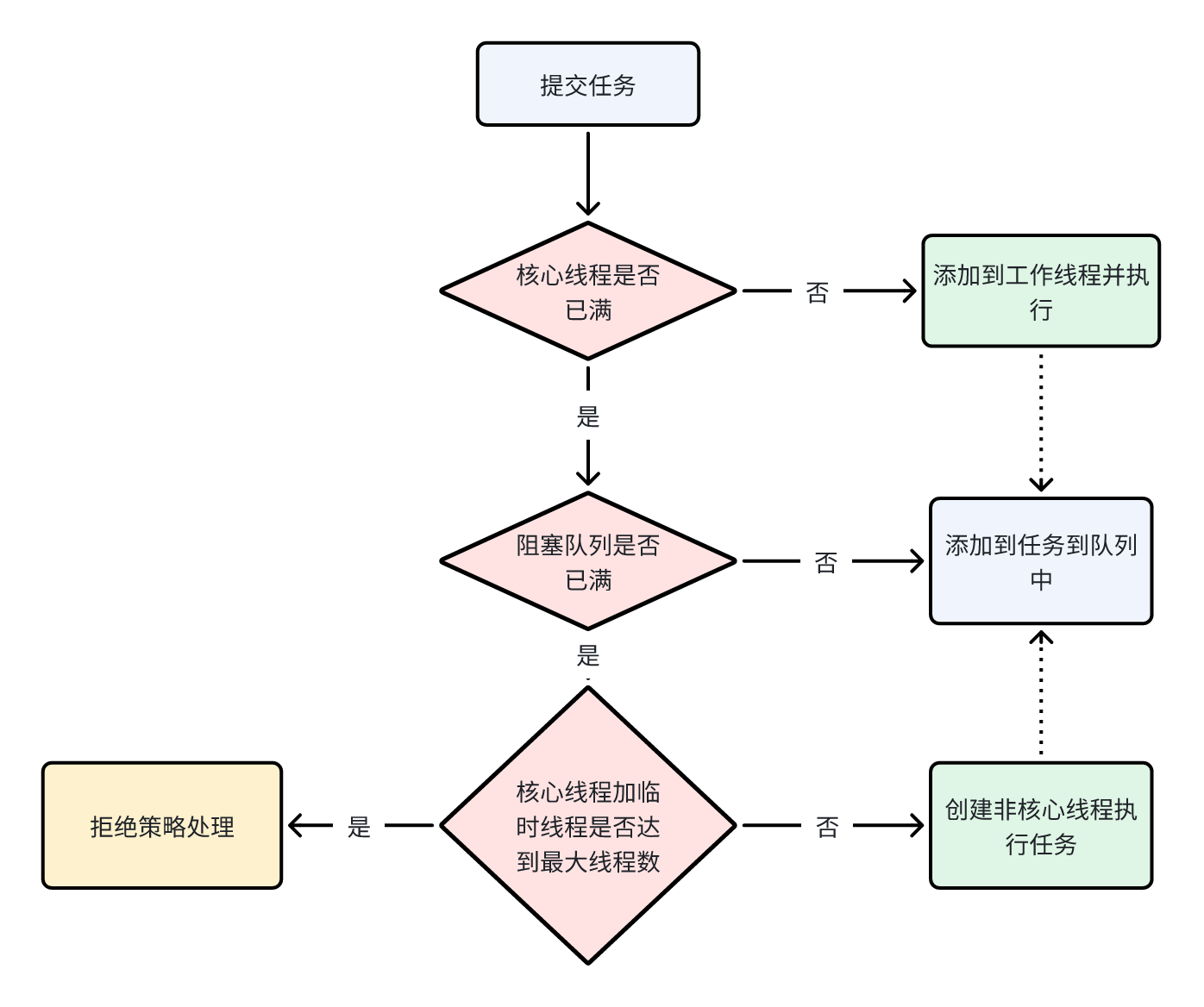
- workQueue - 当没有空闲核心线程时,新来任务会加入到此队列排队,队列满会创建临时线程执行任务
- threadFactory 线程工厂 - 可以定制线程对象的创建,例如设置线程名字、是否是守护线程等
- handler 拒绝策略 - 当所有线程都在繁忙,workQueue 也放满时,会触发拒绝策略
- AbortPolicy:直接抛出异常,默认策略;
- CallerRunsPolicy:用调用者所在的线程来执行任务;
- DiscardOldestPolicy:丢弃阻塞队列中靠最前的任务,并执行当前任务;
- DiscardPolicy:直接丢弃任务;
- 执行流程(原理)