若依框架实战项目 - 中州养老
文档以及资料:04-企业级智能物联网项目(中州养老) - 飞书云文档
项目中的护理模块相关内容已经在若依框架资料中实现
入住办理
在开发之前呢,重新搞定一套新的环境,详细请参考:初始代码-环境准备
需求分析
入住办理列表页
原型文件如下:

- 搜索:老人姓名为模糊搜索,老人身份证号为精准搜索;
- 列表数据:列表中所展示的数据是入住成功且未退住的老人信息
- 发起入住办理:点击【发起入住申请】进入到【入住申请详情页】;
- 查看:点击【查看】进入到【入住详情页】,数据回显,不可编辑,不显示文本框,只显示已填写/已选择的内容;
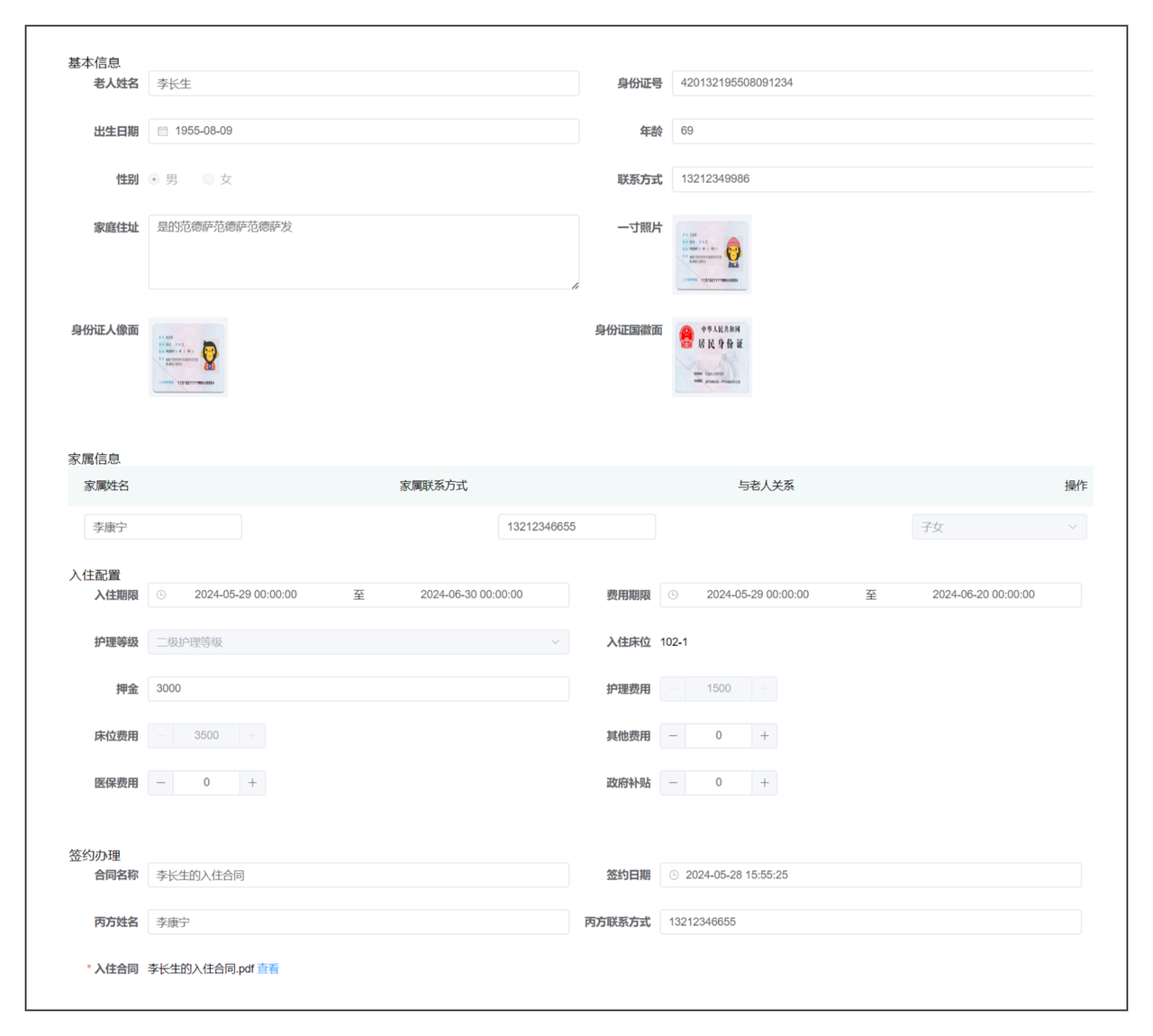
入住办理详情页
通过原型打开入住办理详情页,详细如下:
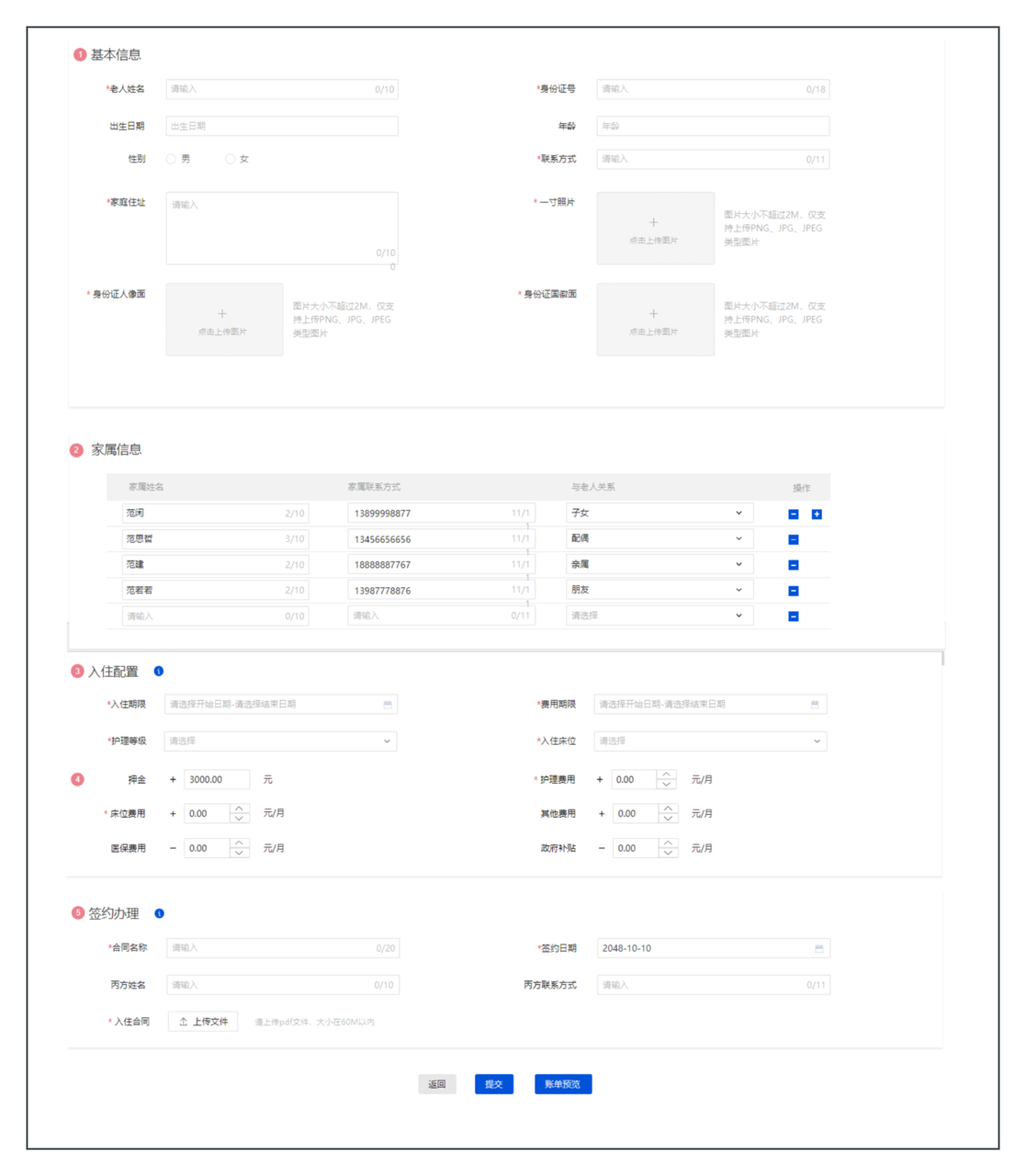
上述需求中,共包含了四部分:
- 基本信息:入住老人的基本信息,包含了姓名、年龄、身份证号、性别,住址、照片等信息
- 家属信息:入住老人的家属列表,可以有多个
- 入住配置:入住老人在养老院选择的费用信息,包含了护理等级,入住床位、入住期限等信息
- 签约办理:入住老人签订的合同信息
表结构设计
后端开发流程
在开发接口之前呢,需要先熟悉一下后端开发的流程,如下:
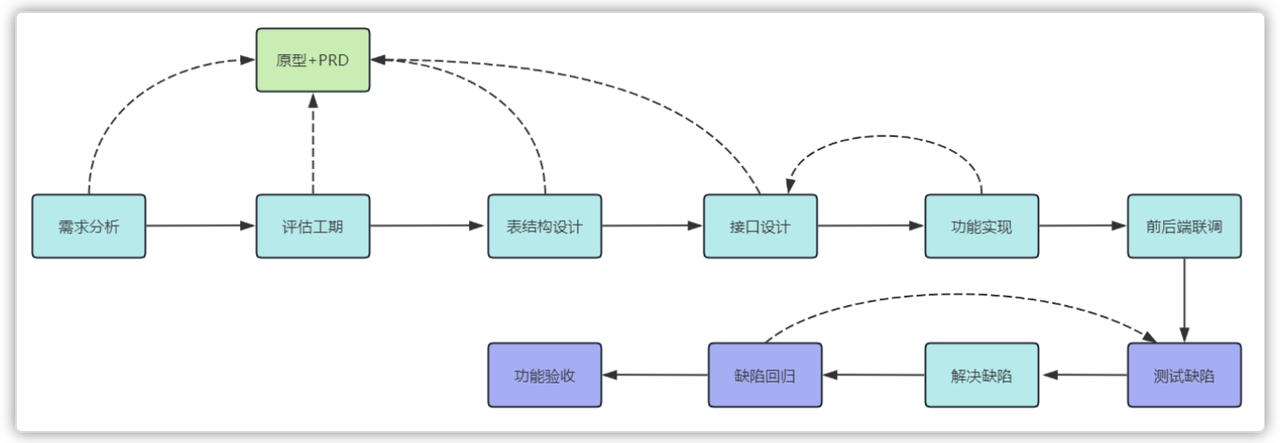
- 需求分析(基于原型和PRD)
- 开发计划(工期评估)
- 表结构设计(基于原型和PRD)
- 接口设计(基于原型和PRD)
- 功能实现(基于接口设计+原型+PRD)
- 前后端联调
- 测试提bug
- 前后端优化,再联调
- 测试回归bug
- 功能验收
如何设计表
ER图
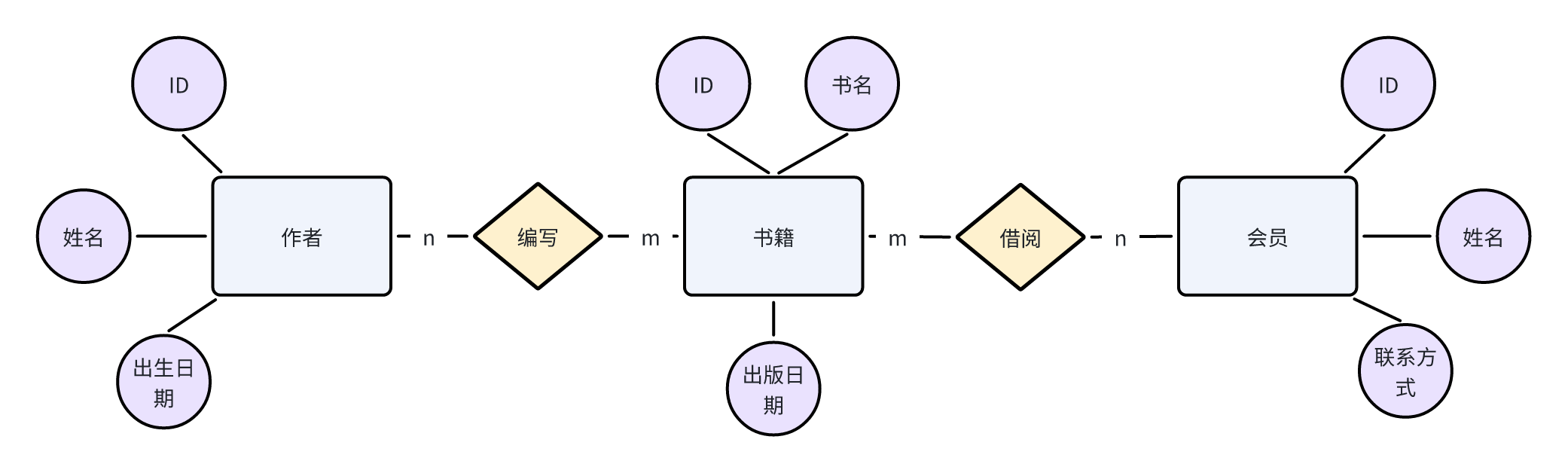
E-R图也称实体-联系图(Entity Relationship Diagram),提供了表示实体类型、属性和联系的方法,用来描述现实世界的概念模型。
一个栗子:
假设咱们要设计一个简单的图书馆数据库系统。咱们可以使用E-R图来描述这个系统的数据模型
咱们可能会有以下实体(Entities):
- 书籍(Book)
- 作者(Author)
- 图书馆会员(Library Member)
然后,咱们可以描述它们之间的关系(Relationships):
- 一本书可以由一个或多个作者编写,这是一个"一对多"的关系。
- 图书馆成员可以借阅多本书,而每本书也可以被多个图书馆成员借阅,这是一个"多对多"的关系。
最后,咱们可以添加一些属性(Attributes):
- 书籍实体可能包括书名、ISBN号、出版日期等属性。
- 作者实体可能包括姓名、国籍、出生日期等属性。
- 图书馆成员实体可能包括会员号、姓名、联系信息等属性。
通过E-R图,咱们可以清晰地展示这些实体之间的关系和它们的属性,从而更好地理解图书馆数据库系统的数据模型。
上述例子的E-R图:
详细设计
- 命名规则参考阿里开发手册(见名知意)
- 数据类型
- 基本准则:
- 可靠性:考虑字段存储的内容长度,尽可能的合适
- name 30-50
- 存储空间:在考虑可靠性的前提下,再考虑存储空间
- 常见数据类型 MySQL常见数据类型
- 主键(必须存在)
- 自增
- UUID
- 雪花算法
- 冗余字段
- 创建时间
- 修改时间
- 创建人
- 修改人
- 备注
- 要结合业务的情况,再去设计冗余字段(为了提升性能,减少多表查询)
建表工具
- 方式一:传统的数据库连接工具
创建表的工具,可以选择使DataGrip或者IDEA中集成的DataGrip工具,协助开发人员来设计表结构
- 方式二:AI协助帮忙创建表结构
可以借助AI大模型问答,写对应的提示词来创建表结构:
你是一个软件工程师,帮我生成MySQL的表结构,需求如下:
1,入住表(check_in),包含的字段有:主键(ID),老人id(elder_id)、身份证号、入住开始时间、入住结束时间、护理等级、入住床位、状态(0:已入住、1:已退住)
2,表中其他必要字段:排序编号、创建时间(create_time)、修改时间(update_time)、创建人(create_by)、修改人(update_by)、备注(remark)这些字段
3,表的主键都是自增的
4,请为每个字段都添加上comment
5,帮我给生成的表中插入一些示例数据
入住相关表结构设计
表结构的E-R图
通过需求分析,咱们可以得到以下信息
- 老人的基本信息里面的所有字段,都可以存储到老人表中(elder表)
- 老人关联的家属是一个列表
- 老人选择的入住配置字段有很多,可以创建入住表来进行存储
- 签约办理相关的内容可以存储到合同表中
整体的E-R图结构如下:
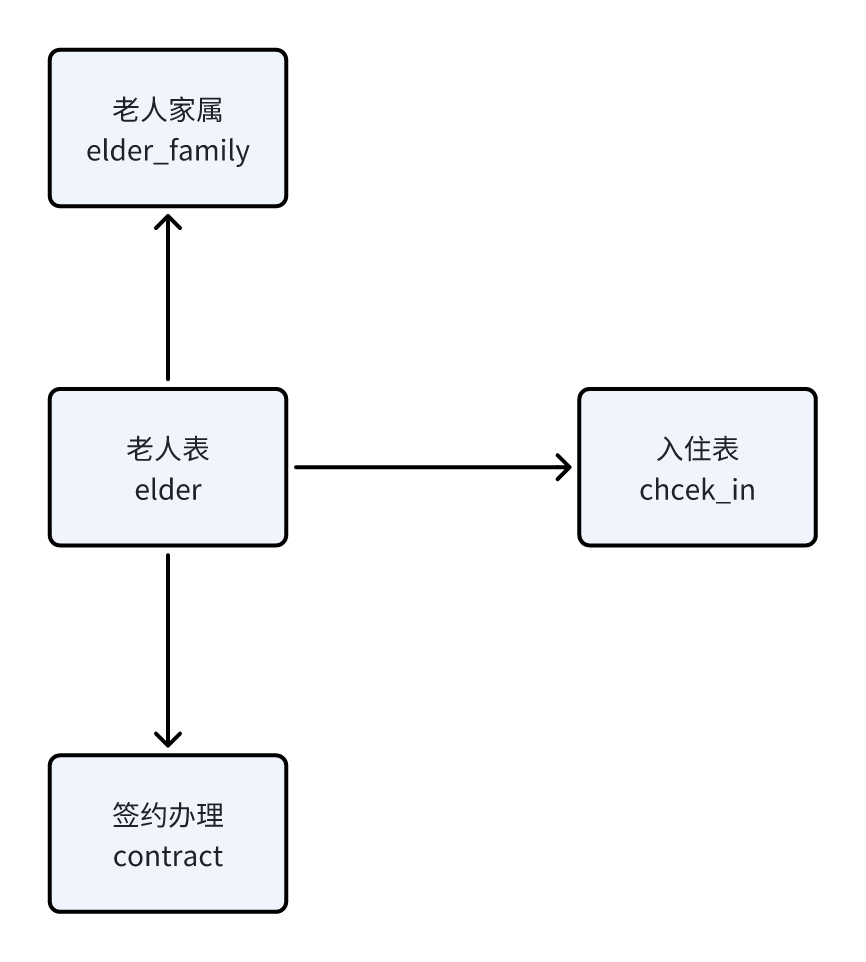
如果这么设计的话,其中的check_in表的字段就非常的多,将会带来以下问题
- 性能下降,字段越多,数据库在执行查询时需要处理的数据量就越大,插入和更新尤为明显
- 维护困难:字段过多会使得表结构复杂,导致难以理解和维护,同时修改表结构也会变得更加复杂和耗时
- 存储空间增加:每个额外的字段,即使大多数情况下为空或数据很少,也会占用额外存储空间,并可能导致数据库备份和恢复操作耗时增加
- 可扩展性差:当表结构变得过于复杂时,添加新功能或进行其他类型的扩展可能会变得更加困难
为了缓解这些问题,可以考虑以下策略:
- 归档旧数据:将不经常访问的旧数据归档到单独的表中或数据库中
- 优化数据类型:确保使用适当的数据类型来存储数据,以减少存储空间的浪费并提高性能
- 垂直分割:将表垂直分割成多个较小的表,每个表包含相关的字段集
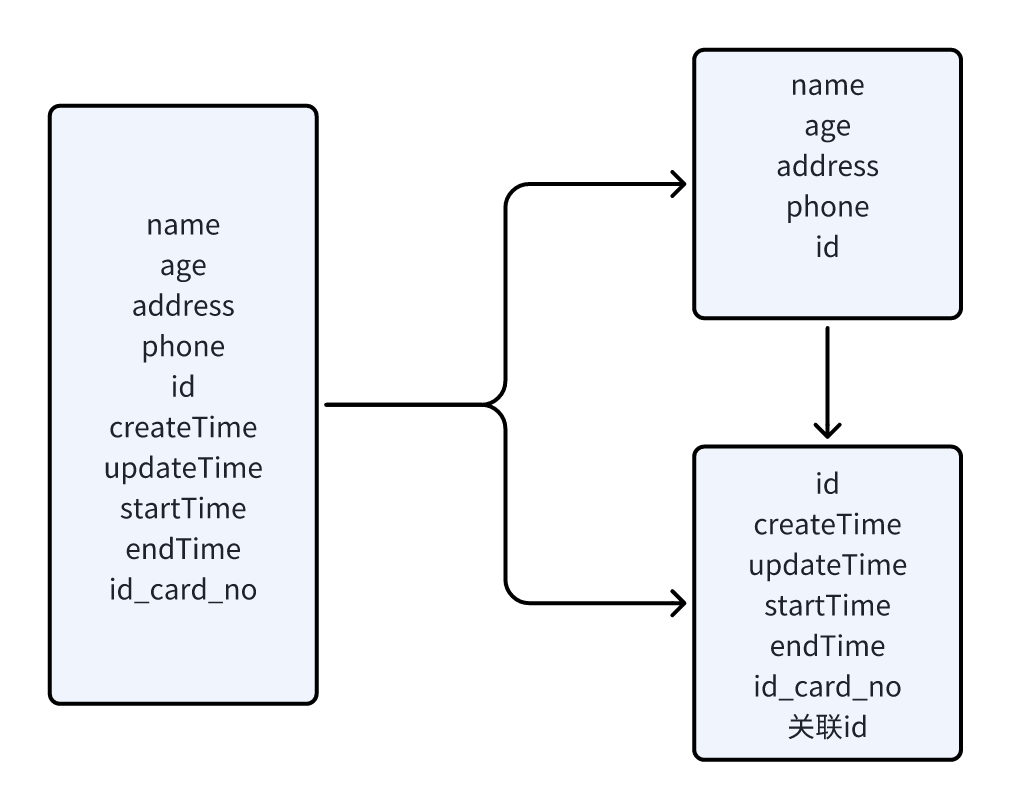
什么是垂直分割
垂直分割表是数据库管理中常用的一种优化技术,它通过将一个大表中的列分割成多个小表,每个小表包含原始表的一部分列,以达到优化数据存储和访问效率的目的。以下是垂直分割表的优缺点总结:
优点
- 提高查询性能:通过减少表的宽度,可以加快查询速度,特别是在**涉及大量列的表**中。当查询只需要访问部分列时,数据库系统只需扫描包含这些列的小表,减少了不必要的数据扫描量
- 减少I/O操作:在读取数据时,数据库系统可以只读取需要的列,而无需扫描整个表,从而减少了I/O操作的次数和数据传输量
缺点
- 增加复杂性:垂直分割表会增加数据库结构的复杂性,需要更多的管理和维护工作。例如,需要修改应用程序中的查询和更新操作,以适应新的表结构
- 事务处理复杂:垂直分割表后,事务的处理可能会变得更加复杂。因为事务可能需要跨越多个子表,这增加了事务管理的难度和开销
- 表连接操作增加:由于数据被分散到多个子表中,因此在查询时可能需要更多的表连接操作,这可能会增加CPU的开销和查询的响应时间
经过垂直分割之后,其中的入住表可以分割为两个表
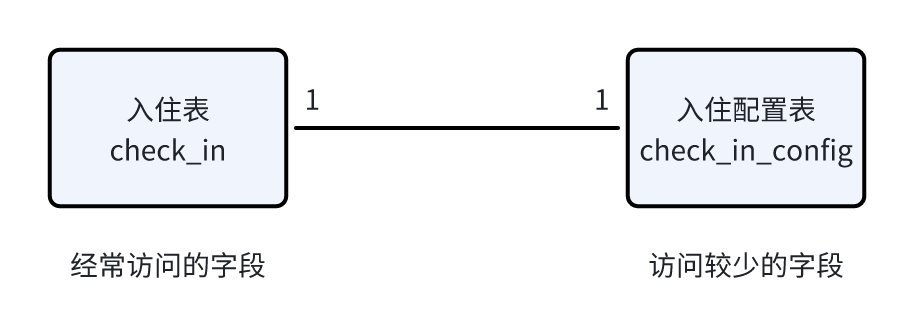
其中列表查询所展示的字段可以认为是经常访问的字段,详情中查看的字段认为是访问较少的字段,由此可以得出:
| 经常访问的字段 | 访问较少的字段 |
|---|---|
| ID主键 | ID主键 |
| 老人姓名 | 入住ID |
| 老人id(elder_id) | 护理等级ID |
| 身份证号 | 护理等级名称 |
| 入住开始时间 | 入住床位 |
| 入住结束时间 | 费用开始时间 |
| 护理等级名称 | 费用结束时间 |
| 入住床位 | 押金(元) |
| 状态(0:已入住、1:已退住) | 护理费用(元/月) |
| 床位费用(元/月) | |
| 医保支付(元/月) | |
| 政府补贴(元/月) | |
| 其他费用(元/月) |
其中在经常访问的字段中,有一些冗余字段:
- 老人姓名(elder表中存在)
- 身份证号(elder表中存在)
- 护理等级名称(check_in_config表中存在)
- 入住床位(check_in_config表中存在)
在设计数据库表时,引入冗余字段是一种常见的优化手段,主要目的:
- 冗余字段减少查询时的表连接操作,降低查询复杂性和执行时间
- 冗余字段简化查询逻辑,使查询语句更简洁易懂,易于维护和减少出错概率
最终表结构
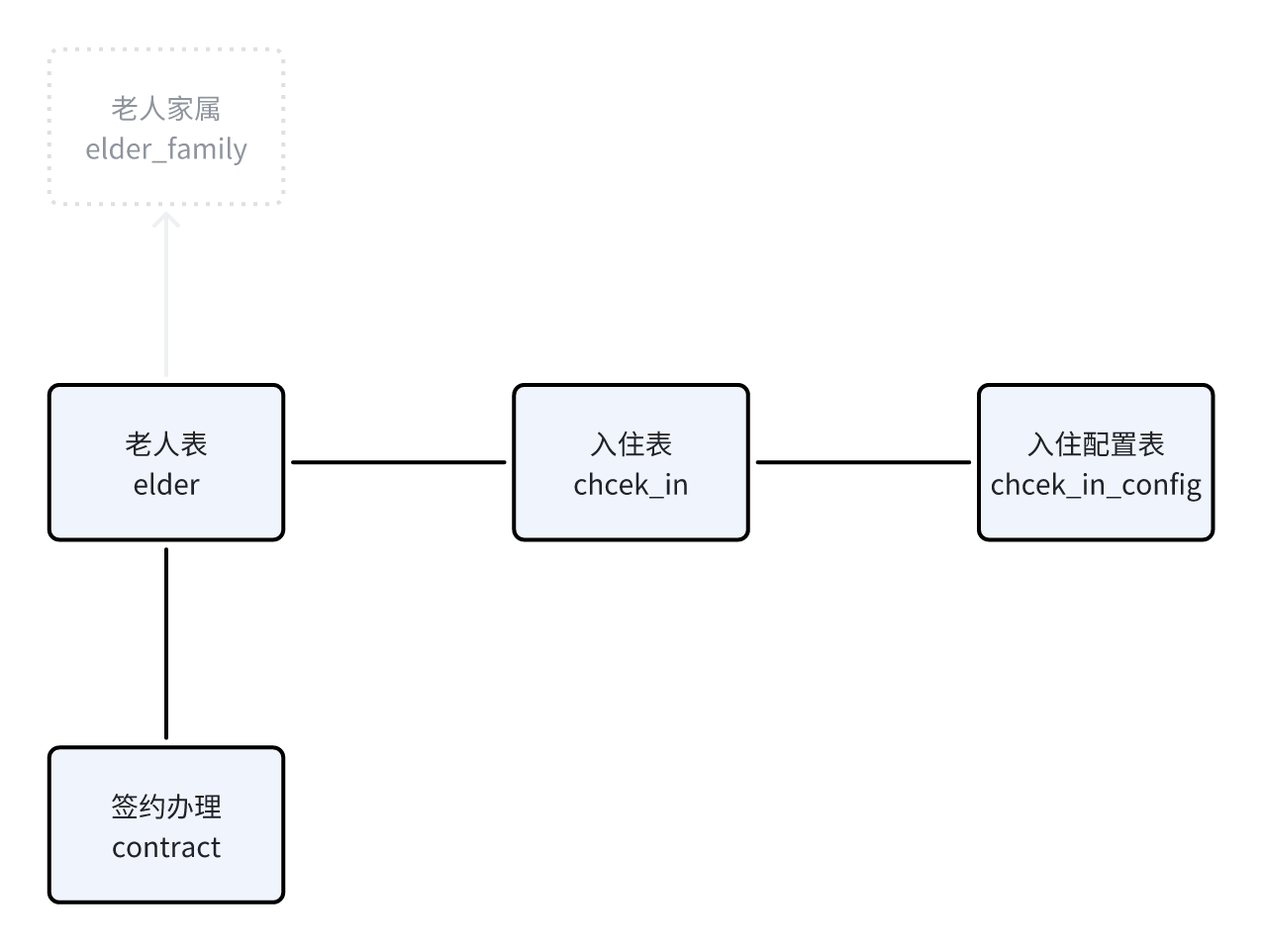
- 上图中的四张表的关系都是一对一的关系
- 废弃了老人家属表,由于老人家属信息主要用于回显展示,可以以json格式存储到入住表中的remark字段中
根据之前的分析结合需求文档,可以使用AI协助创建表结构,共为三张表:
你是一个软件工程师,帮我生成MySQL的表结构,需求如下:
1,入住表(check_in),包含的字段有:主键(ID),老人姓名(elder_name)、老人id(elder_id)、身份证号(id_card_no)、入住开始时间、入住结束时间、护理等级名称(nursing_level_name)、入住床位、状态(0:已入住、1:已退住)
2,入住配置表(check_in_config),包含的字段有:主键(ID),入住表ID、护理等级ID(nursing_level_id)、护理等级名称(nursing_level_name)、费用开始时间、费用结束时间、押金(元)、护理费用(元/月)、床位费用(元/月)、医保支付(元/月)、政府补贴(元/月)、其他费用(元/月)
其他要求:
1,表中其他必要字段:排序编号、创建时间(create_time)、修改时间(update_time)、创建人(create_by)、修改人(update_by)、备注(remark)这些字段
2,入住表和入住配置表是一对一的关系,不需要设置外键约束
3,表的主键都是自增的,类型为bigint
4,请为每个字段都添加上comment
5,帮我给生成的表中插入一些示例数据
最终生成的SQL语句为:
CREATE TABLE `check_in` (
  `id` BIGINT NOT NULL AUTO_INCREMENT COMMENT '主键ID',
  `elder_name` VARCHAR(50) NOT NULL COMMENT '老人姓名',
  `elder_id` BIGINT NOT NULL COMMENT '老人ID',
  `id_card_no` CHAR(18) NOT NULL COMMENT '身份证号',
  `start_date` DATE NOT NULL COMMENT '入住开始时间',
  `end_date` DATE COMMENT '入住结束时间',
  `nursing_level_name` VARCHAR(50) NOT NULL COMMENT '护理等级名称',
  `bed_number` VARCHAR(50) NOT NULL COMMENT '入住床位',
  `status` TINYINT NOT NULL DEFAULT '0' COMMENT '状态 (0: 已入住, 1: 已退住)',
  `sort_order` INT NOT NULL DEFAULT '0' COMMENT '排序编号',
  `create_time` TIMESTAMP DEFAULT CURRENT_TIMESTAMP COMMENT '创建时间',
  `update_time` TIMESTAMP DEFAULT CURRENT_TIMESTAMP ON UPDATE CURRENT_TIMESTAMP COMMENT '修改时间',
  `create_by` VARCHAR(50) COMMENT '创建人',
  `update_by` VARCHAR(50) COMMENT '修改人',
  `remark` VARCHAR(255) COMMENT '备注',
  PRIMARY KEY (`id`)
) ENGINE=InnoDB DEFAULT CHARSET=utf8mb4 COLLATE=utf8mb4_unicode_ci;

CREATE TABLE `check_in_config` (
  `id` BIGINT NOT NULL AUTO_INCREMENT COMMENT '主键ID',
  `check_in_id` BIGINT NOT NULL COMMENT '入住表ID',
  `nursing_level_id` BIGINT NOT NULL COMMENT '护理等级ID',
  `nursing_level_name` VARCHAR(50) NOT NULL COMMENT '护理等级名称',
  `fee_start_date` DATE NOT NULL COMMENT '费用开始时间',
  `fee_end_date` DATE COMMENT '费用结束时间',
  `deposit` DECIMAL(10, 2) NOT NULL COMMENT '押金(元)',
  `nursing_fee` DECIMAL(10, 2) NOT NULL COMMENT '护理费用(元/月)',
  `bed_fee` DECIMAL(10, 2) NOT NULL COMMENT '床位费用(元/月)',
  `insurance_payment` DECIMAL(10, 2) NOT NULL COMMENT '医保支付(元/月)',
  `government_subsidy` DECIMAL(10, 2) NOT NULL COMMENT '政府补贴(元/月)',
  `other_fees` DECIMAL(10, 2) NOT NULL COMMENT '其他费用(元/月)',
  `sort_order` INT NOT NULL DEFAULT '0' COMMENT '排序编号',
  `create_time` TIMESTAMP DEFAULT CURRENT_TIMESTAMP COMMENT '创建时间',
  `update_time` TIMESTAMP DEFAULT CURRENT_TIMESTAMP ON UPDATE CURRENT_TIMESTAMP COMMENT '修改时间',
  `create_by` VARCHAR(50) COMMENT '创建人',
  `update_by` VARCHAR(50) COMMENT '修改人',
  `remark` VARCHAR(255) COMMENT '备注',
  PRIMARY KEY (`id`)
) ENGINE=InnoDB DEFAULT CHARSET=utf8mb4 COLLATE=utf8mb4_unicode_ci;
老人表已经存在了,接下来使用AI生成合同表,提示词如下:
你是一个软件工程师,帮我生成MySQL的表结构,需求如下:
1,合同表(contract),包含的字段有:主键(ID),老人id(elder_id)、合同名称、合同编号、协议地址、丙方手机号、丙方姓名、老人姓名、开始时间、结束时间、状态(status   0:未生效,1:已生效,2:已过期, 3:已失效)、签约日期、解除提交人、解除日期、解除协议地址
2,表中其他必要字段:排序编号、创建时间(create_time)、修改时间(update_time)、创建人(create_by)、修改人(update_by)、备注(remark)这些字段,这些字段默认为null
3,表的主键都是自增的,类型为bigint
4,请为每个字段都添加上comment
5,帮我给生成的表中插入一些示例数据
最终生成的SQL语句为:
CREATE TABLE `contract` (
  `id` BIGINT NOT NULL AUTO_INCREMENT COMMENT '主键ID',
  `elder_id` INT NOT NULL COMMENT '老人ID',
  `contract_name` VARCHAR(100) NOT NULL COMMENT '合同名称',
  `contract_number` VARCHAR(50) NOT NULL COMMENT '合同编号',
  `agreement_path` VARCHAR(255) NOT NULL COMMENT '协议地址(文件路径或URL)',
  `third_party_phone` VARCHAR(20) NOT NULL COMMENT '丙方手机号',
  `third_party_name` VARCHAR(50) NOT NULL COMMENT '丙方姓名',
  `elder_name` VARCHAR(50) NOT NULL COMMENT '老人姓名',
  `start_date` DATE NOT NULL COMMENT '开始时间',
  `end_date` DATE NOT NULL COMMENT '结束时间',
  `status` TINYINT NOT NULL DEFAULT '0' COMMENT '状态 (0: 未生效, 1: 已生效, 2: 已过期, 3: 已失效)',
  `sign_date` DATE NOT NULL COMMENT '签约日期',
  `termination_submitter` VARCHAR(50) COMMENT '解除提交人',
  `termination_date` DATE COMMENT '解除日期',
  `termination_agreement_path` VARCHAR(255) COMMENT '解除协议地址(文件路径或URL)',
  `sort_order` INT NOT NULL DEFAULT '0' COMMENT '排序编号',
  `create_time` TIMESTAMP DEFAULT CURRENT_TIMESTAMP COMMENT '创建时间',
  `update_time` TIMESTAMP DEFAULT CURRENT_TIMESTAMP ON UPDATE CURRENT_TIMESTAMP COMMENT '修改时间',
  `create_by` VARCHAR(50) COMMENT '创建人',
  `update_by` VARCHAR(50) COMMENT '修改人',
  `remark` VARCHAR(255) COMMENT '备注',
  PRIMARY KEY (`id`)
) ENGINE=InnoDB DEFAULT CHARSET=utf8mb4 COLLATE=utf8mb4_unicode_ci;
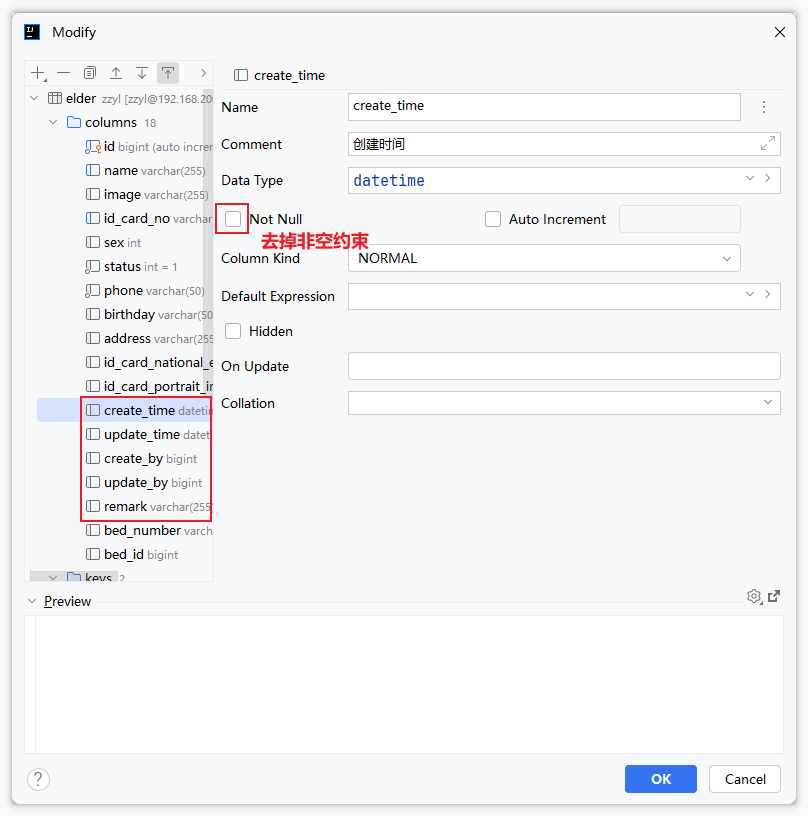
其他修改:由于AI生成的字段都要求是必填的,这样在后期操作数据的时候有很多的限制,咱们可以通过数据库连接工具调整一下
重点调整的字段:sort_order、create_time、update_time、create_by、update_by、remark
接口设计
接口四要素
搞明白需求之后,下面就可以来设计接口了,一个接口包含了四个基本要素,分别是:请求路径、请求方式、接口入参、接口出参
- 请求路径 命名:以模块名称进行区分(英文)
- 请求方式(需要符合restful风格)
- 查询 GET
- 新增 POST
- 修改 PUT
- 删除 DELETE
- 接口入参
- 路径中的参数
- 问号传参—->后端形参接收
- path传参—->后端PathVariable注解接收
- 请求体中的参数
- 前端:json对象
- 后端:对象接收,DTO
- 接口出参
- 统一格式
{code:200,msg:"成功",data:{}} - 数据封装,一般为VO
- 敏感数据过滤
- 整合数据
接口测试
测试工具有很多,以下几个是比较常见的接口测试工具
- Postman
- ApiPost
- Apifox
- Swagger 在线接口文档
- Knife4j 对swagger的增强,可生成离线接口文档
使用postman或者apifox工具测试接口,需要知道明确的接口信息
入住相关的接口
接口文档:入退管理-接口文档
入住办理这个模块中共6个接口,分别是:
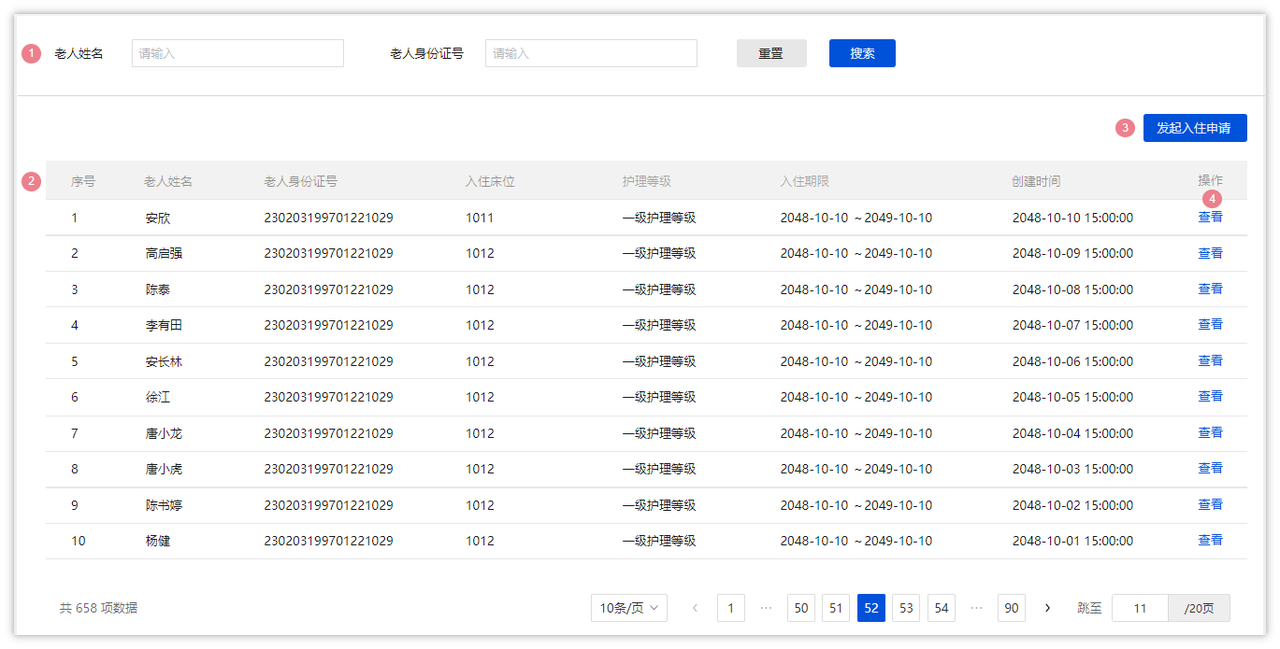
- 分页查询入住列表
- 请求方式:GET
- 参数:分页条件查询(elderName、idNumber、pageNum、pageSize)
- 响应结果:参考若依框架定义的分页对象:
{total:120,rows:[],code:200,msg:成功或失败}
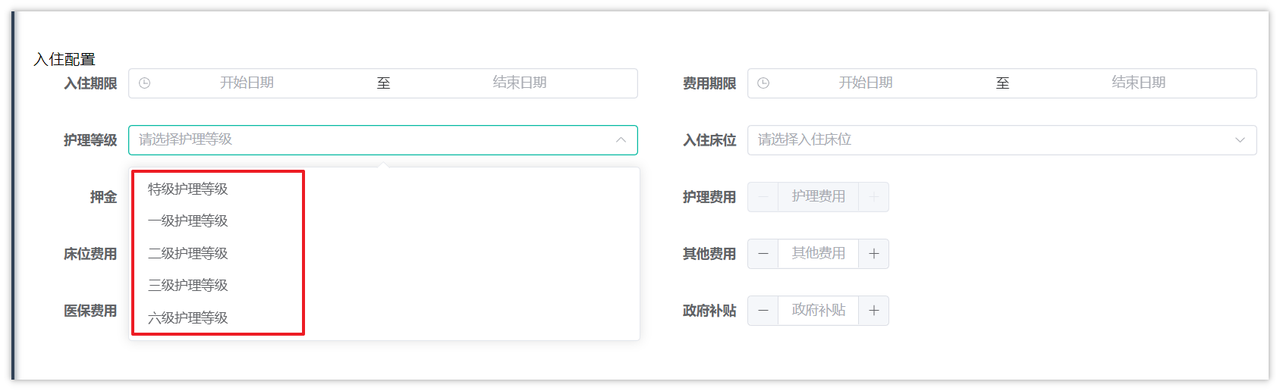
- 查询所有护理等级信息
- 请求方式:GET
- 参数:无
- 响应结果:参考若依框架定义的普通返回对象:
{msg:成功或失败,code:200,data:[]}
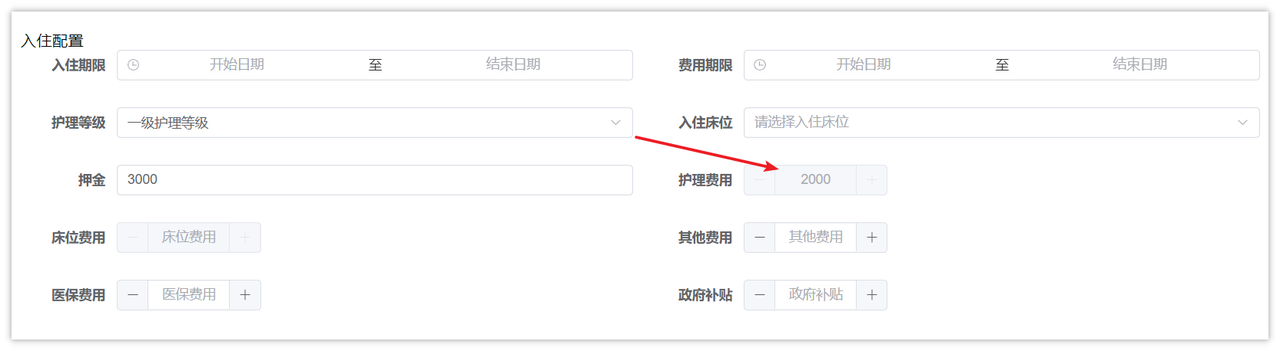
选择护理等级之后,可以自动填充护理费用
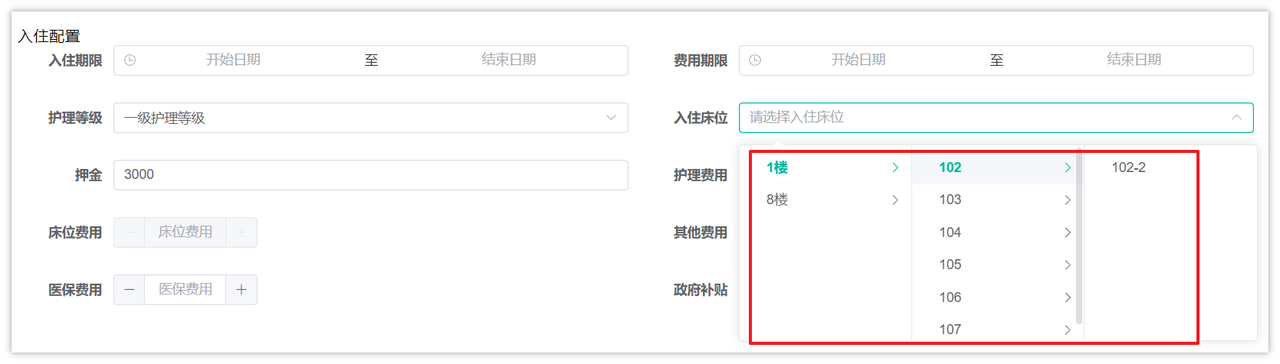
- 根据床位状态查询所有楼层数据
- 请求方式:GET
- 参数:status(比较通用,只查询未入住的床位)
- 响应结果:参考若依框架定义的普通返回对象:
{msg:成功或失败,code:200,data:[]}
- 查询房间数据(楼层、房间、价格)
- 请求方式:GET
- 参数:选择之后的房间ID(房间可以决定床位价格)
- 响应结果:参考若依框架定义的普通返回对象:
{msg:成功或失败,code:200,data:{}}
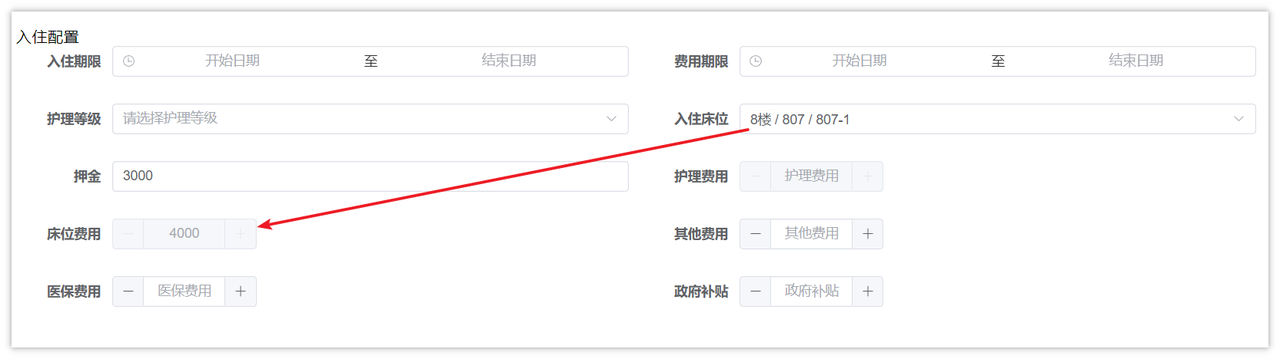
- 申请入住
- 填写入住信息之后,提交表单数据,进行保存,需要涉及到多张表(老人表、入住表、入住配置表、合同表)
- 请求方式:POST
- 参数:请求体数据,表单中的所有数据
-
响应结果:参考若依框架定义的普通返回对象:
{msg:成功或失败,code:200}6. 查询入住详情 -
请求方式:GET
- 参数:入口在入住列表查询,可以传入入住ID
- 响应结果:参考若依框架定义的普通返回对象:
{msg:成功或失败,code:200,data:{}}
接口开发
通过若依的代码生成,根据之前创建的四张表(elder、contract、check_in、check_in_config)生成代码,生成前先确保生成配置是否正确
生成完毕后,不需要调整前端代码,只要将生成的后端代码移动到当前项目中,以下是提供的测试数据:
INSERT INTO `check_in`(`end_date`,`id_card_no`,`nursing_level_name`,`create_time`,`remark`,`elder_id`,`create_by`,`update_time`,`elder_name`,`id`,`bed_number`,`sort_order`,`start_date`,`status`) VALUES ('2024-09-30','132123196712131234','测试护理等级','2024-08-27 16:43:20.0','[{"kinship":"1","name":"13211223322","phone":"13211223322"}]',325,'1','2024-08-27 08:43:19.0','张三',1,'104-1',0,'2024-08-27',0);
INSERT INTO `check_in`(`end_date`,`id_card_no`,`nursing_level_name`,`create_time`,`remark`,`elder_id`,`create_by`,`update_time`,`elder_name`,`id`,`bed_number`,`sort_order`,`start_date`,`status`) VALUES ('2024-09-30','132123196712131239','1号护理计划','2024-08-27 16:50:09.0','[{"kinship":"0","name":"李天","phone":"13222334439"}]',326,'1','2024-08-27 08:50:08.0','李天龙',2,'104-2',0,'2024-08-27',0);
INSERT INTO `check_in`(`end_date`,`id_card_no`,`nursing_level_name`,`create_time`,`remark`,`elder_id`,`create_by`,`update_time`,`elder_name`,`id`,`bed_number`,`sort_order`,`start_date`,`status`) VALUES ('2024-10-31','132123195612132345','2号护理等级','2024-09-12 18:51:36.0','[{"kinship":"1","name":"小李","phone":"13212349900"}]',327,'1','2024-09-12 18:51:36.0','老李',3,'101-2',0,'2024-09-12',0);
INSERT INTO `check_in`(`end_date`,`id_card_no`,`nursing_level_name`,`create_time`,`remark`,`elder_id`,`create_by`,`update_time`,`elder_name`,`id`,`bed_number`,`sort_order`,`start_date`,`status`) VALUES ('2024-10-31','410725196904056698','2号护理等级','2024-09-12 19:10:23.0','[{"kinship":"0","name":"老王","phone":"15100000002"}]',328,'1','2024-09-12 19:10:23.0','老李头儿',4,'101-1',0,'2024-09-12',0);
插入数据后,重启项目并访问入住办理页面
查询所有护理等级列表
控制层
基于接口文档的定义,在NursingLevelController定义新的方法,如下:
@ApiOperation(value = "获取所有护理等级")
@GetMapping("/all")
public R<List<NursingLevel>> listAll() {
    List<NursingLevel> list = nursingLevelService.listAll();
    return R.ok(list);
}
Service层
/**
 * 查询所有护理等级
 * @return  护理等级列表
 */
List<NursingLevel> listAll();
Service层实现类
/**
 * 查询所有护理等级
 *
 * @return 护理等级列表
 */
@Override
public List<NursingLevel> listAll() {
    LambdaQueryWrapper<NursingLevel> queryWrapper = new LambdaQueryWrapper<>();
    queryWrapper.eq(NursingLevel::getStatus, 1);
    List<NursingLevel> list = list(queryWrapper);
    return list;
}
根据床位状态查询所有楼层数据
思路说明
最终的效果图如下:
结合接口文档的数据结构,这个接口需要查询三张表的数据,分别是楼层表、房间表、床位表,它们的关系如下:

控制层
在FloorController中定义新的方法,如下:
@GetMapping("/getRoomAndBedByBedStatus/{status}")
@ApiOperation("按照状态查询楼层房间床位-树形结构")
public R<List<TreeVo>> getRoomAndBedByBedStatus(@ApiParam(value = "床位状态(未入住0, 已入住1)", required = true) @PathVariable("status") Integer status) {
    List<TreeVo> list = floorService.getRoomAndBedByBedStatus(status);
    return R.ok(list);
}
TreeVo(需要结合着接口文档的数据结构来编写vo类)
package com.zzyl.nursing.vo;

import io.swagger.annotations.ApiModel;
import io.swagger.annotations.ApiModelProperty;
import lombok.Data;

import java.util.List;

@Data
@ApiModel("树形结构VO")
public class TreeVo {
    /**
     * 菜单ID
     */
    @ApiModelProperty(value = "菜单ID")
    private String value;

    /**
     * 菜单名称
     */
    @ApiModelProperty(value = "菜单名称")
    private String label;

    /**
     * 子菜单
     */
    @ApiModelProperty(value = "子菜单")
    private List<TreeVo> children;
}
业务层
在IFloorService中定义新的方法:
/**
 * 根据状态获取房间和床位信息
 * @param status    状态
 * @return          结果
 */
List<TreeVo> getRoomAndBedByBedStatus(Integer status);
实现方法:
/**
 * 根据状态获取房间和床位信息
 *
 * @param status 状态
 * @return 结果
 */
@Override
public List<TreeVo> getRoomAndBedByBedStatus(Integer status) {
    return floorMapper.getRoomAndBedByBedStatus(status);
}
持久层(重点)
在FloorMapper中定义查询的方法
List<TreeVo> getRoomAndBedByBedStatus(Integer status);
xml映射文件
<resultMap id="TreeVoResultMap" type="com.zzyl.nursing.vo.TreeVo">
    <id column="fid" property="value"></id>
    <result column="name" property="label"></result>
    <collection property="children" ofType="com.zzyl.nursing.vo.TreeVo">
        <id column="rid" property="value"></id>
        <result column="code" property="label"></result>
        <collection property="children" ofType="com.zzyl.nursing.vo.TreeVo">
            <id column="bid" property="value"></id>
            <result column="bed_number" property="label"></result>
        </collection>
    </collection>
</resultMap>

<select id="getRoomAndBedByBedStatus" resultMap="TreeVoResultMap">
    select f.id fid, f.name, r.id rid, r.code, b.id bid, b.bed_number
    from floor f
             left join room r on f.id = r.floor_id
             left join bed b on r.id = b.room_id
    where b.bed_status = #{status}
    order by f.id, r.id, b.id
</select>
根据房间id查询房间数据(楼层、房间、价格)
思路说明
效果图:
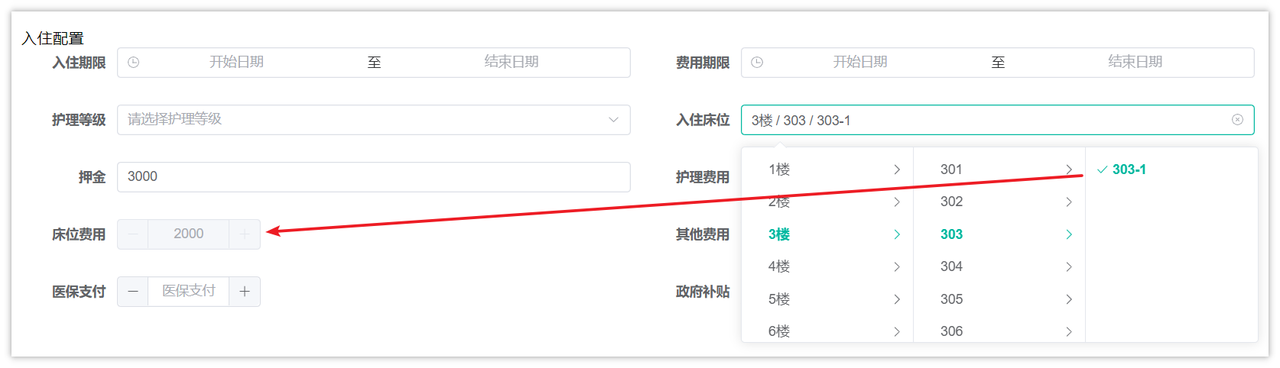
当选择了某一个床位之后,需要根据床位所在的房间,查询所匹配的价格,结合接口文档的返回结果来分析,这里面涉及到了3张表:

控制层
在RoomController中定义新的方法,如下:
@GetMapping("/one/{id}")
@ApiOperation("按照房间id查询楼层、房间、价格")
public R<RoomVo> getRoomById(@ApiParam(value = "房间ID", required = true) @PathVariable("id") Long id){
    RoomVo roomVo = roomService.getRoomById(id);
    return R.ok(roomVo);
}
RoomVo在代码中已提供,符合接口返回的要求
业务层
在IRoomService中定义新的方法:
/**
 * 按照房间id查询楼层、房间、价格
 * @param id
 * @return
 */
RoomVo getRoomById(Long id);
实现方法:
/**
 * 按照房间id查询楼层、房间、价格
 *
 * @param id
 * @return
 */
@Override
public RoomVo getRoomById(Long id) {
    return roomMapper.getRoomById(id);
}
持久层(重点)
在RoomMapper中定义新的方法,如下:
RoomVo getRoomById(Long id);
xml映射文件:
<select id="getRoomById" resultType="com.zzyl.nursing.vo.RoomVo">
    select f.name floorName, f.id floorId, r.id roomId, r.code, rt.price
    from floor f left join room r on f.id = r.floor_id
                 left join room_type rt on rt.name = r.type_name
    where r.id = #{id}
</select>
申请入住
控制层
在CheckInController中定义申请入住的方法
@PostMapping("/apply")
public AjaxResult apply(@RequestBody CheckInApplyDto dto){
    checkInService.apply(dto);
    return AjaxResult.success();
}
基于接口的入参分析,需要定义多个dto来接收参数。可以自己根据接口文档定义类来接收数据,也可以使用AI大模型,基于json格式的请求数据生成java类来接收数据
基本的结构如下:
public class CheckInApplyDto {

    // 老人信息
    private CheckInElderDto checkInElderDto;

    // 家属信息
    private List<ElderFamilyDto> elderFamilyDtoList;

    // 入住配置
    private CheckInConfigDto checkInConfigDto;

    // 签约办理
    private CheckInContractDto checkInContractDto;
}
注意:属性名称要与json结构中保持一致
业务层(重点)
在ICheckInService中定义新的方法,如下:
/**
 * 申请入住
 * @param checkInApplyDto
 */
void apply(CheckInApplyDto checkInApplyDto);
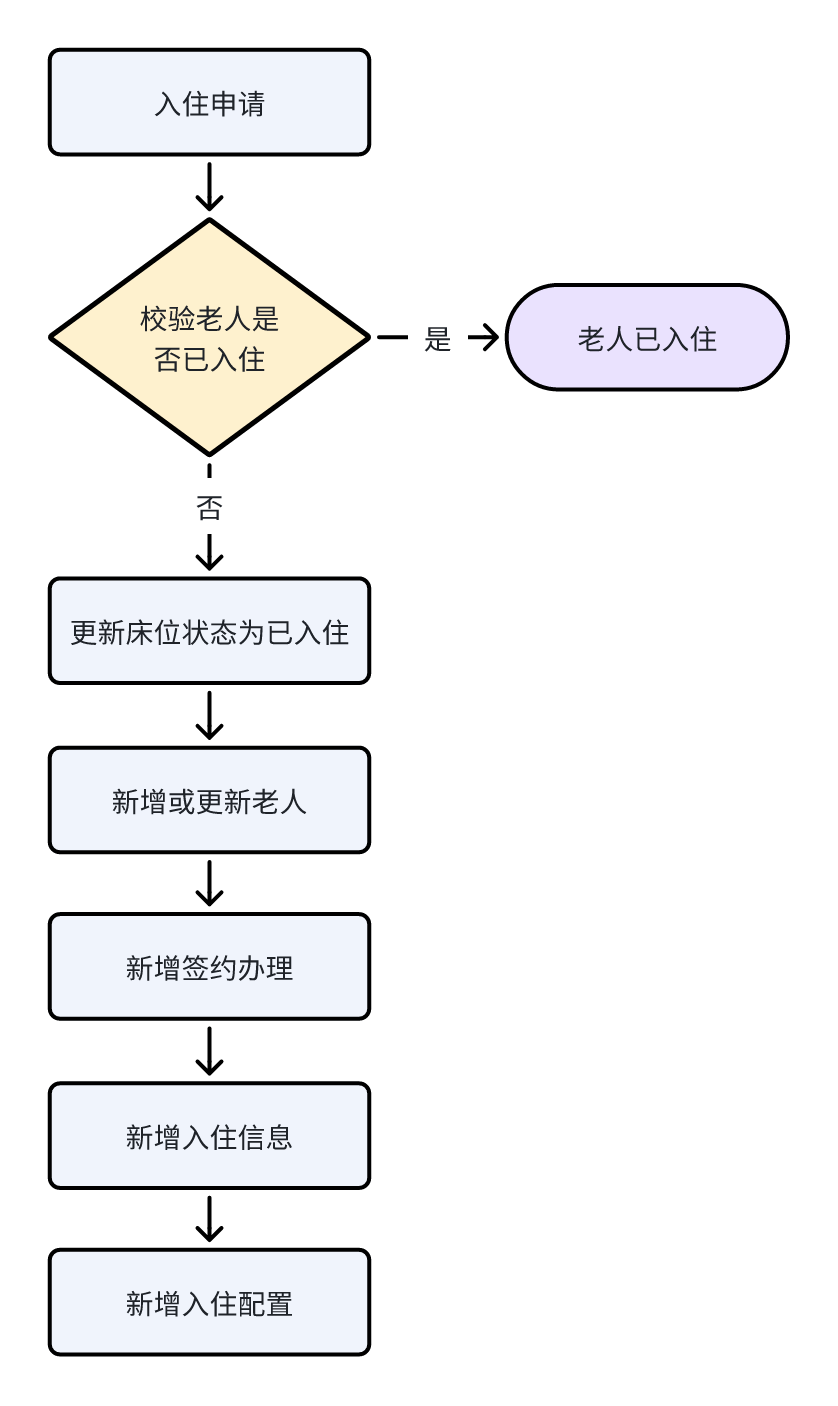
思路说明
申请入住的流程较长,涉及到多张表的操作,流程如下:
接口添加缓存
下图分析了各个接口的情况,重点标明了哪些接口推荐使用缓存
| 接口名称 | 是否需要使用缓存 | 理由 |
|---|---|---|
| 分页查询入住列表 | 否 | 不涉及多表,量也不大 |
| 查询所有护理等级 | 是 | 组件加载需要查询,有效率要求,并且是检索表中所有数据 |
| 根据床位状态查询树形数据 | 否 | 经常性的有写操作(比如:老人入住后需要更新床位状态) |
| 查询房间价格等数据 | 是 | 可以添加,涉及到多表查询 |
| 申请入住 | 否 | 新增,不是查询 |
| 查询入住详情 | 否 | 并非高频访问 |
护理等级添加缓存
在护理等级中添加缓存基本思路如下:
- 查询所有护理等级的时候,先到缓存查,缓存有则返回,缓存没有则查数据库,同时放到缓存中
- 增删改操作之后,需要删除缓存
- 需要修改NursingLevelServiceImpl类中的方法,详细代码如下:
package com.zzyl.nursing.service.impl;

import java.util.List;
import com.zzyl.common.utils.DateUtils;
import com.zzyl.nursing.vo.NursingLevelVo;
import org.springframework.beans.factory.annotation.Autowired;
import org.springframework.data.redis.core.RedisTemplate;
import org.springframework.stereotype.Service;
import com.zzyl.nursing.mapper.NursingLevelMapper;
import com.zzyl.nursing.domain.NursingLevel;
import com.zzyl.nursing.service.INursingLevelService;

/**
 * 护理等级Service业务层处理
 *
 * @author ruoyi
 * @date 2024-09-07
 */
@Service
public class NursingLevelServiceImpl implements INursingLevelService
{
    @Autowired
    private NursingLevelMapper nursingLevelMapper;

    @Autowired
    private RedisTemplate<Object, Object> redisTemplate;

    private static final String CACHE_KEY_PREFIX = "nursingLevel:all";

    /**
     * 查询护理等级
     *
     * @param id 护理等级主键
     * @return 护理等级
     */
    @Override
    public NursingLevel selectNursingLevelById(Long id)
    {
        return nursingLevelMapper.selectNursingLevelById(id);
    }

    /**
     * 查询护理等级列表
     *
     * @param nursingLevel 护理等级
     * @return 护理等级
     */
    @Override
    public List<NursingLevelVo> selectNursingLevelList(NursingLevel nursingLevel)
    {
        return nursingLevelMapper.selectNursingLevelList(nursingLevel);
    }

    /**
     * 新增护理等级
     *
     * @param nursingLevel 护理等级
     * @return 结果
     */
    @Override
    public int insertNursingLevel(NursingLevel nursingLevel)
    {
        nursingLevel.setCreateTime(DateUtils.getNowDate());
        int flag = nursingLevelMapper.insertNursingLevel(nursingLevel);
        // 删除缓存
        deleteCache();
        return flag;
    }

    private void deleteCache() {
        // 删除缓存
        redisTemplate.delete(CACHE_KEY_PREFIX);
    }

    /**
     * 修改护理等级
     *
     * @param nursingLevel 护理等级
     * @return 结果
     */
    @Override
    public int updateNursingLevel(NursingLevel nursingLevel)
    {
        nursingLevel.setUpdateTime(DateUtils.getNowDate());
        int flag =  nursingLevelMapper.updateNursingLevel(nursingLevel);
        deleteCache();
        return flag;
    }

    /**
     * 批量删除护理等级
     *
     * @param ids 需要删除的护理等级主键
     * @return 结果
     */
    @Override
    public int deleteNursingLevelByIds(Long[] ids)
    {
        int flag = nursingLevelMapper.deleteNursingLevelByIds(ids);
        deleteCache();
        return flag;
    }

    /**
     * 删除护理等级信息
     *
     * @param id 护理等级主键
     * @return 结果
     */
    @Override
    public int deleteNursingLevelById(Long id)
    {
        int flag = nursingLevelMapper.deleteNursingLevelById(id);
        deleteCache();
        return flag;
    }

    /**
     * 查询所有护理等级
     * @return
     */
    @Override
    public List<NursingLevel> listAll() {

        // 从缓存中获取
        List<NursingLevel> list = (List<NursingLevel>) redisTemplate.opsForValue().get(CACHE_KEY_PREFIX);
        // 缓存中有数据,直接返回
        if(list != null && list.size() > 0){
            return list;
        }
        // 缓存中没有数据,从数据库中查询
        list = nursingLevelMapper.listAll();
        // 将数据写入缓存
        redisTemplate.opsForValue().set(CACHE_KEY_PREFIX, list);

        return list;
    }
}
智能评估
需求分析
健康评估是指老人办理入住前需上传体检报告,由AI自动进行分析,并对报告进行总结,同时给出合理的建议;
下图是健康评估列表页,展示了经过健康评估的老人列表
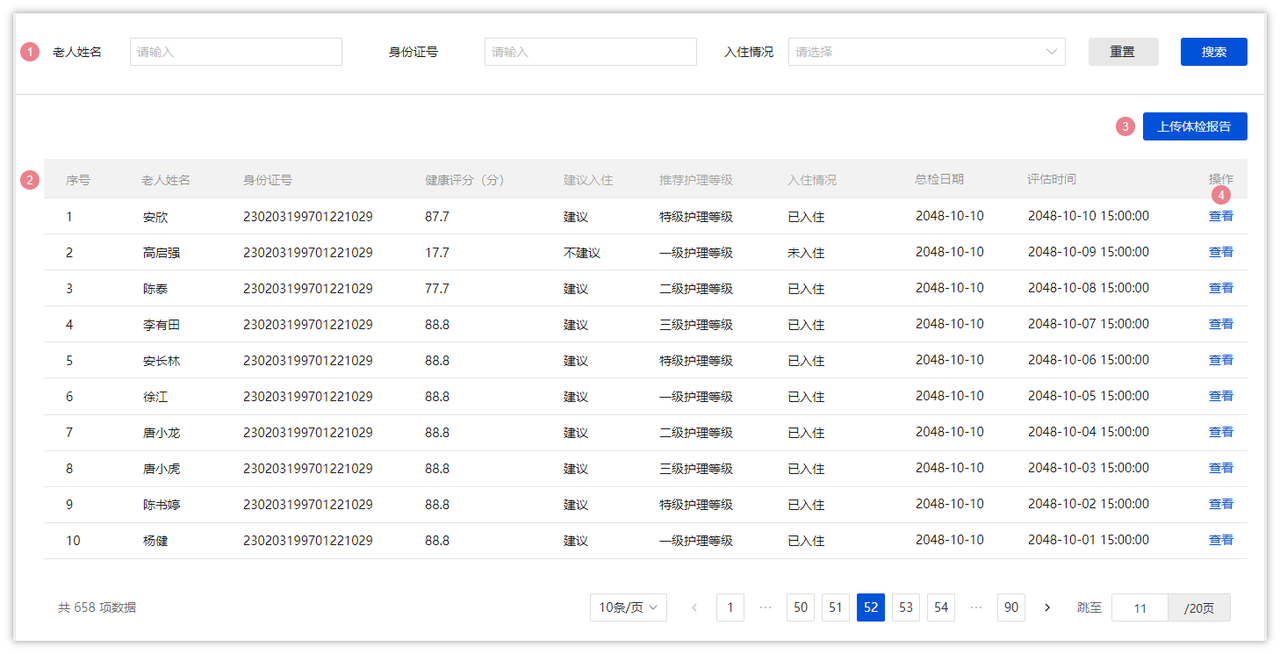
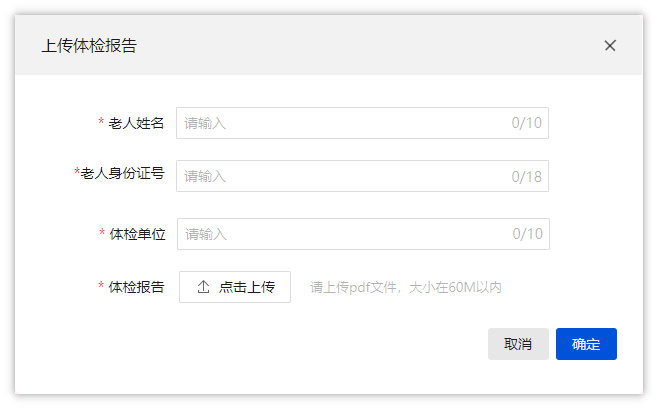
当点击了上传体检报告按钮之后会弹窗,效果如下,需要输入信息,需要提前准备好老人的体检报告(PDF格式)
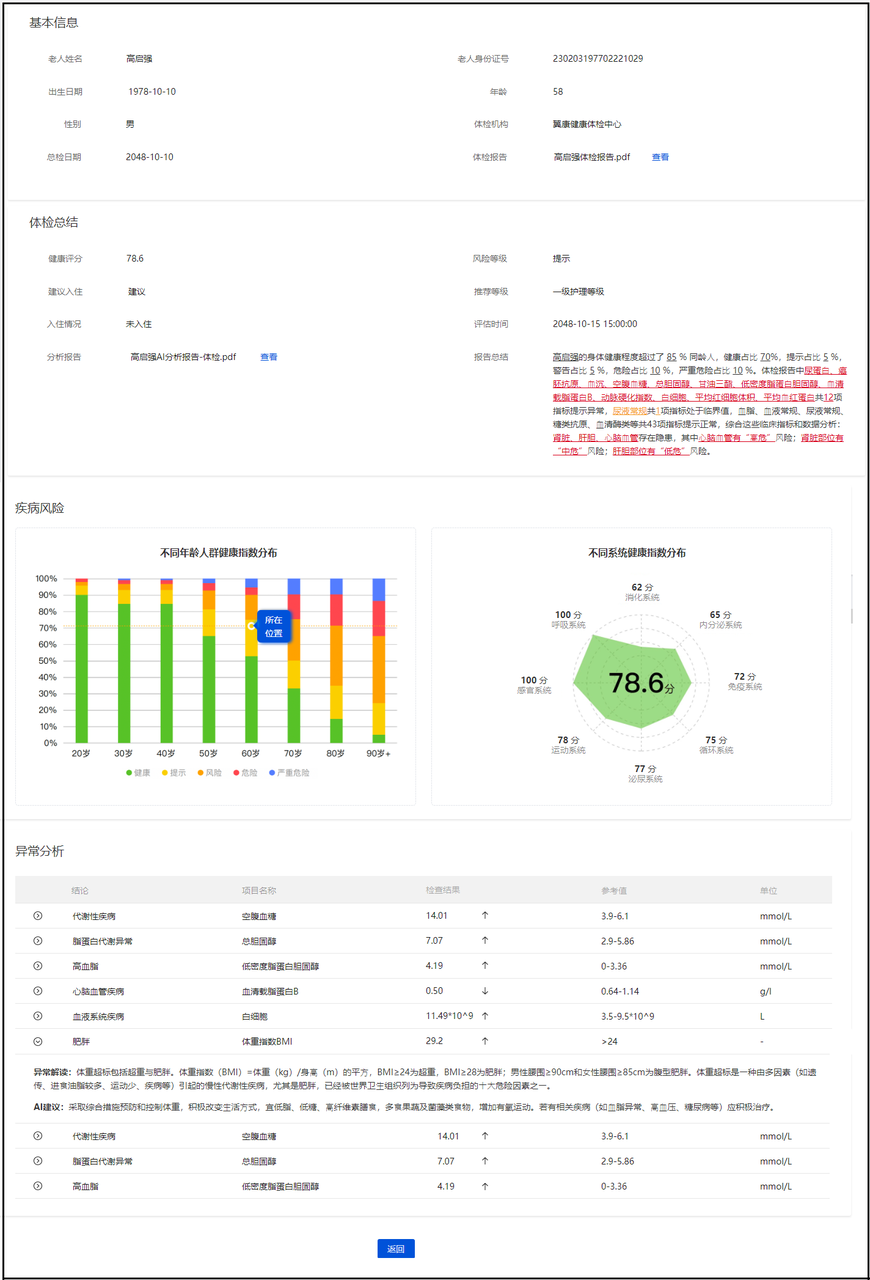
点击确定按钮之后,会使用AI对老人的健康报告进行评估
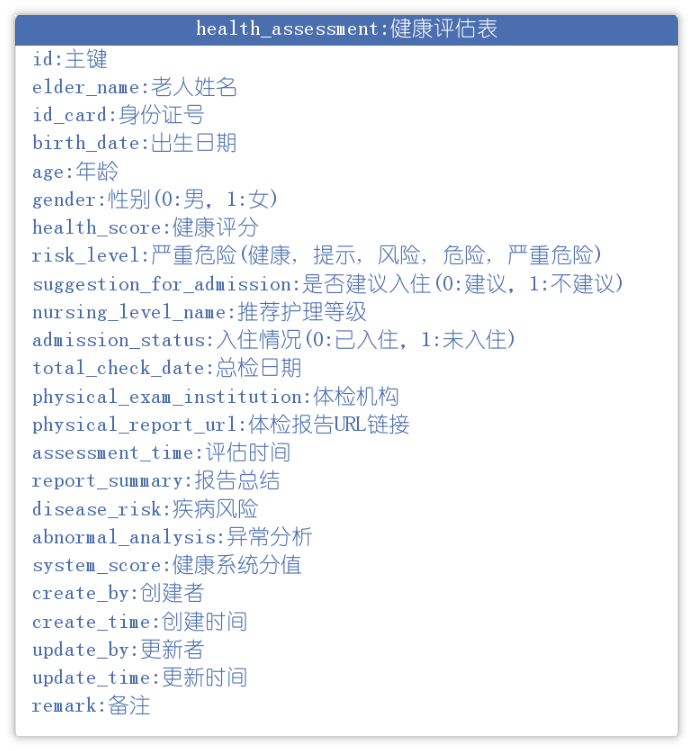
下图是健康评估的详情页面,是使用AI分析后的结果页,给了很多的数据,可以让护理员或销售人员来查看老人的健康状况,进一步更好的服务老人或者给老人推荐一些护理服务
表结构说明
基于需求原型,设计出的健康评估表(health_assessment)如下:
特别字段说明:
- abnormal_analysis(异常分析) 这个字段是字符串类型,会把异常数据转换为json进行存储
建表语句:
CREATE TABLE "health_assessment" (
  "id" bigint NOT NULL AUTO_INCREMENT COMMENT '主键',
  "elder_name" varchar(255) DEFAULT NULL COMMENT '老人姓名',
  "id_card" varchar(255) DEFAULT NULL COMMENT '身份证号',
  "birth_date" datetime DEFAULT NULL COMMENT '出生日期',
  "age" int DEFAULT NULL COMMENT '年龄',
  "gender" int DEFAULT NULL COMMENT '性别(0:男,1:女)',
  "health_score" varchar(255) DEFAULT NULL COMMENT '健康评分',
  "risk_level" varchar(255) DEFAULT NULL COMMENT '危险等级(健康, 提示, 风险, 危险, 严重危险)',
  "suggestion_for_admission" int DEFAULT NULL COMMENT '是否建议入住(0:建议,1:不建议)',
  "nursing_level_name" varchar(255) DEFAULT NULL COMMENT '推荐护理等级',
  "admission_status" int DEFAULT NULL COMMENT '入住情况(0:已入住,1:未入住)',
  "total_check_date" varchar(64) DEFAULT NULL COMMENT '总检日期',
  "physical_exam_institution" varchar(255) DEFAULT NULL COMMENT '体检机构',
  "physical_report_url" varchar(255) DEFAULT NULL COMMENT '体检报告URL链接',
  "assessment_time" datetime DEFAULT NULL COMMENT '评估时间',
  "report_summary" text COMMENT '报告总结',
  "disease_risk" text COMMENT '疾病风险',
  "abnormal_analysis" text COMMENT '异常分析',
  "system_score" varchar(255) DEFAULT NULL COMMENT '健康系统分值',
  "create_by" varchar(255) DEFAULT NULL COMMENT '创建者',
  "create_time" datetime DEFAULT NULL COMMENT '创建时间',
  "update_by" varchar(255) DEFAULT NULL COMMENT '更新者',
  "update_time" datetime DEFAULT NULL COMMENT '更新时间',
  "remark" text COMMENT '备注',
  PRIMARY KEY ("id")
) ENGINE=InnoDB AUTO_INCREMENT=7 DEFAULT CHARSET=utf8mb4 COLLATE=utf8mb4_0900_ai_ci COMMENT='健康评估表';
接口说明
基于需求说明,在健康评估这个模块中,共有4个接口需要开发,分别是
- 列表查询
- 上传体检报告
- 智能评测
- 查看详情
前端代码已经全部提供(zznursing-vue3),所以要结合接口文档开发后端代码
关于健康评估的接口文档,参考链接:入退管理-接口文档
实现方案
整体实现流程如下:
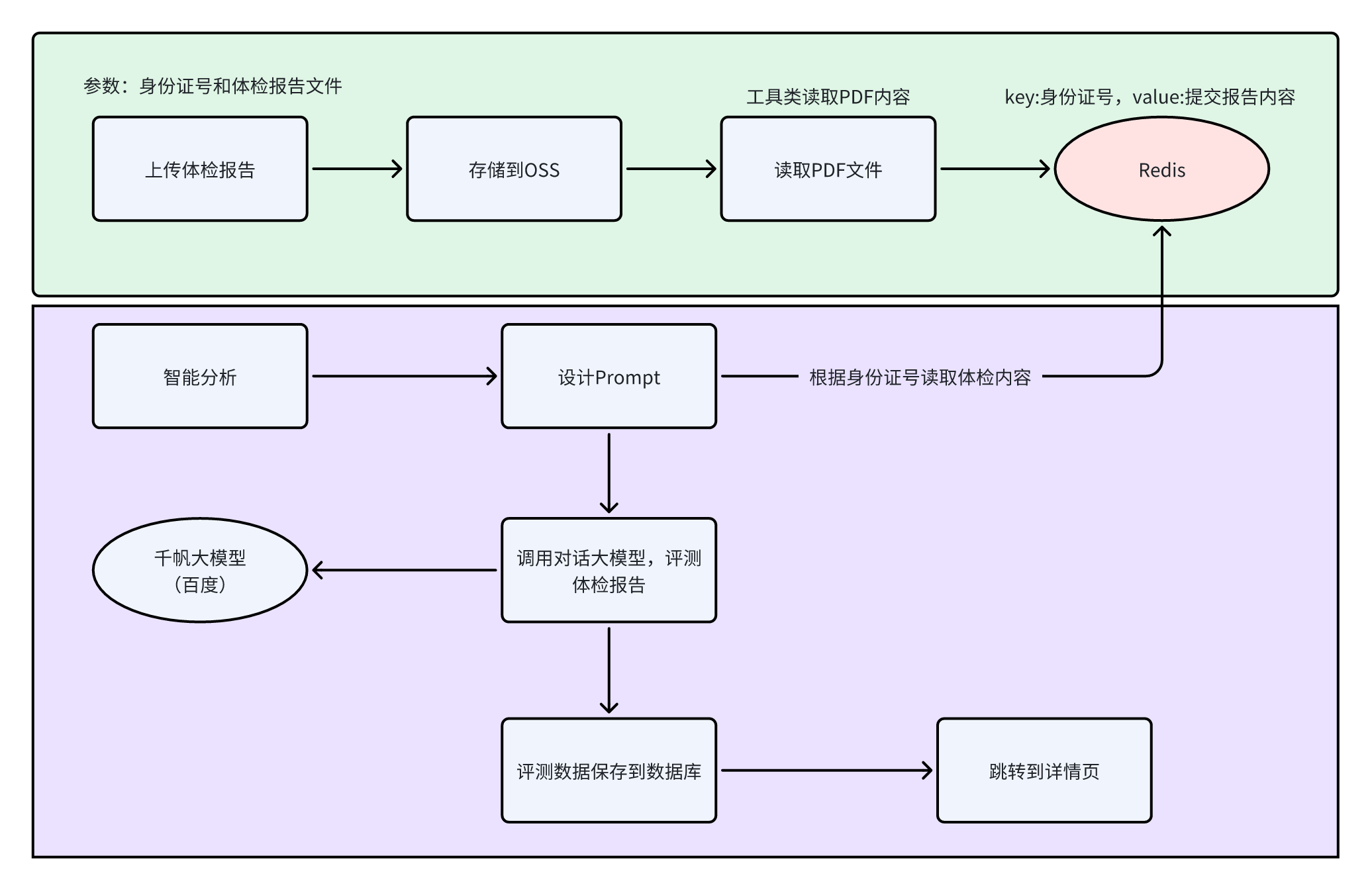
读取PDF文件内容
Apache PDFBox库是一个用于处理PDF文档的开源Java工具。该项目允许创建新的PDF文档,编辑现有的文档,以及从文档中提取内容
导入对应的依赖,在zzyl-common模块中导入以下依赖:
<dependency>
    <groupId>org.apache.pdfbox</groupId>
    <artifactId>pdfbox</artifactId>
    <version>2.0.24</version>
</dependency>
创建工具类,通过pdf文件来读取内容,工具类路径:zzyl-common模块下的com.zzyl.common.utils.PDFUtil
package com.zzyl.common.utils;

import org.apache.pdfbox.pdmodel.PDDocument;
import org.apache.pdfbox.text.PDFTextStripper;

import java.io.File;
import java.io.IOException;
import java.io.InputStream;

public class PDFUtil {

    public static String pdfToString(InputStream inputStream) {

        PDDocument document = null;

        try {
            // 加载PDF文档
            document = PDDocument.load(inputStream);

            // 创建一个PDFTextStripper实例来提取文本
            PDFTextStripper pdfStripper = new PDFTextStripper();

            // 从PDF文档中提取文本
            String text = pdfStripper.getText(document);
            return text;
        } catch (IOException e) {
            e.printStackTrace();
        } finally {
            // 关闭PDF文档
            if (document != null) {
                try {
                    document.close();
                    inputStream.close();
                } catch (IOException e) {
                    e.printStackTrace();
                }
            }
        }
        return null;
    }
}
百度千帆大模型
注册地址:千帆大模型平台
应用创建地址:百度智能云控制台
使用流程参考:飞书云文档
大模型API说明
当前需求中,prompt是比较多的,也就是说需要更多的token,对话Chat V2支持的模型列表如下:
经过综合评估,本次采用的是ERNIE-4.0-8K
官方地址:ERNIE-4.0-8K - ModelBuilder
ERNIE 4.0是百度自研的旗舰级超大规模⼤语⾔模型,相较ERNIE 3.5实现了模型能力全面升级,广泛适用于各领域复杂任务场景;支持自动对接百度搜索插件,保障问答信息时效,支持5K tokens输入+2K tokens输出
- 对话模型,一次请求就是一次对话
- 提供了java的sdk调用,地址:https://cloud.baidu.com/doc/qianfan-docs/s/nm9l6oc8e
- 支持单轮对话、多轮对话、流式
- 部分关键的参数:https://cloud.baidu.com/doc/qianfan-api/s/3m7of64lb
- 返回参数:result可以获取对话返回的结果
集成大模型
- 在zzyl-common模块下新增以下依赖:
<dependency>
    <groupId>com.openai</groupId>
    <artifactId>openai-java</artifactId>
    <version>0.22.0</version> # 按需更新版本号
</dependency>
由于openai用到了kotlin,而这个依赖自带的kotlin版本和项目中的kotlin版本冲突了,所以,还需要排除一些依赖,然后重新引入一个统一的版本,才能正常使用
- 在父工程pom.xml文件中统一管理依赖的版本:
<?xml version="1.0" encoding="UTF-8"?>
<project xmlns="http://maven.apache.org/POM/4.0.0"
         xmlns:xsi="http://www.w3.org/2001/XMLSchema-instance"
         xsi:schemaLocation="http://maven.apache.org/POM/4.0.0 http://maven.apache.org/xsd/maven-4.0.0.xsd">
    <modelVersion>4.0.0</modelVersion>

    <groupId>com.zzyl</groupId>
    <artifactId>zzyl</artifactId>
    <version>3.8.9</version>

    <name>zzyl</name>
    <url>http://www.ruoyi.vip</url>
    <description>中州养老</description>

    <properties>
        <zzyl.version>3.8.9</zzyl.version>
        <project.build.sourceEncoding>UTF-8</project.build.sourceEncoding>
        <project.reporting.outputEncoding>UTF-8</project.reporting.outputEncoding>
        <java.version>11</java.version>
        <maven-jar-plugin.version>3.1.1</maven-jar-plugin.version>
        <spring-boot.version>2.5.15</spring-boot.version>
        <druid.version>1.2.23</druid.version>
        <bitwalker.version>1.21</bitwalker.version>
        <swagger.version>3.0.0</swagger.version>
        <kaptcha.version>2.3.3</kaptcha.version>
        <pagehelper.boot.version>1.4.7</pagehelper.boot.version>
        <fastjson.version>2.0.53</fastjson.version>
        <oshi.version>6.8.1</oshi.version>
        <commons.io.version>2.19.0</commons.io.version>
        <poi.version>4.1.2</poi.version>
        <velocity.version>2.3</velocity.version>
        <jwt.version>0.9.1</jwt.version>
        <!-- override dependency version -->
        <tomcat.version>9.0.105</tomcat.version>
        <logback.version>1.2.13</logback.version>
        <spring-security.version>5.7.12</spring-security.version>
        <spring-framework.version>5.3.39</spring-framework.version>
        <lombok.version>1.18.22</lombok.version>
        <mybatis-plus-spring-boot.version>3.5.2</mybatis-plus-spring-boot.version>
        <aliyun.sdk.oss>3.17.4</aliyun.sdk.oss>
        <hutool-all.version>5.8.10</hutool-all.version>
        <openai-java.version>2.8.1</openai-java.version>
        <kotlin.version>1.9.23</kotlin.version>
        <jackson.version>2.16.1</jackson.version>
        <okhttp.version>4.12.0</okhttp.version>
    </properties>

    <!-- 依赖声明 -->
    <dependencyManagement>
        <dependencies>

            <!-- 覆盖SpringFramework的依赖配置-->
            <dependency>
                <groupId>org.springframework</groupId>
                <artifactId>spring-framework-bom</artifactId>
                <version>${spring-framework.version}</version>
                <type>pom</type>
                <scope>import</scope>
            </dependency>

            <!-- 覆盖SpringSecurity的依赖配置-->
            <dependency>
                <groupId>org.springframework.security</groupId>
                <artifactId>spring-security-bom</artifactId>
                <version>${spring-security.version}</version>
                <type>pom</type>
                <scope>import</scope>
            </dependency>

            <!-- SpringBoot的依赖配置-->
            <dependency>
                <groupId>org.springframework.boot</groupId>
                <artifactId>spring-boot-dependencies</artifactId>
                <version>${spring-boot.version}</version>
                <type>pom</type>
                <scope>import</scope>
            </dependency>

            <!-- 覆盖logback的依赖配置-->
            <dependency>
                <groupId>ch.qos.logback</groupId>
                <artifactId>logback-core</artifactId>
                <version>${logback.version}</version>
            </dependency>

            <dependency>
                <groupId>ch.qos.logback</groupId>
                <artifactId>logback-classic</artifactId>
                <version>${logback.version}</version>
            </dependency>

            <!-- 覆盖tomcat的依赖配置-->
            <dependency>
                <groupId>org.apache.tomcat.embed</groupId>
                <artifactId>tomcat-embed-core</artifactId>
                <version>${tomcat.version}</version>
            </dependency>

            <dependency>
                <groupId>org.apache.tomcat.embed</groupId>
                <artifactId>tomcat-embed-el</artifactId>
                <version>${tomcat.version}</version>
            </dependency>

            <dependency>
                <groupId>org.apache.tomcat.embed</groupId>
                <artifactId>tomcat-embed-websocket</artifactId>
                <version>${tomcat.version}</version>
            </dependency>

            <!-- 阿里数据库连接池 -->
            <dependency>
                <groupId>com.alibaba</groupId>
                <artifactId>druid-spring-boot-starter</artifactId>
                <version>${druid.version}</version>
            </dependency>

            <!-- 解析客户端操作系统、浏览器等 -->
            <dependency>
                <groupId>eu.bitwalker</groupId>
                <artifactId>UserAgentUtils</artifactId>
                <version>${bitwalker.version}</version>
            </dependency>

            <!-- pagehelper 分页插件 -->
            <dependency>
                <groupId>com.github.pagehelper</groupId>
                <artifactId>pagehelper-spring-boot-starter</artifactId>
                <version>${pagehelper.boot.version}</version>
            </dependency>

            <!-- 获取系统信息 -->
            <dependency>
                <groupId>com.github.oshi</groupId>
                <artifactId>oshi-core</artifactId>
                <version>${oshi.version}</version>
            </dependency>

            <!-- Swagger3依赖 -->
            <dependency>
                <groupId>io.springfox</groupId>
                <artifactId>springfox-boot-starter</artifactId>
                <version>${swagger.version}</version>
                <exclusions>
                    <exclusion>
                        <groupId>io.swagger</groupId>
                        <artifactId>swagger-models</artifactId>
                    </exclusion>
                </exclusions>
            </dependency>

            <!-- io常用工具类 -->
            <dependency>
                <groupId>commons-io</groupId>
                <artifactId>commons-io</artifactId>
                <version>${commons.io.version}</version>
            </dependency>

            <!-- excel工具 -->
            <dependency>
                <groupId>org.apache.poi</groupId>
                <artifactId>poi-ooxml</artifactId>
                <version>${poi.version}</version>
            </dependency>

            <!-- velocity代码生成使用模板 -->
            <dependency>
                <groupId>org.apache.velocity</groupId>
                <artifactId>velocity-engine-core</artifactId>
                <version>${velocity.version}</version>
            </dependency>

            <!-- 阿里JSON解析器 -->
            <dependency>
                <groupId>com.alibaba.fastjson2</groupId>
                <artifactId>fastjson2</artifactId>
                <version>${fastjson.version}</version>
            </dependency>

            <!-- Token生成与解析-->
            <dependency>
                <groupId>io.jsonwebtoken</groupId>
                <artifactId>jjwt</artifactId>
                <version>${jwt.version}</version>
            </dependency>

            <!-- 验证码 -->
            <dependency>
                <groupId>pro.fessional</groupId>
                <artifactId>kaptcha</artifactId>
                <version>${kaptcha.version}</version>
            </dependency>

            <!-- 定时任务-->
            <dependency>
                <groupId>com.zzyl</groupId>
                <artifactId>zzyl-quartz</artifactId>
                <version>${zzyl.version}</version>
            </dependency>

            <!-- 代码生成-->
            <dependency>
                <groupId>com.zzyl</groupId>
                <artifactId>zzyl-generator</artifactId>
                <version>${zzyl.version}</version>
            </dependency>

            <!-- 核心模块-->
            <dependency>
                <groupId>com.zzyl</groupId>
                <artifactId>zzyl-framework</artifactId>
                <version>${zzyl.version}</version>
            </dependency>

            <!-- 系统模块-->
            <dependency>
                <groupId>com.zzyl</groupId>
                <artifactId>zzyl-system</artifactId>
                <version>${zzyl.version}</version>
            </dependency>

            <!-- 通用工具-->
            <dependency>
                <groupId>com.zzyl</groupId>
                <artifactId>zzyl-common</artifactId>
                <version>${zzyl.version}</version>
            </dependency>

            <!--护理平台模块-->
            <dependency>
                <groupId>com.zzyl</groupId>
                <artifactId>zzyl-nursing-platform</artifactId>
                <version>${zzyl.version}</version>
            </dependency>

            <!--OSS模块-->
            <dependency>
                <groupId>com.zzyl</groupId>
                <artifactId>zzyl-oss</artifactId>
                <version>${zzyl.version}</version>
            </dependency>

            <!--Lombok-->
            <dependency>
                <groupId>org.projectlombok</groupId>
                <artifactId>lombok</artifactId>
                <version>${lombok.version}</version>
            </dependency>

            <!-- MyBatis-Plus 增强CRUD -->
            <dependency>
                <groupId>com.baomidou</groupId>
                <artifactId>mybatis-plus-boot-starter</artifactId>
                <version>${mybatis-plus-spring-boot.version}</version>
            </dependency>
            <dependency>
                <groupId>com.baomidou</groupId>
                <artifactId>mybatis-plus-annotation</artifactId>
                <version>${mybatis-plus-spring-boot.version}</version>
            </dependency>

            <dependency>
                <groupId>com.aliyun.oss</groupId>
                <artifactId>aliyun-sdk-oss</artifactId>
                <version>${aliyun.sdk.oss}</version>
            </dependency>

            <!-- hutool工具包 -->
            <dependency>
                <groupId>cn.hutool</groupId>
                <artifactId>hutool-all</artifactId>
                <version>${hutool-all.version}</version>
            </dependency>

            <dependency>
                <groupId>org.jetbrains.kotlin</groupId>
                <artifactId>kotlin-bom</artifactId>
                <version>${kotlin.version}</version>
                <scope>import</scope>
                <type>pom</type>
            </dependency>

            <!-- Kotlin Standard Library -->
            <dependency>
                <groupId>org.jetbrains.kotlin</groupId>
                <artifactId>kotlin-stdlib</artifactId>
                <version>${kotlin.version}</version>
            </dependency>

            <dependency>
                <groupId>org.jetbrains.kotlin</groupId>
                <artifactId>kotlin-reflect</artifactId>
                <version>${kotlin.version}</version>
            </dependency>

            <dependency>
                <groupId>org.jetbrains.kotlin</groupId>
                <artifactId>kotlin-stdlib-jdk8</artifactId>
                <version>${kotlin.version}</version>
            </dependency>

            <dependency>
                <groupId>org.jetbrains.kotlin</groupId>
                <artifactId>kotlin-stdlib-jdk7</artifactId>
                <version>${kotlin.version}</version>
            </dependency>

            <dependency>
                <groupId>com.fasterxml.jackson.core</groupId>
                <artifactId>jackson-databind</artifactId>
                <version>${jackson.version}</version>
            </dependency>
            <dependency>
                <groupId>com.fasterxml.jackson.core</groupId>
                <artifactId>jackson-core</artifactId>
                <version>${jackson.version}</version>
            </dependency>
            <dependency>
                <groupId>com.fasterxml.jackson.core</groupId>
                <artifactId>jackson-annotations</artifactId>
                <version>${jackson.version}</version>
            </dependency>

            <dependency>
                <groupId>com.fasterxml.jackson.datatype</groupId>
                <artifactId>jackson-datatype-jdk8</artifactId>
                <version>${jackson.version}</version>
            </dependency>

            <dependency>
                <groupId>com.fasterxml.jackson.datatype</groupId>
                <artifactId>jackson-datatype-jsr310</artifactId>
                <version>${jackson.version}</version>
            </dependency>

            <dependency>
                <groupId>com.fasterxml.jackson.module</groupId>
                <artifactId>jackson-module-kotlin</artifactId>
                <version>${jackson.version}</version>
            </dependency>

            <dependency>
                <groupId>com.openai</groupId>
                <artifactId>openai-java</artifactId>
                <version>${openai-java.version}</version>
            </dependency>

            <dependency>
                <groupId>com.squareup.okhttp3</groupId>
                <artifactId>okhttp</artifactId>
                <version>${okhttp.version}</version>
            </dependency>
        </dependencies>
    </dependencyManagement>

    <modules>
        <module>zzyl-admin</module>
        <module>zzyl-framework</module>
        <module>zzyl-system</module>
        <module>zzyl-quartz</module>
        <module>zzyl-generator</module>
        <module>zzyl-common</module>
        <module>zzyl-nursing-platform</module>
        <module>zzyl-oss</module>
    </modules>
    <packaging>pom</packaging>

    <build>
        <plugins>
            <plugin>
                <groupId>org.apache.maven.plugins</groupId>
                <artifactId>maven-compiler-plugin</artifactId>
                <version>3.1</version>
                <configuration>
                    <source>${java.version}</source>
                    <target>${java.version}</target>
                    <encoding>${project.build.sourceEncoding}</encoding>
                </configuration>
            </plugin>
        </plugins>
    </build>

    <repositories>
        <repository>
            <id>public</id>
            <name>aliyun nexus</name>
            <url>https://maven.aliyun.com/repository/public</url>
            <releases>
                <enabled>true</enabled>
            </releases>
        </repository>
    </repositories>

    <pluginRepositories>
        <pluginRepository>
            <id>public</id>
            <name>aliyun nexus</name>
            <url>https://maven.aliyun.com/repository/public</url>
            <releases>
                <enabled>true</enabled>
            </releases>
            <snapshots>
                <enabled>false</enabled>
            </snapshots>
        </pluginRepository>
    </pluginRepositories>

</project>
- 接下来,在common模块的pom.xml文件中引入openai-java的依赖,并排除有版本冲突的依赖然后重新引入:
<?xml version="1.0" encoding="UTF-8"?>
<project xmlns="http://maven.apache.org/POM/4.0.0"
         xmlns:xsi="http://www.w3.org/2001/XMLSchema-instance"
         xsi:schemaLocation="http://maven.apache.org/POM/4.0.0 http://maven.apache.org/xsd/maven-4.0.0.xsd">
    <parent>
        <artifactId>zzyl</artifactId>
        <groupId>com.zzyl</groupId>
        <version>3.8.9</version>
    </parent>
    <modelVersion>4.0.0</modelVersion>

    <artifactId>zzyl-common</artifactId>

    <description>
        common通用工具
    </description>

    <dependencies>

        <!-- Spring框架基本的核心工具 -->
        <dependency>
            <groupId>org.springframework</groupId>
            <artifactId>spring-context-support</artifactId>
        </dependency>

        <!-- SpringWeb模块 -->
        <dependency>
            <groupId>org.springframework</groupId>
            <artifactId>spring-web</artifactId>
        </dependency>

        <!-- spring security 安全认证 -->
        <dependency>
            <groupId>org.springframework.boot</groupId>
            <artifactId>spring-boot-starter-security</artifactId>
        </dependency>

        <!-- pagehelper 分页插件 -->
        <dependency>
            <groupId>com.github.pagehelper</groupId>
            <artifactId>pagehelper-spring-boot-starter</artifactId>
        </dependency>

        <!-- 自定义验证注解 -->
        <dependency>
            <groupId>org.springframework.boot</groupId>
            <artifactId>spring-boot-starter-validation</artifactId>
        </dependency>

        <!--常用工具类 -->
        <dependency>
            <groupId>org.apache.commons</groupId>
            <artifactId>commons-lang3</artifactId>
        </dependency>

        <!-- JSON工具类 -->
        <dependency>
            <groupId>com.fasterxml.jackson.core</groupId>
            <artifactId>jackson-databind</artifactId>
        </dependency>

        <dependency>
            <groupId>com.fasterxml.jackson.core</groupId>
            <artifactId>jackson-core</artifactId>
        </dependency>

        <dependency>
            <groupId>com.fasterxml.jackson.core</groupId>
            <artifactId>jackson-annotations</artifactId>
        </dependency>

        <dependency>
            <groupId>com.fasterxml.jackson.datatype</groupId>
            <artifactId>jackson-datatype-jdk8</artifactId>
        </dependency>

        <dependency>
            <groupId>com.fasterxml.jackson.datatype</groupId>
            <artifactId>jackson-datatype-jsr310</artifactId>
        </dependency>

        <dependency>
            <groupId>com.fasterxml.jackson.module</groupId>
            <artifactId>jackson-module-kotlin</artifactId>
            <exclusions>
                <exclusion>
                    <groupId>org.jetbrains.kotlin</groupId>
                    <artifactId>kotlin-reflect</artifactId>
                </exclusion>
                <exclusion>
                    <groupId>org.jetbrains.kotlin</groupId>
                    <artifactId>kotlin-stdlib</artifactId>
                </exclusion>
                <exclusion>
                    <groupId>org.jetbrains.kotlin</groupId>
                    <artifactId>kotlin-stdlib-jdk7</artifactId>
                </exclusion>
            </exclusions>
        </dependency>

        <!-- 阿里JSON解析器 -->
        <dependency>
            <groupId>com.alibaba.fastjson2</groupId>
            <artifactId>fastjson2</artifactId>
        </dependency>

        <!-- io常用工具类 -->
        <dependency>
            <groupId>commons-io</groupId>
            <artifactId>commons-io</artifactId>
        </dependency>

        <!-- excel工具 -->
        <dependency>
            <groupId>org.apache.poi</groupId>
            <artifactId>poi-ooxml</artifactId>
        </dependency>

        <!-- yml解析器 -->
        <dependency>
            <groupId>org.yaml</groupId>
            <artifactId>snakeyaml</artifactId>
        </dependency>

        <!-- Token生成与解析-->
        <dependency>
            <groupId>io.jsonwebtoken</groupId>
            <artifactId>jjwt</artifactId>
        </dependency>

        <!-- Jaxb -->
        <dependency>
            <groupId>javax.xml.bind</groupId>
            <artifactId>jaxb-api</artifactId>
        </dependency>

        <!-- redis 缓存操作 -->
        <dependency>
            <groupId>org.springframework.boot</groupId>
            <artifactId>spring-boot-starter-data-redis</artifactId>
        </dependency>

        <!-- pool 对象池 -->
        <dependency>
            <groupId>org.apache.commons</groupId>
            <artifactId>commons-pool2</artifactId>
        </dependency>

        <!-- 解析客户端操作系统、浏览器等 -->
        <dependency>
            <groupId>eu.bitwalker</groupId>
            <artifactId>UserAgentUtils</artifactId>
        </dependency>

        <!-- servlet包 -->
        <dependency>
            <groupId>javax.servlet</groupId>
            <artifactId>javax.servlet-api</artifactId>
        </dependency>

        <!-- ruoyi-springboot2 / swagger knife4j 配置 -->
        <dependency>
            <groupId>com.github.xiaoymin</groupId>
            <artifactId>knife4j-spring-boot-starter</artifactId>
            <version>3.0.3</version>
        </dependency>

        <!--Lombok-->
        <dependency>
            <groupId>org.projectlombok</groupId>
            <artifactId>lombok</artifactId>
        </dependency>

        <!--MyBatisPlus-->
        <dependency>
            <groupId>com.baomidou</groupId>
            <artifactId>mybatis-plus-boot-starter</artifactId>
            <exclusions>
                <exclusion>
                    <groupId>org.jetbrains.kotlin</groupId>
                    <artifactId>kotlin-stdlib</artifactId>
                </exclusion>
                <exclusion>
                    <groupId>org.jetbrains.kotlin</groupId>
                    <artifactId>kotlin-reflect</artifactId>
                </exclusion>
                <exclusion>
                    <groupId>org.jetbrains.kotlin</groupId>
                    <artifactId>kotlin-stdlib-jdk7</artifactId>
                </exclusion>
                <exclusion>
                    <groupId>org.jetbrains.kotlin</groupId>
                    <artifactId>kotlin-stdlib-jdk8</artifactId>
                </exclusion>
            </exclusions>
        </dependency>
        <dependency>
            <groupId>com.baomidou</groupId>
            <artifactId>mybatis-plus-annotation</artifactId>
        </dependency>

        <!--hutool工具包-->
        <dependency>
            <groupId>cn.hutool</groupId>
            <artifactId>hutool-all</artifactId>
        </dependency>

        <!--pdfbox-->
        <dependency>
            <groupId>org.apache.pdfbox</groupId>
            <artifactId>pdfbox</artifactId>
            <version>2.0.24</version>
        </dependency>

        <dependency>
            <groupId>com.squareup.okhttp3</groupId>
            <artifactId>okhttp</artifactId>
        </dependency>

        <dependency>
            <groupId>com.openai</groupId>
            <artifactId>openai-java</artifactId>
            <exclusions>
                <exclusion>
                    <groupId>com.squareup.okhttp3</groupId>
                    <artifactId>okhttp</artifactId>
                </exclusion>
                <exclusion>
                    <groupId>com.squareup.okio</groupId>
                    <artifactId>okio</artifactId>
                </exclusion>
                <exclusion>
                    <groupId>org.jetbrains.kotlin</groupId>
                    <artifactId>kotlin-stdlib</artifactId>
                </exclusion>
                <exclusion>
                    <groupId>org.jetbrains.kotlin</groupId>
                    <artifactId>kotlin-stdlib-jdk7</artifactId>
                </exclusion>
                <exclusion>
                    <groupId>org.jetbrains.kotlin</groupId>
                    <artifactId>kotlin-stdlib-jdk8</artifactId>
                </exclusion>
                <exclusion>
                    <groupId>org.jetbrains.kotlin</groupId>
                    <artifactId>kotlin-reflect</artifactId>
                </exclusion>
            </exclusions>
        </dependency>

        <dependency>
            <groupId>org.jetbrains.kotlin</groupId>
            <artifactId>kotlin-stdlib-jdk7</artifactId>
        </dependency>

        <!-- Kotlin Standard Library -->
        <dependency>
            <groupId>org.jetbrains.kotlin</groupId>
            <artifactId>kotlin-stdlib</artifactId>
        </dependency>

        <dependency>
            <groupId>org.jetbrains.kotlin</groupId>
            <artifactId>kotlin-reflect</artifactId>
        </dependency>

        <dependency>
            <groupId>org.jetbrains.kotlin</groupId>
            <artifactId>kotlin-stdlib-jdk8</artifactId>
            <exclusions>
                <exclusion>
                    <groupId>org.jetbrains.kotlin</groupId>
                    <artifactId>kotlin-stdlib-jdk7</artifactId>
                </exclusion>
            </exclusions>
        </dependency>

    </dependencies>

</project>
package com.zzyl;

import com.openai.client.OpenAIClient;
import com.openai.client.okhttp.OpenAIOkHttpClient;
import com.openai.models.ResponseFormatJsonObject;
import com.openai.models.chat.completions.ChatCompletion;
import com.openai.models.chat.completions.ChatCompletionCreateParams;

public class QianfanAIModelTest {
    public static void main(String[] args) {
        OpenAIClient client = OpenAIOkHttpClient.builder()
                .apiKey("bce-v3/ALTAK-6H6k7kuLyTmZPBmOJ2ajC/2520d4ad36847715153ca819932f1d854bb9e71f") //将your_APIKey替换为真实值,如何获取API Key请查看https://cloud.baidu.com/doc/WENXINWORKSHOP/s/Um2wxbaps#步骤二-获取api-key
                .baseUrl("https://qianfan.baidubce.com/v2/") //千帆ModelBuilder平台地址
                .build();

        ChatCompletionCreateParams params = ChatCompletionCreateParams.builder()
                .addUserMessage("你好") // 对话messages信息
                .model("deepseek-r1") // 模型对应的model值,请查看支持的模型列表:https://cloud.baidu.com/doc/WENXINWORKSHOP/s/wm7ltcvgc
                .responseFormat(ChatCompletionCreateParams.ResponseFormat.ofJsonObject(ResponseFormatJsonObject.builder().build()))
                .build();

        ChatCompletion chatCompletion = client.chat().completions().create(params);
        System.out.println(chatCompletion.choices().get(0).message().content().orElseGet(() -> ""));
    }
}
接口开发
基础代码准备
打开后台管理系统,咱们继续使用代码生成功能,来完成基础代码的准备,导入最新的表结构(健康评估表)
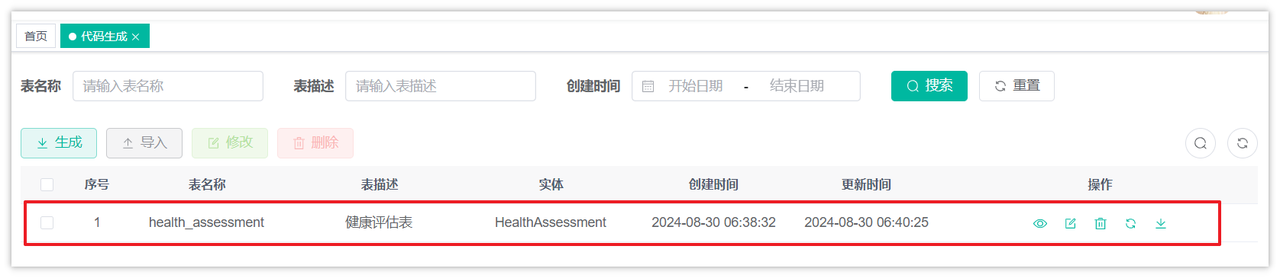
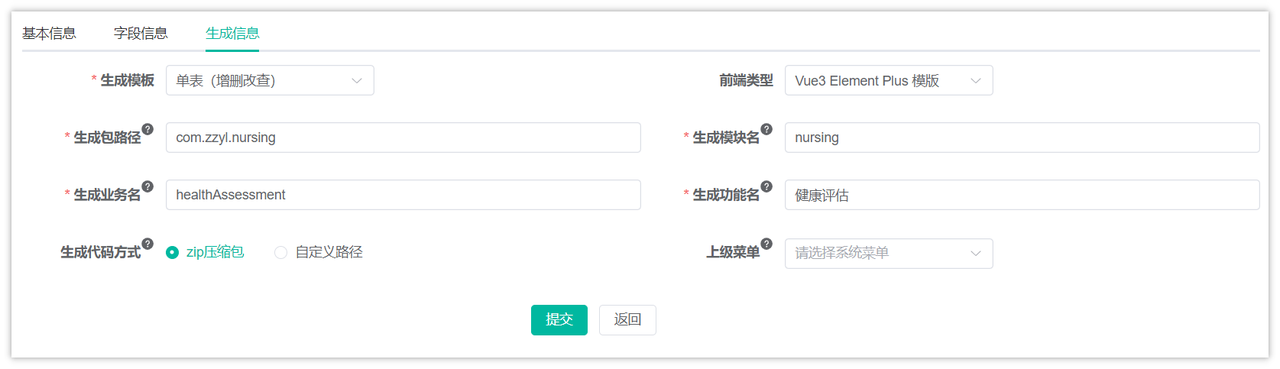
修改代码生成
- 生成包路径:
com.zzyl.nursing - 生成的模块名:
nursing - 生成的业务名:
healthAssessment - 上级菜单:不选择(由于目前已经提供了所有的前端和菜单的表结构,无需自己创建选择菜单)
配置完成后,下载代码到本地
特别注意:只需要拷贝后端代码到idea中即可,不需要执行SQL,不需要拷贝前端代码
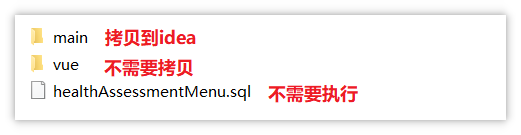
当代码拷贝之后,就已经完成了两个接口的开发,分别是列表分页查询和查看详情。不过关于上传体检报告和智能评测还需要咱们自行实现。
将后端代码都拷贝到项目中后,可以执行下面这条SQL语句插入一条数据:
INSERT INTO `health_assessment`(`system_score`,`nursing_level_name`,`gender`,`total_check_date`,`create_time`,`disease_risk`,`birth_date`,`health_score`,`id_card`,`abnormal_analysis`,`physical_exam_institution`,`create_by`,`risk_level`,`assessment_time`,`suggestion_for_admission`,`admission_status`,`physical_report_url`,`elder_name`,`id`,`age`,`report_summary`) VALUES ('{"breathingSystem":100,"digestiveSystem":85,"endocrineSystem":90,"immuneSystem":95,"circulatorySystem":80,"urinarySystem":90,"motionSystem":100,"senseSystem":90}','一级护理等级',0,'2023-10-10','2024-10-10T01:07:42','{"healthy":60,"caution":30,"risk":10,"danger":0,"severeDanger":0}','1960-01-26T00:00','80.5','210102196001267626','[{"conclusion":"心率略快","examinationItem":"心率","result":"92 次/分","referenceValue":"< 140","unit":"次/分","interpret":"心率稍高于理想范围,可能与情绪、活动或轻度心脏负担有关。","advice":"建议心电图检查及定期监测心率,保持情绪稳定,适量运动。"},{"conclusion":"轻度脂肪肝可能","examinationItem":"肝","result":"形态大小正常,实质回声略粗糙","referenceValue":"-","unit":"-","interpret":"肝脏实质回声略粗糙,提示可能有轻度脂肪肝,与饮食习惯、生活方式或遗传因素有关。","advice":"建议调整饮食结构,减少高脂食物摄入,增加运动,定期检查肝脏情况。"},{"conclusion":"慢性胆囊炎可能","examinationItem":"胆","result":"胆囊壁毛糙","referenceValue":"-","unit":"-","interpret":"胆囊壁毛糙,可能表示有慢性胆囊炎,可能与胆囊结石、感染或长期饮食不规律有关。","advice":"建议进一步检查胆囊情况,保持规律饮食,避免高脂食物。"},{"conclusion":"脾轻度增大","examinationItem":"脾","result":"轻度增大","referenceValue":"-","unit":"-","interpret":"脾脏轻度增大,可能与感染、血液系统疾病或自身免疫性疾病有关。","advice":"建议进一步检查脾脏,以确定增大的原因,并采取相应的治疗措施。"},{"conclusion":"右肾小囊肿可能","examinationItem":"肾","result":"右肾下极见一大小约 5mm 的无回声区","referenceValue":"-","unit":"mm","interpret":"右肾小囊肿,一般为良性病变,可能与肾小管憩室增多有关。","advice":"建议定期监测囊肿大小,若无症状且囊肿不增大,可暂不处理。"},{"conclusion":"前列腺形态略增大","examinationItem":"前列腺","result":"形态略增大","referenceValue":"-","unit":"-","interpret":"前列腺形态略增大,可能与前列腺增生有关,是老年男性常见病变。","advice":"建议进行PSA检查以排除前列腺肿瘤,并定期检查前列腺情况。"}]','中州体检','1','caution','2024-10-10T01:07:42',0,1,'https://java110-ai.oss-cn-beijing.aliyuncs.com/2024/10/af59dc76-0c01-4043-9706-b9ed1ec08984.pdf','刘爱国',9,64,'体检报告中心率、肝脏、胆囊、脾脏、肾脏、前列腺共6项指标提示异常,综合这些临床指标和数据分析:循环系统、消化系统存在隐患,其中循环系统有“中危”风险;消化系统部位有“低危”风险。');
这样就能看到列表分页查询和查看详情的内容了
设计Prompt
回顾一下Prompt的构成部分:
- 角色:给 AI 定义一个最匹配任务的角色,比如:「你是一位软件工程师」「你是一位小学老师」
- 指示:对任务进行描述
- 上下文:给出与任务相关的其它背景信息(尤其在多轮交互中)
- 例子:必要时给出举例,[实践证明例子对输出正确性有帮助]
- 输入:任务的输入信息;在提示词中明确的标识出输入
- 输出:输出的格式描述,以便后继模块自动解析模型的输出结果,比如(JSON、Java)
清楚了Prompt的构成部分之后,再来分析一下之前的需求,重点来看一下哪些字段需要AI来提供,如下图:
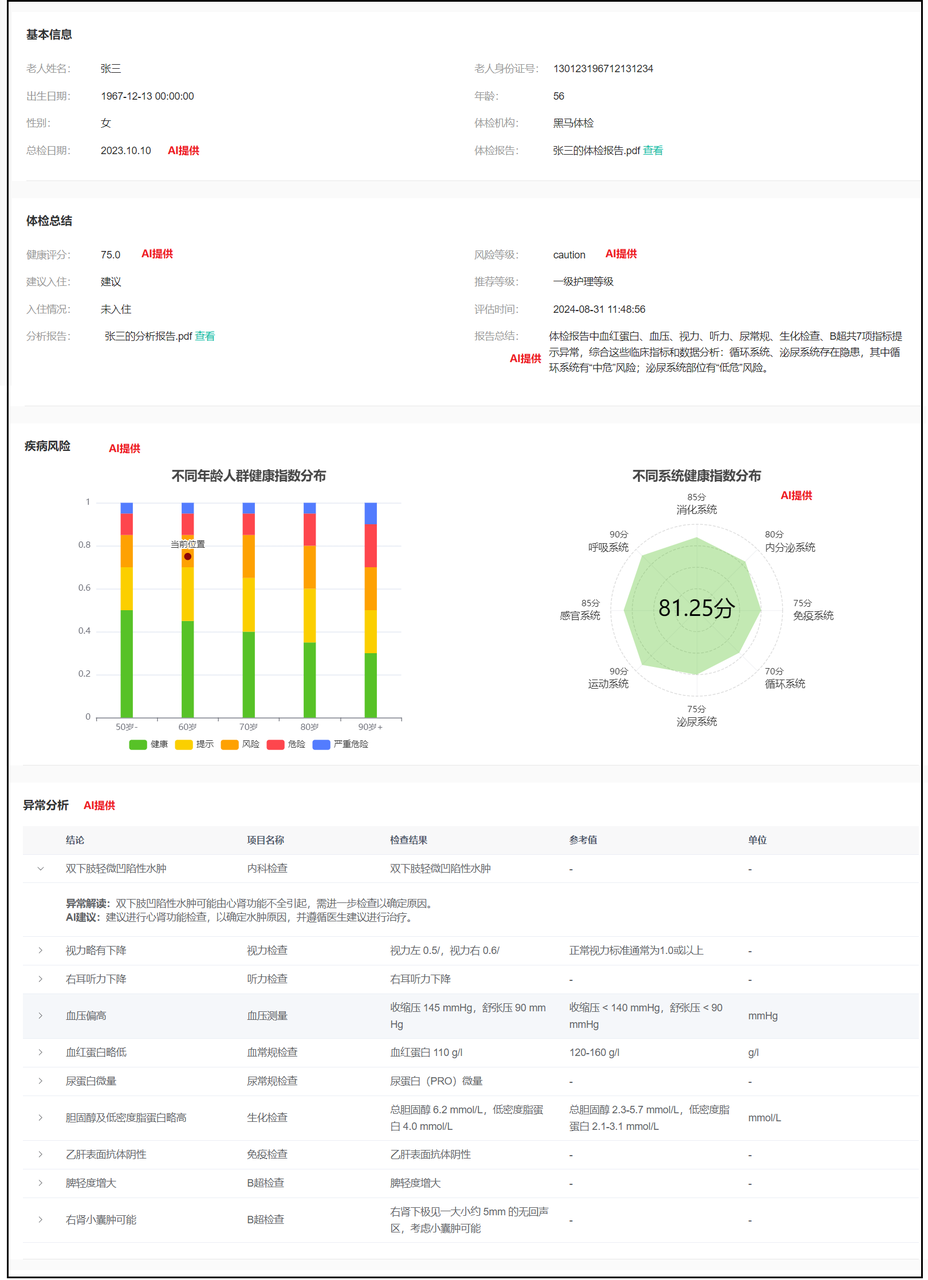
设计之后的Prompt提示词,这里涉及了大量的专业名词和健康指标,实际开发中需要找产品经理协助
请以一个专业医生的视角来分析这份体检报告,报告中包含了一些异常数据,我需要您对这些数据进行解读,并给出相应的健康建议。
体检内容如下:
    内容略....

要求:
1. 提取体检报告中的“总检日期”;
2. 通过临床医学、疾病风险评估模型和数据智能分析,给该用户的风险等级和健康指数给出结果。风险等级分为:健康、提示、风险、危险、严重危险。健康指数范围为0至100分;
3. 根据用户身体各项指标数据,详细说明该用户各项风险等级的占比是多少,最多保留两位小数。结论格式:该用户健康占比20.00%,提示占比20.00%,风险占比20%,危险占比20%,严重危险占比20%;
4. 对于体检报告中的异常数据,请列出(异常数据的结论、体检项目名称、检查结果、参考值、单位、异常解读、建议)这7字段。解读异常数据,解决这些数据可能代表的健康问题或风险。分析可能的原因,包括但不限于生活习惯、饮食习惯、遗传因素等。基于这些异常数据和可能的原因,请给出具体的健康建议,包括饮食调整、运动建议、生活方式改变以及是否需要进一步检查或治疗等。
结论格式:异常数据的结论:肥胖,体检项目名称:体重指数BMI,检查结果:29.2,参考值>24,单位:-。异常解读:体重超标包括超重与肥胖。体重指数(BMI)=体重(kg)/身⾼(m)的平⽅,BMI≥24为超重,BMI≥28为肥胖;男性腰围≥90cm和⼥性腰围≥85cm为腹型肥胖。体重超标是⼀种由多因素(如遗传、进⻝油脂较多、运动少、疾病等)引起的慢性代谢性疾病,尤其是肥胖,已经被世界卫⽣组织列为导致疾病负担的⼗⼤危险因素之⼀。AI建议:采取综合措施预防和控制体重,积极改变⽣活⽅式,宜低脂、低糖、⾼纤维素膳⻝,多⻝果蔬及菌藻类⻝物,增加有氧运动。若有相关疾病(如⾎脂异常、⾼⾎压、糖尿病等)应积极治疗。
5. 根据这个体检报告的内容,分别给人体的8大系统打分,每项满分为100分,8大系统分别为:呼吸系统、消化系统、内分泌系统、免疫系统、循环系统、泌尿系统、运动系统、感官系统
6. 给体检报告做一个总结,总结格式:体检报告中尿蛋⽩、癌胚抗原、⾎沉、空腹⾎糖、总胆固醇、⽢油三酯、低密度脂蛋⽩胆固醇、⾎清载脂蛋⽩B、动脉硬化指数、⽩细胞、平均红细胞体积、平均⾎红蛋⽩共12项指标提示异常,尿液常规共1项指标处于临界值,⾎脂、⾎液常规、尿液常规、糖类抗原、⾎清酶类等共43项指标提示正常,综合这些临床指标和数据分析:肾脏、肝胆、⼼脑⾎管存在隐患,其中⼼脑⾎管有“⾼危”⻛险;肾脏部位有“中危”⻛险;肝胆部位有“低危”⻛险。

输出要求:
最后,将以上结果输出为纯JSON格式,不要包含其他的文字说明,也不要出现Markdown语法相关的文字,所有的返回结果都是json,详细格式如下:

{
  "totalCheckDate": "YYYY-MM-DD",
  "healthAssessment": {
    "riskLevel": "healthy/caution/risk/danger/severeDanger",
    "healthIndex": XX.XX
  },
  "riskDistribution": {
    "healthy": XX.XX,
    "caution": XX.XX,
    "risk": XX.XX,
    "danger": XX.XX,
    "severeDanger": XX.XX
  },
  "abnormalData": [
    {
      "conclusion": "异常数据的结论",
      "examinationItem": "体检项目名称",
      "result": "检查结果",
      "referenceValue": "参考值",
      "unit": "单位",
      "interpret":"对于异常的结论进一步详细的说明",
      "advice":"针对于这一项的异常,给出一些健康的建议"
    }
  ],
  "systemScore": {
    "breathingSystem": XX,
    "digestiveSystem": XX,
    "endocrineSystem": XX,
    "immuneSystem": XX,
    "circulatorySystem": XX,
    "urinarySystem": XX,
    "motionSystem": XX,
    "senseSystem": XX
  },
  "summarize": "体检报告的总结"
}
上传体检报告
需求回顾
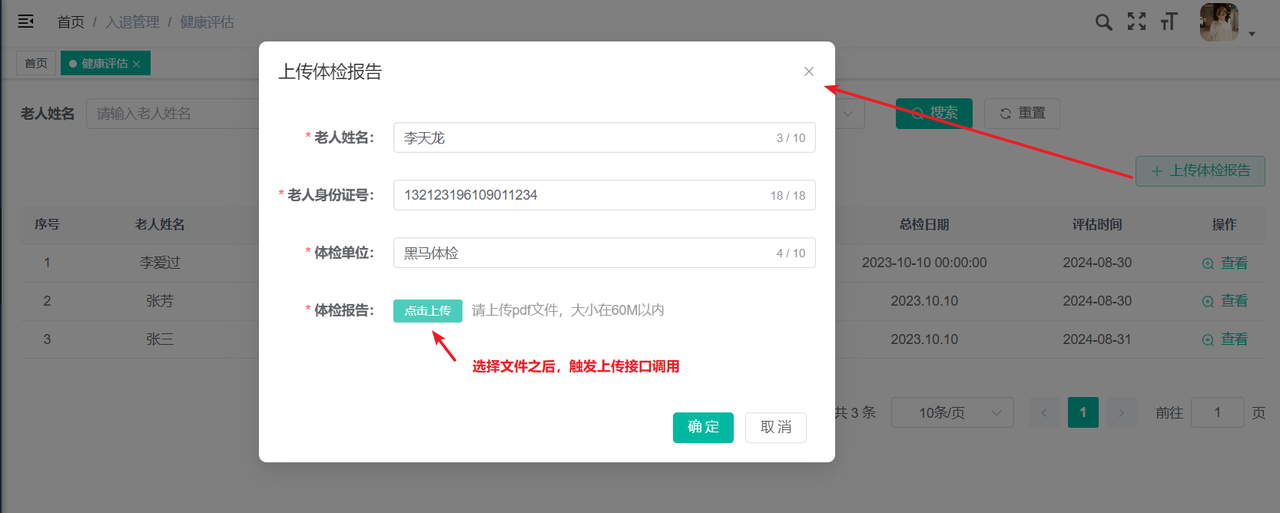
如下图,当点击了上传体检报告之后,弹窗需要输入信息,当选择了文件之后,会自动触发接口调用
参数有两个:身份证号和体检报告文件
思路回顾
如下图:
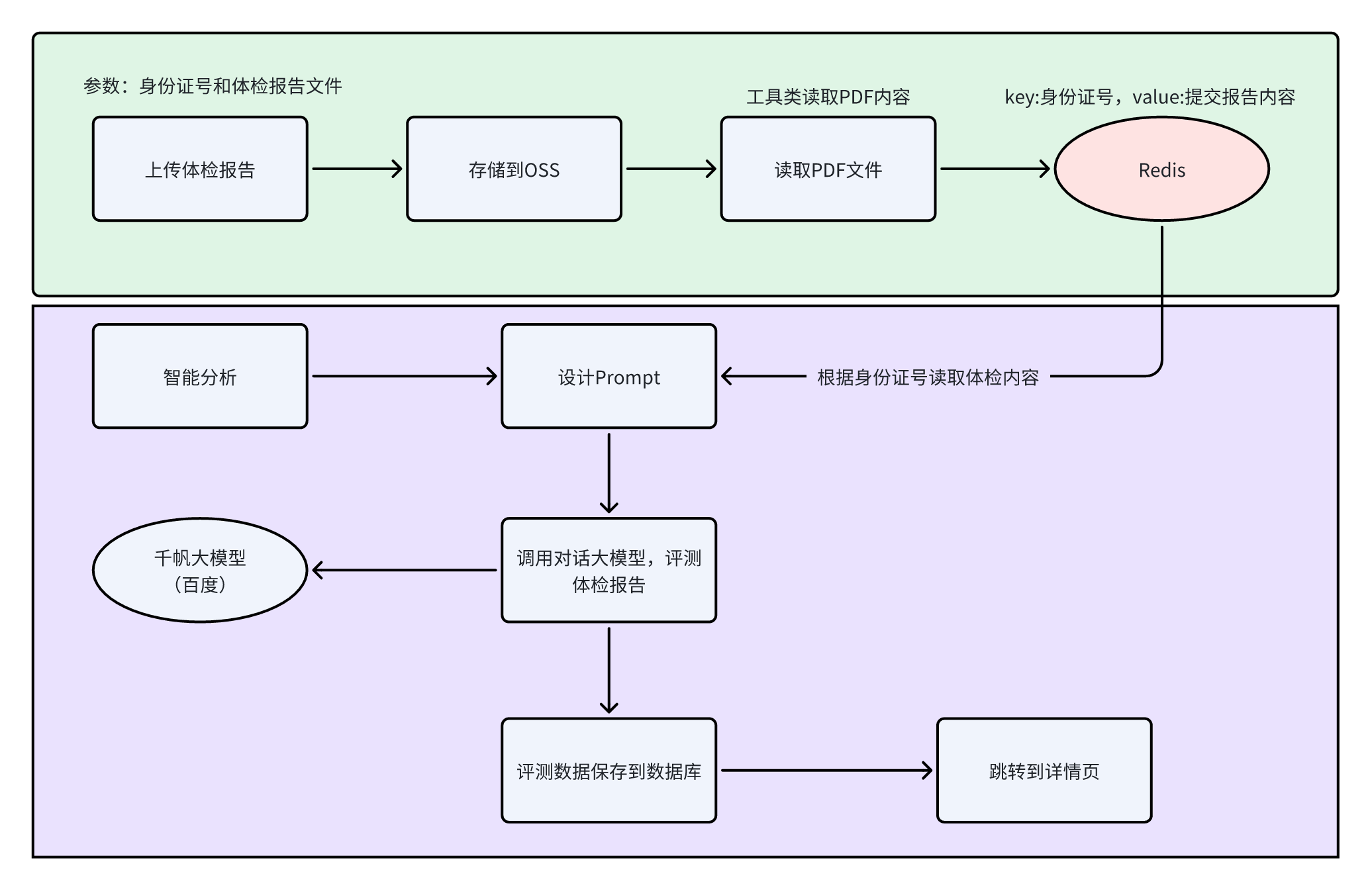
功能实现
文件需要上传到OSS中,所以需要在zzyl-nursing-platform模块中新增zzyl-oss的依赖
<dependency>
    <groupId>com.zzyl</groupId>
    <artifactId>zzyl-oss</artifactId>
</dependency>
在HealthAssessmentController中定义新的方法,如下:
@Autowired
private AliyunOSSOperator aliyunOSSOperator;

@Autowired
private RedisTemplate<String, String> redisTemplate;

/**
 * 通用上传请求(单个)
 */
@ApiOperation("上传体检报告")
@PostMapping("/upload")
public AjaxResult uploadFile(MultipartFile file, String idCardNo) throws Exception
{
    try {
        // 上传到OSS
        String url = aliyunOSSOperator.upload(file.getBytes(), file.getOriginalFilename());

        AjaxResult ajax = AjaxResult.success();
        ajax.put("url", url);
        ajax.put("fileName", url);
        // ajax.put("newFileName", url.substring(url.lastIndexOf("/")));
        ajax.put("originalFilename", file.getOriginalFilename());
        // PDF文件内容读取为字符串
        String content = PDFUtil.pdfToString(file.getInputStream());
        // 临时存储到redis中
        redisTemplate.opsForHash().put("healthReport", idCardNo, content);

        return ajax;
    } catch (Exception e) {
        return AjaxResult.error(e.getMessage());
    }
}
智能评测
抽取大模型调用工具
提前将调用大模型的代码抽取成一个工具方法
- 一些可变的参数,在application.yml文件中定义,在application.yml文件中定义内容,如下:
# 百度千帆大模型配置
baidu:
  qianfan:
    apiKey: xxxxxxxxx
    baseUrl: https://qianfan.baidubce.com/v2/
    model: ernie-4.0-8k
- 定义properties类来方便读取配置,在zzyl-common模块下新增一个类com.zzyl.common.ai.BaiduAIProperties
package com.zzyl.common.ai;

import lombok.Data;
import org.springframework.boot.context.properties.ConfigurationProperties;
import org.springframework.context.annotation.Configuration;

@Data
@Configuration
@ConfigurationProperties(prefix = "baidu.qianfan")
public class BaiduAIProperties {
    private String apiKey;
    private String baseUrl;
    private String model;
}
- 参考之前集成千帆大模型的方式,在zzyl-common模块下新增一个类com.zzyl.common.ai.AIModelInvoker
package com.zzyl.common.ai;

import com.openai.client.OpenAIClient;
import com.openai.client.okhttp.OpenAIOkHttpClient;
import com.openai.models.ResponseFormatJsonObject;
import com.openai.models.chat.completions.ChatCompletion;
import com.openai.models.chat.completions.ChatCompletionCreateParams;
import lombok.extern.slf4j.Slf4j;
import org.springframework.beans.factory.annotation.Autowired;
import org.springframework.stereotype.Component;

@Component
@Slf4j
public class AIModelInvoker {
    @Autowired
    private BaiduAIProperties baiduAIProperties;

    public String qianfanInvoker(String prompt) {
        OpenAIClient client = OpenAIOkHttpClient.builder()
                .apiKey(baiduAIProperties.getApiKey())
                .baseUrl(baiduAIProperties.getBaseUrl())
                .build();

        ChatCompletionCreateParams params = ChatCompletionCreateParams.builder()
                .addUserMessage(prompt)
                .model(baiduAIProperties.getModel())
                .responseFormat(ChatCompletionCreateParams.ResponseFormat.ofJsonObject(ResponseFormatJsonObject.builder().build()))
                .build();

        ChatCompletion chatCompletion = client.chat().completions().create(params);
        return chatCompletion.choices().get(0).message().content().orElseGet(() -> "");
    }
}
修改控制层
找到HealthAssessmentController中的add方法的返回值类型为Long类型,用来接收Service层方法返回的主键id
/**
 * 新增健康评估
 */
@ApiOperation("新增健康评估")
@PreAuthorize("@ss.hasPermi('nursing:healthAssessment:add')")
@Log(title = "健康评估", businessType = BusinessType.INSERT)
@PostMapping
public AjaxResult add(@RequestBody @ApiParam("新增的健康评估对象") HealthAssessment healthAssessment)
{
    Long id = healthAssessmentService.insertHealthAssessment(healthAssessment);
    return success(id);
}
修改业务层
- 修改IHealthAssessmentService中的insertHealthAssessment方法,把返回值类型替换为Long
/**
 * 新增健康评估
 *
 * @param healthAssessment 健康评估
 * @return 结果
 */
public Long insertHealthAssessment(HealthAssessment healthAssessment);
- 实现类中的返回值类型也要改为Long,并且按照思路来编写业务代码
最终代码如下:
@Autowired
private RedisTemplate<String, String> redisTemplate;

@Autowired
private AIModelInvoker aiModelInvoker;

/**
 * 新增健康评估
 *
 * @param healthAssessment 健康评估
 * @return 结果
 */
@Override
public Long insertHealthAssessment(HealthAssessment healthAssessment)
{
    // 1.设计Prompt提示词(需要从Redis中读取当前身份证号对应的体检报告)
    String prompt = getPrompt(healthAssessment.getIdCard());

    // 2.调用百度千帆大模型,分析体检报告,获取分析结果
    String qianfanResult = aiModelInvoker.qianfanInvoker(prompt);

    // 3.将分析结果保存到数据库中,并返回保存的这条记录的id
    // 将大模型返回的字符串解析为对象,方便取数据
    HealthReportVo healthReportVo = JSON.parseObject(qianfanResult, HealthReportVo.class);

    return saveHealthAssessment(healthReportVo, healthAssessment);
}

/**
 * 保存大模型返回的结果和前端传递的老人信息到数据库
 * @param healthReportVo        千帆大模型返回的结果
 * @param healthAssessment      老人基本信息
 * @return  记录的id
 */
private Long saveHealthAssessment(HealthReportVo healthReportVo, HealthAssessment healthAssessment) {
    // 老人身份证号
    String idCard = healthAssessment.getIdCard();

    healthAssessment.setBirthDate(IDCardUtils.getBirthDateByIdCard(idCard));
    healthAssessment.setAge(IDCardUtils.getAgeByIdCard(idCard));
    healthAssessment.setGender(IDCardUtils.getGenderFromIdCard(idCard));

    // 健康评分
    double healthScore = healthReportVo.getHealthAssessment().getHealthIndex();
    healthAssessment.setHealthScore(String.valueOf(healthScore));

    // 风险等级
    healthAssessment.setRiskLevel(healthReportVo.getHealthAssessment().getRiskLevel());

    // 通过健康评分判断是否建议入住
    healthAssessment.setSuggestionForAdmission(healthScore >= 60 ? 0 : 1);

    // 通过健康评分计算一个推荐的护理等级
    String nursingLevelName = getLevelNameByHealthScore(healthScore);
    healthAssessment.setNursingLevelName(nursingLevelName);

    // 统一先设置未入住
    healthAssessment.setAdmissionStatus(1);

    // 总检日期
    healthAssessment.setTotalCheckDate(healthReportVo.getTotalCheckDate());

    healthAssessment.setAssessmentTime(LocalDateTime.now());

    // 报告总结
    healthAssessment.setReportSummary(healthReportVo.getSummarize());

    // 疾病风险分布
    healthAssessment.setDiseaseRisk(JSON.toJSONString(healthReportVo.getRiskDistribution()));

    // 异常分析
    healthAssessment.setAbnormalAnalysis(JSON.toJSONString(healthReportVo.getAbnormalData()));

    // 八大系统评分
    healthAssessment.setSystemScore(JSON.toJSONString(healthReportVo.getSystemScore()));

    healthAssessmentMapper.insert(healthAssessment);
    return healthAssessment.getId();
}

private String getLevelNameByHealthScore(double healthScore) {
    if (healthScore > 100 || healthScore < 0) {
        throw new BaseException("健康评分值不合法");
    }

    if (healthScore >= 90) {
        return "四级护理等级";
    } else if (healthScore >= 80) {
        return "三级护理等级";
    } else if (healthScore >= 70) {
        return "二级护理等级";
    } else if (healthScore >= 60) {
        return "一级护理等级";
    } else {
        return "特级护理等级";
    }
}

/**
 * 获取Prompt提示词
 * @param idCard    身份证号
 * @return  提示词
 */
private String getPrompt(String idCard) {
    // 获取文件中的内容
    String content = (String) redisTemplate.opsForHash().get("healthReport", idCard);

    // 判断是否为空
    if (StringUtils.isEmpty(content)) {
        throw new BaseException("文件提取内容失败,请重新上传提交报告");
    }

    String prompt = "请以一个专业医生的视角来分析这份体检报告,报告中包含了一些异常数据,我需要您对这些数据进行解读,并给出相应的健康建议。\n" +
            "体检内容如下:\n" +
            content + "    \n" +
            "\n" +
            "要求:\n" +
            "1. 提取体检报告中的“总检日期”;\n" +
            "2. 通过临床医学、疾病风险评估模型和数据智能分析,给该用户的风险等级和健康指数给出结果。风险等级分为:健康、提示、风险、危险、严重危险。健康指数范围为0至100分;\n" +
            "3. 根据用户身体各项指标数据,详细说明该用户各项风险等级的占比是多少,最多保留两位小数。结论格式:该用户健康占比20.00%,提示占比20.00%,风险占比20%,危险占比20%,严重危险占比20%;\n" +
            "4. 对于体检报告中的异常数据,请列出(异常数据的结论、体检项目名称、检查结果、参考值、单位、异常解读、建议)这7字段。解读异常数据,解决这些数据可能代表的健康问题或风险。分析可能的原因,包括但不限于生活习惯、饮食习惯、遗传因素等。基于这些异常数据和可能的原因,请给出具体的健康建议,包括饮食调整、运动建议、生活方式改变以及是否需要进一步检查或治疗等。\n" +
            "结论格式:异常数据的结论:肥胖,体检项目名称:体重指数BMI,检查结果:29.2,参考值>24,单位:-。异常解读:体重超标包括超重与肥胖。体重指数(BMI)=体重(kg)/身⾼(m)的平⽅,BMI≥24为超重,BMI≥28为肥胖;男性腰围≥90cm和⼥性腰围≥85cm为腹型肥胖。体重超标是⼀种由多因素(如遗传、进⻝油脂较多、运动少、疾病等)引起的慢性代谢性疾病,尤其是肥胖,已经被世界卫⽣组织列为导致疾病负担的⼗⼤危险因素之⼀。AI建议:采取综合措施预防和控制体重,积极改变⽣活⽅式,宜低脂、低糖、⾼纤维素膳⻝,多⻝果蔬及菌藻类⻝物,增加有氧运动。若有相关疾病(如⾎脂异常、⾼⾎压、糖尿病等)应积极治疗。\n" +
            "5. 根据这个体检报告的内容,分别给人体的8大系统打分,每项满分为100分,8大系统分别为:呼吸系统、消化系统、内分泌系统、免疫系统、循环系统、泌尿系统、运动系统、感官系统\n" +
            "6. 给体检报告做一个总结,总结格式:体检报告中尿蛋⽩、癌胚抗原、⾎沉、空腹⾎糖、总胆固醇、⽢油三酯、低密度脂蛋⽩胆固醇、⾎清载脂蛋⽩B、动脉硬化指数、⽩细胞、平均红细胞体积、平均⾎红蛋⽩共12项指标提示异常,尿液常规共1项指标处于临界值,⾎脂、⾎液常规、尿液常规、糖类抗原、⾎清酶类等共43项指标提示正常,综合这些临床指标和数据分析:肾脏、肝胆、⼼脑⾎管存在隐患,其中⼼脑⾎管有“⾼危”⻛险;肾脏部位有“中危”⻛险;肝胆部位有“低危”⻛险。\n" +
            "\n" +
            "输出要求:\n" +
            "最后,将以上结果输出为纯JSON格式,不要包含其他的文字说明,也不要出现Markdown语法相关的文字,所有的返回结果都是json,详细格式如下:\n" +
            "\n" +
            "{\n" +
            "  \"totalCheckDate\": \"YYYY-MM-DD\",\n" +
            "  \"healthAssessment\": {\n" +
            "    \"riskLevel\": \"healthy/caution/risk/danger/severeDanger\",\n" +
            "    \"healthIndex\": XX.XX\n" +
            "  },\n" +
            "  \"riskDistribution\": {\n" +
            "    \"healthy\": XX.XX,\n" +
            "    \"caution\": XX.XX,\n" +
            "    \"risk\": XX.XX,\n" +
            "    \"danger\": XX.XX,\n" +
            "    \"severeDanger\": XX.XX\n" +
            "  },\n" +
            "  \"abnormalData\": [\n" +
            "    {\n" +
            "      \"conclusion\": \"异常数据的结论\",\n" +
            "      \"examinationItem\": \"体检项目名称\",\n" +
            "      \"result\": \"检查结果\",\n" +
            "      \"referenceValue\": \"参考值\",\n" +
            "      \"unit\": \"单位\",\n" +
            "      \"interpret\":\"对于异常的结论进一步详细的说明\",\n" +
            "      \"advice\":\"针对于这一项的异常,给出一些健康的建议\"\n" +
            "    }\n" +
            "  ],\n" +
            "  \"systemScore\": {\n" +
            "    \"breathingSystem\": XX,\n" +
            "    \"digestiveSystem\": XX,\n" +
            "    \"endocrineSystem\": XX,\n" +
            "    \"immuneSystem\": XX,\n" +
            "    \"circulatorySystem\": XX,\n" +
            "    \"urinarySystem\": XX,\n" +
            "    \"motionSystem\": XX,\n" +
            "    \"senseSystem\": XX\n" +
            "  },\n" +
            "  \"summarize\": \"体检报告的总结\"\n" +
            "}";
    return prompt;
}
相关的Vo类可以在资料中获取,或者自行根据结果进行编辑
智能检测
产品数据准备
根据IOT产品设备管理的教程,创建两款产品,用于后续的使用
1号产品:烟雾报警器
| 属性名称 | 属性描述 | 数据类型 | 访问权限 | 取值范围 |
|---|---|---|---|---|
| CurrentHumidity | 湿度 | int | 读写 | 0~100 |
| IndoorTemperature | 温度 | int | 读写 | -40~80 |
| SmokeSensorState | 烟雾监测状态 | bool(布尔) | 读写 | 布尔值:0:正常1:检测到烟雾 |
二号产品:睡眠监测带
| 属性名称 | 属性描述 | 数据类型 | 访问权限 | 取值范围 |
|---|---|---|---|---|
| BedTime | 离床时间 | dateTime(日期时间) | 读写 | 300 |
| BedExitCount | 离床次数 | int | 读写 | 0~10 |
| SleepPhaseState | 睡眠状态 | int | 读写 | 0~2 |
| HeartRate | 心率 | int | 读写 | 1~200 |
| RespiratoryRate | 呼吸率 | int | 读写 | 1~150 |
设备管理
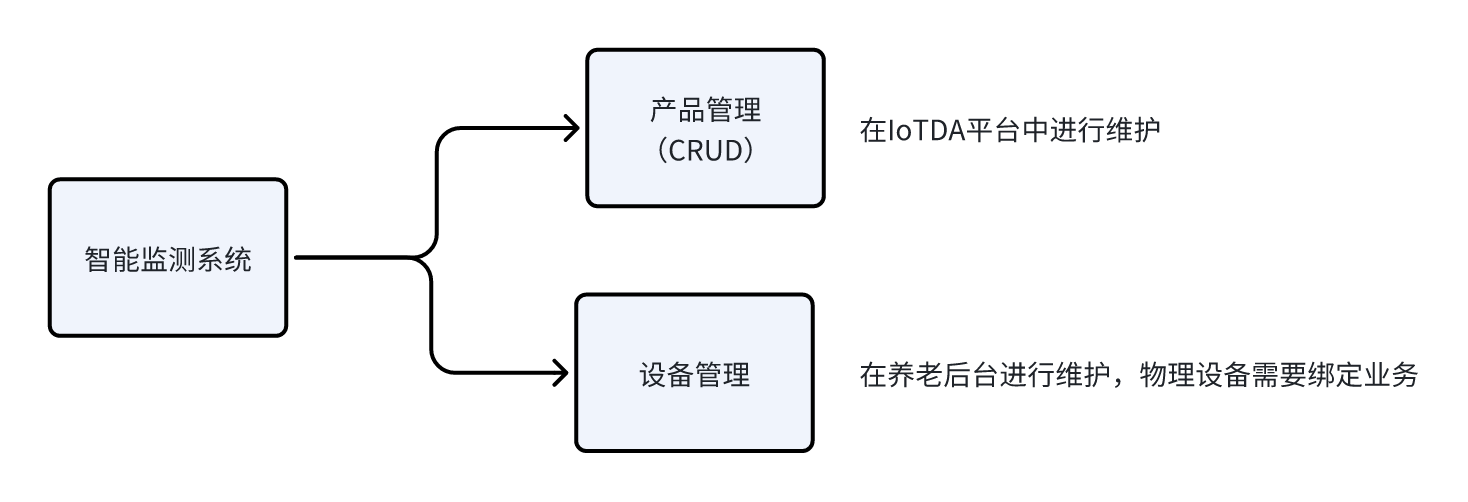
熟悉了IOT平台的基本概念以及基本操作后,可以来分析后台系统的功能需求。在后台管理系统中,需要自己维护设备,不需要创建产品,因为产品直接在物联网平台创建添加即可
需要单独维护设备的原因是,设备需要跟养老院的老人或者位置进行绑定,才能做到精准的监控
比如:
- 烟雾报警器需要绑定到某个房间
- 智能手表需要绑定某个老人
需求分析
设备管理列表页
找到智能监测->设备管理
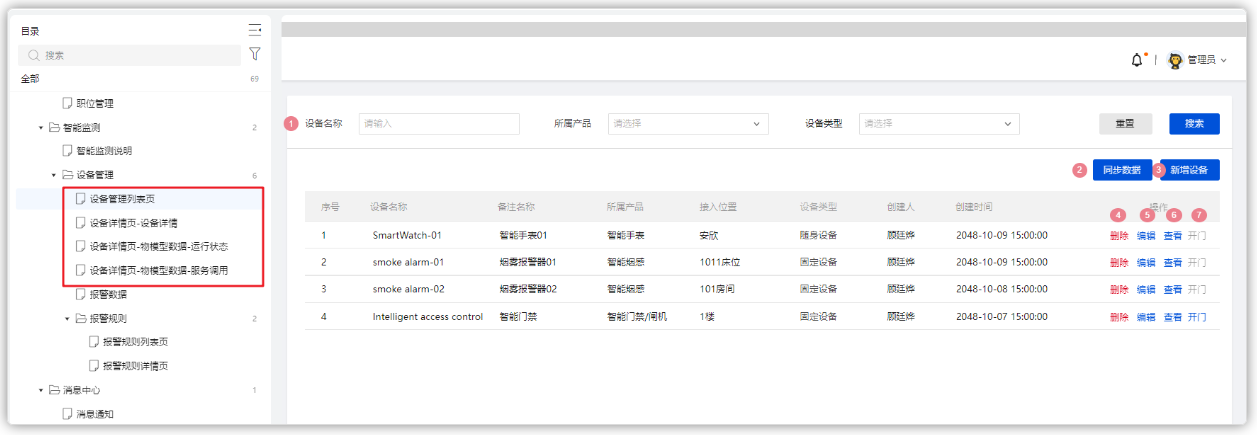
- 搜索:可以根据设备名称模糊查询,根据产品和设备类型精确查询
- 所属产品=【Iot平台-产品管理-产品名称】
- 设备类型=随身设备、固定设备;
- 同步数据:点击【同步数据】后,获取华为云产品数据
- 新增设备:
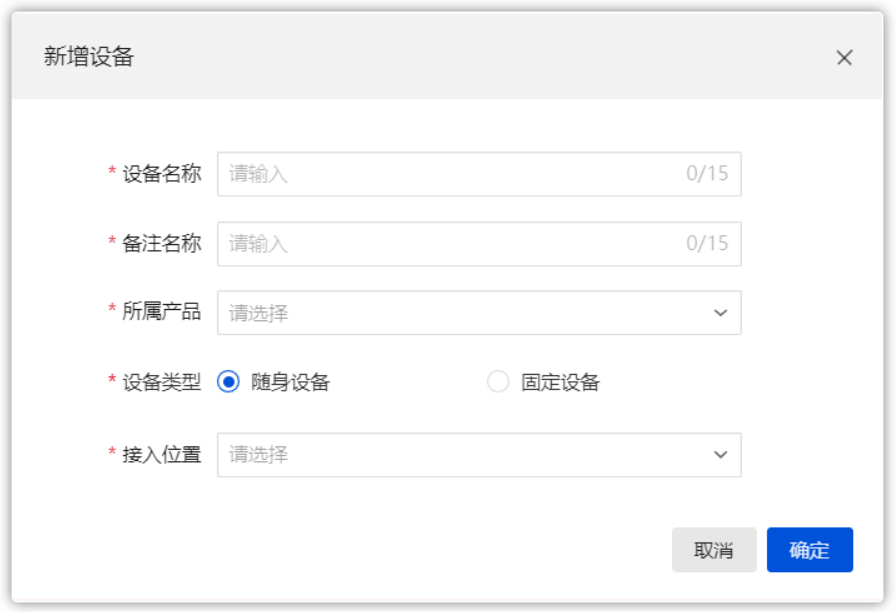
- 随身设备:表示绑定在老人身上的设备,如手表;
- 固定设备:表示绑定在固定位置的设备,如睡眠监测带、门磁、摄像头;
- 接入位置为随身设备=入退管理->入住管理->入住办理->老人姓名->当前已入住的老人;
- 接入位置为固定设备=楼层、房间、床位 = 在住管理->床位管理->床位房型;
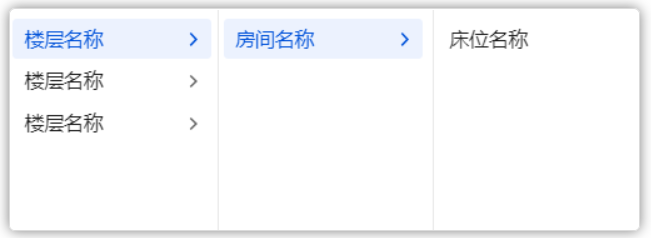
- 删除:将该条设备从列表中移除。老人与设备自动解绑
- 编辑:先查看该条设备,然后再修改设备数据
- 查看:跳转到设备详情页
-
开门
-
当所属产品中包含“门禁”字眼;操作中【开门】可点击,若不包含,【开门】按钮置灰;
- 点击【开门】,若输出参数值是0,则显示开门失败,若参数是1,则显示开门成功;
设备详情
当在列表点击查看按钮之后,可以查看设备详情页,如下效果
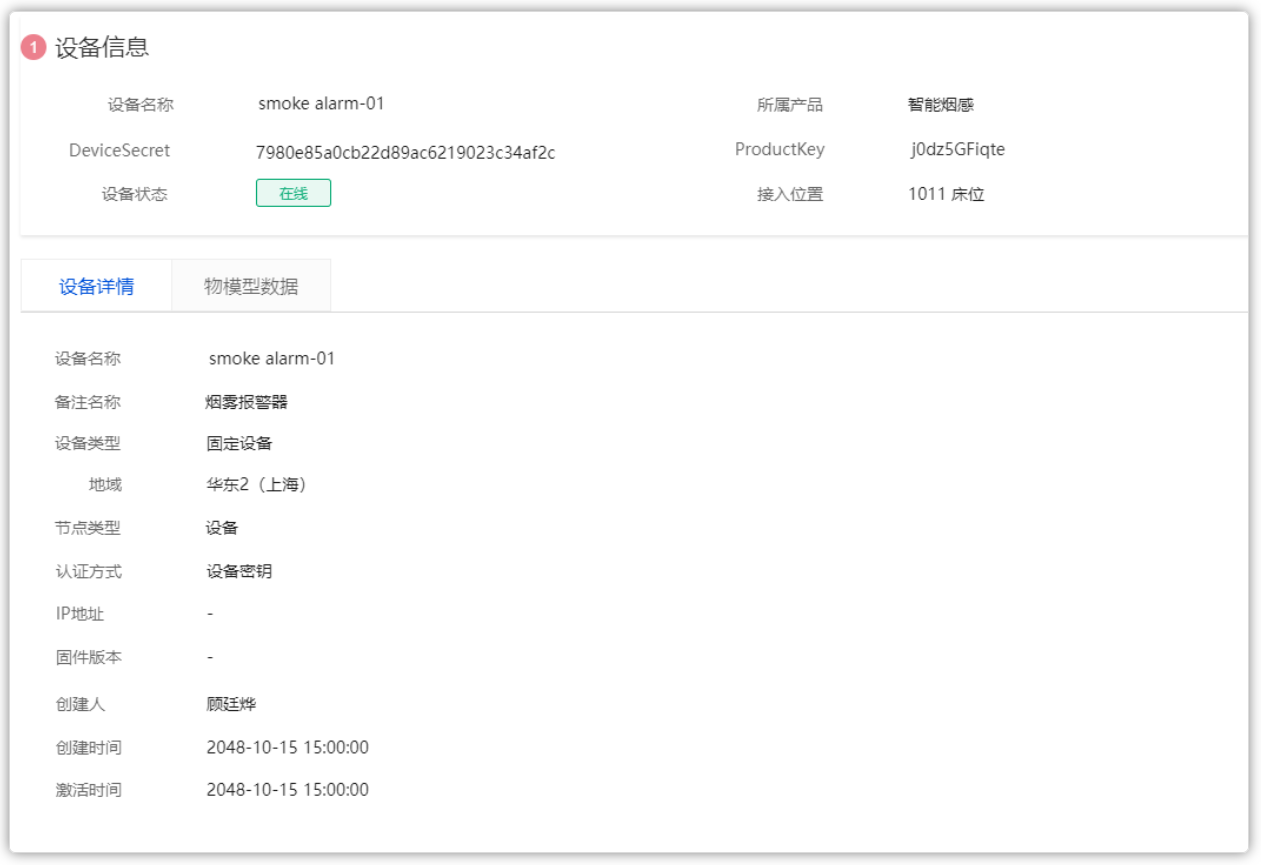
物模型数据-运行状态
点击【物模型数据】,查询物模型运行状态,列表中的数据为上行指令数据;
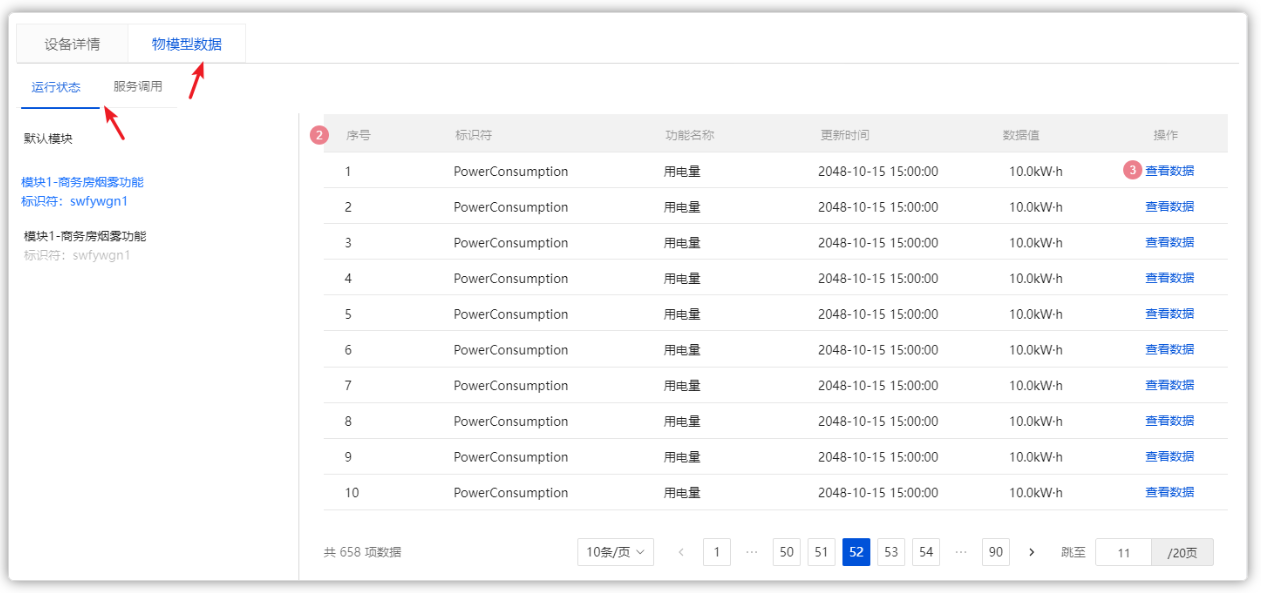
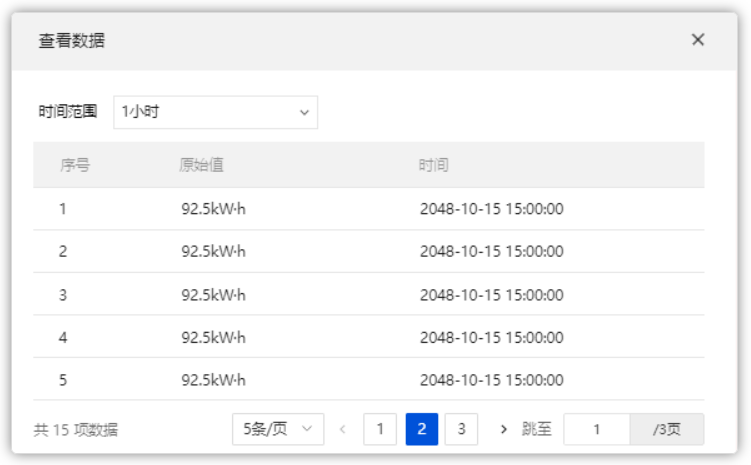
当点击了【查看数据】,出【查看数据】弹窗;
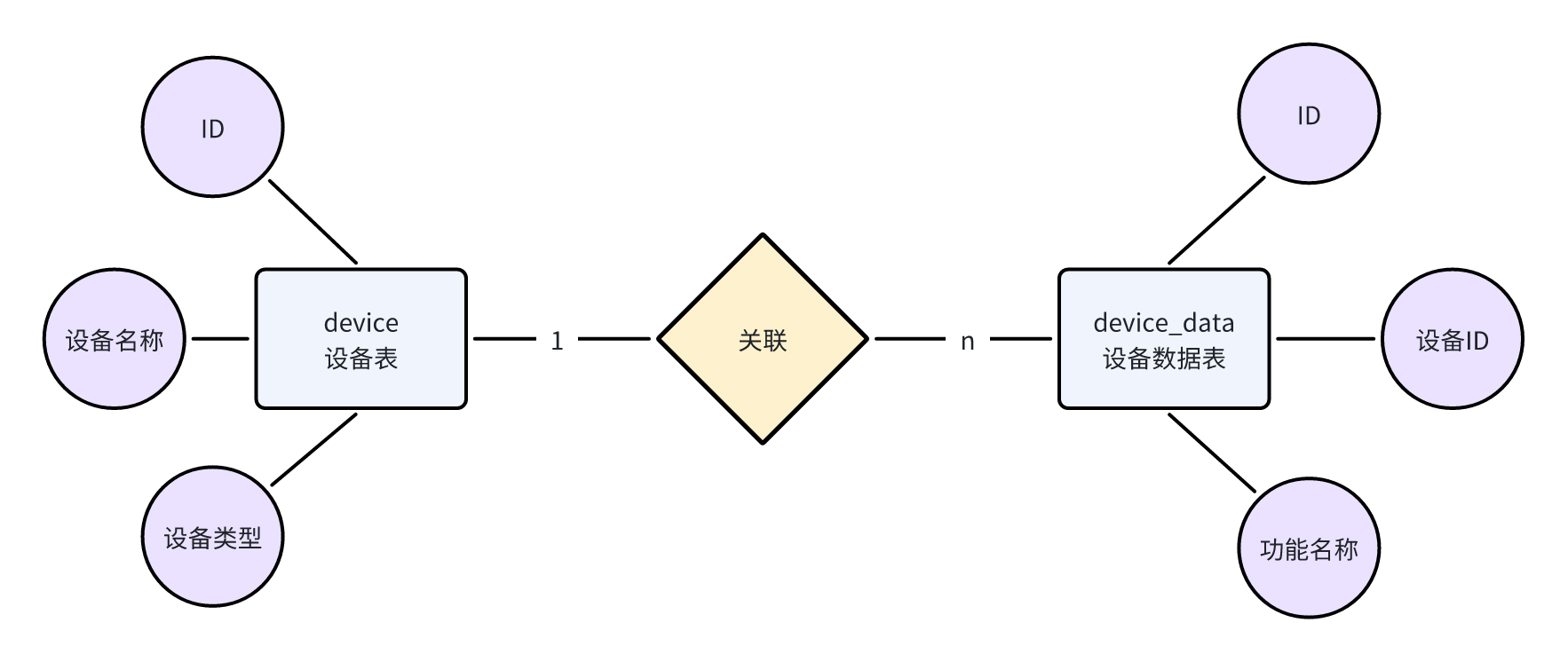
表结构说明
因为需要在本地维护设备数据,所以需要创建设备表;设备上报的数据也要存储,还需要创建设备数据表,如下:
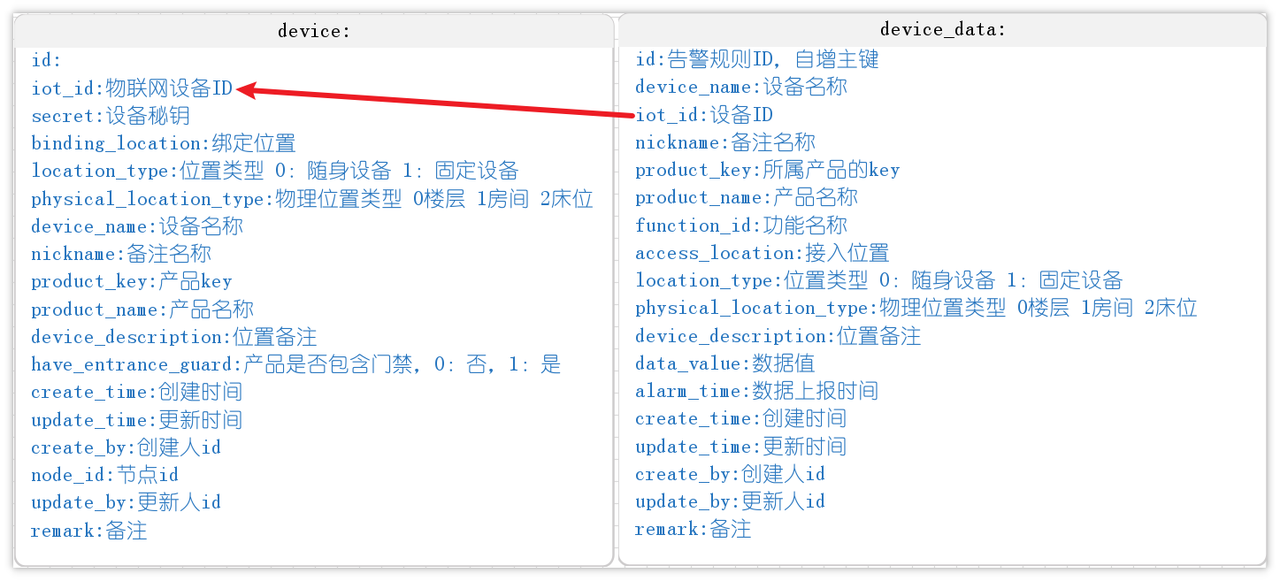
详细表字段说明:
sql表结构:导入本章资料中的sql脚本,里面包含了智能监测模块的所有需要的表
接口分析
接口列表
依据刚才的需求分析,在养老系统中需要维护设备数据,咱们需要开发以下接口
- 从物联网平台同步产品列表
- 查询所有产品列表
- 注册设备
- 分页查询设备列表
- 查询设备详细数据
- 查看设备上报的数据
- 修改设备备注名称
- 删除设备
- 分页查询设备服务调用数据(暂不开发,等接收到数据之后再完成)
接口文档
接口文档参考:智能监测-接口文档
接口文档中的设备管理部分
IOT接口对接
刚才分析了功能中涉及到的接口,其中关于设备的维护(新增、删除、修改、查询),咱们都需要在IOT平台中去操作,同时也需要在本地保存一份,那为什么要保存两份呢?
IOT平台中只是维护了基础的设备信息,并没有跟业务数据进行绑定,比如,设备属于哪个位置,绑定了哪个老人
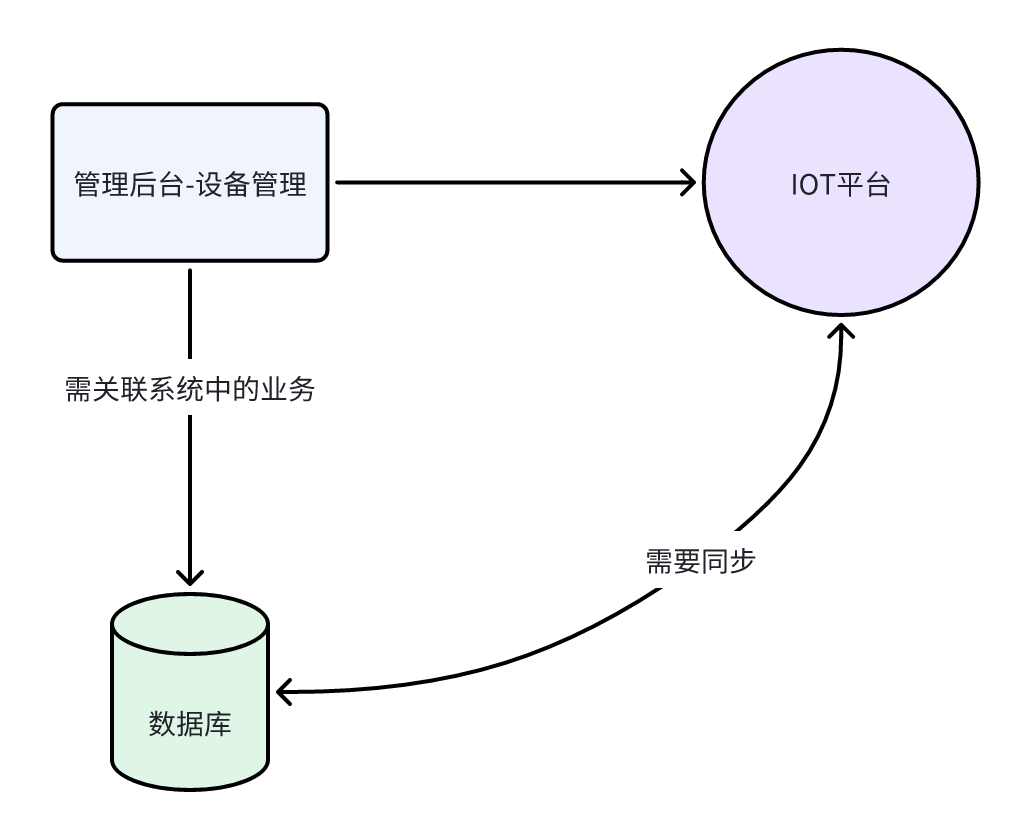
只有设备绑定了业务数据,等后面采集数据之后,才能有针对性的进行排查问题。
所以,在接口开发过程中,需要调用远程的接口维护设备,同时也需要在本地进行数据操作。关于远程接口,IOT平台给提供了丰富的API,利于开发人员操作
API列表
先查阅IOT官方提供API列表:API列表
目前业务中所需要的接口文档如下:
环境集成
IOT平台已经提供了完整的SDK,可以把它们集成到项目中进行接口的调用,集成方式:官方说明
在zzyl-framework模块导入依赖:
<dependency>
    <groupId>com.huaweicloud.sdk</groupId>
    <artifactId>huaweicloud-sdk-core</artifactId>
    <version>3.1.76</version>
</dependency>
<dependency>
    <groupId>com.huaweicloud.sdk</groupId>
    <artifactId>huaweicloud-sdk-iotda</artifactId>
    <version>3.1.76</version>
</dependency>
在zzyl-admin模块中的application-dev.yml文件中添加关于IOT的配置如下:
huaweicloud:
  ak: UTVLYVJKFVGYVEFFWG
  sk: WkEWqfwZoFlLwbR5Kq5NmWTLmj71WhRXe
  #如果是上海一,请填写"cn-east-3";如果是北京四,请填写"cn-north-4";
  regionId: cn-east-3
  endpoint: 38e7abf.st1.iotda-app.cn-east-3.myhuaweicloud.com
  projectId: 57ee9b4c827a44cb94319a077f0fe7cb
  #amqp相关配置 下一章课程接收设备数据使用
  host: 38e7abedbf.st1.iotda-app.cn-east-3.myhuaweicloud.com
  accessKey: S25ZeTC5
  accessCode: a4fKpE5zbk0nbGNJU0d1bKkJNRZxQzlp
  queueName: DefaultQueue   #默认无需改动
AK/SK认证:通过AK(Access Key ID)/SK(Secret Access Key)加密调用请求
- ak和sk是华为云身份凭证,需要新增一个访问密钥,操作如下:
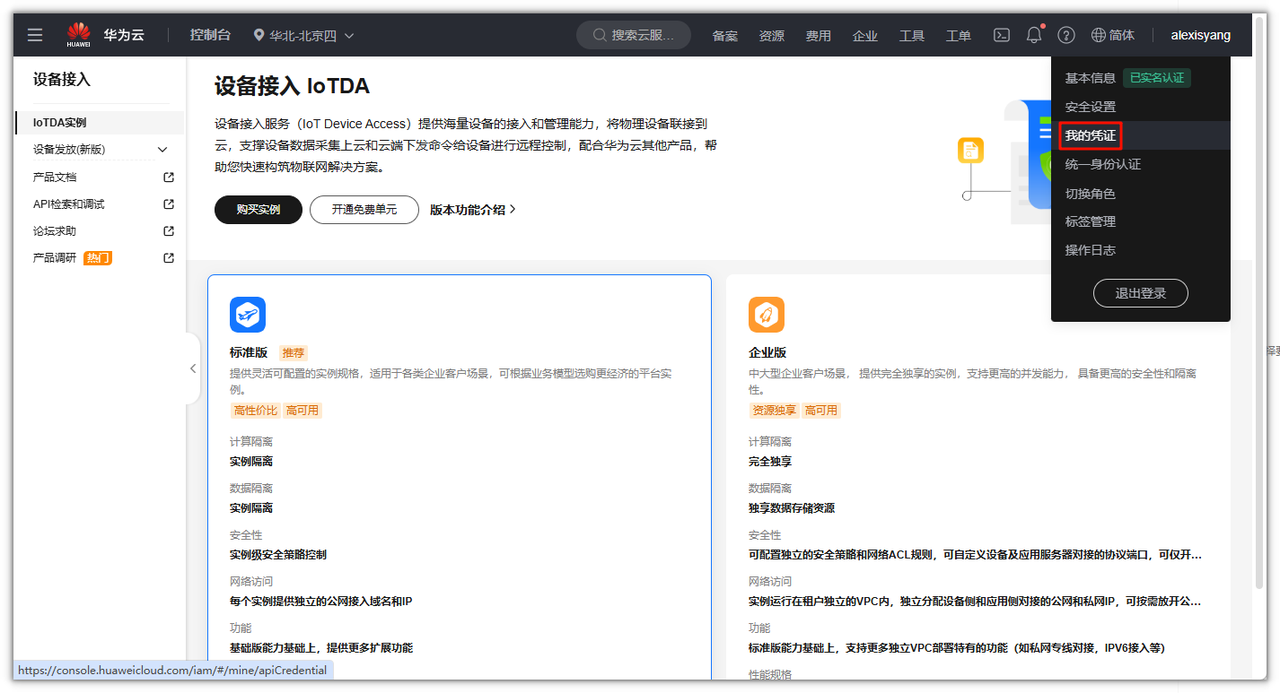
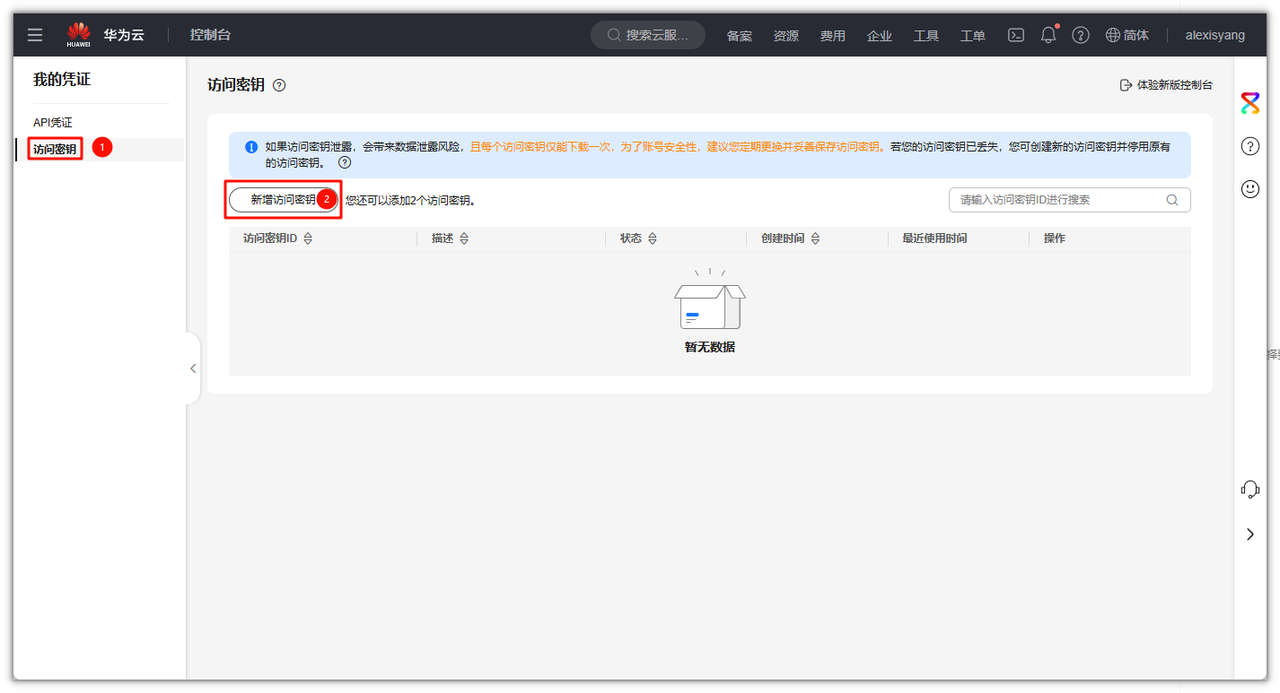
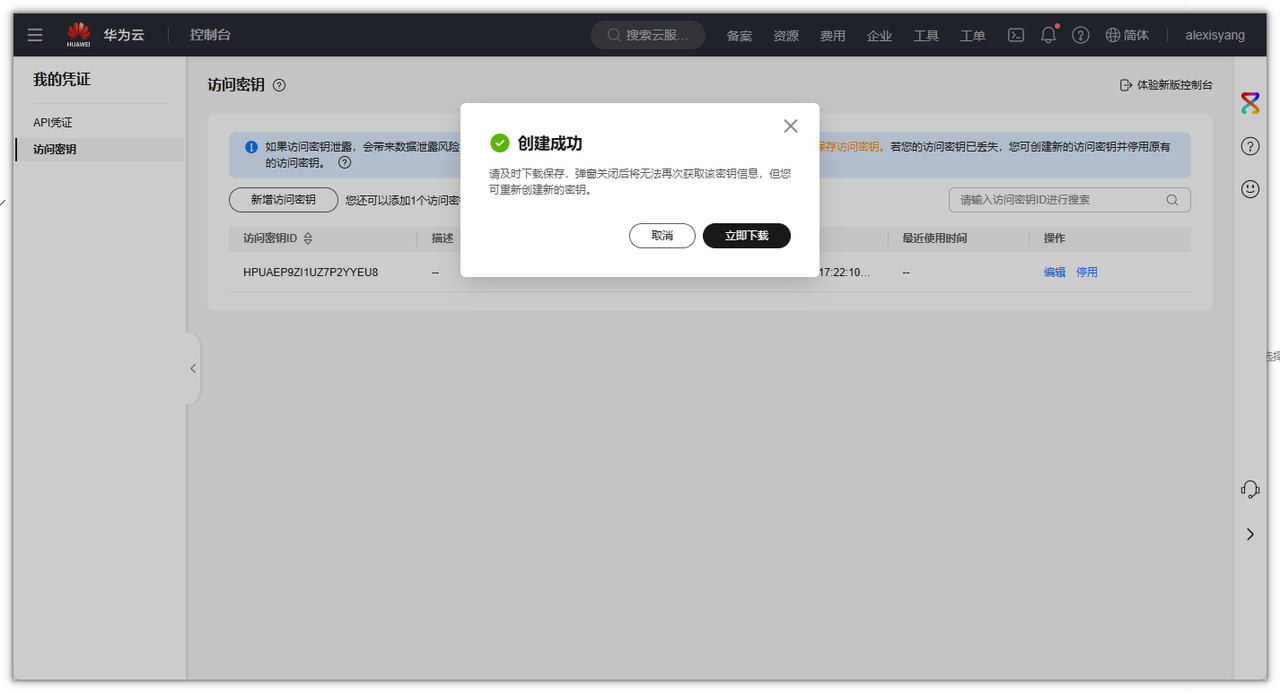
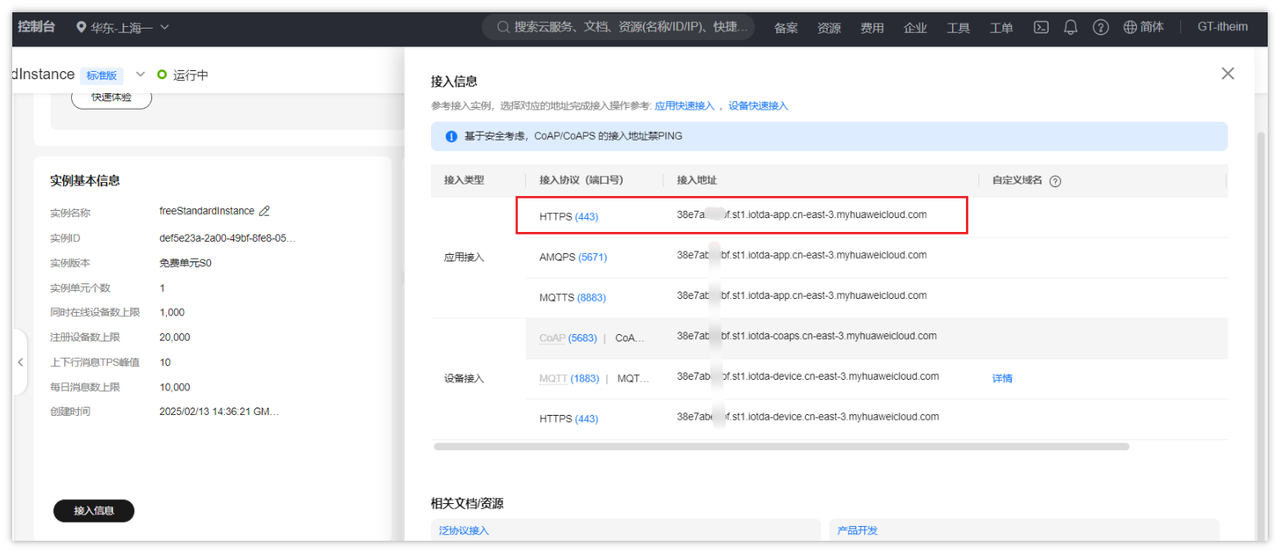
- endpoint 请在控制台的”总览”界面的”接入信息”中查看“应用侧”的https接入地址。
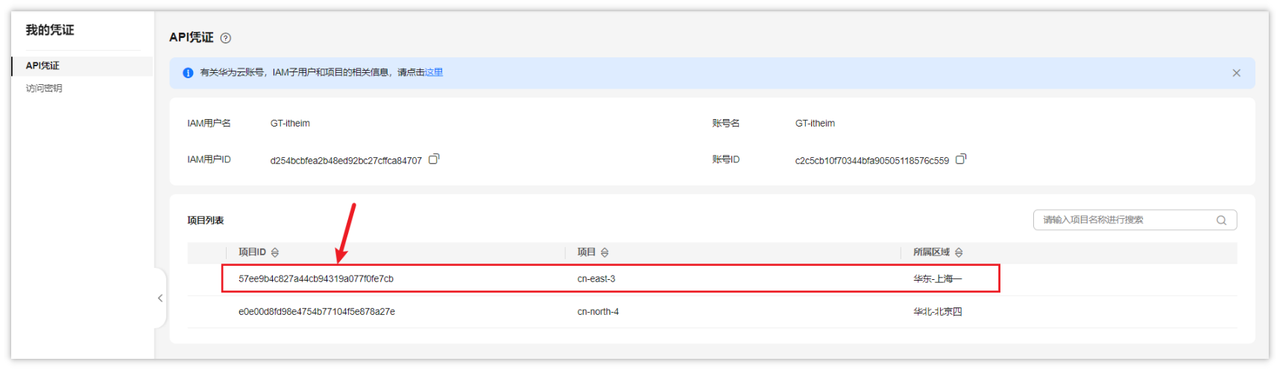
- projectId项目ID,获取项目ID
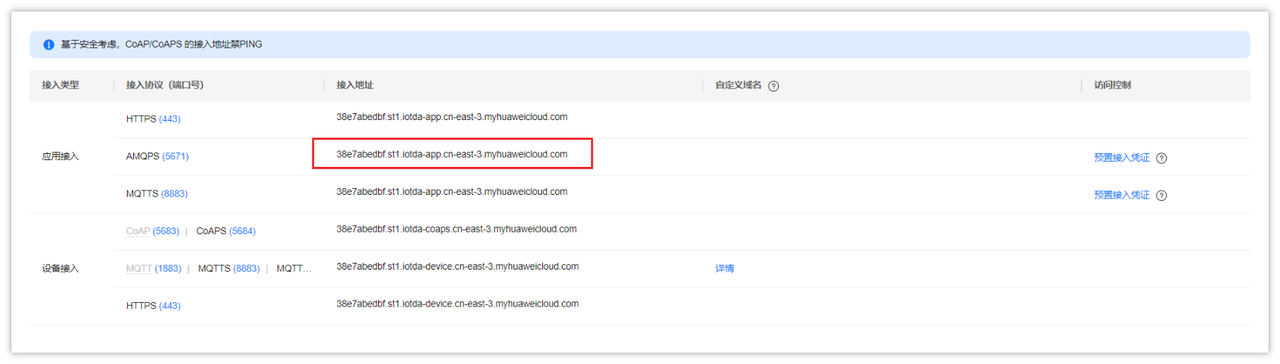
- host是AMQP访问的地址,获取方式如下:
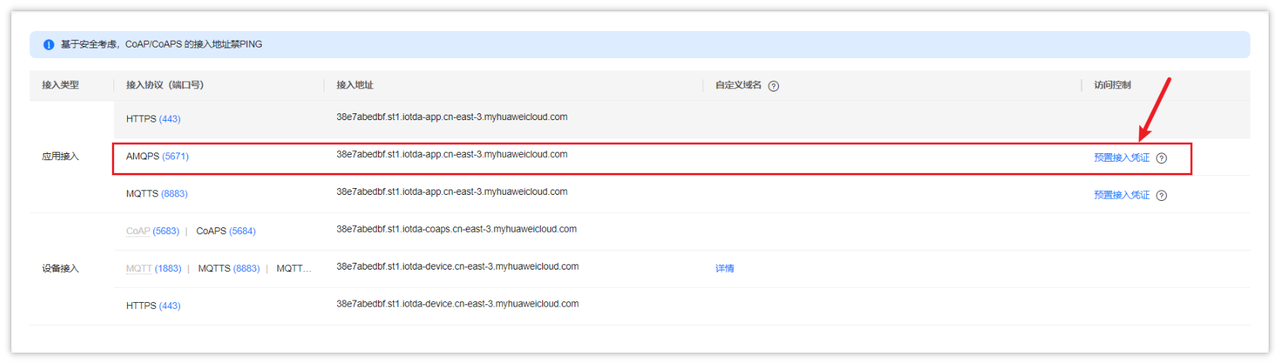
- accessKey和accessCode从预置接入凭证获取
- 在zzyl-framework中新增HuaWeiIotConfigProperties 来读取配置文件
package com.zzyl.framework.config.properties;

import lombok.Data;
import lombok.NoArgsConstructor;
import org.springframework.boot.context.properties.ConfigurationProperties;
import org.springframework.context.annotation.Configuration;

import java.util.Map;

/**
 * @author itheima
 */

@Data
@NoArgsConstructor
@Configuration
@ConfigurationProperties(prefix = "huaweicloud")
public class HuaWeiIotConfigProperties {

    /**
     * 访问Key
     */
    private String ak;

    /**
     * 访问秘钥
     */
    private String sk;

    /**
     * 区域id
     */
    private String regionId;

    /**
     * 应用侧https接入地址
     */
    private String endpoint;

    /**
     * 项目id
     */
    private String projectId;

    /**
     * 应用侧amqp接入地址
     */
    private String host;

    /**
     * amqp连接端口
     */
    private int port = 5671;

    /**
     * amqp接入凭证键值
     */
    private String accessKey;

    /**
     * amqp接入凭证密钥
     */
    private String accessCode;

    // 指定单个进程启动的连接数
    // 单个连接消费速率有限,请参考使用限制,最大64个连接
    // 连接数和消费速率及rebalance相关,建议每500QPS增加一个连接
    //可根据实际情况自由调节,目前测试和正式环境资源有限,限制更改为4
    private int connectionCount = 4;

    /**
     * 队列名称
     */
    private String queueName;

    /**
     * 开门命令所属服务id
     */
    private String smartDoorServiceId;

    /**
     * 开门记录属性
     */
    private String doorOpenPropertyName;

    /**
     * 开门命令
     */
    private String doorOpenCommandName;

    /**
     * 设置临时密码命令
     */
    private String passwordSetCommandName;

    /**
     * 仅支持true
     */
    private boolean useSsl = true;

    /**
     * IoTDA仅支持default
     */
    private String vhost = "default";

    /**
     * IoTDA仅支持PLAIN
     */
    private String saslMechanisms = "PLAIN";

    /**
     * true: SDK自动ACK(默认)
     * false:收到消息后,需要手动调用message.acknowledge()
     */
    private boolean isAutoAcknowledge = true;

    /**
     * 重连时延(ms)
     */
    private long reconnectDelay = 3000L;

    /**
     * 最大重连时延(ms),随着重连次数增加重连时延逐渐增加
     */
    private long maxReconnectDelay = 30 * 1000L;

    /**
     * 最大重连次数,默认值-1,代表没有限制
     */
    private long maxReconnectAttempts = -1;

    /**
     * 空闲超时,对端在这个时间段内没有发送AMQP帧则会导致连接断开。默认值为30000。单位:毫秒。
     */
    private long idleTimeout = 30 * 1000L;

    /**
     * The values below control how many messages the remote peer can send to the client and be held in a pre-fetch buffer for each consumer instance.
     */
    private int queuePrefetch = 1000;

    /**
     * 扩展参数
     */
    private Map<String, String> extendedOptions;
}
- 在zzyl-framework中添加如下配置:
package com.zzyl.framework.config;

import com.huaweicloud.sdk.core.auth.BasicCredentials;
import com.huaweicloud.sdk.core.auth.ICredential;
import com.huaweicloud.sdk.core.region.Region;
import com.huaweicloud.sdk.iotda.v5.IoTDAClient;
import com.zzyl.framework.config.properties.HuaWeiIotConfigProperties;
import org.springframework.beans.factory.annotation.Autowired;
import org.springframework.context.annotation.Bean;
import org.springframework.context.annotation.Configuration;

@Configuration
public class IotClientConfig {

    @Autowired
    private HuaWeiIotConfigProperties huaWeiIotConfigProperties;

    @Bean
    public IoTDAClient huaWeiIotInstance() {
        ICredential auth = new BasicCredentials()
                .withAk(huaWeiIotConfigProperties.getAk())
                .withSk(huaWeiIotConfigProperties.getSk())
                // 标准版/企业版需要使用衍生算法,基础版请删除配置"withDerivedPredicate"
                .withDerivedPredicate(BasicCredentials.DEFAULT_DERIVED_PREDICATE)
                .withProjectId(huaWeiIotConfigProperties.getProjectId());

        return IoTDAClient.newBuilder()
                .withCredential(auth)
                // 标准版/企业版:需自行创建Region对象,基础版:请使用IoTDARegion的region对象,如"withRegion(IoTDARegion.CN_NORTH_4)"
                .withRegion(new Region(huaWeiIotConfigProperties.getRegionId(), huaWeiIotConfigProperties.getEndpoint()))
                // .withRegion(IoTDARegion.CN_NORTH_4)
                .build();
    }
}
测试,在zzyl-admin模块下创建单元测试,查询产品列表,接口说明
详细代码如下:
package com.zzyl.test;

import com.huaweicloud.sdk.iotda.v5.IoTDAClient;
import com.huaweicloud.sdk.iotda.v5.model.ListProductsRequest;
import com.huaweicloud.sdk.iotda.v5.model.ListProductsResponse;
import com.huaweicloud.sdk.iotda.v5.model.Page;
import com.huaweicloud.sdk.iotda.v5.model.ProductSummary;
import org.junit.jupiter.api.Test;
import org.springframework.beans.factory.annotation.Autowired;
import org.springframework.boot.test.context.SpringBootTest;

import java.util.List;

@SpringBootTest
public class IoTDeviceTest {

    @Autowired
    private IoTDAClient client;

    /**
     * 查询公共实例下的所有产品
     * @throws Exception
     */
    @Test
    public void selectProduceList() throws Exception {
        ListProductsRequest listProductsRequest = new ListProductsRequest();
        listProductsRequest.setLimit(50);
        ListProductsResponse response = client.listProducts(listProductsRequest);
        List<ProductSummary> products = response.getProducts();
        System.out.println(products);
    }

}
功能实现
基础代码准备
按照之前的思路,使用代码生成的功能来生成代码
- 包名:
com.zzyl.nursing - 模块名:
nursing
只拷贝后端代码到idea中
同时删除DeviceController中除了list方法之外的其他方法,如下代码
/**
 * 智能设备Controller
 *
 * @author ruoyi
 * @date 2025-06-20
 */
@RestController
@RequestMapping("/nursing/device")
@Api(tags = "智能设备的接口")
public class DeviceController extends BaseController
{
    @Autowired
    private IDeviceService deviceService;

    /**
     * 查询设备列表
     */
    @PreAuthorize("@ss.hasPermi('elder:device:list')")
    @GetMapping("/list")
    @ApiOperation("查询设备列表")
    public TableDataInfo list(Device device) {
        startPage();
        List<Device> list = deviceService.selectDeviceList(device);
        return getDataTable(list);
    }

}
从物联网平台同步产品列表
- 思路分析:
前四个接口,分别是:从物联网平台同步产品列表、查询所有产品列表、注册设备、分页查询设备列表,这四个接口都与产品有关系
- 物联网中的产品是在物理网平台进行维护的,设备是在养老项目后台管理并同步到物联网平台的
- 其中注册设备、分页查询设备列表都需要用到产品数据
由于以上两条原因,需要先让物联网平台的产品数据同步到后台,然后再被注册设备、分页查询设备列表这两个接口所引用
以下就是物联网产品与养老后台同步的思路
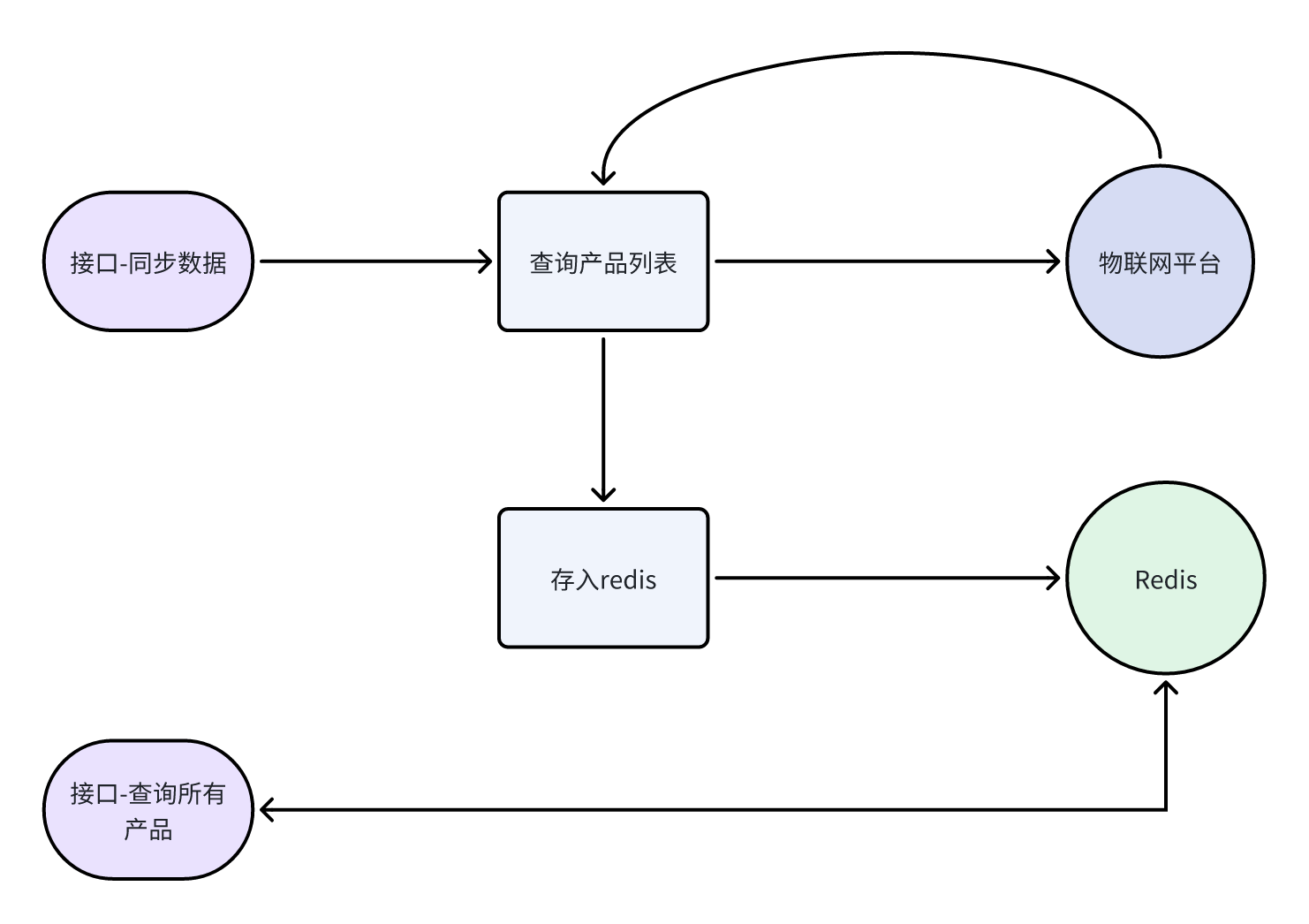
- 接口定义:
在DeviceController定义同步的方法,详细如下:
@PostMapping("/syncProductList")
@ApiOperation(value = "从物联网平台同步产品列表")
public AjaxResult syncProductList() {
    deviceService.syncProductList();
    return success();
}
- 业务层:
在IDeviceService类中定义同步的方法,如下:
/**
 * 从物联网平台同步产品列表
 */
void syncProductList();
实现类的方法:
@Autowired
private RedisTemplate<String, String> redisTemplate;

@Autowired
private IoTDAClient client;

/**
 * 同步产品列表
 */
@Override
public void syncProductList() {
    // 请求参数
    ListProductsRequest listProductsRequest = new ListProductsRequest();
    // 设置条数
    listProductsRequest.setLimit(50);
    // 发起请求
    ListProductsResponse response = client.listProducts(listProductsRequest);
    if(response.getHttpStatusCode() != 200) {
        throw new BaseException("物联网接口 - 查询产品,同步失败");
    }
    // 存储到redis
    redisTemplate.opsForValue().set(CacheConstants.IOT_ALL_PRODUCT_LIST, JSONUtil.toJsonStr(response.getProducts()));

}
其中的缓存常量,可以自己定义
public static final String IOT_ALL_PRODUCT_LIST= “iot:all_product_list”;
查询所有产品列表
- 接口定义:
在DeviceController中新增方法,如下:
@ApiOperation("查询所有产品列表")
@GetMapping("/allProduct")
public R<List<ProductVo>> allProduct() {
    List<ProductVo> list = deviceService.allProduct();
    return R.ok(list);
}
- 业务层:
在DeviceService中新增方法如下:
/**
 * 查询所有产品列表
 *
 * @return 产品列表
 */
List<ProductVo> allProduct();
ProductVo
package com.zzyl.nursing.vo;

import io.swagger.annotations.ApiModel;
import io.swagger.annotations.ApiModelProperty;
import lombok.Data;

/**
 * 产品信息响应模型
 *
 * @author itcast
 **/
@Data
@ApiModel("产品信息响应模型")
public class ProductVo {
    /**
     * 产品的ProductKey,物联网平台产品唯一标识
     */
    @ApiModelProperty("产品的ProductKey,物联网平台产品唯一标识")
    private String productId;

    /**
     * 产品名称
     */
    @ApiModelProperty("产品名称")
    private String name;
}
实现方法:
/**
 * 查询所有产品列表
 *
 * @return
 */
@Override
public List<ProductVo> allProduct() {
    // 从redis中查询数据
    String jsonStr = redisTemplate.opsForValue().get(CacheConstants.IOT_ALL_PRODUCT_LIST);
    // 如果数据为空,则返回一个空集合
    if(StringUtils.isEmpty(jsonStr)){
        return Collections.emptyList();
    }
    // 解析数据,并返回
    return JSONUtil.toList(jsonStr, ProductVo.class);
}
查询已经入住的老人列表
当新增设备的时候,如果选择的的随身设备,则会弹窗选择已经入住的老人,如下图
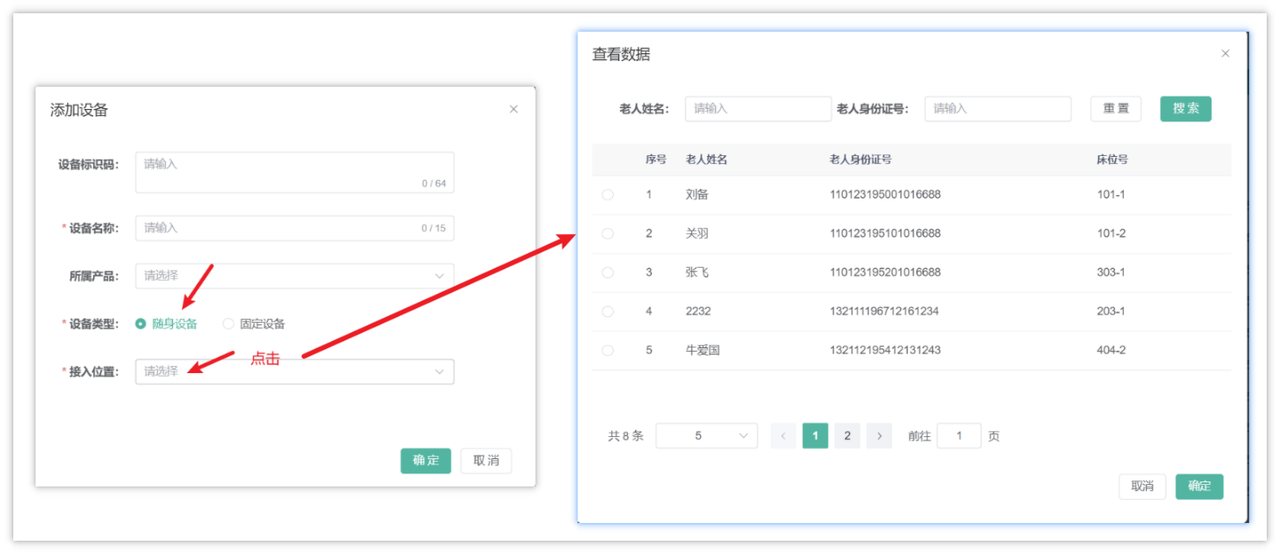
该接口已经在之前的代码生成中完成了
注册设备接口
- 思路分析:
整体思路如下:
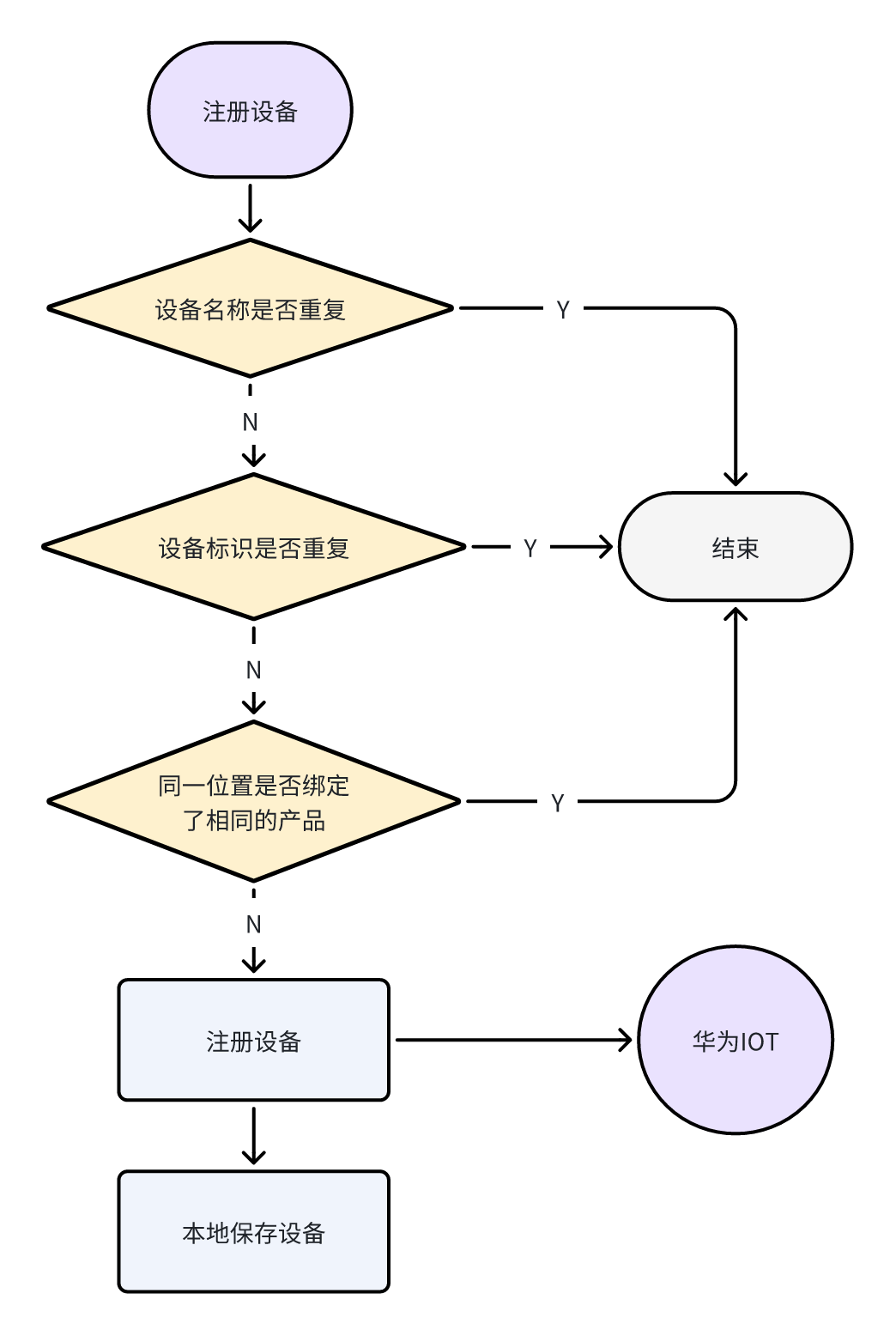
- 接口定义:
在DeviceController中新增方法,如下:
@PostMapping("/register")
@ApiOperation(value = "注册设备")
public AjaxResult registerDevice(@RequestBody DeviceDto deviceDto) {
    deviceService.registerDevice(deviceDto);
    return success();
}
基于接口文档,定义DeviceDto,代码如下:
package com.zzyl.nursing.dto;

import io.swagger.annotations.ApiModel;
import io.swagger.annotations.ApiModelProperty;
import lombok.Data;

@Data
@ApiModel(value = "设备注册参数")
public class DeviceDto {

    private Long id;

    /** 备注 */
    private String remark;

    /**
     * 设备标识码,通常使用IMEI、MAC地址或Serial No作为node_id
     */
    @ApiModelProperty(value = "设备标识码", required = true)
    private String nodeId;

    @ApiModelProperty(value = "设备id")
    public String iotId;

    @ApiModelProperty(value = "产品的id")
    public String productKey;

    @ApiModelProperty(value = "产品名称")
    private String productName;

    @ApiModelProperty(value = "位置名称回显字段")
    private String deviceDescription;

    @ApiModelProperty(value = "位置类型 0 老人 1位置")
    Integer locationType;

    @ApiModelProperty(value = "绑定位置")
    Long bindingLocation;

    @ApiModelProperty(value = "设备名称")
    String deviceName;

    @ApiModelProperty(value = "物理位置类型 -1 老人 0楼层 1房间 2床位")
    Integer physicalLocationType;
}
- 业务层:
在IDeviceService接口中新增方法,如下:
/**
 * 注册设备
 * @param deviceDto
 */
void registerDevice(DeviceDto deviceDto);
实现方法
/**
 * 注册设备
 * @param dto
 */
@Override
public void registerDevice(DeviceDto dto) {
    // 判断设备名称是否存在
    long count = count(Wrappers.<Device>lambdaQuery().eq(Device::getDeviceName, dto.getDeviceName()));
    if(count > 0) {
        throw new BaseException("设备名称已存在,请重新输入");
    }

    // 判断设备标识是否存在
    count = count(Wrappers.<Device>lambdaQuery().eq(Device::getNodeId, dto.getNodeId()));
    if(count > 0) {
        throw new BaseException("设备标识码已存在,请重新输入");
    }

    // 判断同一位置是否绑定了相同的产品
    count = count(Wrappers.<Device>lambdaQuery()
            .eq(Device::getProductKey, dto.getProductKey())
            .eq(Device::getBindingLocation, dto.getBindingLocation())
            .eq(Device::getLocationType, dto.getLocationType())
            .eq(dto.getPhysicalLocationType() != null, Device::getPhysicalLocationType, dto.getPhysicalLocationType()));
    if(count > 0) {
        throw new BaseException("该老人/位置已绑定该产品,请重新选择");
    }

    // 注册设备--->IoT平台
    AddDeviceRequest request = new AddDeviceRequest();
    AddDevice body = new AddDevice();
    body.withProductId(dto.getProductKey());
    body.withDeviceName(dto.getDeviceName());
    body.withNodeId(dto.getNodeId());

    // 秘钥设置
    AuthInfo authInfo = new AuthInfo();
    String secret = UUID.randomUUID().toString().replaceAll("-", "");
    authInfo.withSecret(secret);
    body.setAuthInfo(authInfo);
    request.setBody(body);

    AddDeviceResponse response;
    try {
        response = client.addDevice(request);
    } catch (Exception e) {
        e.printStackTrace();
        throw new BaseException("物联网接口 - 注册设备,调用失败");
    }
    // 本地保存设备
    // 属性拷贝
    Device device = BeanUtil.toBean(dto, Device.class);
    // 秘钥
    device.setSecret(secret);
    // 设备id、设备绑定状态
    device.setIotId(response.getDeviceId());
    save(device);
}
主要的业务逻辑分为三部分:第一部分用于校验属性重复,第二部分用于注册设备,最后一部分保存设备信息
分页查询设备列表
该接口在生成的代码中已经实现
其中的搜索条件,需要在后台添加数据字典:
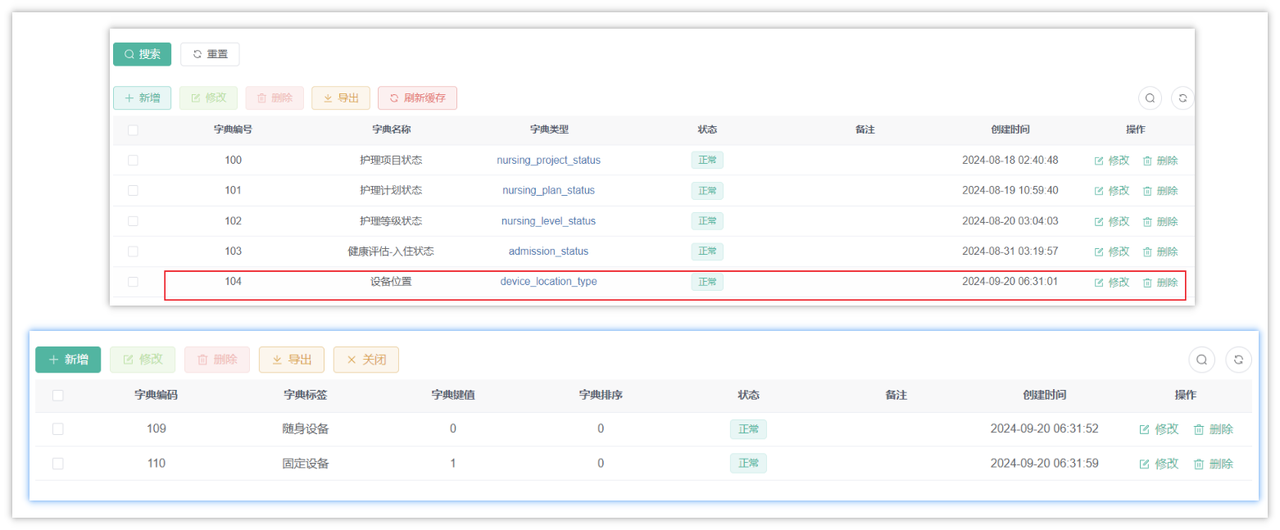
最终效果:
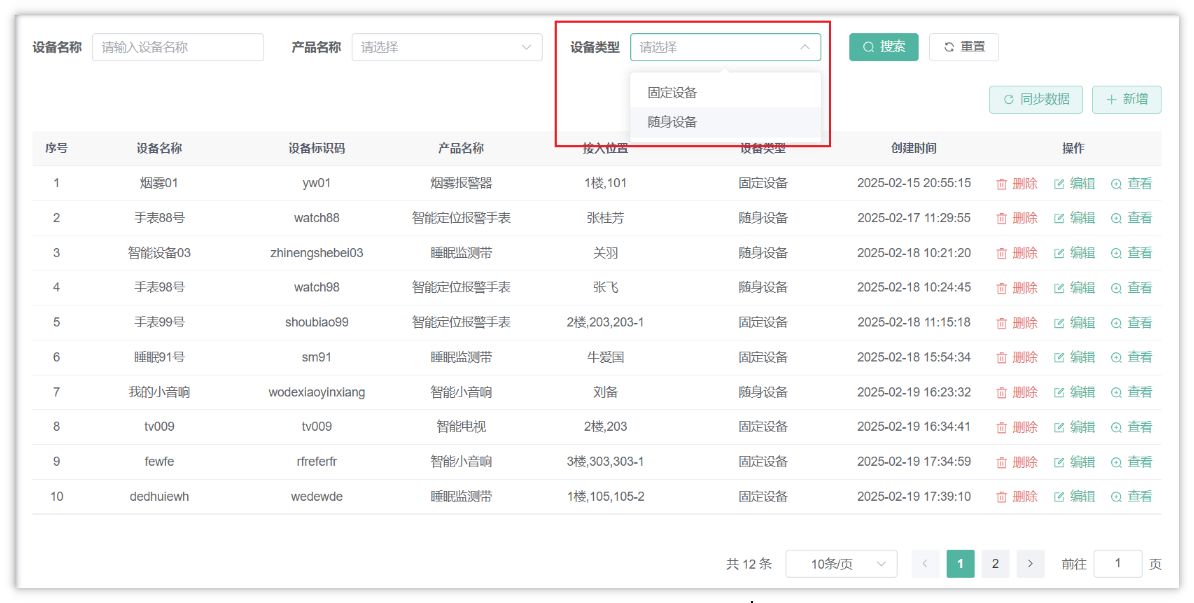
查询设备详细数据
- 思路分析
这里的查询是有两部分数据的,第一部分是数据库中存储的设备数据,第二部分是物联网中的设备数据,查询流程如下:
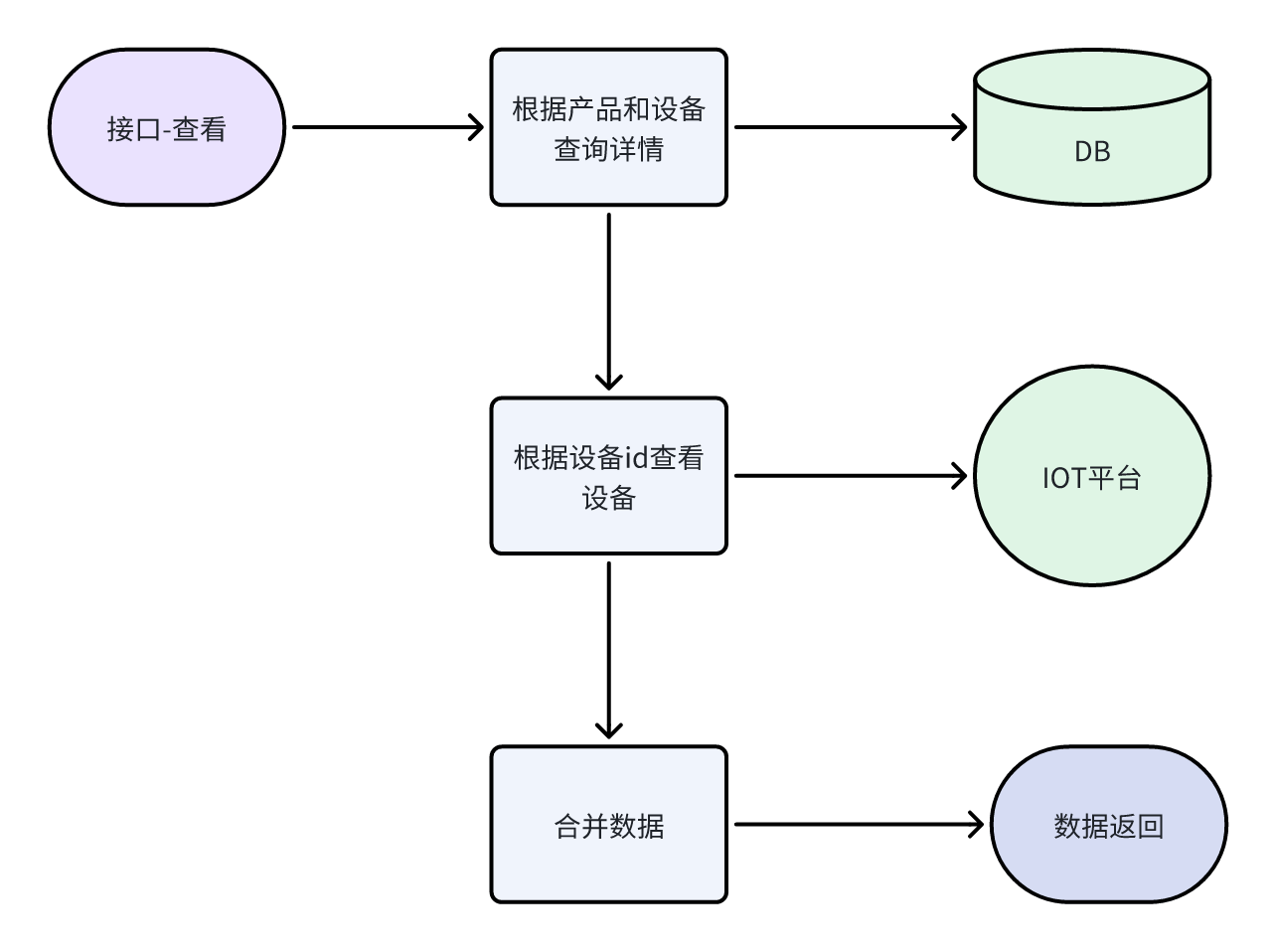
- 接口定义
在DeviceController中定义方法,如下:
/**
 * 获取设备详细信息
 */
@GetMapping("/{iotId}")
@ApiOperation("获取设备详细信息")
public AjaxResult getInfo(@PathVariable("iotId") String iotId) {
    return success(deviceService.queryDeviceDetail(iotId));
}
- 业务层
在DeviceService中新增方法,如下:
/**
 * 查询设备详情
 * @param iotId
 * @return
 */
DeviceDetailVo queryDeviceDetail(String iotId);
DeviceDetailVo:
package com.zzyl.nursing.vo;

import com.fasterxml.jackson.annotation.JsonFormat;
import com.zzyl.common.annotation.Excel;
import io.swagger.annotations.ApiModel;
import io.swagger.annotations.ApiModelProperty;
import lombok.Data;

import java.time.LocalDateTime;

/**
 * @author itcast
 */
@Data
@ApiModel("设备详情响应模型")
public class DeviceDetailVo {

    /**
     * 设备id
     */
    @ApiModelProperty(value = "设备id")
    private Long id;

    /**
     * 物联网设备id
     */
    @ApiModelProperty(value = "物联网设备id")
    private String iotId;

    /**
     * 设备名称
     */
    @ApiModelProperty(value = "设备名称")
    private String deviceName;

    /**
     * 设备标识码
     */
    @ApiModelProperty(value = "设备标识码")
    private String nodeId;

    /**
     * 设备秘钥
     */
    @ApiModelProperty(value = "设备秘钥")
    private String secret;

    /**
     * 产品id
     */
    @ApiModelProperty(value = "产品id")
    public String productKey;

    /**
     * 产品名称
     */
    @ApiModelProperty(value = "产品名称")
    public String productName;

    /**
     * 位置类型 0 随身设备 1固定设备
     */
    @ApiModelProperty(value = "位置类型 0 随身设备 1固定设备")
    private Integer locationType;

    /**
     * 绑定位置,如果是随身设备为老人id,如果是固定设备为位置的最后一级id
     */
    @ApiModelProperty(value = "绑定位置,如果是随身设备为老人id,如果是固定设备为位置的最后一级id")
    private Long bindingLocation;

    /**
     * 接入位置
     */
    @ApiModelProperty(value = "接入位置")
    private String remark;

    /**
     * 设备状态,ONLINE:设备在线,OFFLINE:设备离线,ABNORMAL:设备异常,INACTIVE:设备未激活,FROZEN:设备冻结
     */
    @ApiModelProperty(value = "设备状态,ONLINE:设备在线,OFFLINE:设备离线,ABNORMAL:设备异常,INACTIVE:设备未激活,FROZEN:设备冻结")
    private String deviceStatus;

    /**
     * 激活时间
     */
    @ApiModelProperty(value = "激活时间,格式:yyyy-MM-dd HH:mm:ss")
    @JsonFormat(pattern = "yyyy-MM-dd HH:mm:ss", timezone = "GMT+8")
    private LocalDateTime activeTime;

    /**
     * 创建时间
     */
    @ApiModelProperty(value = "创建时间,格式:yyyy-MM-dd HH:mm:ss")
    @JsonFormat(pattern = "yyyy-MM-dd HH:mm:ss", timezone = "GMT+8")
    private LocalDateTime createTime;

    /**
     * 创建人id
     */
    @ApiModelProperty(value = "创建人id")
    private Long createBy;

    /**
     * 创建人名称
     */
    @ApiModelProperty(value = "创建人名称")
    private String creator;

    /** 位置备注 */
    @ApiModelProperty(value = "位置备注")
    private String deviceDescription;
}
实现方法:
@Override
public DeviceDetailVo queryDeviceDetail(String iotId) {
    // 查询本地设备数据
    Device device = getOne(Wrappers.<Device>lambdaQuery().eq(Device::getIotId, iotId));
    if(ObjectUtil.isEmpty(device)) {
        return null;
    }
    // 调用华为云接口查询设备详情
    ShowDeviceRequest request = new ShowDeviceRequest();
    request.setDeviceId(iotId);
    ShowDeviceResponse response;
    try {
        response = client.showDevice(request);
    } catch (Exception e) {
        throw new BaseException("物联网接口 - 查询设备详情,调用失败");
    }
    // 属性拷贝
    DeviceDetailVo deviceVo = BeanUtil.toBean(device, DeviceDetailVo.class);
    deviceVo.setDeviceStatus(response.getStatus());
    String activeTimeStr = response.getActiveTime();
    // 日期转换
    if(StringUtils.isNotEmpty(activeTimeStr)) {
        // 把字符串转换为LocalDateTime
        LocalDateTime activeTime = LocalDateTimeUtil.parse(activeTimeStr, DatePattern.UTC_MS_PATTERN);
        // 日期时区转换
        deviceVo.setActiveTime(DateTimeZoneConverter.utcToShanghai(activeTime));
    }

    return deviceVo;
}
从本章资料可以找到日期转换工具类DateTimeZoneConverter
查看设备上报的数据(设备影子)
- 接口定义:
在DeviceController中新增方法,如下:
接收的参数就是接口的请求参数
/**
 * 查询设备上报数据
 */
@GetMapping("/queryServiceProperties/{iotId}")
@ApiOperation("查询设备上报数据")
public AjaxResult queryServiceProperties(@PathVariable("iotId") String iotId) {
    AjaxResult ajaxResult = deviceService.queryServiceProperties(iotId);
    return ajaxResult;
}
- 业务层:
在IDeviceService中定义新的方法
/**
 * 查询设备上报数据
 * @param iotId
 * @return
 */
AjaxResult queryServiceProperties(String iotId);
实现方法:
@Override
public AjaxResult queryServiceProperties(String iotId) {

    ShowDeviceShadowRequest request = new ShowDeviceShadowRequest();
    request.setDeviceId(iotId);
    ShowDeviceShadowResponse response = client.showDeviceShadow(request);
    if(response.getHttpStatusCode() != 200) {
        throw new BaseException("物联网接口 - 查询设备影子,调用失败");
    }
    List<DeviceShadowData> shadow = response.getShadow();
    if(CollUtil.isEmpty(shadow)) {
        List<Object> emptyList = Collections.emptyList();
        return AjaxResult.success(emptyList);
    }
    // 获取上报数据的reported (参考返回的json数据)
    DeviceShadowProperties reported = shadow.get(0).getReported();
    // 把数据转换为JSONObject(map),方便处理
    JSONObject jsonObject = JSONUtil.parseObj(reported.getProperties());
    // 遍历数据,封装到list中
    List<Map<String,Object>>  list = new ArrayList<>();
    // 事件上报时间
    String eventTimeStr = reported.getEventTime();
    // 把字符串转换为LocalDateTime
    LocalDateTime eventTimeLocalDateTime = LocalDateTimeUtil.parse(eventTimeStr, "yyyyMMdd'T'HHmmss'Z'");
    // 时区转换
    LocalDateTime eventTime = DateTimeZoneConverter.utcToShanghai(eventTimeLocalDateTime);

    // k:属性标识,v:属性值
    jsonObject.forEach((k,v) -> {
        Map<String,Object> map = new HashMap<>();
        map.put("functionId", k);
        map.put("value", v);
        map.put("eventTime", eventTime);
        list.add(map);
    });

    // 数据返回
    return AjaxResult.success(list);
}
这里利用的是Map构造返回值,而不是使用实体类(实体类也是可以的)
接收设备端数据
前置内容:智能检测-数据处理展示
整体的接收数据思路如下:
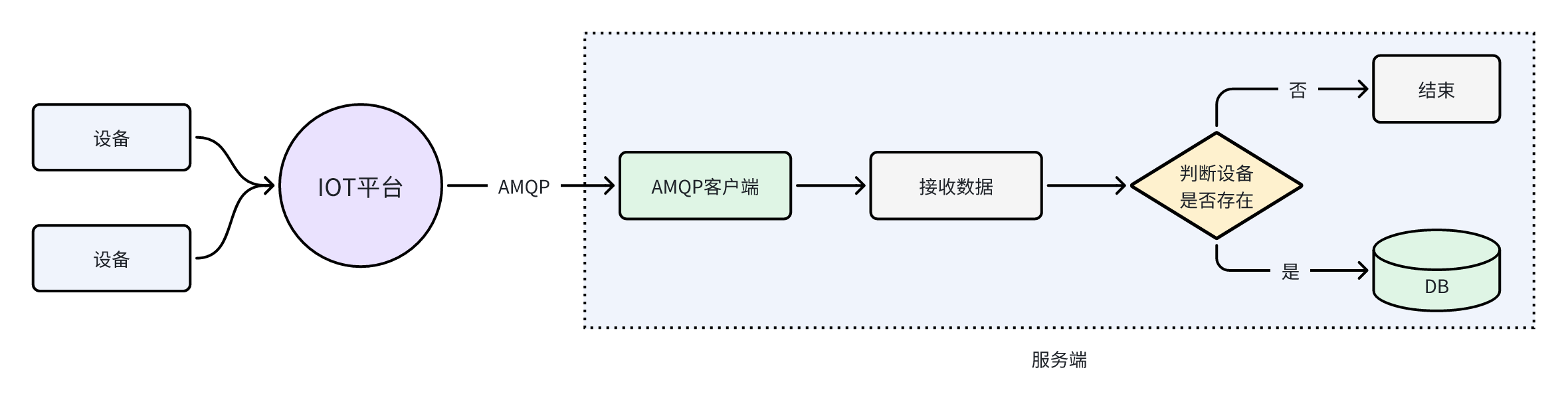
表结构
基础代码生成
使用代码生成的功能,来生成代码
- 包名:
com.zzyl.nursing - 模块名:
nursing - 除了主键之外的Long类型,改为Integer
- 数据上报时间字段改为LocalDateTime类型
- 生成业务名称:data
- 生成功能名称:设备数据
只拷贝后端代码到idea中
修改DeviceData表,添加三个注解,方便使用构建者设计模式来构建对象,如下图:
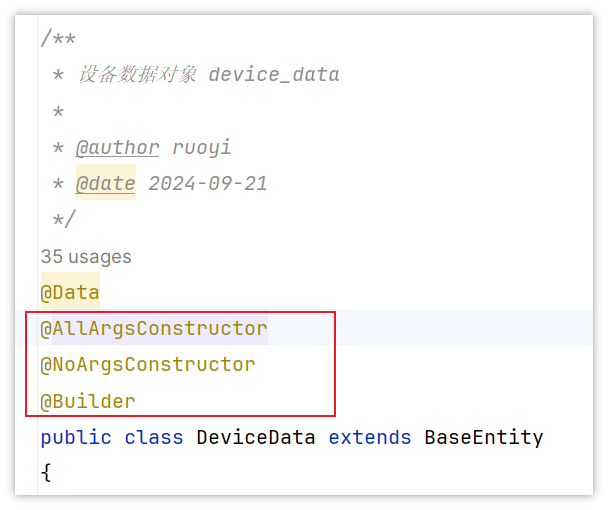
功能实现
- 思路分析
接收到的数据格式如下,是一个json字符串,可以定义一个类来转换接收数据
{
  "resource": "device.property",
  "event": "report",
  "event_time": "20250706T023712Z",
  "event_time_ms": "2025-07-06T02:37:12.573Z",
  "request_id": "c13e6473-2709-4f34-8017-3538d9c57ccd",
  "notify_data": {
    "header": {
      "app_id": "a7bb0103499749d984777860b53eadf6",
      "device_id": "6864b04ed582f2001837367e_watch01",
      "node_id": "watch01",
      "product_id": "6864b04ed582f2001837367e",
      "gateway_id": "6864b04ed582f2001837367e_watch01"
    },
    "body": {
      "services": [
        {
          "service_id": "watch_services",
          "properties": {
            "BodyTemp": 36.8,
            "HeartRate": 5.9712353,
            "xueyang": 84.60445,
            "BatteryPercentage": 24.040668
          },
          "event_time": "20250706T023712Z"
        }
      ]
    }
  }
}
重点关注:device_id、properties、event_time
上述json的数据结构中,已经标明颜色的是重点要解析的,由于嵌套层级较多,需要定义多个类来进行接收,对应的类可以在本章资料中找到,如下图
在设备数据表中,一次上报需要保存一个设备的多个物模型数据
比如,烟雾报警有三个物模型,那么当接收到一个数据上报的时候,就要保存三条数据到设备数据中
- 修改AmqpClient类,解析json数据并调用设备数据的业务层,批量添加数据
package com.zzyl.nursing.task;

import cn.hutool.core.text.CharSequenceUtil;
import cn.hutool.core.util.ObjectUtil;
import cn.hutool.json.JSONObject;
import cn.hutool.json.JSONUtil;
import com.zzyl.framework.config.properties.HuaWeiIotConfigProperties;
import com.zzyl.nursing.job.vo.IotMsgNotifyData;
import com.zzyl.nursing.service.IDeviceDataService;
import lombok.extern.slf4j.Slf4j;
import org.apache.qpid.jms.*;
import org.apache.qpid.jms.message.JmsInboundMessageDispatch;
import org.apache.qpid.jms.transports.TransportOptions;
import org.apache.qpid.jms.transports.TransportSupport;
import org.springframework.beans.factory.annotation.Autowired;
import org.springframework.boot.ApplicationArguments;
import org.springframework.boot.ApplicationRunner;
import org.springframework.stereotype.Component;

import javax.annotation.Resource;
import javax.jms.*;
import java.net.InetAddress;
import java.net.URI;
import java.net.UnknownHostException;
import java.text.MessageFormat;
import java.util.HashMap;
import java.util.Map;
import java.util.UUID;
import java.util.concurrent.ExecutorService;
import java.util.stream.Collectors;

/**
 * @author itcast
 */
@Slf4j
@Component
public class AmqpClient implements ApplicationRunner {

    @Resource
    private HuaWeiIotConfigProperties huaWeiIotConfigProperties;

    // 业务处理异步线程池,线程池参数可以根据您的业务特点调整,或者您也可以用其他异步方式处理接收到的消息。
    @Resource
    private ExecutorService executorService;

    // 控制台服务端订阅中消费组状态页客户端ID一栏将显示clientId参数。
    // 建议使用机器UUID、MAC地址、IP等唯一标识等作为clientId。便于您区分识别不同的客户端。
    private static String clientId;

    static {
        try {
            clientId = InetAddress.getLocalHost().getHostAddress();
        } catch (UnknownHostException e) {
            e.printStackTrace();
        }
    }

    @Override
    public void run(ApplicationArguments args) throws Exception {
        start();
    }

    public void start() throws Exception {
        // 参数说明,请参见AMQP客户端接入说明文档。
        for (int i = 0; i < huaWeiIotConfigProperties.getConnectionCount(); i++) {
            // 创建amqp连接
            Connection connection = getConnection();

            // 加入监听者
            ((JmsConnection) connection).addConnectionListener(myJmsConnectionListener);
            // 创建会话。
            // Session.CLIENT_ACKNOWLEDGE: 收到消息后,需要手动调用message.acknowledge()。
            // Session.AUTO_ACKNOWLEDGE: SDK自动ACK(推荐)。
            Session session = connection.createSession(false, Session.AUTO_ACKNOWLEDGE);
            connection.start();

            // 创建Receiver连接。
            MessageConsumer consumer = newConsumer(session, connection, huaWeiIotConfigProperties.getQueueName());
            consumer.setMessageListener(messageListener);
        }

        log.info("amqp  is started successfully, and will exit after server shutdown ");
    }

    /**
     * 创建amqp连接
     *
     * @return amqp连接
     */
    private Connection getConnection() throws Exception {
        String connectionUrl = generateConnectUrl();
        JmsConnectionFactory cf = new JmsConnectionFactory(connectionUrl);
        // 信任服务端
        TransportOptions to = new TransportOptions();
        to.setTrustAll(true);
        cf.setSslContext(TransportSupport.createJdkSslContext(to));
        String userName = "accessKey=" + huaWeiIotConfigProperties.getAccessKey();
        cf.setExtension(JmsConnectionExtensions.USERNAME_OVERRIDE.toString(), (connection, uri) -> {
            // IoTDA的userName组成格式如下:“accessKey=${accessKey}|timestamp=${timestamp}”
            String newUserName = userName;
            if (connection instanceof JmsConnection) {
                newUserName = ((JmsConnection) connection).getUsername();
            }
            return newUserName + "|timestamp=" + System.currentTimeMillis();
        });

        // 创建连接。
        return cf.createConnection(userName, huaWeiIotConfigProperties.getAccessCode());
    }

    /**
     * 生成amqp连接地址
     *
     * @return amqp连接地址
     */
    public String generateConnectUrl() {
        String uri = MessageFormat.format("{0}://{1}:{2}",
                (huaWeiIotConfigProperties.isUseSsl() ? "amqps" : "amqp"),
                huaWeiIotConfigProperties.getHost(),
                String.valueOf(huaWeiIotConfigProperties.getPort()));
        Map<String, String> uriOptions = new HashMap<>();
        uriOptions.put("amqp.vhost", huaWeiIotConfigProperties.getVhost());
        uriOptions.put("amqp.idleTimeout", String.valueOf(huaWeiIotConfigProperties.getIdleTimeout()));
        uriOptions.put("amqp.saslMechanisms", huaWeiIotConfigProperties.getSaslMechanisms());

        Map<String, String> jmsOptions = new HashMap<>();
        jmsOptions.put("jms.prefetchPolicy.queuePrefetch", String.valueOf(huaWeiIotConfigProperties.getQueuePrefetch()));
        if (CharSequenceUtil.isNotBlank(clientId)) {
            jmsOptions.put("jms.clientID", clientId);
        } else {
            jmsOptions.put("jms.clientID", UUID.randomUUID().toString());
        }
        jmsOptions.put("failover.reconnectDelay", String.valueOf(huaWeiIotConfigProperties.getReconnectDelay()));
        jmsOptions.put("failover.maxReconnectDelay", String.valueOf(huaWeiIotConfigProperties.getMaxReconnectDelay()));
        if (huaWeiIotConfigProperties.getMaxReconnectAttempts() > 0) {
            jmsOptions.put("failover.maxReconnectAttempts", String.valueOf(huaWeiIotConfigProperties.getMaxReconnectAttempts()));
        }
        if (huaWeiIotConfigProperties.getExtendedOptions() != null) {
            for (Map.Entry<String, String> option : huaWeiIotConfigProperties.getExtendedOptions().entrySet()) {
                if (option.getKey().startsWith("amqp.") || option.getKey().startsWith("transport.")) {
                    uriOptions.put(option.getKey(), option.getValue());
                } else {
                    jmsOptions.put(option.getKey(), option.getValue());
                }
            }
        }
        StringBuilder stringBuilder = new StringBuilder();
        stringBuilder.append(uriOptions.entrySet().stream()
                .map(option -> MessageFormat.format("{0}={1}", option.getKey(), option.getValue()))
                .collect(Collectors.joining("&", "failover:(" + uri + "?", ")")));
        stringBuilder.append(jmsOptions.entrySet().stream()
                .map(option -> MessageFormat.format("{0}={1}", option.getKey(), option.getValue()))
                .collect(Collectors.joining("&", "?", "")));
        return stringBuilder.toString();
    }

    /**
     * 创建消费者
     *
     * @param session    session
     * @param connection amqp连接
     * @param queueName  队列名称
     * @return 消费者
     */
    public MessageConsumer newConsumer(Session session, Connection connection, String queueName) throws Exception {
        if (connection == null || !(connection instanceof JmsConnection) || ((JmsConnection) connection).isClosed()) {
            throw new Exception("create consumer failed,the connection is disconnected.");
        }

        return session.createConsumer(new JmsQueue(queueName));
    }

    private final MessageListener messageListener = message -> {
        try {
            //异步处理收到的消息,确保onMessage函数里没有耗时逻辑
            executorService.submit(() -> processMessage(message));
        } catch (Exception e) {
            log.error("submit task occurs exception ", e);
        }
    };

    @Autowired
    private IDeviceDataService deviceDataService;

    /**
     * 在这里处理您收到消息后的具体业务逻辑。
     */
    private void processMessage(Message message) {
        String contentStr;
        try {
            contentStr = message.getBody(String.class);
            String topic = message.getStringProperty("topic");
            String messageId = message.getStringProperty("messageId");
            log.info("receive message,\n topic = {},\n messageId = {},\n content = {}", topic, messageId, contentStr);
        } catch (JMSException e) {
            throw new RuntimeException("服务器错误");
        }

        // 将消息转换为json格式,数据为空,直接返回
        JSONObject jsonMsg = JSONUtil.parseObj(contentStr);

        // 取出消息中的notify_data字段,数据为空,直接返回
        JSONObject jsonNotifyData = jsonMsg.getJSONObject("notify_data");
        if (ObjectUtil.isEmpty(jsonNotifyData)) {
            return;
        }

        // 将json字符串转换为对象,如果属性上报为空,程序结束
        IotMsgNotifyData iotMsgNotifyData = JSONUtil.toBean(jsonNotifyData, IotMsgNotifyData.class);
        if (ObjectUtil.isEmpty(iotMsgNotifyData.getBody()) || ObjectUtil.isEmpty(iotMsgNotifyData.getBody().getServices())) {
            return;
        }

        deviceDataService.batchInsertDeviceData(iotMsgNotifyData);

    }

    private final JmsConnectionListener myJmsConnectionListener = new JmsConnectionListener() {
        /**
         * 连接成功建立。
         */
        @Override
        public void onConnectionEstablished(URI remoteURI) {
            log.info("onConnectionEstablished, remoteUri:{}", remoteURI);
        }

        /**
         * 尝试过最大重试次数之后,最终连接失败。
         */
        @Override
        public void onConnectionFailure(Throwable error) {
            log.error("onConnectionFailure, {}", error.getMessage());
        }

        /**
         * 连接中断。
         */
        @Override
        public void onConnectionInterrupted(URI remoteURI) {
            log.info("onConnectionInterrupted, remoteUri:{}", remoteURI);
        }

        /**
         * 连接中断后又自动重连上。
         */
        @Override
        public void onConnectionRestored(URI remoteURI) {
            log.info("onConnectionRestored, remoteUri:{}", remoteURI);
        }

        @Override
        public void onInboundMessage(JmsInboundMessageDispatch envelope) {
        }

        @Override
        public void onSessionClosed(Session session, Throwable cause) {
        }

        @Override
        public void onConsumerClosed(MessageConsumer consumer, Throwable cause) {
        }

        @Override
        public void onProducerClosed(MessageProducer producer, Throwable cause) {
        }
    };
}
流程
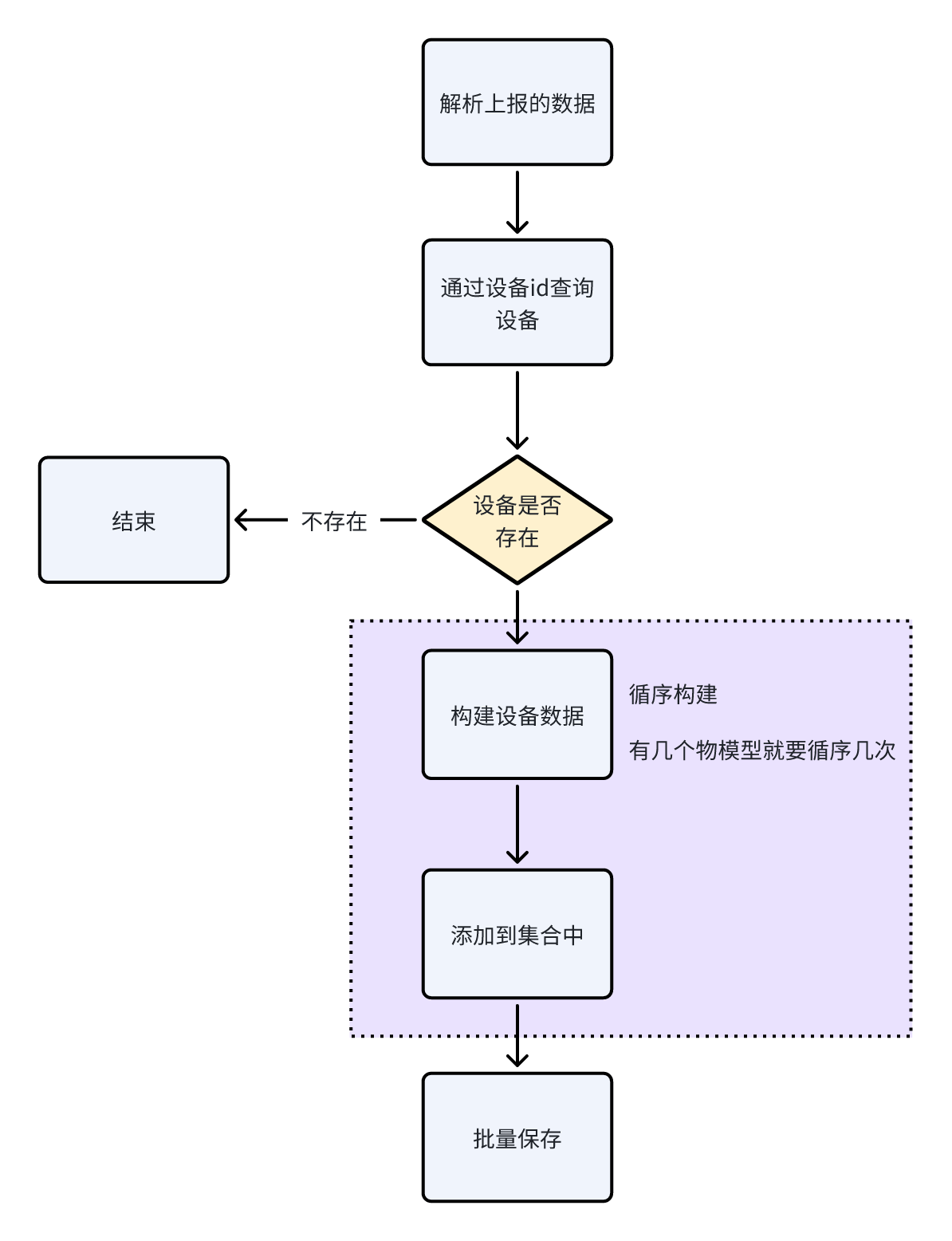
- 在设备数据的业务层定义批量添加的方法
在IDeviceDataService中定义新的方法:
/**
 * 批量保存数据
 * @param iotMsgNotifyData
 */
void batchInsertDeviceData(IotMsgNotifyData iotMsgNotifyData);
实现方法:
@Autowired
private DeviceMapper deviceMapper;

/**
 * 批量保存设备数据
 * @param iotMsgNotifyData
 */
@Override
public void batchInsertDeviceData(IotMsgNotifyData iotMsgNotifyData) {
    String iotId = iotMsgNotifyData.getHeader().getDeviceId();
    // 查询设备信息
    Device device = deviceMapper.selectOne(Wrappers.<Device>lambdaQuery().eq(Device::getIotId, iotId));
    if(ObjectUtil.isEmpty(device)) {
        log.error("设备不存在");
        return;
    }
    // 批量保存设备数据
    iotMsgNotifyData.getBody().getServices().forEach(s -> {
        // 判断属性是否为空
        Map<String, Object> properties = s.getProperties();
        if(CollUtil.isEmpty(properties)) {
            return;
        }

        // 上报时间处理
        String eventTimeStr = s.getEventTime();
        LocalDateTime localDateTime = LocalDateTimeUtil.parse(eventTimeStr, "yyyyMMdd'T'HHmmss'Z'");
        LocalDateTime eventTime = DateTimeZoneConverter.utcToShanghai(localDateTime);

        List<DeviceData> list = new ArrayList<>();

        // key:属性id,value:属性值
        properties.forEach((k,v) -> {
            DeviceData deviceData = BeanUtil.toBean(device, DeviceData.class);
            deviceData.setId(null);
            deviceData.setAlarmTime(eventTime);
            deviceData.setFunctionId(k);
            deviceData.setDataValue(v + "");
            list.add(deviceData);
        });
        // 批量保存设备数据
        saveBatch(list);
    });

}
AmqpClient 是通过消息队列接收华为IoT数据的后台服务,它运行在独立的线程中,不是Web请求线程。当这个线程中执行数据库操作时,会触发 MyMetaObjectHandler 的自动填充功能,但由于没有HTTP请求上下文,request 对象无法正常使用。需要修改一下MyMetaObjectHandler中的代码:
public boolean isExclude() {
// 当request无法正常获取到请求路径时,会抛出异常。如果抛出异常,就直接设置为true即可
    try {
        String requestURI = request.getRequestURI();
        if (requestURI.startsWith("/member")) {
            return true;
        }
    } catch (Exception e) {
        return true;
    }
    return false;
}
bug修复
当设备增多后,数据库连接池可能会很快耗尽,可以适当增加连接数数量和等待时间
可能的错误提示:
wait millis 60003, active 20, maxActive 20, creating 0
数据库连接池耗尽,活跃连接数已达上限(maxActive=20),无可用连接且等待超时(60秒),导致新请求无法获取连接
修改application.yml文件关于数据库的配置,如下标颜色内容
spring:
  datasource:
    type: com.alibaba.druid.pool.DruidDataSource
    driverClassName: com.mysql.cj.jdbc.Driver
    druid:
      # 主库数据源
      master:
        url: jdbc:mysql://192.168.100.168:3306/zzyl?useUnicode=true&characterEncoding=utf8&zeroDateTimeBehavior=convertToNull&useSSL=true&serverTimezone=GMT%2B8
        username: root
        password: heima123
      # 从库数据源
      slave:
        # 从数据源开关/默认关闭
        enabled: false
        url:
        username:
        password:
      # 初始连接数
      initialSize: 5
      # 最小连接池数量
      minIdle: 10
      # 最大连接池数量
      maxActive: 60   # 提升最大连接数
      # 配置获取连接等待超时的时间
      maxWait: 120000   # 延长等待时间至2分钟
      # 配置连接超时时间
      connectTimeout: 30000
      # 配置网络超时时间
      socketTimeout: 60000
      # 配置间隔多久才进行一次检测,检测需要关闭的空闲连接,单位是毫秒
      timeBetweenEvictionRunsMillis: 60000
      # 配置一个连接在池中最小生存的时间,单位是毫秒
      minEvictableIdleTimeMillis: 300000
      # 配置一个连接在池中最大生存的时间,单位是毫秒
      maxEvictableIdleTimeMillis: 900000
      # 配置检测连接是否有效
      validationQuery: SELECT 1 FROM DUAL
      testWhileIdle: true
      testOnBorrow: true  # 借出连接时校验有效性
      testOnReturn: false
      webStatFilter:
        enabled: true
      statViewServlet:
        enabled: true
        # 设置白名单,不填则允许所有访问
        allow:
        url-pattern: /druid/*
        # 控制台管理用户名和密码
        login-username: ruoyi
        login-password: 123456
      filter:
        stat:
          enabled: true
          # 慢SQL记录
          log-slow-sql: true
          slow-sql-millis: 1000
          merge-sql: true
        wall:
          config:
            multi-statement-allow: true
修改了maxActive、maxWait、testOnBorrow
查询设备的物模型数据
需求分析
最终的效果:
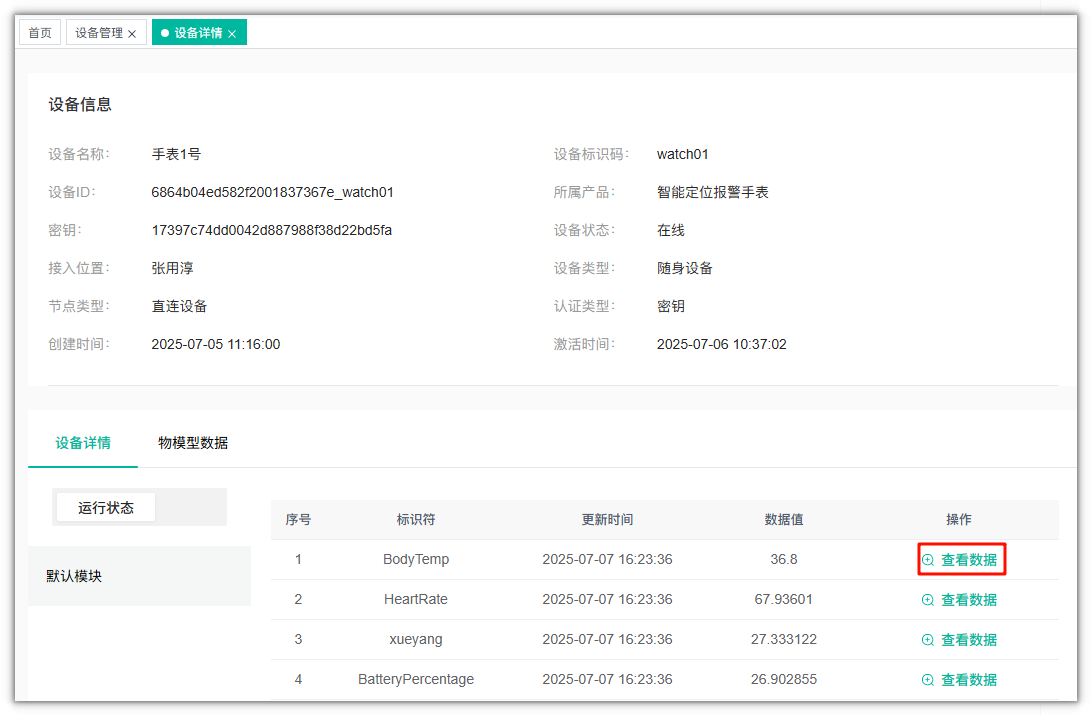
其中的数据值,是从IOT平台实时获取到的数据值
当点击了某个功能(物模型)的查看数据按钮,则会显示这个功能的历史数据,可以按照时间范围进行检索,如下图:
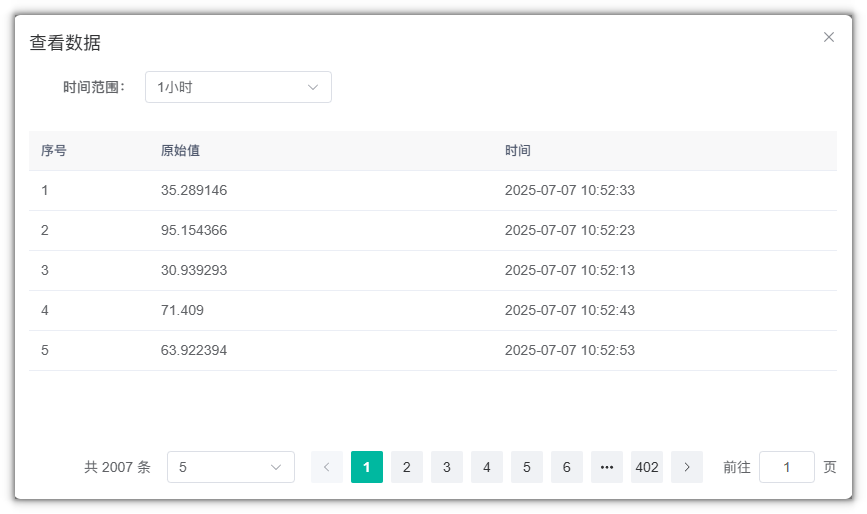
时间范围=1小时、24小时、7天
接口定义
参考接口文档:智能监测-接口文档
功能实现
接口定义
在DeviceDataController ,改造查询数据的方法,如下:
/**
 * 查询设备数据列表
 */
@PreAuthorize("@ss.hasPermi('elder:data:list')")
@GetMapping("/list")
@ApiOperation("查询设备数据列表")
public TableDataInfo list(DeviceDataPageReqDto deviceDataPageReqDto)
{
    return deviceDataService.selectDeviceDataList(deviceDataPageReqDto);
}

/**
 * 导出设备数据列表   删除这个方法
 */
@ApiOperation("导出设备数据列表")
@PreAuthorize("@ss.hasPermi('nursing:deviceData:export')")
@Log(title = "设备数据", businessType = BusinessType.EXPORT)
@PostMapping("/export")
public void export(HttpServletResponse response, DeviceData deviceData)
{
    List<DeviceData> list = deviceDataService.selectDeviceDataList(deviceData);
    ExcelUtil<DeviceData> util = new ExcelUtil<DeviceData>(DeviceData.class);
    util.exportExcel(response, list, "设备数据数据");
}
DeviceDataPageReqDto
package com.zzyl.nursing.dto;

import io.swagger.annotations.ApiModel;
import io.swagger.annotations.ApiModelProperty;
import lombok.Data;
import org.springframework.format.annotation.DateTimeFormat;

import java.time.LocalDateTime;

@Data
@ApiModel("设备数据分页查询请求模型")
public class DeviceDataPageReqDto {

    @ApiModelProperty(value = "设备名称", required = false)
    private String deviceName;

    @ApiModelProperty(value = "功能ID", required = false)
    private String functionId;

    @ApiModelProperty(value = "开始时间", required = false)
    @DateTimeFormat(pattern = "yyyy-MM-dd HH:mm:ss")
    private LocalDateTime startTime;

    @ApiModelProperty(value = "结束时间", required = false)
    @DateTimeFormat(pattern = "yyyy-MM-dd HH:mm:ss")
    private LocalDateTime endTime;

    @ApiModelProperty(value = "页码", required = true, example = "1")
    private Integer pageNum;

    @ApiModelProperty(value = "页面大小", required = true, example = "10")
    private Integer pageSize;

}
业务层
在IDeviceDataService接口,改造分页查询方法,代码如下:
/**
 * 查询设备数据列表
 *
 * @param deviceDataPageReqDto 设备数据
 * @return 设备数据集合
 */
public TableDataInfo selectDeviceDataList(DeviceDataPageReqDto deviceDataPageReqDto);
实现方法:
/**
 * 查询设备数据列表
 *
 * @param dto 设备数据
 * @return 设备数据
 */
@Override
public TableDataInfo selectDeviceDataList(DeviceDataPageReqDto dto) {

    LambdaQueryWrapper<DeviceData> lambdaQueryWrapper =  new LambdaQueryWrapper<>();
    Page<DeviceData> page = new Page(dto.getPageNum(), dto.getPageSize());
    // 模糊查询设备名称
    if(StringUtils.isNotEmpty(dto.getDeviceName())) {
        lambdaQueryWrapper.eq(DeviceData::getDeviceName, dto.getDeviceName());
    }
    // 精确查询功能名称
    if (StringUtils.isNotEmpty(dto.getFunctionId())) {
        lambdaQueryWrapper.eq(DeviceData::getFunctionId, dto.getFunctionId());
    }
    // 时间范围查询
    if(ObjectUtils.isNotEmpty(dto.getStartTime()) && ObjectUtils.isNotEmpty(dto.getEndTime())) {
        lambdaQueryWrapper.between(DeviceData::getAlarmTime, dto.getStartTime(), dto.getEndTime());
    }

    // 分页查询
    page = page(page, lambdaQueryWrapper);

    // 封装分页对象
    return getTableDataInfo(page);

}

/**
 * 封装分页对象
 * @param page
 * @return
 */
@NotNull
private static TableDataInfo getTableDataInfo(Page<DeviceData> page) {
    TableDataInfo tableData = new TableDataInfo();
    tableData.setCode(HttpStatus.SUCCESS);
    tableData.setMsg("查询成功");
    tableData.setRows(page.getRecords());
    tableData.setTotal(page.getTotal());
    return tableData;
}
智能床位
参考接口文档:智能监测-接口文档
数据准备:

获取所有楼层(智能楼层)
思路分析
目的是为了展示绑定了智能设备的楼层和楼层下的房间、床位信息以及智能设备最近一次上报的数据
比如下图中,只有3楼、4楼、5楼、1楼绑定了设备,那就只展示这些楼层
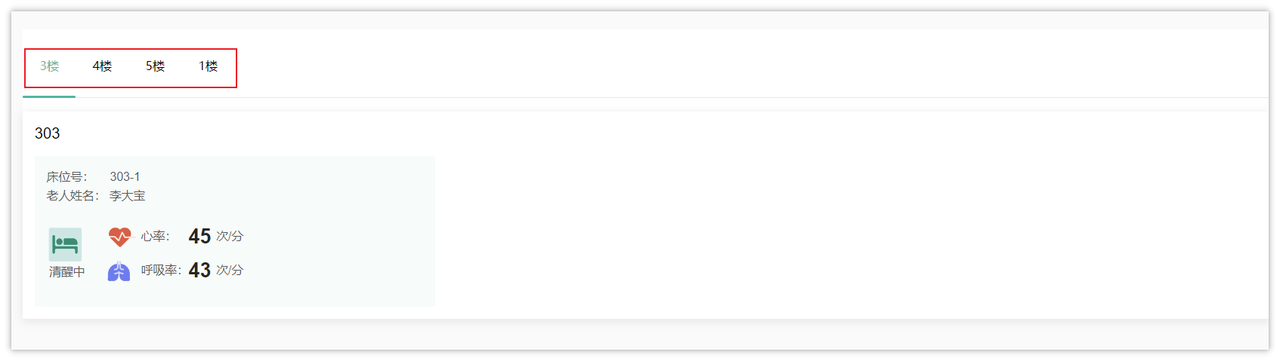
表关系
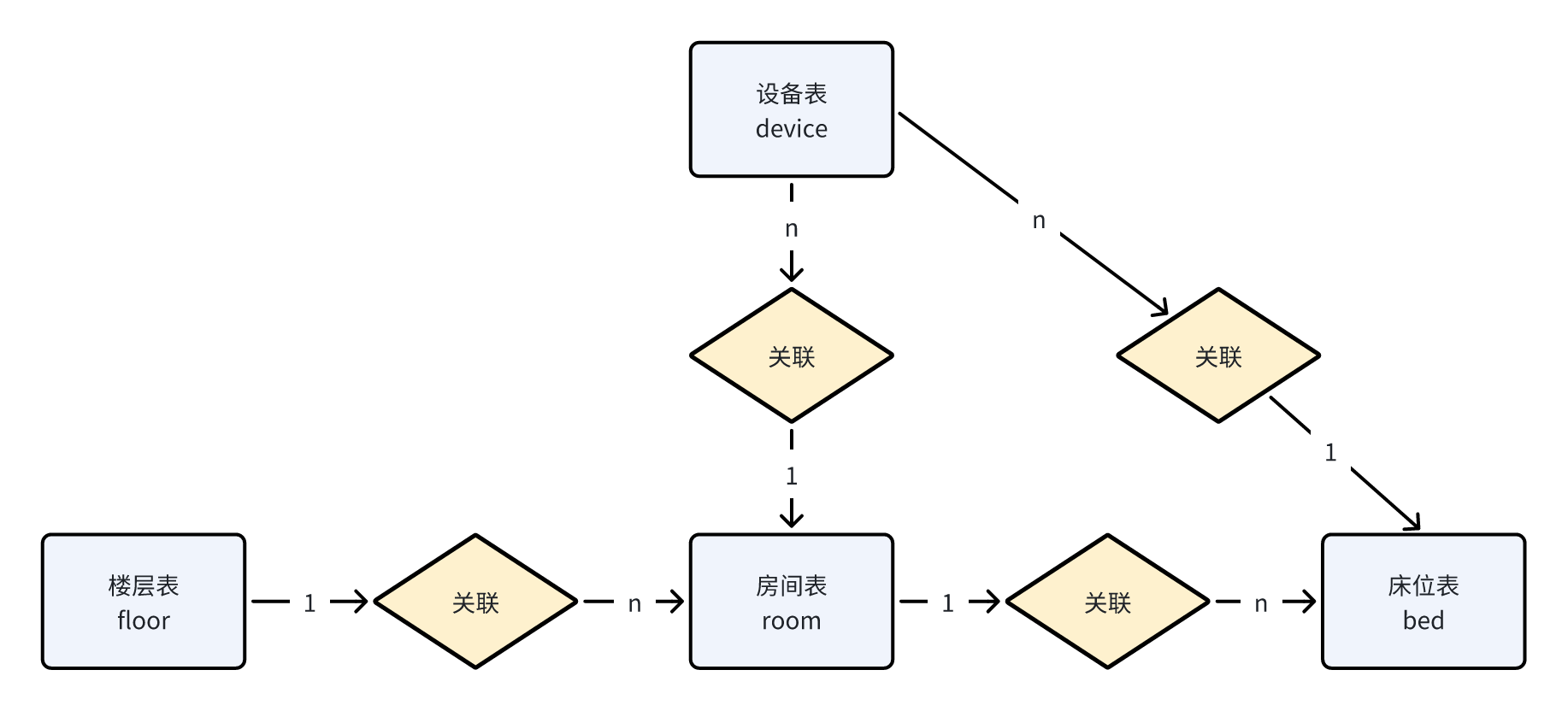
目前设备的绑定都是房间或者是床位
比如:烟雾报警绑定的位置是房间,睡眠监测带绑定的位置是床位
在设备(device)表中同时有三个字段确定绑定的位置
- location_type 位置类型 0:随身设备 1:固定设备
- physical_location_type 物理位置类型 0楼层 1房间 2床位
- binding_location 具体位置对应的id值(如果是房间,则是房间id,如果是床位,则对应床位id)
5张表关联查询(floor、room、bed、device【房间|床位】),对应的sql
select f.id, f.name, f.code
from floor f
         left join room r on f.id = r.floor_id
         left join bed b on r.id = b.room_id
         left join device rd on rd.binding_location = r.id and rd.location_type = 1 and rd.physical_location_type = 1
         left join device bd on bd.binding_location = b.id and bd.location_type = 1 and bd.physical_location_type = 2
where (rd.id is not null or bd.id is not null)
group by f.id;
上述sql中的group by f.id 是为了去除重复数据
控制层
在FloorController中新增查询智能楼层的方法,如下:
@GetMapping("/getAllFloorsWithDevice")
@ApiOperation("查询所有楼层(智能设备)")
public R<List<FloorVo>> getAllFloorsWithDevice() {
    return R.ok(floorService.getAllFloorsWithDevice());
}
业务层
在FloorService中新增查询智能楼层的方法,如下:
/**
 * 查询智能楼层
 * @return
 */
List<FloorVo> getAllFloorsWithDevice();
对应的实现方法:
/**
 * 查询智能楼层
 * @return
 */
@Override
public List<FloorVo> getAllFloorsWithDevice() {
    return floorMapper.getAllFloorsWithDevice();
}
持久层
在FloorMapper中新增方法,无参
List<FloorVo> getAllFloorsWithDevice();
对应的映射文件:
<select id="getAllFloorsWithDevice" resultType="com.zzyl.nursing.vo.FloorVo">
    select f.id, f.name, f.code
    from floor f
             left join room r on f.id = r.floor_id
             left join bed b on r.id = b.room_id
             left join device rd on rd.binding_location = r.id and rd.location_type = 1 and rd.physical_location_type = 1
             left join device bd on bd.binding_location = b.id and bd.location_type = 1 and bd.physical_location_type = 2
    where (rd.id is not null or bd.id is not null)
    group by f.id
</select>
获取房间中的智能设备及数据
思路分析
- 根据楼层ID查询房间或者是床位的设备数据(最新的一条数据)
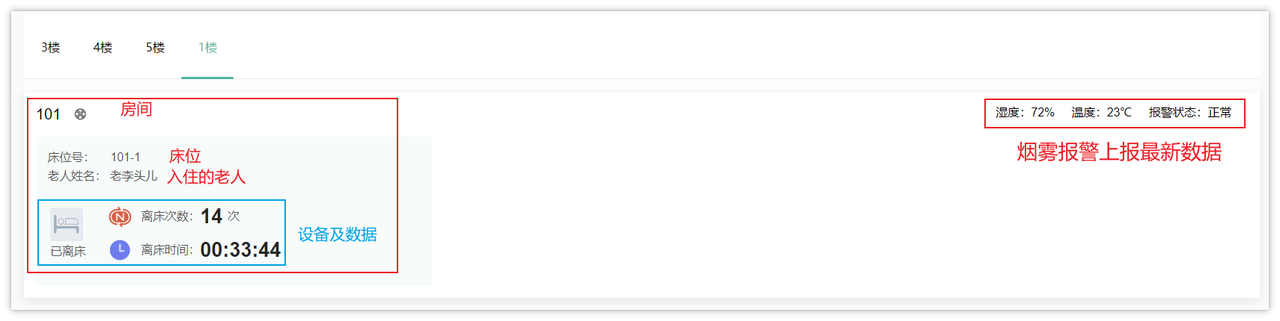
在这个接口中返回的数据较多:
- 房间数据以及房间绑定的设备、设备上报的数据
- 床位数据以及床位入住的老人姓名、绑定的设备、设备上报的数据
实现方案有两种
- 方案一:通过楼层关联房间、床位、老人、设备表2次、设备数据表2次共7张表查询对应的数据(设备数据表数据较多,效率不高),不推荐这种方案
- 方案二:使用缓存,因为只需要查询最近一次的设备数据,可以把最近一次采集的数据存储到redis中,然后让房间或者床位进行匹配
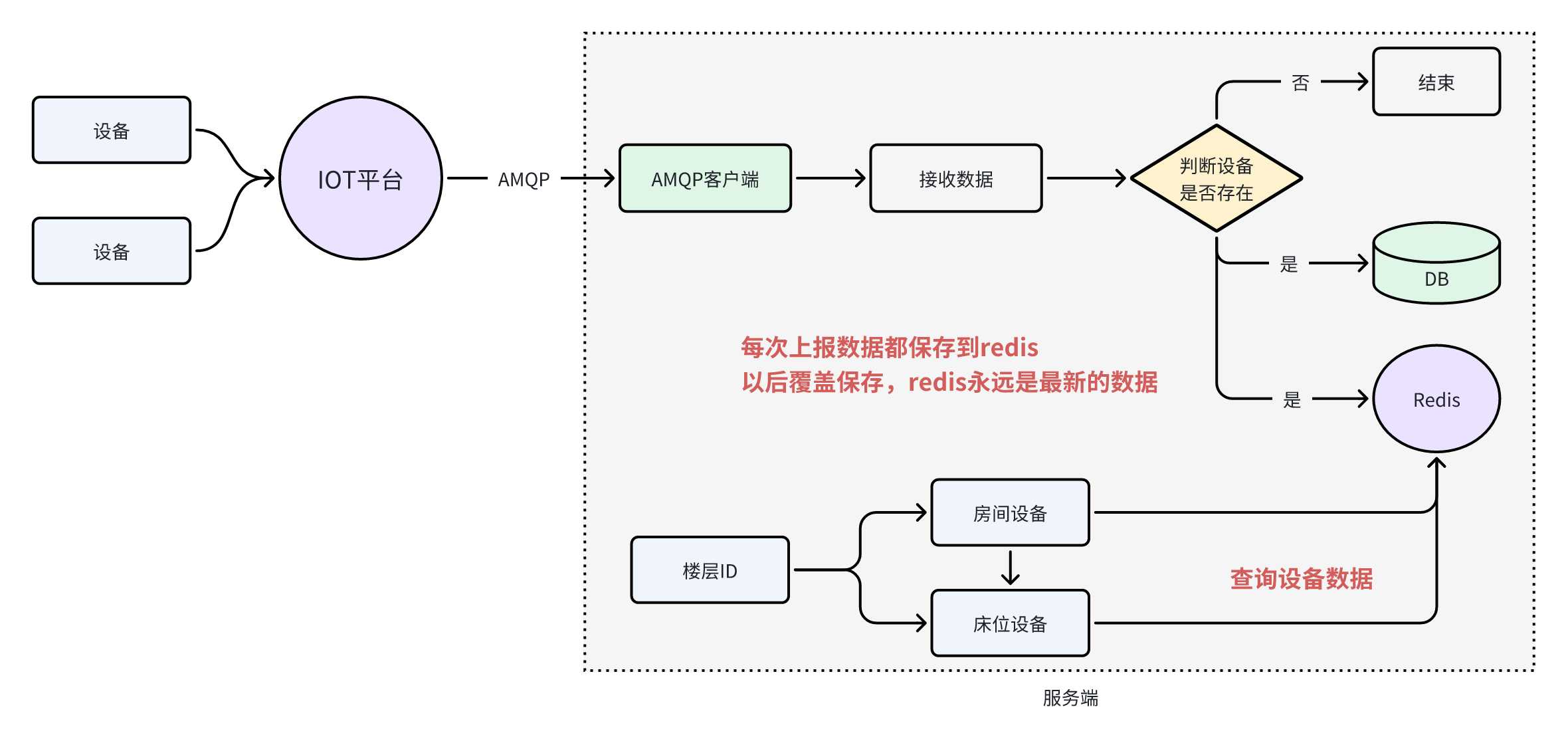
按照这种实现思路,需要改造上报数据的接收逻辑,将设备上报的数据保存到Redis中存储,将来需要展示设备最近一次上报的数据时只需从Redis中获取即可
改造上报数据接收逻辑
找到DeviceDataServiceImpl类中的batchInsertDeviceData方法,把每次上报的数据存储到Redis中,由于Redis保存数据的时候key相同的情况下可以覆盖旧数据,所以在Redis中存储的永远都是最新的数据
详细代码,如下:
@Autowired
private RedisTemplate<String, String> redisTemplate;

/**
 * 批量保存
 *
 * @param data
 */
@Override
public void batchInsertDeviceData(IotMsgNotifyData data) {
    // 根据iotId查询设备
    Device device = deviceMapper.selectOne(Wrappers.<Device>lambdaQuery().eq(Device::getIotId, data.getHeader().getDeviceId()));
    if(ObjectUtil.isEmpty(device)){
        log.info("设备不存在,设备id:{}",data.getHeader().getDeviceId());
        return;
    }

    // 构建设备数据,可能会有多条
    List<IotMsgService> services = data.getBody().getServices();
    if(CollUtil.isEmpty(services)){
        log.info("设备数据为空");
        return;
    }
    // 遍历services
    services.forEach(s->{

        //处理上报时间
        String eventTimeStr = s.getEventTime();
        LocalDateTime localDateTime = LocalDateTimeUtil.parse(eventTimeStr, "yyyyMMdd'T'HHmmss'Z'");
        LocalDateTime eventTime = DateTimeZoneConverter.utcToShanghai(localDateTime);

        List<DeviceData> list = new ArrayList<>();

        s.getProperties().forEach((k,v)->{
            //属性拷贝,从设备拷贝到设备数据
            DeviceData deviceData = BeanUtil.toBean(device, DeviceData.class);
            deviceData.setId(null);
            deviceData.setCreateTime(null);
            deviceData.setFunctionId(k);
            deviceData.setDataValue(v+"");
            deviceData.setAlarmTime(eventTime);
            list.add(deviceData);
        });
        //批量保存
        saveBatch(list);
        redisTemplate.opsForHash().put(CacheConstants.IOT_DEVICE_LAST_DATA, device.getIotId(), JSONUtil.toJsonStr(list));
    });
}
需要在CacheConstants类中定义新的常量
public static final String `*`IOT_DEVICE_LAST_DATA `*`= "iot:device_last_data";
查询基础数据
按照前面分析的思路实现,结合接口需要的响应结果,需要准备基础数据并返回,基础数据就包括了房间、床位、老人、设备(房间或床位),其中的设备数据从Redis中获取
查询基础的sql:
select r.*,  -- 房间数据
       b.id bid,-- 床位数据
       b.bed_number,
       b.sort,
       b.bed_status,
       b.room_id,
       b.create_by,
       b.update_by,
       b.remark,
       b.create_time,
       b.update_time,
       e.name ename,-- 老人数据
       e.id eid,
       d.id as r_did,-- 房间关联的设备
       d.iot_id,
       d.product_key as product_key,
       d.device_name,
       d.product_name,
       dd.id as b_did,-- 床位关联的设备
       dd.iot_id b_iot_id,
       dd.product_key as b_product_key,
       dd.device_name as b_device_name,
       dd.product_name as b_product_name
from room r
         left join bed b on r.id = b.room_id
         left join elder e on b.id = e.bed_id
         left join device d on d.binding_location = r.id and d.location_type = 1 and d.physical_location_type = 1
         left join device dd on dd.binding_location = b.id and dd.location_type = 1 and dd.physical_location_type = 2
where r.floor_id = 1 and  (d.id is not null or dd.id is not null)
根据接口文档中返回数据的样式修改Vo
- 新建
DeviceInfo来存储设备信息
package com.zzyl.nursing.vo;

import com.zzyl.nursing.domain.DeviceData;
import io.swagger.annotations.ApiModel;
import io.swagger.annotations.ApiModelProperty;
import lombok.Data;

import java.util.List;

@ApiModel("设备信息响应模型")
@Data
public class DeviceInfo {

    @ApiModelProperty(value = "主键")
    private Long id;

    @ApiModelProperty(value = "物联网设备ID")
    private String iotId;

    @ApiModelProperty(value = "设备名称")
    private String deviceName;

    @ApiModelProperty(value = "产品key")
    public String productKey;

    @ApiModelProperty(value = "产品名称")
    public String productName;

    @ApiModelProperty(value = "设备数据")
    private List<DeviceData> deviceDataVos;
}
其中的设备数据
deviceDataVos字段,是不需要从数据库中查询数据的,后面会到redis中查询设备数据
- 在
RoomVo和BedVo中两个类中分别添加一个deviceVos设备集合属性
/**
 * 关联的设备
 */
private List<DeviceInfo> deviceVos;
控制层
根据接口中的路径分析,这个接口需要定义在RoomController中,代码如下:
@GetMapping("/getRoomsWithDeviceByFloorId/{floorId}")
@ApiOperation("获取所有房间(智能床位)")
public R<List<RoomVo>> getRoomsWithDeviceByFloorId(@PathVariable(name = "floorId") Long floorId) {
    return R.ok(roomService.getRoomsWithDeviceByFloorId(floorId));
}
持久层
这里需要使用MyBatis的多表查询,根据刚才的sql,其中的房间、床位、老人、房间设备、床位设备数据都要返回
在RoomMapper中新增方法
List<RoomVo> getRoomsWithDeviceByFloorId(Long floorId);
业务层
/**
 * 获取所有房间(负责老人)
 * @param floorId
 * @return
 */
List<RoomVo> getRoomsWithDeviceByFloorId(Long floorId);
对应的实现方法,需要到redis中根据iotId匹配最新上报的设备数据
@Autowired
private RedisTemplate<String,String> redisTemplate;

/**
 * 查询智能楼层的基础数据和设备上报的数据
 *
 * @param floorId
 * @return
 */
@Override
public List<RoomVo> getRoomsWithDeviceByFloorId(Long floorId) {
//        redisTemplate.opsForHash().get(CacheConstants.IOT_DEVICE_LAST_DATA,"");
    // SQL返回的数据是基础数据,找到的是房间、床位、设备(房间|床位)
    List<RoomVo> roomVos = roomMapper.getRoomsWithDeviceByFloorId(floorId);
    roomVos.forEach(roomVo -> {
        // 遍历的是房间数据
        List<DeviceInfo> deviceVos = roomVo.getDeviceVos();
        // 房间设备所对应的设备上报的数据
        deviceVos.forEach(deviceInfo -> {
            String jsonStr = (String) redisTemplate.opsForHash().get(CacheConstants.IOT_DEVICE_LAST_DATA, deviceInfo.getIotId());
            if(StringUtils.isEmpty(jsonStr)) {
                return; // 跳出本次循环,并不是结束方法
            }
            deviceInfo.setDeviceDataVos(JSONUtil.toList(jsonStr, DeviceData.class));
        });
        // 遍历的是床位数据
        roomVo.getBedVoList().forEach(bedVo -> {
            // 获取床位对应的设备列表
            bedVo.getDeviceVos().forEach(deviceInfo -> {
                String jsonStr = (String) redisTemplate.opsForHash().get(CacheConstants.IOT_DEVICE_LAST_DATA, deviceInfo.getIotId());
                if(StringUtils.isEmpty(jsonStr)) {
                    return; // 跳出本次循环,并不是结束方法
                }
                deviceInfo.setDeviceDataVos(JSONUtil.toList(jsonStr, DeviceData.class));
            });
        });
    });
    return roomVos;
}
报警管理和通知
报警规则
想要获取报警数据,必须先根据不同的设备,不同的物模型来定义报警规则
新增报警规则
先分析需求,打开原型图
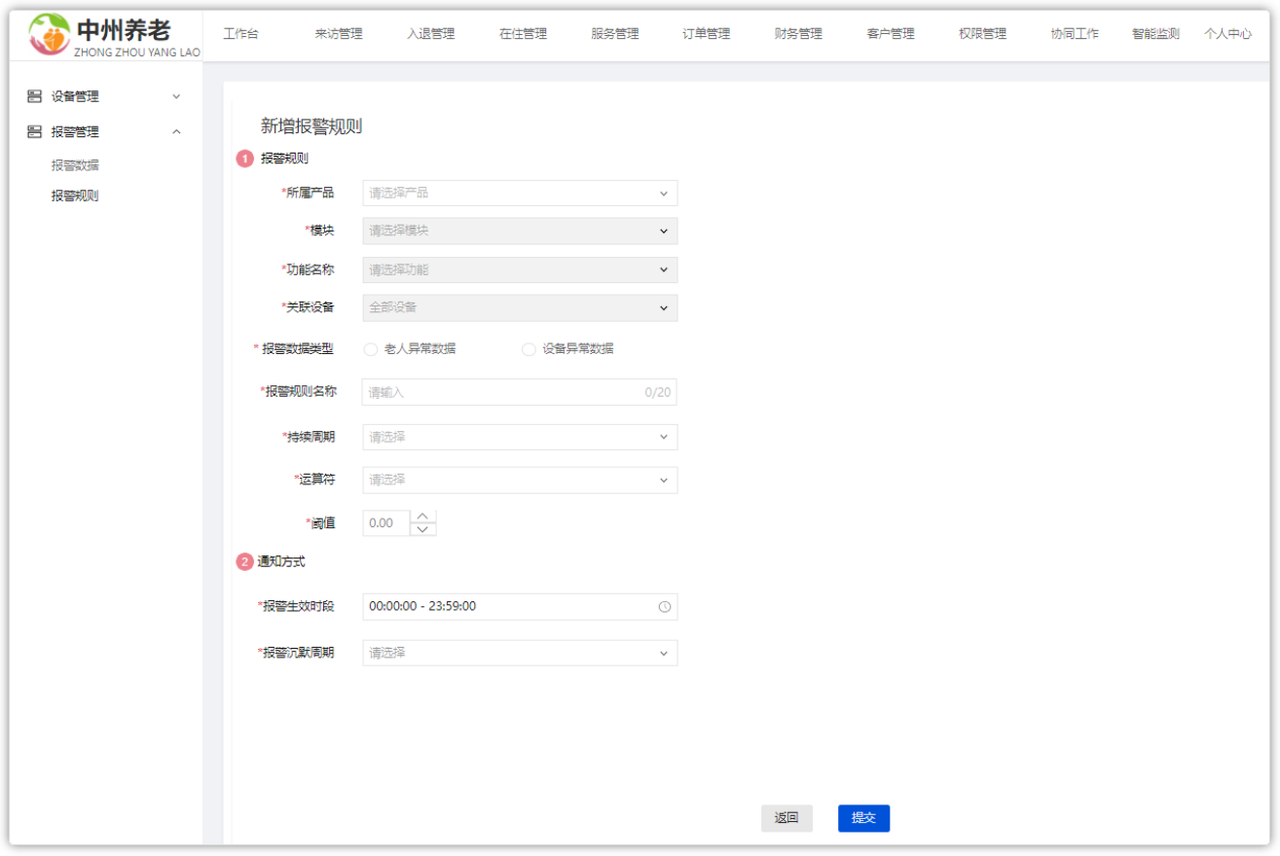
数据来源:
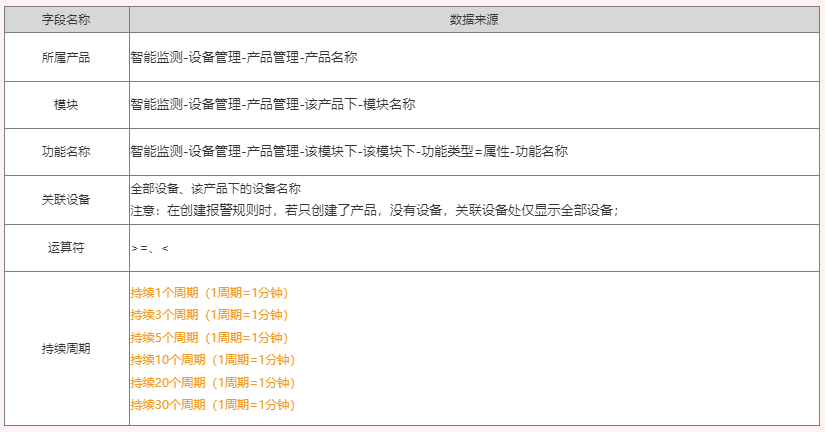
逻辑规则:
1)若多条报警规则是包含/互斥关系时,只要符合报警规则时,就会产生一条报警数据;
例如:规则1: 手表电量 >=10 ,规则2:手表电量< 50, 此时是包含关系,当手机电量=40时,符合两条报警规则,则产生两条报警数据;
2)报警数据见下方示例,1分钟(数据聚合周期)检查一次智能手表(所属产品)中的全部设备(关联设备)的血氧(功能名称),
监控值(统计字段)是否 < 90(运算符+阈值),当持续3个周期(持续周期)都满足这个规则时,触发报警;
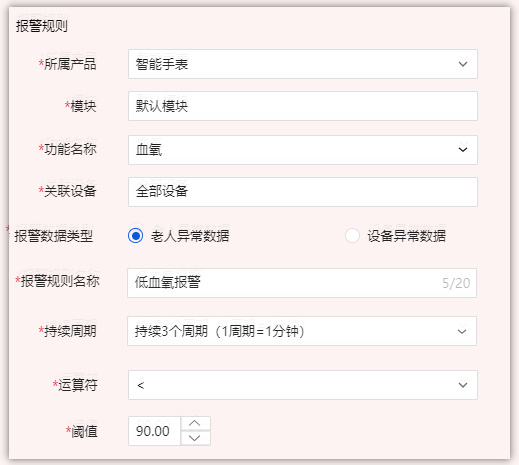
通知方式:
1)报警生效时间:报警规则的生效时间,报警规则只在生效时间内才会检查监控数据是否需要报警;
2)报警沉默周期:指报警发生后如果未恢复正常,重复发送报警通知的时间间隔;
报警方式:
1)当触发报警规则时,则发送消息通知,
2)通知对象:设备数据类型=老人异常数据时,通知老人对应的护理员;设备数据类型=设备异常数据时,通知后勤部维修工;
报警规则其他需求
下面展示的就是刚刚创建的报警规则查询列表
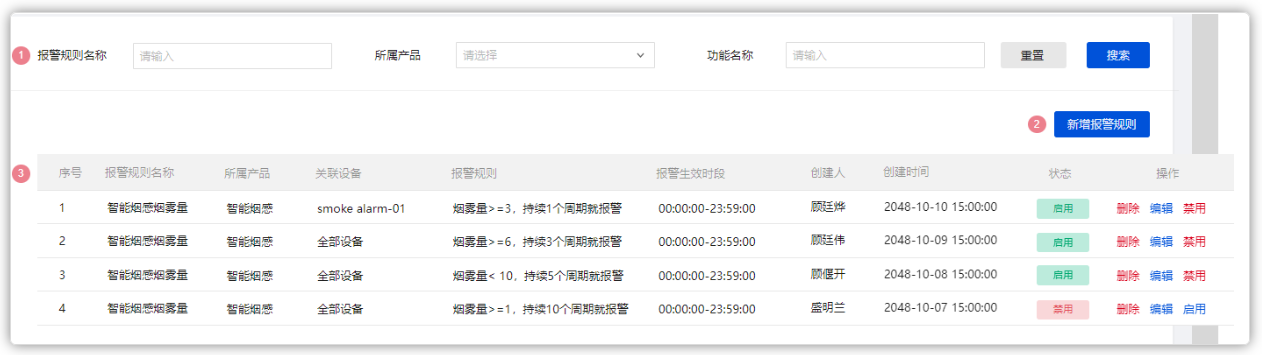
其中在操作中可以处理报警规则(删除,编辑,启用禁用)
表结构
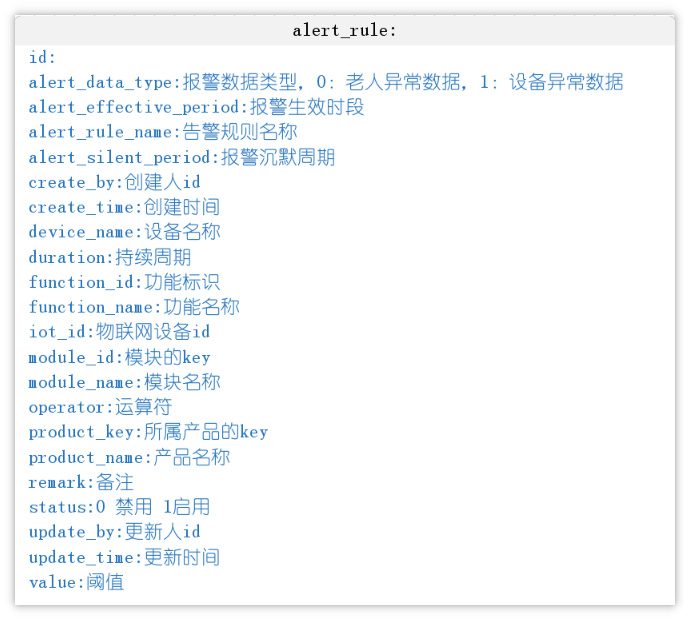
报警规则建表语句:
CREATE TABLE "alert_rule" (
  "id" bigint NOT NULL AUTO_INCREMENT,
  "product_key" varchar(50) CHARACTER SET utf8mb4 COLLATE utf8mb4_unicode_ci DEFAULT NULL COMMENT '所属产品的key',
  "product_name" varchar(500) CHARACTER SET utf8mb4 COLLATE utf8mb4_unicode_ci DEFAULT NULL COMMENT '产品名称',
  "module_id" varchar(50) CHARACTER SET utf8mb4 COLLATE utf8mb4_unicode_ci DEFAULT NULL COMMENT '模块的key',
  "module_name" varchar(500) CHARACTER SET utf8mb4 COLLATE utf8mb4_unicode_ci DEFAULT NULL COMMENT '模块名称',
  "function_name" varchar(255) CHARACTER SET utf8mb4 COLLATE utf8mb4_unicode_ci DEFAULT NULL COMMENT '功能名称',
  "function_id" varchar(255) CHARACTER SET utf8mb4 COLLATE utf8mb4_unicode_ci DEFAULT NULL COMMENT '功能标识',
  "iot_id" varchar(255) CHARACTER SET utf8mb4 COLLATE utf8mb4_unicode_ci DEFAULT NULL COMMENT '物联网设备id',
  "device_name" varchar(255) CHARACTER SET utf8mb4 COLLATE utf8mb4_unicode_ci DEFAULT NULL COMMENT '设备名称',
  "alert_data_type" int DEFAULT NULL COMMENT '报警数据类型,0:老人异常数据,1:设备异常数据',
  "alert_rule_name" varchar(255) CHARACTER SET utf8mb4 COLLATE utf8mb4_unicode_ci DEFAULT NULL COMMENT '告警规则名称',
  "operator" varchar(255) CHARACTER SET utf8mb4 COLLATE utf8mb4_unicode_ci DEFAULT NULL COMMENT '运算符',
  "value" float DEFAULT NULL COMMENT '阈值',
  "duration" int DEFAULT NULL COMMENT '持续周期',
  "alert_effective_period" varchar(255) CHARACTER SET utf8mb4 COLLATE utf8mb4_unicode_ci DEFAULT NULL COMMENT '报警生效时段',
  "alert_silent_period" int DEFAULT NULL COMMENT '报警沉默周期',
  "status" int DEFAULT NULL COMMENT '0 禁用 1启用',
  "create_time" datetime NOT NULL COMMENT '创建时间',
  "update_time" datetime DEFAULT NULL COMMENT '更新时间',
  "create_by" bigint DEFAULT NULL COMMENT '创建人id',
  "update_by" bigint DEFAULT NULL COMMENT '更新人id',
  "remark" varchar(255) CHARACTER SET utf8mb4 COLLATE utf8mb4_0900_ai_ci DEFAULT NULL COMMENT '备注',
  PRIMARY KEY ("id") USING BTREE
) ENGINE=InnoDB AUTO_INCREMENT=53 DEFAULT CHARSET=utf8mb4 COLLATE=utf8mb4_unicode_ci ROW_FORMAT=DYNAMIC;
需求加强说明
基于前面的报警规则,一旦有不符合预期的数据就会触发报警,产生报警数据,通知相关的负责人解决
案例一
详细报警规则,如下图:
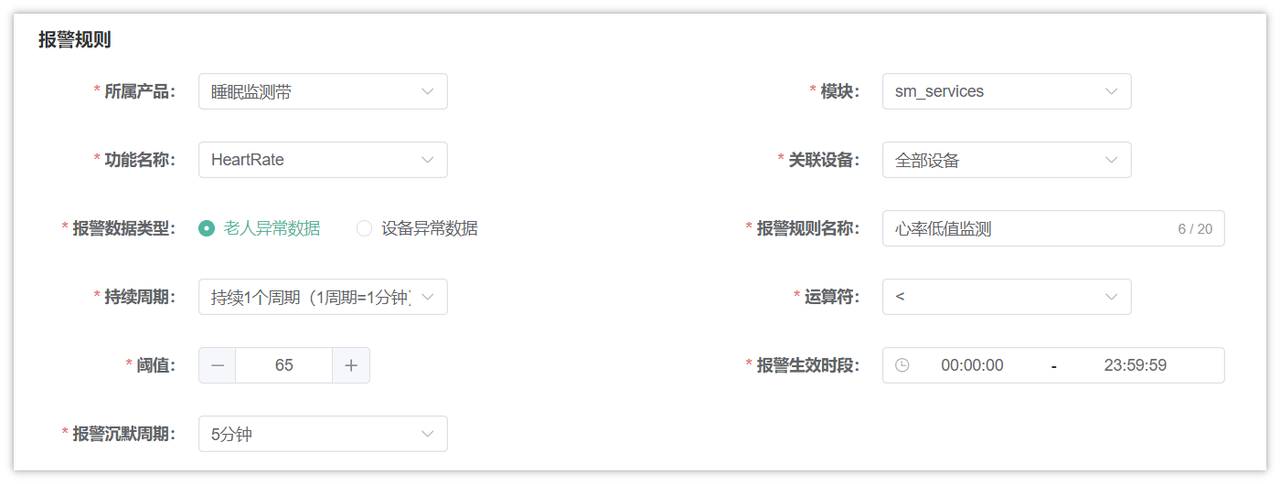
- 监测的产品为睡眠监测带,物模型为心率,过滤的是该产品下的所有设备
- 报警类型为老人异常数据(设备报警通知老人绑定的护理员和超级管理员)
- 持续周期:
- 持续1个周期(1周期=1分钟):表示触发报警之后,马上会保存报警数据
- 持续3个周期(1周期=1分钟):表示触发报警之后,连续三次都是异常数据才会保存报警数据**
- 依此类推
- 阈值为65,运算符为**<:表示采集的心率数据如果小于65**就触发报警
- 沉默周期为5分钟,已经保存报警数据之后,如果后面有连续报警,5分钟之后再触发报警规则
- 报警生效时段为00:00:00~23:59:59:表示任意时段都会采集数据
案例二
报警规则如下图:
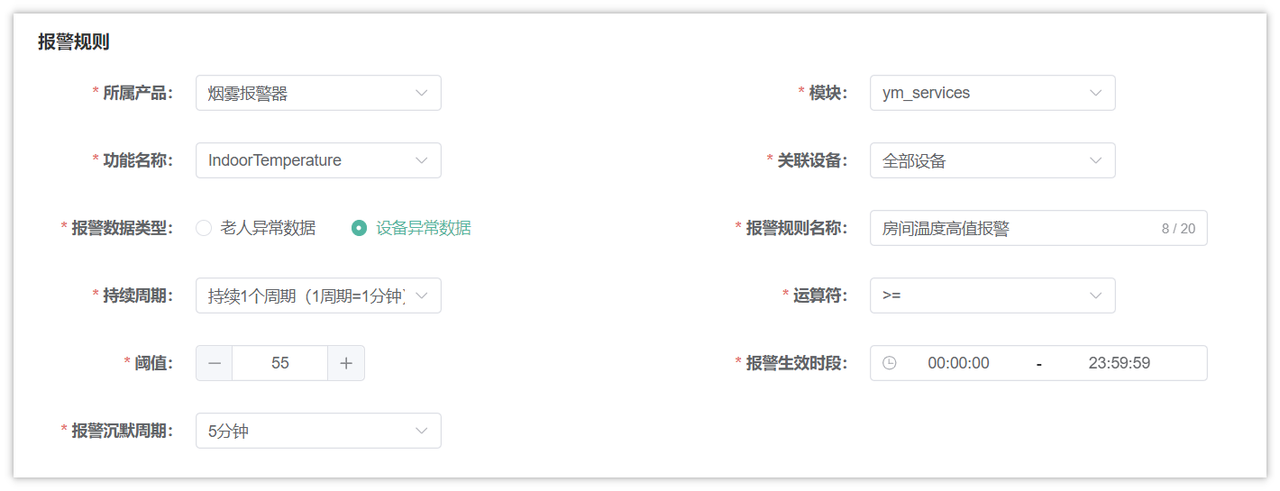
- 监测的产品为烟雾报警器,物模型为温度,过滤的是该产品下的全部设备
- 报警类型为设备异常数据(设备报警通知行政和超级管理员)
- 持续周期为持续1个周期(1后期=1分钟):表示触发报警之后,马上会保存报警数据
- 阈值为55,运算符为**>=:表示采集的室内温度数据大于等于55**就触发报警
- 沉默周期为5分钟,已经保存报警数据之后,如果后面有连续报警,5分钟之后再触发报警规则
- 报警生效时段为00:00:00~23:59:59:表示任意时段都会采集数据
报警规则基础代码准备
- 包名:
com.zzyl.nursing - 模块名:
nursing - 生成业务名称:alertRule
- 生成功能名称:报警规则
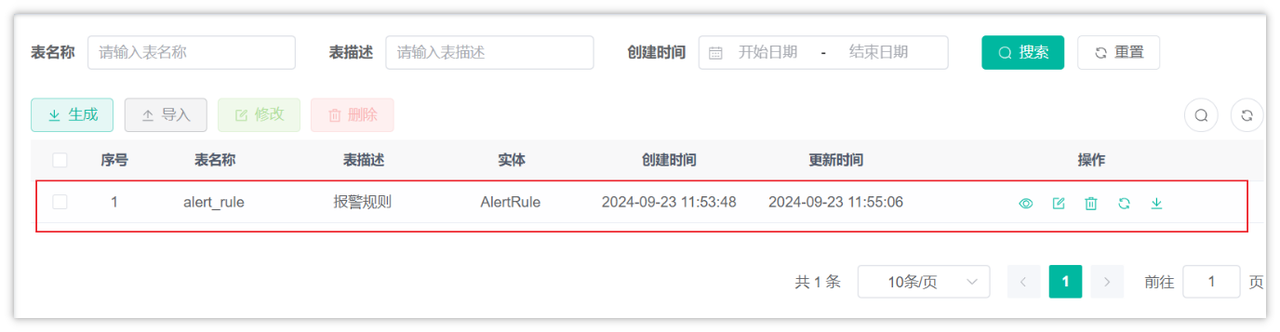
- 只需要拷贝后端代码
- 由于报警规则页面就是单表的增删改查,在若依代码生成功能生成的代码中所有功能都已经实现了,无需编写代码,但是要充分理解业务
查询产品详情接口
需求说明
当新增报警规则的时候,需要选择产品中具体的功能,所以在选择产品之后需要查询到该产品下的服务列表及属性列表
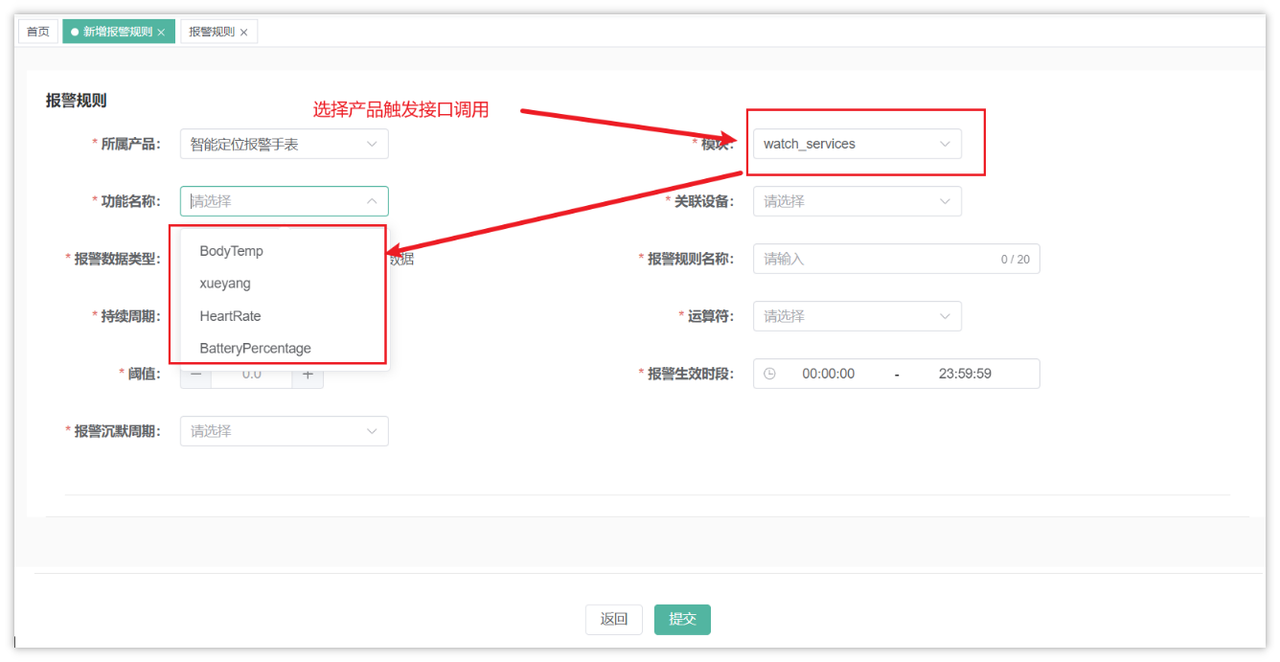
接口定义
接口文档参考:智能监测-接口文档
华为云接口:https://support.huaweicloud.com/api-iothub/iot_06_v5_0052.html
在DeviceController定义新的方法,如下:
@GetMapping("/queryProduct/{productKey}")
@ApiOperation(value = "查询产品详情")
public AjaxResult queryProduct(@PathVariable String productKey) {
    return deviceService.queryProduct(productKey);
}
业务层
在IDeviceService中定义新的方法,如下:
/**
 * 查询产品详情
 * @param productKey
 * @return
 */
AjaxResult queryProduct(String productKey);
实现方法:
/**
 * 查询产品详情
 * @param productKey
 * @return
 */
@Override
public AjaxResult queryProduct(String productKey) {
    // 参数校验
    if(StringUtils.isEmpty(productKey)) {
        throw new BaseException("请输入正确的参数");
    }
    // 调用华为云IOT平台接口
    ShowProductRequest showProductRequest = new ShowProductRequest();
    showProductRequest.setProductId(productKey);
    ShowProductResponse response;

    try {
        response = client.showProduct(showProductRequest);
    } catch (Exception e) {
        throw new BaseException("查询产品详情失败");
    }
    // 判断是否存在服务数据
    List<ServiceCapability> serviceCapabilities = response.getServiceCapabilities();
    if(CollUtil.isEmpty(serviceCapabilities)) {
        return AjaxResult.success(Collections.emptyList());
    }

    return AjaxResult.success(serviceCapabilities);
}
报警数据过滤及处理
执行流程
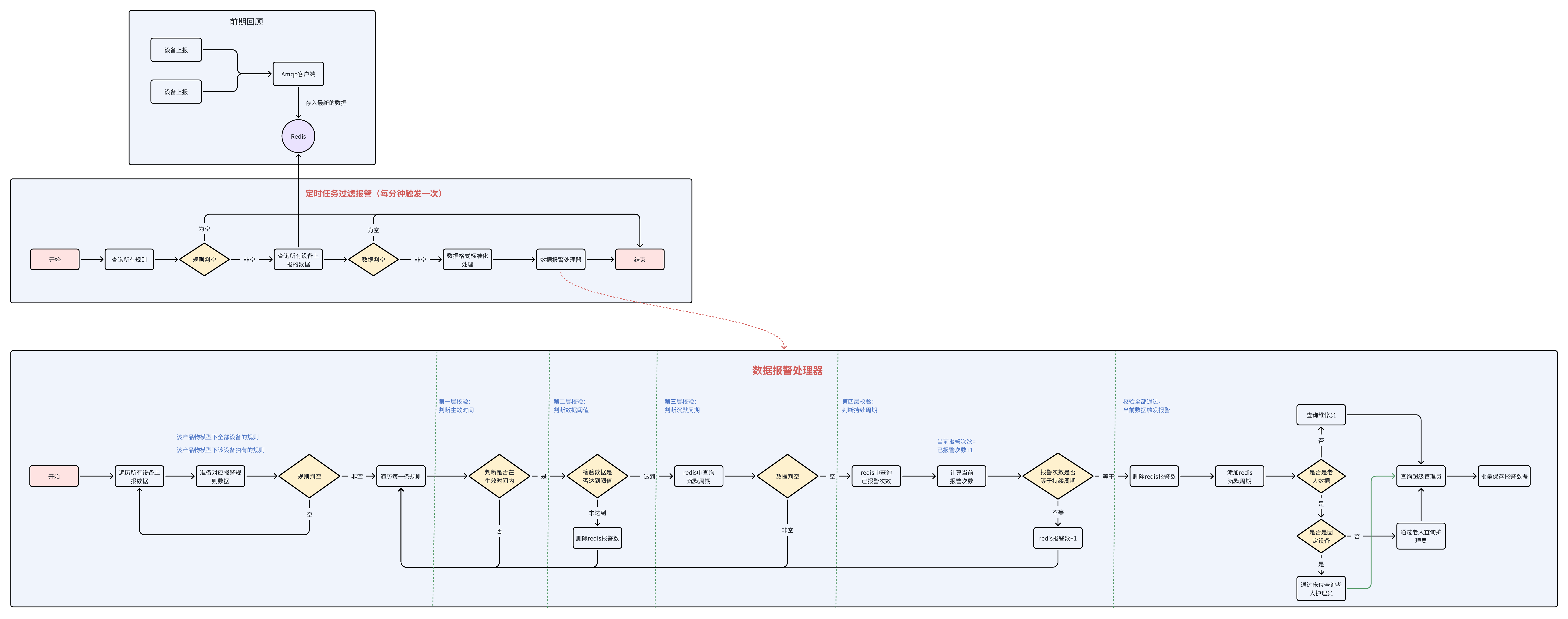
准备工作
负责老人功能介绍
- 在服务管理下提供了一个负责老人功能,在这里可以给已经入住的老人分配对应的护理员:
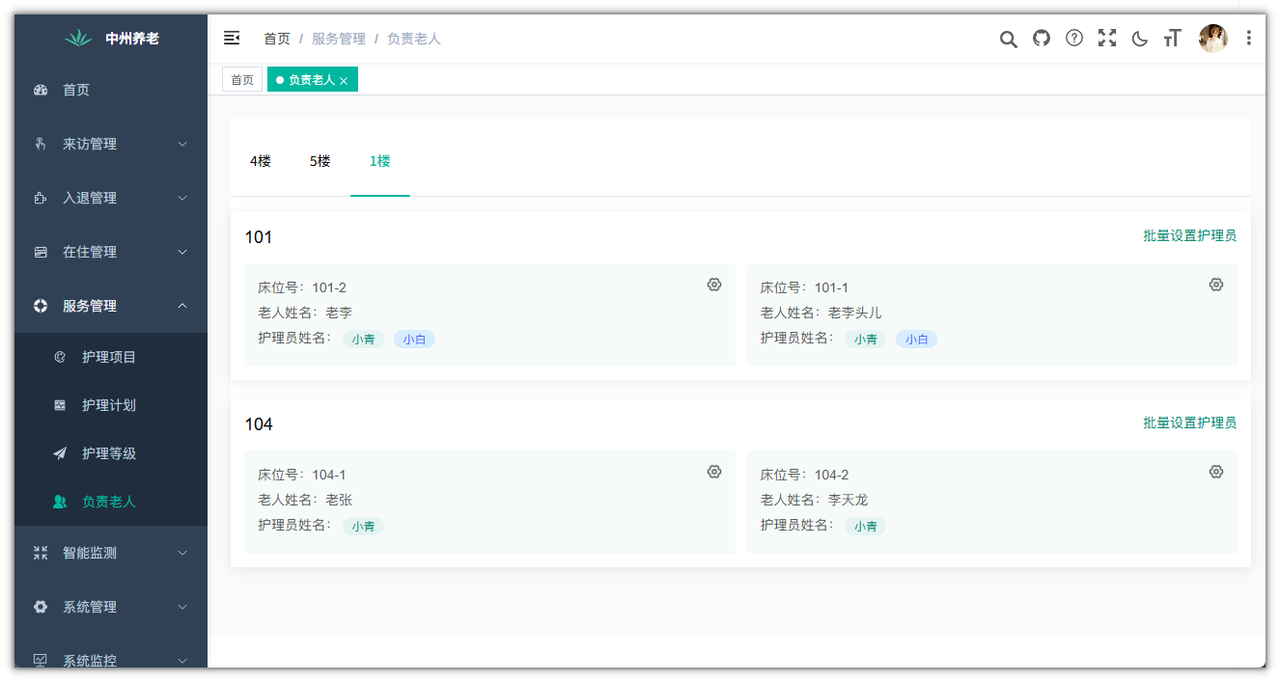
- 表结构介绍
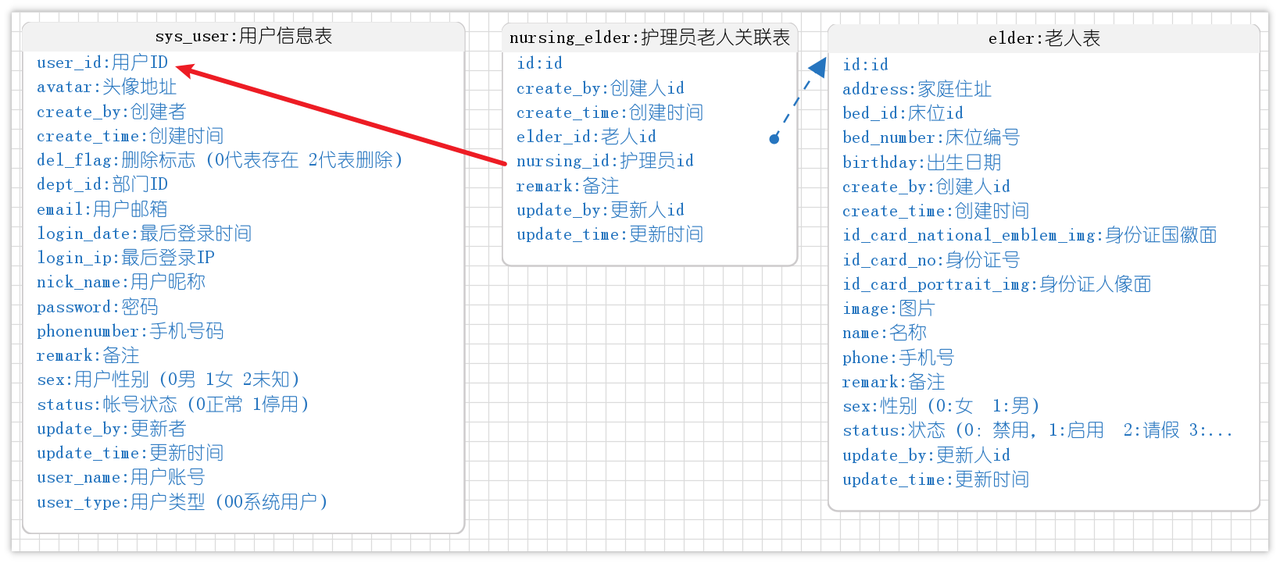
- 用户表
sys_user:存储养老院的员工信息,包含了院长、销售、财务、护理员等各种角色的员工信息 - 老人表
elder:养老院中入住的老人数据 - 护理员老人关联表
nursing_elder:养老院的老人所负责的护理员列表
批量保存报警数据
一旦有了报警数据之后,可能需要通知多个人,所以要为每一个要通知的人保存一条报警数据
告警数据表结构:alert_data(已提供)
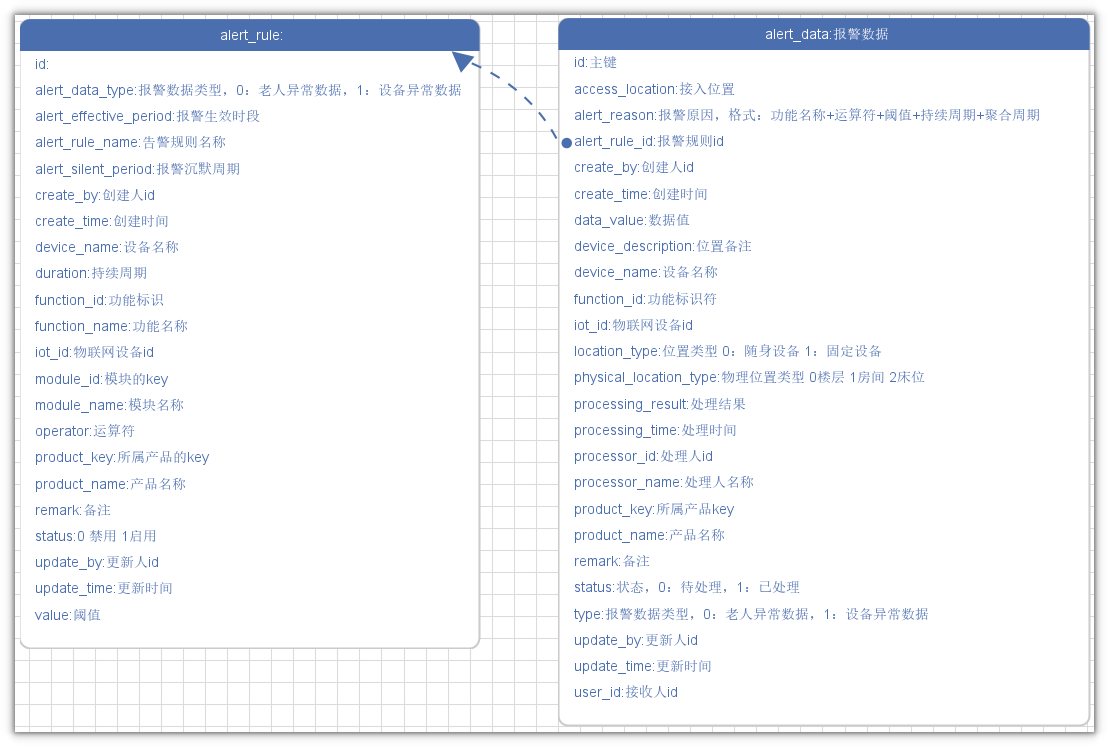
- 报警规则与报警数据为一对多的关系
- 重要字段提醒
- user_id:是指需要处理报警的用户
- 报警数据基础代码准备
- 包名:
com.zzyl.nursing - 模块名:
nursing - 生成业务名称:alertData
- 处理时间字段为:LocalDateTime
- 生成功能名称:报警数据
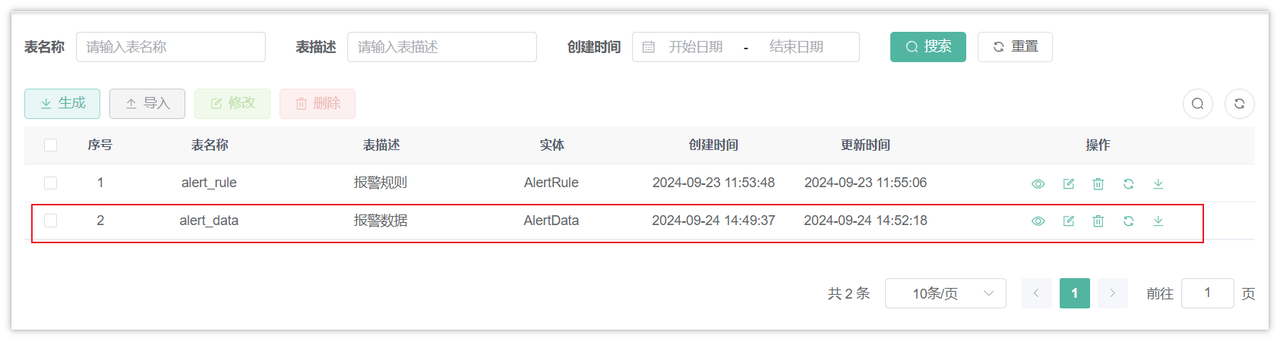
只需要拷贝后端代码
查询报警通知人
在流程结束之后,如果出现了报警数据,基于不同的报警设备的类型,通知的人的也是不同的
- 老人异常数据,通知负责老人的护理员及超级管理员
- 如果是随身设备,可以通过设备找到老人ID,然后通过老人id查询nursing_elder表找到护理员的ID
- 如果是床位上的固定设备,则需要通过设备表中存储的床位ID查询老人表找到老人ID,,然后通过老人id查询nursing_elder表找到护理员的ID
- 设备异常数据,通知行政人员(维修工)及超级管理员
- 如果是楼层或者房间中的固定设备,不需要通知护理员,需要根据维修工角色名称找到对应的维修工的ID
查询老人异常数据要通知的护理员
表关系
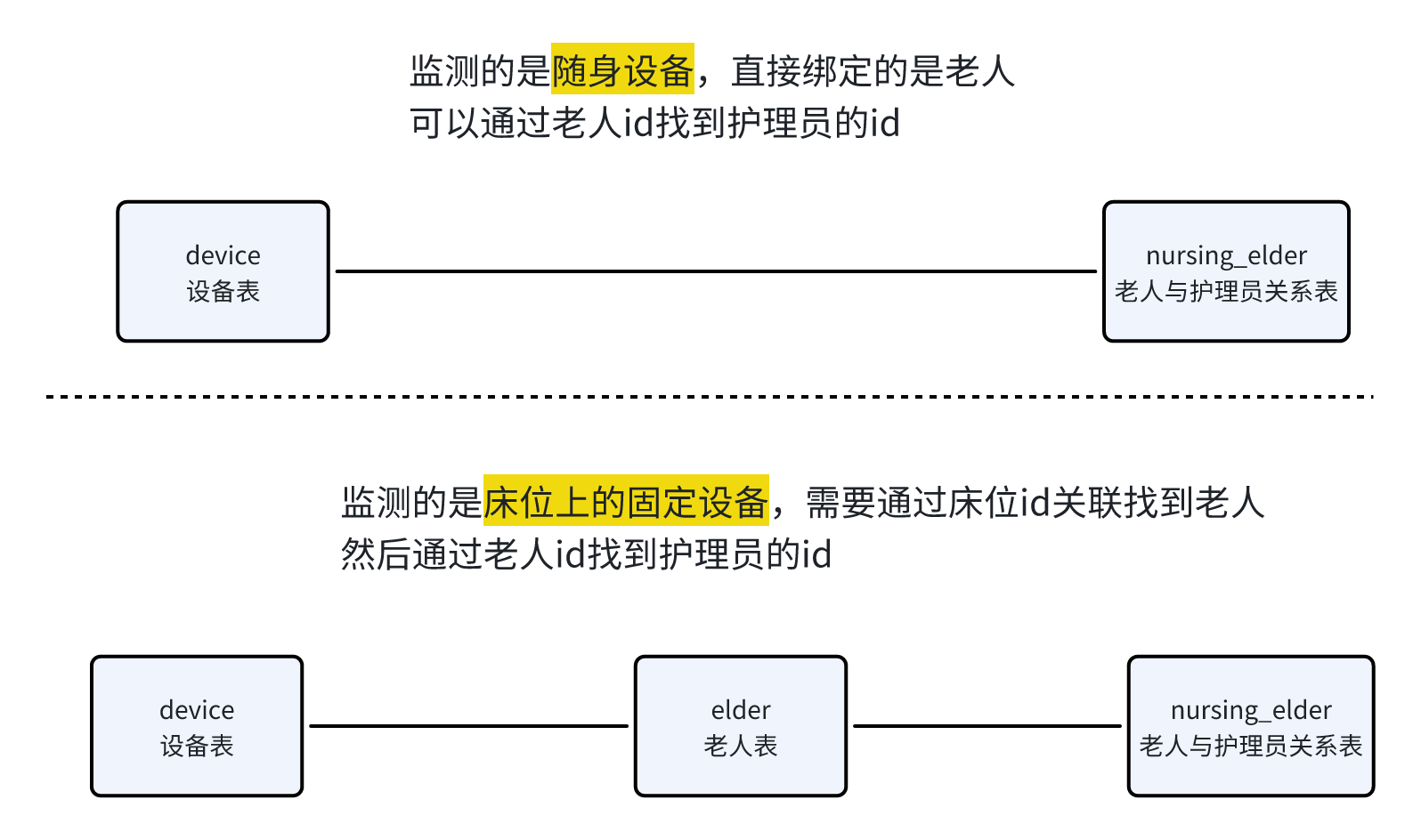
在DeviceMapper中新增两个方法,都是通过iotId查询对应的护理员
/**
 * 根据随身设备id查询老人关联的护理人员id列表
 * @param iotId 设备id
 * @return  护理人员列表
 */
List<Long> selectNursingIdsByIotIdWithElder(@Param("iotId") String iotId);

/**
 * 根据固定设备id查询老人关联的护理人员id列表
 * @param iotId 设备id
 * @return  护理人员列表
 */
List<Long> selectNursingIdsByIotIdWithBed(@Param("iotId") String iotId);
对应的xml映射文件
<select id="selectNursingIdsByIotIdWithElder" resultType="java.lang.Long">
    select ne.nursing_id
    from device d
             left join nursing_elder ne on ne.elder_id = d.binding_location
    where d.location_type = 0
      and d.iot_id = #{iotId}
</select>
<select id="selectNursingIdsByIotIdWithBed" resultType="java.lang.Long">
    select ne.nursing_id
    from device d
             left join elder e on e.bed_id = d.binding_location
             left join nursing_elder ne on ne.elder_id = e.id
    where d.location_type = 1 and d.physical_location_type = 2
      and d.iot_id = #{iotId}
</select>
通过角色名称查询用户id
表关系
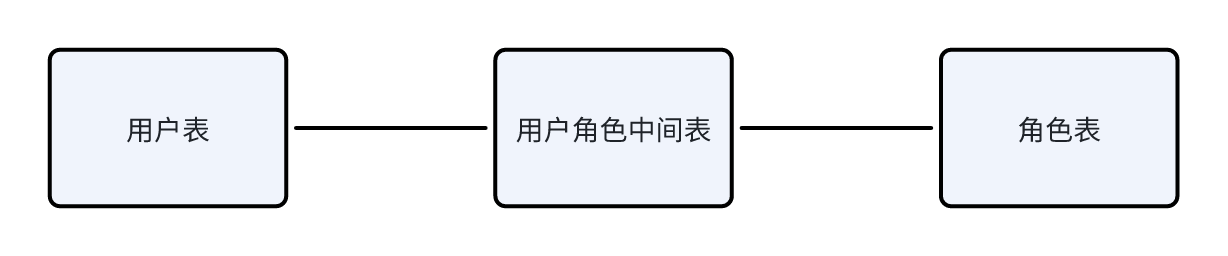
需要在SysUserRoleMapper(zzyl-system模块下)中新增方法,通过角色名称查询用户id
@Select("select sur.user_id from sys_user_role sur left join sys_role sr on sur.role_id = sr.role_id where sr.role_name = #{roleName}")
List<Long> selectUserIdByRoleName(String roleName);
定时任务
在zzyl-nursing-platform中新增定时任务类,启动数据过滤
package com.zzyl.nursing.task;

import com.zzyl.nursing.service.IAlertRuleService;
import lombok.extern.slf4j.Slf4j;
import org.springframework.beans.factory.annotation.Autowired;
import org.springframework.scheduling.annotation.Scheduled;
import org.springframework.stereotype.Component;

@Component
@Slf4j
public class AlertTask {

    @Autowired
    private IAlertRuleService alertRuleService;

    public void deviceDataAlertFilter() {
        alertRuleService.alertFilter();
    }
}
核心过滤逻辑
在AlertRuleService中新增方法,过滤数据,如下:
/**
 * 过滤报警
 */
void alertFilter();
实现方法(在编写代码的过程中,需要打开流程图,按图编写代码):
@Autowired
private SysUserRoleMapper userRoleMapper;

@Autowired
private DeviceMapper deviceMapper;

@Autowired
private IAlertDataService alertDataService;

@Value("${alert.deviceMaintainerRole}")
private String deviceMaintainerRole;

@Value("${alert.managerRole}")
private String managerRole;

@Autowired
private RedisTemplate<String, String> redisTemplate;

/**
 * 报警过滤
 */
@Override
public void alertFilter() {
    // 查询所有规则,遍历规则
    long count = count(Wrappers.<AlertRule>lambdaQuery().eq(AlertRule::getStatus, 1));
    if (count <= 0) {
        return;
    }
    // 查询所有上报的数据
    List<Object> values = redisTemplate.opsForHash().values(CacheConstants.IOT_DEVICE_LAST_DATA);
    if (CollUtil.isEmpty(values)) {
        return;
    }
    // 解析上报的数据
    List<DeviceData> deviceDatas = new ArrayList<>();
    values.forEach(v -> deviceDatas.addAll(JSONUtil.toList(v.toString(), DeviceData.class)));

    // 遍历报警数据,逐条处理
    deviceDatas.forEach(d -> alertFilter(d));
}

/**
 * 逐条过滤报警数据
 *
 * @param deviceData 设备数据
 */
private void alertFilter(DeviceData deviceData) {
    // 判断当前上报的数据是否超过了1分钟
    LocalDateTime alarmTime = deviceData.getAlarmTime();
    long between = LocalDateTimeUtil.between(alarmTime, LocalDateTime.now(), ChronoUnit.SECONDS);
    if (between > 60) {
        return;
    }
    // 查询所有的该产品规则和该物模型的规则
    List<AlertRule> allRules = list(Wrappers.<AlertRule>lambdaQuery()
            .eq(AlertRule::getProductKey, deviceData.getProductKey())
            .eq(AlertRule::getIotId, "-1")
            .eq(AlertRule::getFunctionId, deviceData.getFunctionId())
            .eq(AlertRule::getStatus, 1));

    List<AlertRule> iotIdRules = list(Wrappers.<AlertRule>lambdaQuery()
            .eq(AlertRule::getProductKey, deviceData.getProductKey())
            .eq(AlertRule::getIotId, deviceData.getIotId())
            .eq(AlertRule::getFunctionId, deviceData.getFunctionId())
            .eq(AlertRule::getStatus, 1));
    // 合并
    Collection<AlertRule> allArertRules = CollUtil.addAll(allRules, iotIdRules);
    // 如果为空,则中断
    if (CollUtil.isEmpty(allArertRules)) {
        return;
    }
    // 按照过滤规则和上报的数据进行匹配
    allArertRules.forEach(alertRule -> deviceDataAlarmHandler(alertRule, deviceData));

}

/**
 * 过滤数据是否触发报警规则
 *
 * @param rule
 * @param deviceData
 */
private void deviceDataAlarmHandler(AlertRule rule, DeviceData deviceData) {
    // 判断上报时间是否在规则的生效时段内 00:00:00~23:59:59
    String[] split = rule.getAlertEffectivePeriod().split("~");
    LocalTime startTime = LocalTime.parse(split[0]);
    LocalTime endTime = LocalTime.parse(split[1]);
    // 获取上报时间
    LocalTime time = LocalDateTimeUtil.of(deviceData.getAlarmTime()).toLocalTime();
    // 不在上报时间内,则结束请求
    if (time.isBefore(startTime) || time.isAfter(endTime)) {
        return;
    }
    // 获取IOTID
    String iotId = deviceData.getIotId();
    // 统计次数的key
    String aggCountKey = CacheConstants.ALERT_TRIGGER_COUNT_PREFIX + iotId + ":" + deviceData.getFunctionId() + ":" + rule.getId();

    // 数据对比,上报的数据与规则中的阈值进行对比
    // 两个参数x,y(参数有顺序要求,左边是上报的数据,后边是规则的数据)  x==y 返回0  x>y 返回大于0  x<y 返回小于0的数值
    int compare = NumberUtil.compare(Double.valueOf(deviceData.getDataValue()), rule.getValue());
    if ((rule.getOperator().equals(">=") && compare >= 0) || (rule.getOperator().equals("<") && compare < 0)) {
        log.info("当前上报的数据符合规则异常");
    } else {
        // 正常的数据
        redisTemplate.delete(aggCountKey);
        return;
    }
    // 异常的数据会走到这里
    // 判断是否在沉默周期内
    String silentKey = CacheConstants.ALERT_SILENT_PREFIX + iotId + ":" + deviceData.getFunctionId() + ":" + rule.getId();
    String silentData = redisTemplate.opsForValue().get(silentKey);
    if (StringUtils.isNotEmpty(silentData)) {
        return;
    }
    // 持续周期的逻辑
    String aggData = redisTemplate.opsForValue().get(aggCountKey);
    int count = StringUtils.isEmpty(aggData) ? 1 : Integer.parseInt(aggData) + 1;
    // 如果count与持续周期的值相等,则触发报警
    if (ObjectUtil.notEqual(count, rule.getDuration())) {
        // 不相等
        redisTemplate.opsForValue().set(aggCountKey, count + "");
        return;
    }
    // 删除redis的报警数据
    redisTemplate.delete(aggCountKey);
    // 存储数据到沉默周期,设置一个过期时间,规则中的沉默周期
    redisTemplate.opsForValue().set(silentKey, "1", rule.getAlertSilentPeriod(), TimeUnit.MINUTES);

    // 报警数据,需要找到对应的人
    List<Long> userIds = new ArrayList<>();
    if (rule.getAlertDataType().equals(0)) {
        // 老人异常数据
        if (deviceData.getLocationType().equals(0)) {
            // 说明是报警手表,直接可以找到老人的id,通过老人id,找到对应的护理员
            userIds = deviceMapper.selectNursingIdsByIotIdWithElder(iotId);
        } else if (deviceData.getLocationType().equals(1) && deviceData.getPhysicalLocationType().equals(2)) {
            // 说明是床位设备,可以通过床位id找到老人,通过老人id,找到对应的护理员
            userIds = deviceMapper.selectNursingIdsByIotIdWithBed(iotId);
        }
    } else {
        // 设备异常数据,找维修工,或者是行政人员
        userIds = userRoleMapper.selectUserIdByRoleName(deviceMaintainerRole);
    }
    // 不论是哪种情况,都要通知超级管理员
    List<Long> managerIds = userRoleMapper.selectUserIdByRoleName(managerRole);
    Collection<Long> allUserIds = CollUtil.addAll(userIds, managerIds);
    // 去重
    allUserIds = CollUtil.distinct(allUserIds);

    // 保存报警数据
    insertAlertData(allUserIds, rule, deviceData);
}

/**
 * 保存报警数据
 *
 * @param allUserIds
 * @param rule
 * @param deviceData
 */
private void insertAlertData(Collection<Long> allUserIds, AlertRule rule, DeviceData deviceData) {
    // 对象拷贝
    AlertData alertData = BeanUtil.toBean(deviceData, AlertData.class);
    alertData.setAlertRuleId(rule.getId());
    // 心率<60,持续3个周期就报警
    String alertReason = CharSequenceUtil.format("{}{}{},持续{}个周期就报警", rule.getFunctionName(), rule.getOperator(), rule.getValue(), rule.getDuration());
    alertData.setAlertReason(alertReason);
    alertData.setStatus(0);
    alertData.setType(rule.getAlertDataType());
    // 遍历allUserIds
    List<AlertData> list = allUserIds.stream().map(userId -> {
        AlertData dbAlertData = BeanUtil.toBean(alertData, AlertData.class);
        dbAlertData.setUserId(userId);
        dbAlertData.setId(null);
        return dbAlertData;
    }).collect(Collectors.toList());

    // 批量保存
    alertDataService.saveBatch(list);

}
逻辑相对复杂,一定要对照流程图阅读代码理解
上述代码中多次用到了redis,并且定义了常量来表示redis的key,需要在CacheConstants新增常量,如下:
/**
 * 报警规则连续触发次数,缓存前缀
 */
public static final String ALERT_TRIGGER_COUNT_PREFIX = "iot:alert_trigger_count:";
/**
 * 报警规则沉默周期,缓存前缀
 */
public static final String ALERT_SILENT_PREFIX = "iot:alert_silent:";
上述代码中,对于超级管理员和维修工是通过配置的方式读取的名字,需要在application-dev.yml文件中添加数据
alert:
    deviceMaintainerRole: 维修工
    managerRole: 超级管理员
报警通知提醒
需求说明
当设备上报的数据触发了报警规则之后,需要及时提醒相关人员来处理,为了更快的让相应的负责人收到消息,一旦监测到异常数据,可以给相关负责人发送通知,例如:
对于当前项目来说,可以在后台管理系统中进行通知,效果如下:
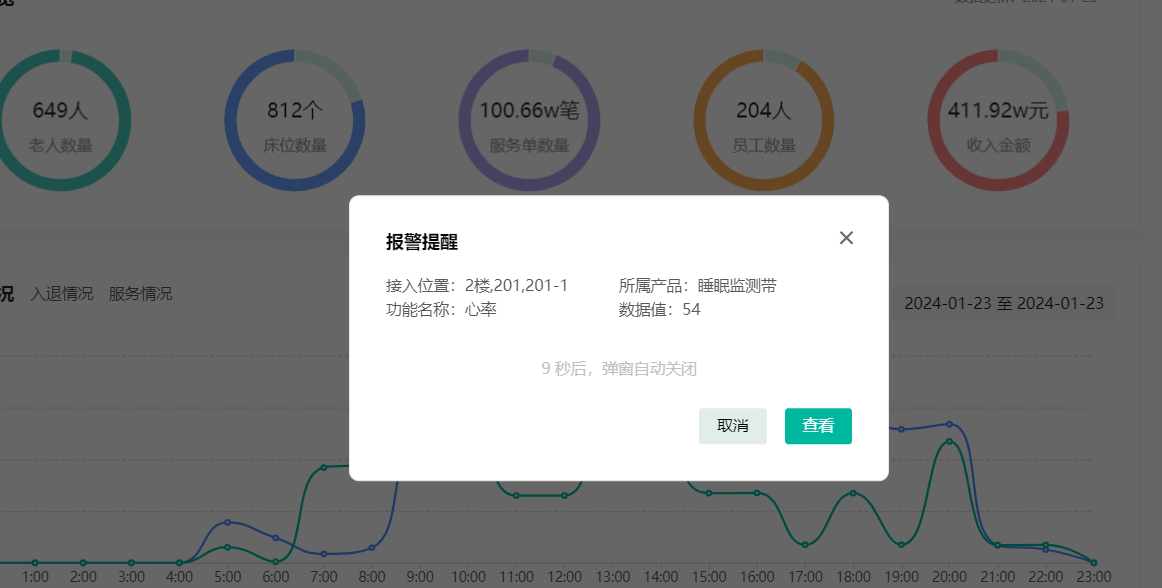
要想实现这个功能,需要使用一个新的技术:WebSocket
功能实现
实现思路
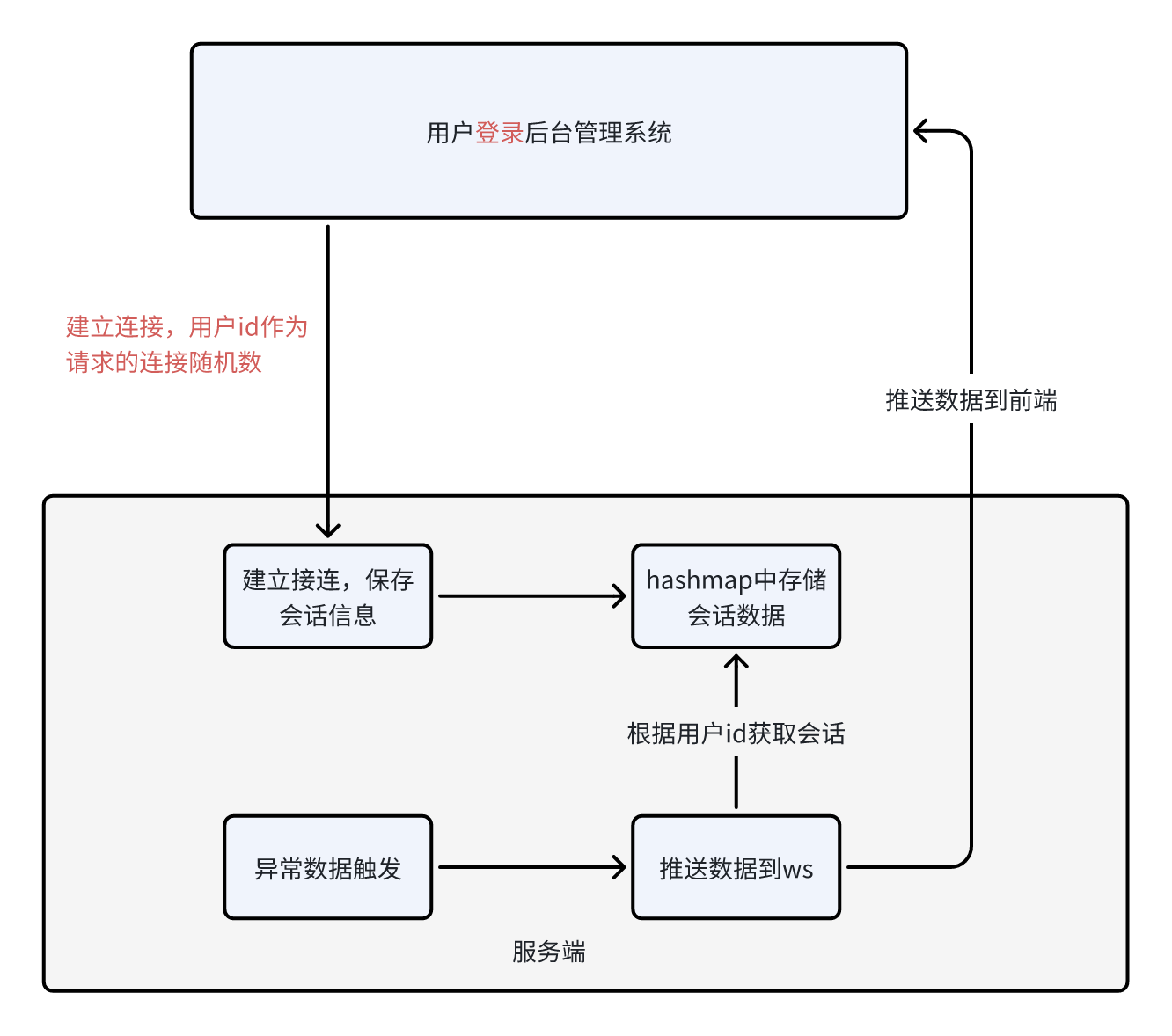
环境集成
- 导入依赖
在zzyl-nursing-platform中如导入以下依赖
<dependency>
    <groupId>org.springframework.boot</groupId>
    <artifactId>spring-boot-starter-websocket</artifactId>
</dependency>
- 定义WebSocket服务和注册WebSocket
配置类:
package com.zzyl.nursing.config;

import org.springframework.context.annotation.Bean;
import org.springframework.context.annotation.Configuration;
import org.springframework.web.socket.server.standard.ServerEndpointExporter;

@Configuration
public class WebSocketConfig {

    /**
     * 注册基于@ServerEndpoint声明的Websocket Endpoint
     * @return
     */
    @Bean
    public ServerEndpointExporter serverEndpointExporter() {
        return new ServerEndpointExporter();
    }

}
WebSocketServer:
package com.zzyl.nursing.config;

import cn.hutool.core.collection.CollUtil;
import cn.hutool.core.util.ObjectUtil;
import cn.hutool.json.JSONUtil;
import com.zzyl.common.exception.base.BaseException;
import com.zzyl.nursing.vo.AlertNotifyVo;
import lombok.extern.slf4j.Slf4j;
import org.springframework.stereotype.Component;
import org.springframework.util.CollectionUtils;
import org.springframework.web.socket.config.annotation.EnableWebSocket;

import javax.websocket.*;
import javax.websocket.server.PathParam;
import javax.websocket.server.ServerEndpoint;
import java.io.IOException;
import java.util.Collection;
import java.util.HashMap;
import java.util.List;
import java.util.Map;

@Slf4j
@Component
@EnableWebSocket
@ServerEndpoint("/ws/{sid}")
public class WebSocketServer {

    private static Map<String, Session> sessionMap = new HashMap<>();

    /**
     * 连接建立时触发
     *
     * @param session
     * @param sid
     */
    @OnOpen
    public void onOpen(Session session, @PathParam("sid") String sid) {
        log.info("有客户端连接到了服务器 , {}", sid);
        sessionMap.put(sid, session);
    }

    /**
     * 服务端接收到消息时触发
     *
     * @param session
     * @param message
     * @param sid
     */
    @OnMessage
    public void onMessage(Session session, String message, @PathParam("sid") String sid) {
        log.info("接收到了客户端 {} 发来的消息 : {}", sid, message);
    }

    /**
     * 连接关闭时触发
     *
     * @param session
     * @param sid
     */
    @OnClose
    public void onClose(Session session, @PathParam("sid") String sid) {
        System.out.println("连接断开:" + sid);
        sessionMap.remove(sid);
    }

    /**
     * 通信发生错误时触发
     *
     * @param session
     * @param sid
     * @param throwable
     */
    @OnError
    public void onError(Session session, @PathParam("sid") String sid, Throwable throwable) {
        System.out.println("出现错误:" + sid);
        throwable.printStackTrace();
    }

    /**
     * 广播消息
     *
     * @param message
     * @throws IOException
     */
    public void sendMessageToAll(String message) throws IOException {
        Collection<Session> sessions = sessionMap.values();
        if (!CollectionUtils.isEmpty(sessions)) {
            for (Session session : sessions) {
                //服务器向客户端发送消息
                session.getBasicRemote().sendText(message);
            }
        }
    }

    /**
     * 发送websocket消息给指定消费者
     *
     * @param alertNotifyVo 报警消息
     * @param userIds   报警数据map
     * @throws IOException io异常
     */
    public void sendMessageToConsumer(AlertNotifyVo alertNotifyVo, Collection<Long> userIds) {
        //如果消费者为空,程序结束
        if (CollUtil.isEmpty(userIds)) {
            return;
        }

        //如果websoket客户端为空,程序结束
        if (ObjectUtil.isEmpty(sessionMap)) {
            return;
        }

        //遍历消费者,发送消息
        //key为消息接收人id,value为报警数据id
        userIds.forEach(userId -> {
            //获取该消费者的websocket连接,如果不存在,跳出本次循环
            Session session = sessionMap.get(String.valueOf(userId));
            if (ObjectUtil.isEmpty(session)) {
                return;
            }
            //获取该消费者的websocket连接,并发送消息
            try {
                session.getBasicRemote().sendText(JSONUtil.toJsonStr(alertNotifyVo));
            } catch (IOException e) {
                throw new BaseException("websocket推送消息失败");
            }
        });
    }

}
消息通知Vo:
package com.zzyl.nursing.vo;

import lombok.AllArgsConstructor;
import lombok.Builder;
import lombok.Data;
import lombok.NoArgsConstructor;

/**
 * 报警通知消息对象
 *
 **/
@Data
@Builder
@NoArgsConstructor
@AllArgsConstructor
public class AlertNotifyVo {
    /**
     * 报警数据id
     */
    private Long id;

    /**
     * 接入位置
     */
    private String accessLocation;

    /**
     * 位置类型 0:随身设备 1:固定设备
     */
    private Integer locationType;

    /**
     * 物理位置类型 0楼层 1房间 2床位
     */
    private Integer physicalLocationType;

    /**
     * 设备位置
     */
    private String deviceDescription;

    /**
     * 产品名称
     */
    private String productName;

    /**
     * 功能名称
     */
    private String functionName;

    /**
     * 数据值
     */
    private String dataValue;

    /**
     * 报警数据类型,0:老人异常数据,1:设备异常数据
     */
    private Integer alertDataType;

    /**
     * 语音通知状态,0:关闭,1:开启
     */
    private Integer voiceNotifyStatus;

    /**
     * 报警通知类型,0:解除报警,1:报警
     */
    private Integer notifyType;

    /**
     * 是否全员通知<br>
     * 智能床位的报警消息是全员通知,对于护理员和固定设备维护人员不是全员通知
     */
    private Boolean isAllConsumer;
}
报警数据推送到前端
修改AlertRuleServiceImpl类,添加推送报警数据逻辑
/**
 * 设备数据匹配过滤规则
 * @param deviceData
 * @param rule
 */
private void deviceDataAlarmHandler(DeviceData deviceData, AlertRule rule) {

    // 判断上报的数据是否在生效时段内  00:00:00~23:59:59    00:05:00~22:59:59
    String[] split = rule.getAlertEffectivePeriod().split("~");
    LocalTime startTime = LocalTime.parse(split[0]);
    LocalTime endTime = LocalTime.parse(split[1]);
    // 数据上报的时间
    LocalTime localTime = deviceData.getAlarmTime().toLocalTime();
    // 如果上报的时间不在生效时段内,则结束请求
    if(localTime.isBefore(startTime) || localTime.isAfter(endTime)) {
        return;
    }

    // 统计次数的key
    String aggCountKey = CacheConstants.IOT_COUNT_ALERT+deviceData.getIotId()+":"+deviceData.getFunctionId()+":"+rule.getId();

    // 判断上报的数据是否达到了规则的阈值
    Double dataValue = Double.valueOf(deviceData.getDataValue());
    Double value = rule.getValue();
    // 工具类x,y(顺序有要求,左边是上报的数据,后边是规则定义的数据)  x等于y 返回0  x>y  返回大于0的值   x<y  返回小于0的值
    int compare = NumberUtil.compare(dataValue, value);
    if((rule.getOperator().equals(">=") && compare >= 0) || (rule.getOperator().equals("<") && compare < 0)){
        //符合上报的规则,产生了异常数据
        log.info("当前数据符合报警规则");
    } else {
        log.info("正常上报的数据");
        redisTemplate.delete(aggCountKey);
        return;
    }

    // 沉默周期  持续周期
    // 设计一个redis的可以,必须唯一,代表的当前的设备、物模型、规则ID
    String silentKey = CacheConstants.IOT_SILENT_ALERT+deviceData.getIotId()+":"+deviceData.getFunctionId()+":"+rule.getId();
    //获取沉默周期
    String silentData = redisTemplate.opsForValue().get(silentKey);
    if(StringUtils.isNotEmpty(silentData)){
        return;
    }
    // 持续周期

    String aggCountData = redisTemplate.opsForValue().get(aggCountKey);
    Integer count = StringUtils.isEmpty(aggCountData)? 1 : (Integer.parseInt(aggCountData) + 1);
    // 当前count不等于持续周期,就累加数据,并且结束请求
    if(ObjectUtil.notEqual(count,rule.getDuration())){
        // 累加数据
        redisTemplate.opsForValue().set(aggCountKey,count+"");
        return;
    }
    // 到了报警的条件了,保存一份沉默周期
    redisTemplate.opsForValue().set(silentKey,"1",rule.getAlertSilentPeriod(), TimeUnit.MINUTES);
    // 删除统计的次数
    redisTemplate.delete(aggCountKey);

    // 保存异常数据
    // 判断上报数据的设备的类型,如果老人的异常数据(手表、睡眠检测带) 设备异常(烟雾报警)
    List<Long> userIds = new ArrayList<>();
    if(rule.getAlertDataType().equals(0)){
        // 老人异常(手表、睡眠检测带)  设备id-->设备-->老人id--->护理员
        if(deviceData.getLocationType().equals(0)){
            // 随身设备
            userIds = deviceMapper.selectNursingIdsByIotIdWithElder(deviceData.getIotId());
        }else if(deviceData.getLocationType().equals(1) && deviceData.getPhysicalLocationType().equals(2)){
            // 床位设备  设备id-->设备-->床位-->老人id--->护理员
            userIds = deviceMapper.selectNursingIdsByIotIdWithBed(deviceData.getIotId());
        }
    }else {
        // 设备异常  找维修人员   通过角色名称(维修工)   用户  角色  用户角色中间表
        userIds = sysUserRoleMapper.selectByRoleName("维修工");
    }
    // 找到超级管理员
    List<Long> managerIds = sysUserRoleMapper.selectByRoleName("超级管理员");
    // 合并两份用户id
    Collection<Long> allUserIds = CollUtil.addAll(userIds, managerIds);
    // 去重
    allUserIds = CollUtil.distinct(allUserIds);

    // 批量保存异常数据
    List<AlertData> alertDataList = insertAlertData(allUserIds, deviceData, rule);

    // websocket推送消息
    webSocketNotity(alertDataList.get(0), rule, allUserIds);

}

@Autowired
private WebSocketServer webSocketServer;

/**
 * websocket推送消息
 * @param alertData
 * @param rule
 * @param allUserIds
 */
private void webSocketNotity(AlertData alertData, AlertRule rule, Collection<Long> allUserIds) {

    //属性拷贝
    AlertNotifyVo alertNotifyVo = BeanUtil.toBean(alertData, AlertNotifyVo.class);
    alertNotifyVo.setAccessLocation(alertData.getRemark());
    alertNotifyVo.setFunctionName(alertRule.getFunctionName());
    alertNotifyVo.setAlertDataType(alertRule.getAlertDataType());
    alertNotifyVo.setNotifyType(1);
    // 向指定的人推送消息
    webSocketServer.sendMessageToConsumer(alertNotifyVo, ids);

}

@Autowired
private IAlertDataService alertDataService;

/**
 * 保存异常数据
 * @param allUserIds
 * @param deviceData
 * @param rule
 */
private List<AlertData> insertAlertData(Collection<Long> allUserIds, DeviceData deviceData, AlertRule rule) {

    // 属性拷贝,从deviceData拷贝到alertData
    AlertData alertData = BeanUtil.toBean(deviceData, AlertData.class);
    // 关于规则的数据都拷贝不过去
    alertData.setAlertRuleId(rule.getId());
    // 功能名称+运算符+阈值+持续周期+聚合周期
    String reason = CharSequenceUtil.format("{}{}{},持续了{}周期,就报警",rule.getFunctionId(),
            rule.getOperator(),rule.getValue(),rule.getDuration());
    alertData.setAlertReason(reason);
    // 报警状态
    alertData.setStatus(0);
    alertData.setType(rule.getAlertDataType());
    // 批量保存数据了,由于多个人
    List<AlertData> list = allUserIds.stream().map(userId -> {
        // 再次拷贝
        AlertData dBalertData = BeanUtil.toBean(alertData, AlertData.class);
        dBalertData.setUserId(userId);
        dBalertData.setId(null);
        return dBalertData;

    }).collect(Collectors.toList());
    // 批量保存
    alertDataService.saveBatch(list);

    return list;
}
前端环境配置
用资料中提供的index.vue替换src/layout目录下的index.vue(主要是集成WebSocket)
修改前端的ws的连接地址:
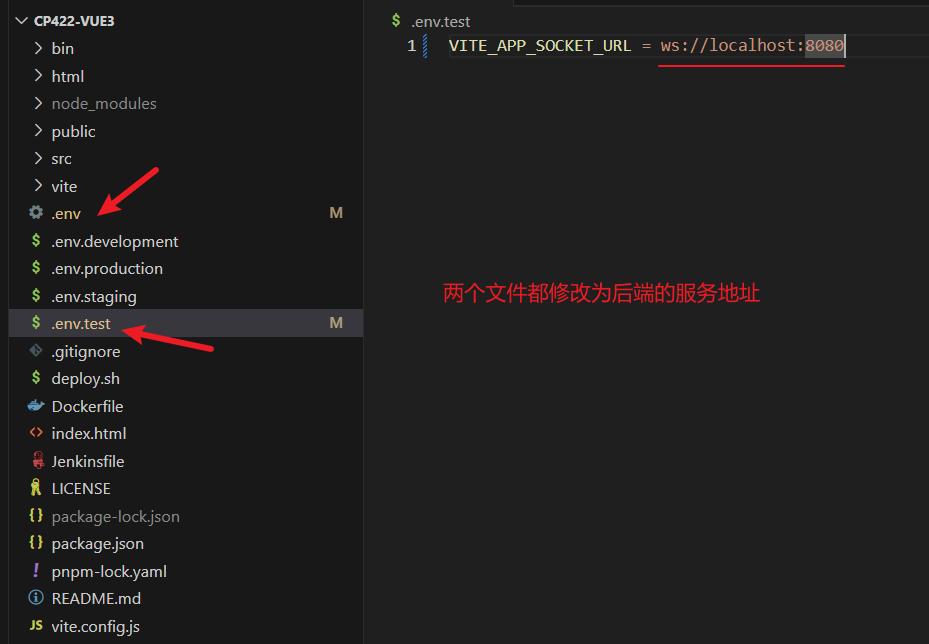
注意:是ws不是wss
由于前端要发请求到后端建立连接,所以还需要在SpringSecurity中放行ws开头的请求
放行代码
中州养老项目总结
若依框架的使用
若依框架的使用,重点关注三个功能:代码生成、表单构建、定时任务
- 代码生成功能:若依提供的代码生成功能可以基于数据库表结构快速生成前后端基础增删改查代码和系统菜单
- 表单构建功能:若依提供的表单构建功能可以通过图形化界面拖拉拽的形式快速生成复杂的页面表单
- 定时任务功能:若依提供的定时任务功能可以在系统页面管理系统中的定时任务以及查看定时任务的执行情况
入退管理模块
入退管理模块是项目中一个比较重要的模块,涉及到健康评估和入住办理两个功能:
- 健康评估:老人在入住养老院之前,需要提供一份最近完成的PDF版本的体检报告,在系统中上传体检报告后(从PDF中提取体检信息文本),AI大模型会自动分析体检报告并给出分析结果
- 入住办理:当老人确定要入住养老院后,可以在系统上发起入住办理,在入住办理页面填写老人的基本信息、家属信息、入住配置信息和签约办理信息,就可以让老人入住到养老院中
在住管理模块
在住管理模块包括三个功能:房型设置、床位预览、智能床位
- 房型设置:在房型设置页面可以维护养老院中的房型,包括房间图片、房型类型、床位费用、房型介绍等
- 床位预览:在床位预览页面可以维护养老院中的楼层、楼层下的房间、房间中的床位
- 智能床位:智能床位功能展示的是养老院中有智能床位的楼层、楼层下有智能设备的房间和床位信息以及智能设备最近一次上报的数据
服务管理模块
服务管理模块包括四个功能:
- 护理项目:在护理项目页面可以维护养老院中能够提供的护理项目,例如:洗头、洗脚、助餐等
- 护理计划:在护理计划页面可以维护养老院中的护理计划,一个护理计划中可以关联多个护理项目
- 护理等级:在护理等级页面可以维护养老院中的护理等级,一个护理等级唯一对应一个护理计划
- 负责老人:在负责老人页面可以展示出有老人入住的楼层,以及楼层下的房间和床位信息,可以单独维护某一个床位的护理人员,也可以批量维护一个房间中所有床位上的护理人员
智能监测模块
智能监测模块包括三个功能:设备管理、报警规则、报警数据
- 设备管理:在设备管理页面可以维护华为云IOT平台的设备,并将设备和系统中的位置(老人、床位、房间)进行绑定
- 报警规则:在报警规则页面可以维护系统中的报警规则,方便通过报警规则过滤异常数据
- 报警数据:在报警数据页面可以看到符合报警规则的数据,并能对报警数据进行处理
微信小程序模块
微信小程序模块包括:微信小程序登录、绑定家人、参观预约
- 微信小程序登录:在微信小程序端获取用户授权后,调用微信开放平台提供的登录接口进行登录
- 绑定家人:在微信小程序端绑定正在养老院入住的家人信息,方便发起探访预约申请和查看家人的身体健康数据等
- 参观预约:可以在微信小程序端发起参观预约申请,并在预约的时间到养老院进行参观